
About | Privacy Policy | Terms of Use | Support | Contact Us
Copyright © 2026 Tipard Studio. All Rights Reserved.

Windows

Rip your favorite Blu-ray/DVD movies or videos to popular formats

Powerful software to play Blu-ray/DVD videos and audio

Create Blu-ray disc/folder/ISO file with your own video

Backup/Copy your favorite Blu-ray to disc/folder/iso files
Mac

Rip your favorite Blu-ray/DVD movies or videos to popular formats on Mac

Powerful software to play Blu-ray and popular video formats on Mac
Windows

Rip DVD to any popular video format quickly of full quality

Create DVD from videos and burn video to DVD/Blu-ray freely

Copy DVD to DVD disc/folder/ISO files in a 1:1 ratio
Mac

Rip DVD to any popular video format quickly of full quality on Mac

Burn or author a DVD from videos with subtitles and chapters on Mac

Copy DVD to DVD disc/folder/ISO files in a 1:1 ratio on Mac
Windows

Rip DVD, convert 4K video, edit, and upscale videos to 5K/8K

Repair broken videos with high accuracy and support many formats

Convert any video to MP3, MP4, MOV, WAV, and other 350 formats

Upscale resolution, optimize brightness and remove video noise

The easiest tool to capture screen, game, audio, etc. with high quality

Convert any 2D video to 3D video and convert 3D to 2D video

Convert 4K video to 4K/1080P and common videos

Convert TS video to various popular video/audio formats
Mac

Rip DVD, convert 4K video, edit, and upscale videos to 5K/8K on Mac

Repair broken videos with high accuracy and support many formats on Mac

Convert any video to MP3, MP4, MOV, WAV, and other 350 formats on Mac

Upscale resolution, optimize brightness and remove video noise on Mac

The easiest tool to capture screen, game, audio, etc. with high quality on Mac

Convert any 2D video to 3D video and convert 3D to 2D video on Mac

Convert 4K video to 4K/1080P and common videos on Mac

Convert TS video to various popular video/audio formats on Mac
Desktop

Rip and convert DVDs to MP3 and support other audio formats

Reset Windows Admin and Standard user account password in seconds

Accurately Convert any PDF file to Word with OCR

Convert PDF to Word, Excel, HTML and Image with OCR
Online

Easily remove watermarks from many image file formats free online
Any Video Editor can assist you rotate, crop, cut, join and enhance your video clips in all popular video formats including MP4, MOV, AVI, MKV, WMV, FLV, SWF, etc. and add effects, text/image watermark to your YouTube videos before uploading. This video editing software can also be a great audio editor to edit MP3, FLAC, WAV, M4A, AAC, etc. audio files with ease.
Coming soon...
Any Video Editor is an easy-to-use video editing software offering versatile editing functions to rotate, clip, crop, watermark, improve and convert video and audio files in 300+ formats on your iMac, MacBook Pro, MacBook Air, etc.
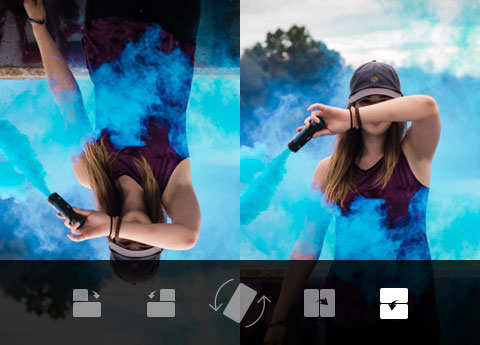
This Mac video editor can be a video rotator to help you flip the orientation of a video taken from your iPhone or other Android phones. You can rotate a video clip to 90 degree clockwise or counterclockwise. You can also making horizontal or vertical flip to the video file just in one click. Unlike rotating video online, you can do more editing after video rotation.
Crop video to the best position and remove the unwanted parts of your movie. You can easily crop area size by enter the specific pixels or just adjust the crop frame on the original preview window. You can also choose to keep aspect ratio or not, choose original, 16:9 or 4:3 frame size, change crop area position and zoom mode from Letterbox, Media, Pan & Scan and Full. Of course, the most important is you can preview the output effect instantly as you crop your video.

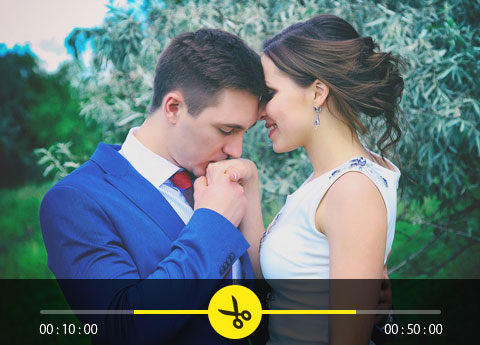
Using Basic Clip function to help you cut remove the unwanted footage from beginning and the end to keep the middle fragment. Or use remove selected part to do the vice verse choice to merge the beginning and the end and delete the middle part of the movie. With Advanced Clip, you can cut footage into parts, delete unnecessary segments and keep all the trimmed clips separately or join the parts into the fresh new on video.
Adjust your video effect by change the Brightness, Contrast, Saturation and Hue without losing the original quality of the edited video. You can also choose to edit a video with or without a watermark. If you want to upload your video to streaming sites and sentence your ownership, you can add your own watermark in text or picture on your videos.


Video/Audio Joiner
Join or merge several video segments into one video clip and easily change the order of specific video parts.

Improve Video Quality
Upscale video resolution, optimize brightness and contrast, remove video noise and reduce video shaking are optional.

Video Conversion
This video editing program supports more than 300 video and audio formats converting compared with online video converter.

Output settings
The free video editor enables you to make output video and audio settings like resolution, encoder, ratio, etc.
The Best Way to Convert M2TS to MP4
This topic will show you how to convert M2TS format to MP4 used reputable and professional Converter.
Top 5 Screen Recorder Freeware for Mac in 2026
You can get totally free 5 screen recorder for Mac, to capture desktop activities in high quality. In addition, some screen capture freeware even have built-in screen editor too.
How to Crop Video for PC/Mac and iPhone/Android
This article would show the best Video Cropper to crop a video for Windows/Mac and iOS/Android.


