


Svip Special Offer Svip Special Offer Svip Special Offer Close

Rip All Types of DVDs - Hommade and Commerical

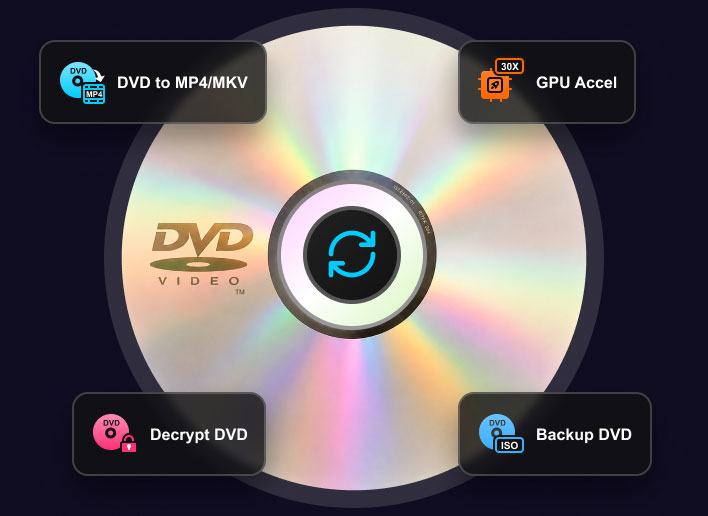
Tipard DVD Ripper is the best DVD ripper for Windows to rip all types of DVDs, including discs and ISO/Video_TS backups. It will keep developing the decoding abilities to handle the latest copy protections.

Rip DVDs with Copy Protection

  • Tipard DVD Ripper can rip DVDs with CSS, APS, CPRM, Sony ARccOS, 99-Title, and more encryptions. Just insert your DVD, and it will automatically bypass encryption.
  • It can also rip DVDs with all region codes, from region 1 to 6. You can easily rip DVDs from Japan, Australia, South America, and Latin America.
  • Tipard continues to develop its decoding and decryption technology to handle the latest protections.
  • We kindly ask that you respect copyright laws; do not use this tool for commercial purposes.

Support DVD Disc, ISO, and DVD Folder

  • Best DVD ripping software that can handle all types of discs, including DVD ±R, DVD±RW, DVD-RAM, D VD±R DL, DVD-ROM, etc.
  • Easily recognize and convert DVD ISO image, DVD folder (VIDEO_TS folder) to digital video formats with modern codecs like H.264 and HEVC.
  • Support different DVD capacities, like DVD-5 (single-layered) and DVD-9 (dual-layered). The seamless DVD-9 decoding can merge two layers without layer-break glitches.

Handle Scratched & Custom Discs

Don't throw away old, unreadable discs. Tipard DVD Ripper uses advanced sector scanning to read through deep scratches, blemishes, fingerprints, and smudges that cause other players to freeze. It automatically fixes read errors on the disc surface, rescuing unreadable files and converting them into clean digital videos.

Easily rip uniquely homemade or non-standard DVDs that don't follow regular rules. Our engine easily handles non-standard DVD structures, variable bitrates (VBR), and rare video codecs. It accurately reads uncommon frame rates (FPS), such as old PAL or NTSC formats, and perfectly extracts the video, multi-channel audio, and subtitles without losing audio sync or stretching the picture.

  • CSS
  • APS
  • ARccOS
  • Region Codes
  • 99-Titles

It encrypts the video data on a DVD using a 40-bit key. To play the movie, a DVD player must use a matching, authorized decryption key to unscramble the data in real time.

It injects corrupted pulses into the analog video signal, causing the copied video to become heavily distorted, dark, or unwatchable.

It deliberately introduces physical or logical bad sectors (corrupted data) onto the disc. Average DVD rippers will get stuck trying to read the broken data and crash or fail.

They restrict DVDs to specific regions (e.g., Region 1), and a DVD player also has a hardcoded region key. If the disc's region code does not match the player's region key, playback is blocked.

It creates 99 visible titles on the disc, but 98 of them contain scrambled, looped, or missing chapters. Only one hidden title has a real movie.

Solved: Directly locate video files (.vob), skip bad sectors created by ARccOS, emulate a licensed player for CSS and Region Codes, and automatically recognize the correct playback sequence.

Rip DVDs with Copy Protection
Rip All DVD Types with Ease
Scratched DVD Hover
Scratched DVD
Blemished Disc
Blemished DVD Hover
Non-Standard DVD
Non-Standard DVD Hover

DVDs with physical scratches can cause playback skipping, freezing, or read errors during ripping and copying.
[Supported: Features powerful error-correction to recover and rip damaged DVDs.]

DVDs with blemishes and smudges can cause drive freezes, read errors, or software crashes.
[Supported: Uses smart sector-scanning to bypass flaws and automatically fix read errors.]

Non-standard DVDs often use custom structures, uncommon video codecs, or erratic bitrates that confuse ordinary ripping tools.
[Supported: Adapts to any custom layout, accurately decodes complex structures, rare frame rates, and multi-channel audio with perfect sync.]

Rip Scratched & Custom Discs

Rip DVDs to 1000+ Video and Audio Formats

Tipard DVD Ripper is the best DVD ripping software that allows you to seamlessly rip DVDs to MP4, MOV, MKV, AVI, and WMV, and more standard formats, as well as specialized containers including ProRes, WebM, M4V, TS, VOB, and MPEG. With comprehensive support for cutting-edge codecs like AV1, H.265/HEVC, H.264, and MPEG-4, your digitized files are guaranteed to be fully compatible with modern playback platforms and devices. Additionally, it can seamlessly extract audio from DVDs to save high-quality soundtracks into MP3, AC3, AAC, FLAC, etc. For ultimate convenience, the software includes optimized presets tailored perfectly for the latest devices, including the iPhone 17/16/15 series, iPad, smart TVs, Apple Vision Pro, Plex, Samsung, and more.

Digital Formats

MP4, MKV, AVI, WebM, WMV, MOV, MPEG, MP3, AC3, FLAC, AAC, etc.

Media Codecs

H.264, HEVC/H.265, AV1, MPEG-4, VP9, VP8, ProRes, Xvid, MPEG-2, etc.

Convert DVD to Digital Format

Digital Devices

iPhone, iPad, Samsung, Android, TV, Xbox, PS5, Sony, PC, Chromebook, and more.

Streaming

YouTube, Instagram, TikTok, Facebook, X (Twitter), Plex Media, NAS, etc.

1:1 ORIGINAL CLONE

Back up DVD Collection for Storage, Playback, and Sharing

  • For Storage and Further Burning:

    Tipard DVD Ripper can back up a full DVD to ISO Image or a Video_TS folder, preserving the exact original structure with zero quality loss. Video streams, audio tracks, title and chapter menus, subtitles, and internal parameters will all be kept.

  • For Playback and Sharing:

    Tipard DVD Ripper can rip DVD to lossless MKV with original structure, content, and cinematic-level visuals and audio. With the MKV format, you can stream these flawless files to your home theater system or share the movies with your friends, social media, Plex, NAS, and more.

Back up DVD to ISO Folder MKV
Compress DVD Size Without Losing Quality

Compress DVD Size Without Losing Quality

DVDs usually have a capacity of at least 4 GB. Don't let the large sizes exhausate your hard drive. Tipard DVD Ripper can rip and compress your DVDs to smaller digital files

  • Upgrade Codec: Convert aging MPEG-2 DVD streams into modern H.265, AV1, or H.264 formats, which can slashe file sizes by up to 70-80%.
  • Smart Compression: Analyze the video complexity frame by frame to keep a high bitrate to ensure zero visible pixelation or compression artifacts.
  • Flexible Output: You can choose your balance between size and quality. Compress a standard dual-layered 8.5GB DVD down to a 1.7GB MP4/MKV for mobile viewing, or keep a higher threshold for modern, large-screen displays.

Upscale and Enhance DVD to 1080p/4K with AI

Don't let low-resolution DVDs compromise your modern large-screen experience. Tipard DVD Ripper provides advanced upscaling algorithms that can intelligently elevate standard 480p footage to crisp 1080p or breathtaking 4K, optimizing bitrates up to 40 Mbps for the ultimate cinematic definition.

Beyond that, Tipard DVD Ripper features smart deinterlacing to eliminate annoying horizontal tearing and motion artifacts, transforming dated 480i videos into smooth progressive videos.

Moreover, this premier DVD ripper features a free AI enhancement tool to intelligently eliminate video noise from your DVD movies. Then, you can enjoy the crystal-clear, stunning visuals across your PC, smartphone, and home theater.

Upscale and Enhance DVD to 1080p/4K with AI

Lightning-Fast DVD Ripping with Full GPU Acceleration

Tipard DVD Ripper fully supports hardware acceleration driven by your graphics card. By leveraging advanced GPU technologies like NVIDIA NVENC, AMD VCN, Intel Quick Sync Video, and multi-core CPUs, this fast DVD ripper software delivers a 30× faster ripping speed than average alternatives, digitizing your discs in minutes with very little CPU usage.

Besides, it features powerful batch conversion, allowing you to transcode multiple titles and chapters to your desired output formats simultaneously. You can seamlessly rip entire DVD collections to your computer and get individual files instantly.
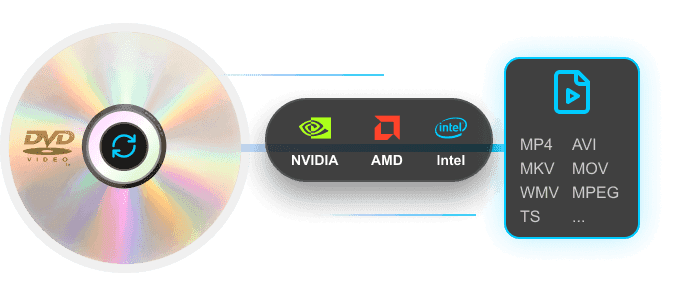
Lightning-Fast DVD Ripping with Full GPU Acceleration

In our test, we ripped (transcoded) an 8.5 GB DVD on a Windows 11 PC with NVIDIA RTX 4070 SUPER, and it took only 4 to 5 minutes across 5 consecutive rounds. The CPU usage of this DVD ripper remained under 7% during the entire ripping process.

CPU Usage 85% - 95%

Time Spent 45 - 60 Mins

No Hardware Acceleration

Traditional Mode

Standard Ripping Software

Basic Acceleration

CPU Usage 50% - 65%

Time Spent 15 - 20 Mins

Tipard DVD Ripper

Level-3 Hardware Acceleration

CPU Usage ~7%

Time Spent ~5 Mins

Easily Edit and Polish Your DVD Movies

Enhance and customize your DVD movies before converting. Explore these built-in editing tools to perfect your video:

How to Rip DVDs for Free with Tipard DVD Ripper

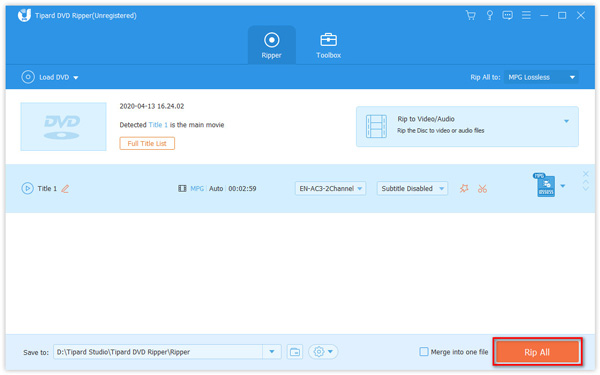
Tipard DVD Ripper is a safe and clean DVD ripping software. It has a clear interface and simple workflow so that you can easily and quickly rip your DVDs to MP4/MKV or ISO/VIDEO_TS. Just follow the detailed steps below and feel free to rip your DVDs with Tipard DVD Ripper.

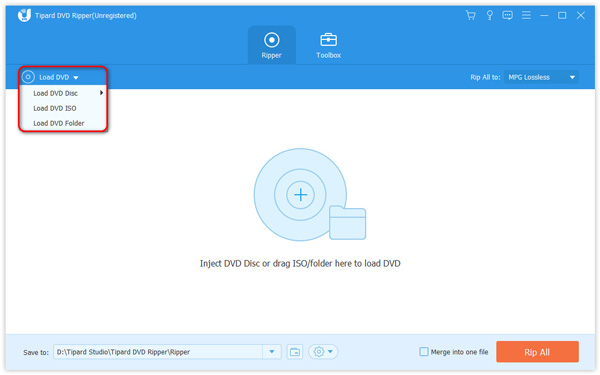
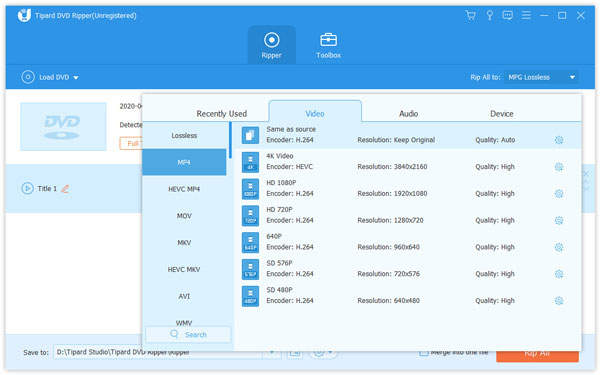
Load Choose output Format Rip All

1

Insert DVD

Click Load DVD and Tipard will instantly scan and bypass any encryptions on the disc automatically.

2

Select Profile

Pick from 500+ presets including MKV Lossless, MP4, or specific device formats tailored for smartphones.

3

Hit Rip All

Let the GPU acceleration take over. Your high-quality digital file will be ready in mere minutes.

Trusted by Leading Media and Users

Toptenreviews

Tipard DVD Ripper is the universal and best DVD Ripper of all freeware. It is a super fast and high video/audio quality Free DVD Converter with Hyper-threading and Super Encode Engine built on MMX-SSE & 3D now.

PCworld

Tipard DVD Ripper brings convenience to people who are DVD collectors and would like to convert their DVD to digital files, like MP4, MKV, etc.

Windowsreport

The software supports ripping by choosing titles and adjusting output parameters, which makes it easier to reproduce a baseline encode and compare results across discs.

S

Sunny

Amateur

"I use it to rip my movie DVD. There's no encryption alert anymore. Moreover, I can upscale my movie to 4K and watch it on my TV. That's so exciting to rip and convert it so quickly!"

T

Thomas

Student

"My Japanese language lesson DVD got quickly ripped, and I can improve the audio quality for clearer watching and listening. This DVD ripper is so lightweight but powerful. I think it's worth staying on my PC."

J

Jennifer

Videophile

"My movie DVD gets quickly ripped in this free DVD ripper. It takes a few minutes to rip my favorite movie to MKV. I can watch the movie on my phone, tablet, and TV. I'm going to rip all my DVD collections with it."

V

VelvetHex

Tech Enthusiast

"Finally rescued my old fitness DVDs and got them back on my TV. Working out with these nostalgic videos is such a vibe."

G

Glitchdoll

Content Creator

"I chose MKV Lossless, and the ripping speed was insanely fast! Now my entire legacy movie collection is ready to stream on my Plex. Highly recommend!"

P

PhantomFury

Vlogger

"Now I can easily grab my desired movie scenes and add them to my videos! No more wasting hours searching for clips online."

FAQs of Tipard DVD Ripper

Is it legal to rip a DVD?

It depends on your local laws. In many regions, ripping a DVD is legal if you own the original disc and use the digital copy for personal, non-commercial use only.

Is it safe to use Tipard DVD Ripper?

Yes, Tipard DVD Ripper is 100% safe to use. It is completely clean and free of malware, viruses, or bundled adware. The software processes all DVD ripping and editing locally on your computer, meaning your private videos and data are never uploaded to any servers, ensuring absolute privacy.

What's the difference between ripping DVD to ISO and converting DVD to digital?

Ripping to ISO: Creates a 1:1 digital mirror of the entire disc. It preserves everything, including the movie, menus, trailers, subtitles, and all audio tracks, in one large file. Ideal for full backups.
Converting to Digital (e.g., MP4/MKV): Extracts and compresses DVD movies into a standalone video file. It's much smaller in size and works on almost any device, like iPhones, tablets, or smart TVs.

What's the best format for ripping DVDs?

You can choose MP4 as the output format to get a high-quality playback. MP4 is the most popular and commonly used video format, and is compatible with most mobile devices, media players, TVs, laptops and more.

How can I convert DVD to MP4?

First, download this DVD ripper to your computer, install and launch it. Load your DVD disc/folder/ISO file. Then, choose MP4 as the output format. In the end, click the Rip All button to rip your DVD to MP4.

How to rip subtitles from DVD?

Load your DVD in Tipard DVD Ripper. Click the Subtitle dropdown button and then select Export subtitle file to rip the subtitles from your DVD.

How fast can Tipard DVD Ripper rip DVDs?

Tipard DVD Ripper is engineered for maximum efficiency. Equipped with advanced Level-3 GPU acceleration (powered by NVIDIA® CUDA™, AMD APP, and Intel® Quick Sync Video), it can rip DVDs at up to 30× faster speed than standard rippers. This optimization can reduce CPU usage to as low as 10%–15% (on a low-end PC) during the entire ripping process

Is Tipard DVD Ripper available on Windows 11?

Yes, Tipard DVD Ripper is compatible with Windows 11 (Home, Pro, Pro Education, Enterprise, Pro for Workstations, etc.), Windows 10, Windows 8.1, Windows 8, and Windows 7. You can also download Tipard DVD Ripper for Mac. It can work smoothly on your Windows or Mac computer.

Helpful Tips & Guides for DVD Ripping

iCon

Ready to Convert Your DVDs Effortlessly?

Digitize any encrypted or scratched DVD to standard video in just 5 minutes!