


About | Privacy Policy | Terms of Use | Support | Contact Us
Copyright © 2025 Tipard Studio. All Rights Reserved.

Windows

Rip your favorite Blu-ray/DVD movies or videos to popular formats

Powerful software to play Blu-ray/DVD videos and audio

Create Blu-ray disc/folder/ISO file with your own video

Backup/Copy your favorite Blu-ray to disc/folder/iso files
Mac

Rip your favorite Blu-ray/DVD movies or videos to popular formats on Mac

Powerful software to play Blu-ray/DVD videos and audio on Mac
Windows

Rip DVD to any popular video format quickly of full quality

Create DVD from videos and burn video to DVD/Blu-ray freely

Copy DVD to DVD disc/folder/ISO files in a 1:1 ratio
Mac

Rip DVD to any popular video format quickly of full quality on Mac

Create DVD from videos and burn video to DVD/Blu-ray freely on Mac

Copy DVD to DVD disc/folder/ISO files in a 1:1 ratio on Mac
Windows

Rip DVD, convert 4K video, edit, and upscale videos to 5K/8K

Repair broken videos with high accuracy and support many formats

Convert any video to MP3, MP4, MOV, WAV, and other 350 formats

Upscale resolution, optimize brightness and remove video noise

The easiest tool to capture screen, game, audio, etc. with high quality

Convert any 2D video to 3D video and convert 3D to 2D video

Convert 4K video to 4K/1080P and common videos

Convert TS video to various popular video/audio formats
Mac

Rip DVD, convert 4K video, edit, and upscale videos to 5K/8K on Mac

Repair broken videos with high accuracy and support many formats on Mac

Convert any video to MP3, MP4, MOV, WAV, and other 350 formats on Mac

Upscale resolution, optimize brightness and remove video noise on Mac

The easiest tool to capture screen, game, audio, etc. with high quality on Mac

Convert any 2D video to 3D video and convert 3D to 2D video on Mac

Convert 4K video to 4K/1080P and common videos on Mac

Convert TS video to various popular video/audio formats on Mac
Desktop

Rip and convert DVDs to MP3 and support other audio formats

Reset Windows Admin and Standard user account password in seconds

Accurately Convert any PDF file to Word with OCR

Convert PDF to Word, Excel, HTML and Image with OCR
Online

Easily remove watermarks from many image file formats free online
Tipard iPhone Video Converter is useful and easy-to-use software, which can convert popular video formats like AVI, MKV, WMV, VOB, HD video to iPhone compatible MP4/MOV/M4V formats for iPhone 16/15, as well as iPad and iPod series. This Mac iPhone Video Converter also performs excellently in customizing stylish videos by presetting output options and personalizing videos by adjusting parameter setting and more. You can convert video with perfect output quality and fastest conversion speed.
Tipard Mac iPhone Video Converter is powerful software, designed not only for converting popular videos to iPhone compatible formats but also editing the videos. It is especially easy for new users, and the process of converting can be finished simply by few clicks.
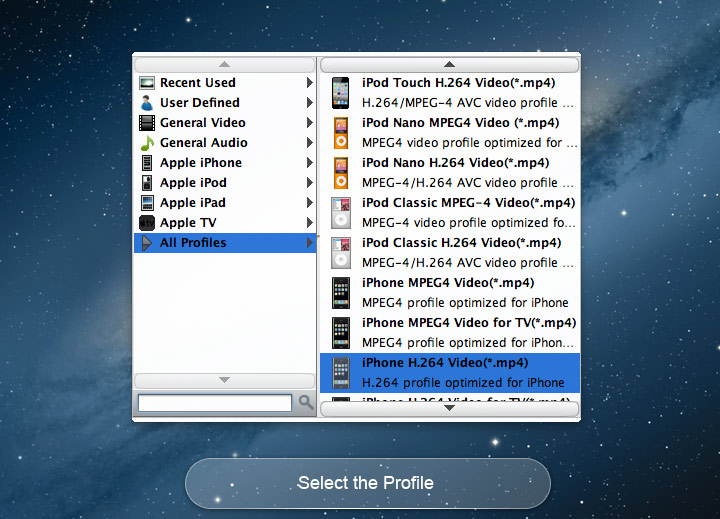
Tipard iPhone Video Converter for Mac has powerful functions of converting various videos to iPhone supporting formats. It converts almost any standard definition video files such as AVI, MKV, WMV, MOD, MTS, etc. to iPhone MP4/H.264/MOV/M4V supported by iPhone (iPhone 16/iPhone 16 Plus/iPhone 16 Pro/iPhone 16 Pro Max, iPhone 15/iPhone 15 Plus/iPhone 15 Pro/iPhone 15 Pro Max, iPhone 14/iPhone 14 Plus/iPhone 14 Pro/iPhone 14 Pro Max, iPhone 13/iPhone 13 Pro/iPhone 13 Pro Max/iPhone 13 mini, iPhone 12/12 Pro/12 Pro Max/12 mini, iPhone 11/11 Pro/11 Pro Max, iPhone XS/XS Max/XR/X, iPhone 8/8 Plus, iPhone 7/7 Plus, iPhone SE, iPhone 6s, iPhone 6s plus, iPhone 6, iPhone 6 plus, iPhone 5S/5C, iPhone 5), iPod nano, iPad Pro, iPad Mini, New iPad. It also serves as a high-definition Mac iPhone video converter and is capable of converting HD videos to iPhone, such as HD MTS or HD M2TS to iPhone format. Its plentiful input formats makes the converter compatible with prevailing portable devices, including the latest-released iPhone 16. Video to iPhone Converter also can extract audios from video files, which is wonderful and practical to capture music as needed.
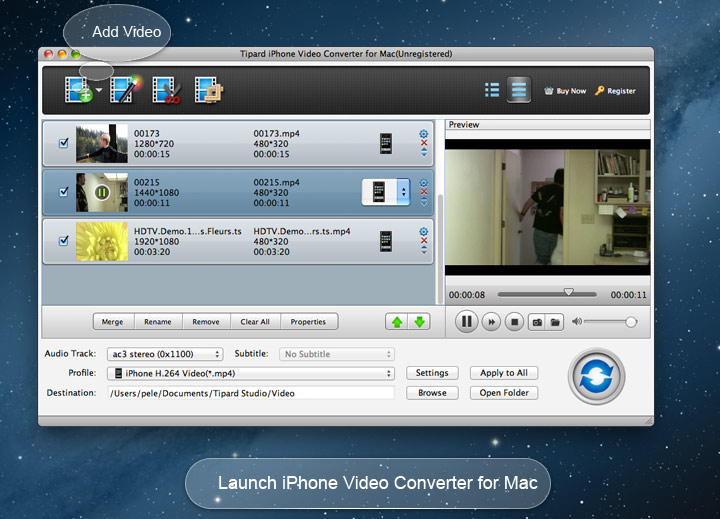
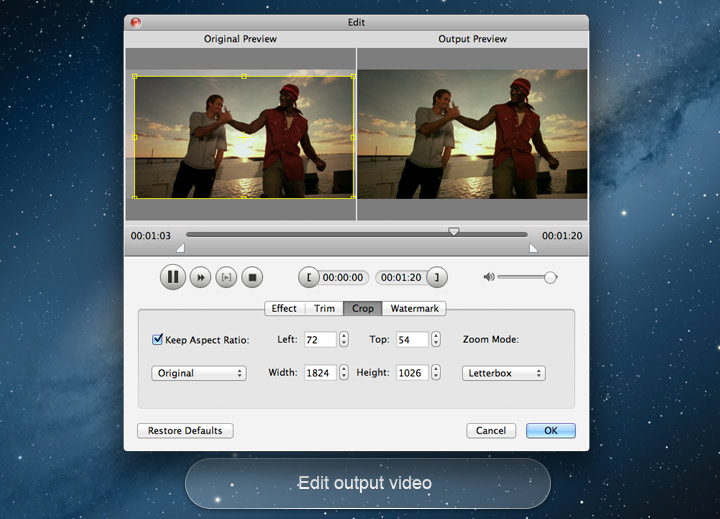
With this iPhone Video Converter for Mac, you can make your own style of video file. This program can help you trim video files to change the video length and join several segments together as a single one. Watermark can help you add pictures or images as logo to make your videos special, and you can edit the font-family, size, color, etc as individual preference. Crop the play region of video to make it fit for your player and your favor. With the function of "Merge", you can put several chapters of video into one file, and you'll enjoy a single long movie with a single click. In addition, this high-end Mac iPhone video converter enables you to improve your video effect by setting Brightness, Contrast, Saturation and so forth.

Video preset is also offered with this iPhone video converting software, such as the Video Encoder, Frame Rate, Resolution and Video Bitrate to make video quality high. It is also available to set audio parameters (Audio Encoder, Sample Rate, Channel, and Audio Bitrate) to output video with clear sound. The Video/Audio Bitrate is bigger, the video/sound quality is better. Beyond that, Tipard video to iPhone converter for Mac allows you to choose audio track and subtitle you want, or choose no subtitle based on your needs.
This Mac Video to iPhone Converter is easy-to-use converting software and beyond-imagination video editor. Not only does it not require professional knowledge and technical operation, but also not need complex operation. The fantastic software provides users intuitive interface with image illustrated guide to fulfil easy operation, and even beginners are able to convert and edit the videos they long for effortlessly. Bunch of conversion can also be applied to all added video files, whether you need to convert them to same iphone video formats or to different formats.

Preview & Snapshot
You can preview the videos when it is converting, and you can capture and save pictures you want to preserve.

Update Automatically
When a newest version released, the program will remind you to upgrade, and you will always own the lasted version.

Merge
You are capable of combing several video segments and export them into one file.

Compatible with Apple Devices
This iPhone video converter supports nearly all iOS devices, including iPhone, iPad, iPod and Apple TV series.

Hoffman: It's amazing that Tipard Video to MP4 Converter software can support so many different video formats. It is much better than other similar programs I have tried before. I like it so much.

Sunny: It is really user friendly. The simple design and easy operation make conversion fast and perfect. That's what I really need.

Benson: Its powerful converting and editing functions help me so much. It makes convert camcorder to other video formats much simpler. It is really friendly!
Rip DVD and convert video to iPhone compatible format and highly support iPhone SE, iPhone 6s/6s plus.