





 Video Converter
About | Privacy Policy | Terms of Use | Support | Contact Us
Copyright © 2026 Tipard Studio. All Rights Reserved.
Stunning video converter to convert any videos to MP4, MKV, MOV, etc on Mac.
 [4.8] 212 Reviews
100% Clean & Safe
30-Day Money Back Guarantee
100% Clean & Safe
30-Day Money Back Guarantee

Tipard Video Converter for Mac can convert videos to all popular and rare video formats, like MP4, MOV (QuickTime), MKV, WebM, AVI, MTS, and more. It also supports many popular video encoders like ProRes, H.264, HEVC, and VP9. In this way, this video converter can help you convert a video to a desired format compatible with many platforms and devices.
You can also convert audio and extract audio files from video and save them in popular audio formats like MP3, FLAC, ALAC, AAC, OGG, WAV, etc. With Tipard Video Converter for Mac, you can enjoy your videos or songs on different devices and displays. You can also edit your videos and audio files with better compatibility and video quality.


When you convert video files with Tipard Video Converter for Mac, you can choose to upscale your video to HD, 1080p, and 4k resolutions. With higher resolution, your video will be crisper with more details. You can watch videos on a bigger screen and high-resolution displays like the iPhone, iPad, and MacBook.
Moreover, you can adjust the aspect ratio of your source video. It supports 4:3 and 16:9. Suppose you want to convert your wide-angle shot video, you can use Tipard Video Converter for Mac to adjust the aspect ratio and upscale the resolution, and then you can enjoy your magnificent video on a wide display home theater.
Tipard Video Converter for Mac offers output presets that are compatible with many popular devices like iPhone 17/16/15, Samsung, Android devices, Apple TV, game consoles, and more. That means you can directly play videos smoothly on those digital devices if you convert your videos with Tipard Video Converter for Mac.
You can also export your videos to format presets compatible with popular social media and online platforms like YouTube, Facebook, Vimeo, Yahoo, and more. You can edit and convert videos with this program and directly upload them to online platforms. Your videos will play properly and seamlessly on the target platform.


Besides the powerful conversion function, Tipard Video Converter for Mac also offers great flexibility to customize the video and audio settings. You can adjust the video resolution, frame rate, video and audio encoders, bitrate, sample rate, channels, and more. This feature can highly increase your video quality. Moreover, this program offers practical and easy-to-use editing features.
Tipard Video Converter for Mac can easily enhance video quality to fix any blurry video to make it clearer and crisper. Besides the video upscaler tool mentioned above, you can also:
Remove video noise: Remove blur and dirt-like video noise to make your footage clearer. It can fix blurry videos quickly and effectively.
Color correct videos: If your videos look overexposed or over-focused, don't worry. Tipard Video Converter for Mac can correct the color with AI technology in just one click.
Remove video shaking: Use AI-driven technology to remove video shake without causing distortion or stutter. Enjoy smoother, more stable footage instantly.


As professional Mac Video Conversion software, it is devoted to providing users with high-definition videos at super-high speed. It can fully utilize your Apple Silicon and Apple VideoToolbox to speed up rendering. Also, the interface is very easy to understand, and the workflow is easy and simple. You can quickly convert all types of videos without any difficulty.
Tipard Video Converter for Mac is a powerful video converter on Mac with practical video editing features, and it also have other amazing features you must want when you are making a nice video artwork. Please check them.
3D Movie Maker
Tipard Video Converter for Mac can make 3D videos easily. You can convert your 2D (flat) videos to anaglyph or split-screen 3D videos with only one click.
Audio and Subtitle Track
Tipard Video Converter for Mac can also help you change the audio and subtitle tracks. You can also adjust the subtitle font, size, color, and other settings.
Add Watermark
You can also add a personal watermark on your video, including text and image watermarks. This watermark feature helps you indicate your copyright.
 Tipard Video Converter for Mac Tipard Video Converter for Mac |
 Tipard Mac Video Converter Ultimate Tipard Mac Video Converter Ultimate |
|
|---|---|---|
| Features | ||
| Supported output formats | 350+ video and audio formats (MP4, MOV, WebM, MKV, MP3, M4A, etc.) | 500+ video and audio formats (MP4, MOV, MKV, WebM, WAV, AVI, MP3, FLAC, ALAC, M4A, etc., supporting ProRes codecs.) |
| Converting speed | 6× | 60×, up to 120× (support Apple VideoToolbox) |
| Editing features | Rotate, crop, trim, filters, watermark, adjust video tone, and enhance video | Rotate, crop, trim, filters, watermark, audio delay, adjust video tone, compress video, edit metadata, and over 20 editing mini tools. |
| Batch converting |  |
Faster with better GPU acceleration |
| Enhance video quality | |
(support AI Upscaling, Video Noise Removal, Auto Deshaking, and Auto Color Correction) |
| Rip DVD |  |
Support DVD region codes and encryptions like CSS, APS, ARccOS, and 99-Titles. |
| Video art creation | |
(Music video creation and video collage maker) |
| Toolbox | |
(20+ additional tools) |
| Download |
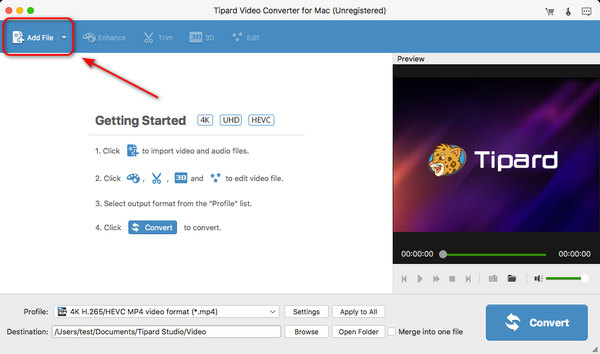
1. Add Files
Click the Add File button on top left side of the main interface to add your video to this program.
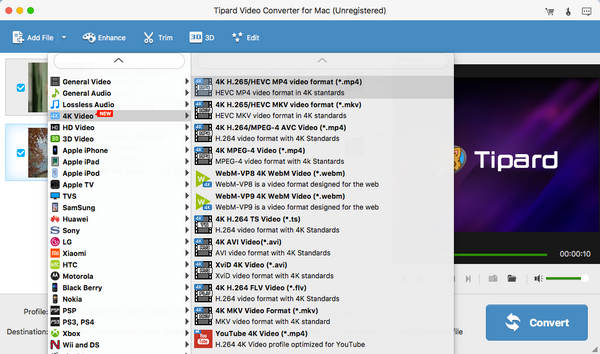
2. Choose Output Format
Click the Profile dropdown button to select a desired output format. It offers many popular presets.
3. Export Files
Click the Convert button to convert your videos to the output format instantly.


Richard
Student

I have used some Mac video converters before, but this one really impresses me. It can convert video to what I just need. I need HEVC and VP9 codecs, and high frame rate. It supports so many formats and codecs, far beyond my expectations.

Matilda
IT Engineer
The conversion speed is so fast! I can convert a movie to the HEVC codec to increase the video quality. I can also upscale my movie to 4K for watching it on my big TV display. That's just what I'm doing!

Gillian
Freelance
So amazing that it can support so many video formats. What I want is MOV with HEVC and FLAC codecs, and it supports them! So, I assume that the developer is very considerate and has done in-depth market research.
What is the best video format I should use on my Mac?
MOV is the best format you should use. Although MP4 is the most popular one, MOV works better on Apple devices. However, you can still choose MP4.
Can I improve video quality with this program?
Yes, you can. You can upscale your video to 4K, 5K, and even 8K. Improving the video resolution is a good way to improve the video quality.
Is Tipard Video Converter for Mac safe to use?
Yes, it is. Tipard Video Converter for Mac is 100% safe and secure. It won't do anything harmful to your device, data, privacy, or anything.

The Best Video Converter on Mac
100% Clean & Safe
30-Day Money Back Guarantee
100% Clean & Safe
30-Day Money Back Guarantee