



 Blu-ray Converter
About | Privacy Policy | Terms of Use | Support | Contact Us
Copyright © 2025 Tipard Studio. All Rights Reserved.
Quickly convert Blu-ray and DVD to ISO, folder, and 500+ video formats with best quality and smooth playback.
 [4.9] 700+ Reviews
100% Clean & Safe
30-Day Money Back Guarantee
100% Clean & Safe
30-Day Money Back Guarantee

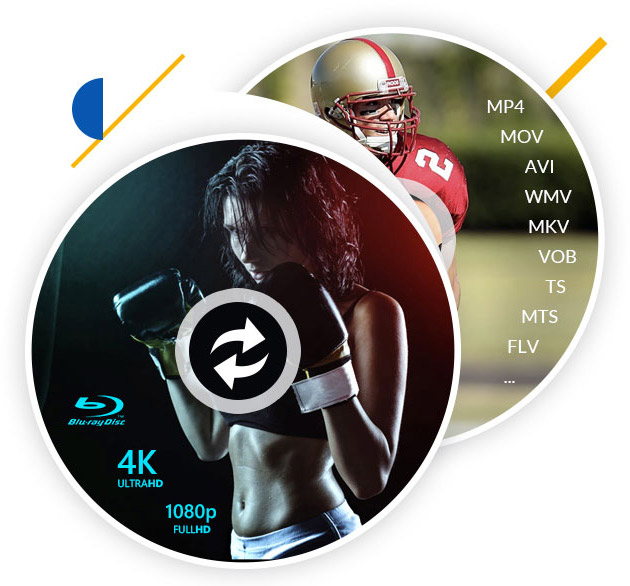
Tipard Blu-ray Converter can rip movies from Blu-ray discs/folders and convert them into digital formats. It supports converting Blu-ray to MKV, MP4, WMV, MOV, AVI, TS,and 500+ video formats, including 4K/HD formats.
This software allows you to convert full Blu-ray disc/Blu-ray folder to MKV lossless. This MKV file will retain all original contents including audio tracks and subtitles of the Blu-ray movie. The video quality of the output is equal to the original Blu-ray film.
Besides, it is capable of ripping audio files from the Blu-ray movies and save them into desired audio formats, like FLAC, WAV, WMA, MP3, OGG and more for your any player.

Blu-ray conversion is not the single merit of Tipard Blu-ray Converter. Held up as the best choice, it also features on wonderful implementation to convert DVDs.

Tipard Blu-ray Converter is also a powerful video conversion program for almost all digital formats. Supporting a wide range of video and audio formats, it can handle MP4, AVI, MOV, MKV, MPG, 3GP, WebM, FLV, SWF, WMV, MP3, FLAC, WMA, AAC, and so on.
It can even create GIFs from videos and edit ID3 tag for your music to personalize your files. Highly compatible with the popular encodes like H.265/HEVC, H.264, Xvid, VP8, VP9, etc., it lets you open any video files on iPhone, iPad, HTC, Kindle Fire HD, Sony Vegas, Avid Media Composer, After Effect, Windows Movie Maker, and more without hassle.

Tipard Blu-ray Converter is a specially designed program around the concept of being easy-to-use and user-friendly. It adopts the top-level accelerating technology, Blu-Hyper technology, which includes Graphics card image processing (NVIDIA, Intel, and AMD), and video decoding/encoding technology based on CPU level, so that it creates a 30× faster ripping and converting speed than before. Ripping Blu-ray/DVD and converting video/audio skyrockets.
Tipard Blu-ray Converter also offers many other powerful features to help you deal with many problems in digital life. For example, you can add audio track and subtitle to your ripped Blu-ray/DVD and video. You can also add filters to your video and adjust contrast, etc. Some basic editing features like compressing video, clipping video, merging video, and more are available in this Blu-ray ripping program.

GIF Maker
Tipard Blu-ray Converter offers a GIF maker feature that can make animated GIF from photos or video clips. You can change GIF's resolution, aspect ratio, and frame rate flexibly.

Compress Video
You can compress video into a smaller size by adjusting the compression rate, resolution, format, etc., and keep original video quality. Therefore, you can upload video to email or social.

Media Editing Features
You can clip a video and merge videos from your Blu-ray/DVD/video files. You can also crop the video to change its aspect ratio, and rotate or flip the video vertically or horizontally to refresh its appearance.

Add Subtitle & Audio Track
You can add audio and subtitles to video after you convert Blu-ray/DVD/video. you can also replace the original tracks and subtitles with downloaded ones to synchronize the movie.

Video Enhancer
The video quality enhancer lets you upscale video resolution, convert SD to HD, or convert 1080p to 4K. You can also denoise video or remove video shaking to enhance your video.

3D Maker
The 3D video maker lets you convert 2D video to 3D or from 3D to 2D. You can create Anaglyph (Stereoscopic 3D) 3D video and wear a pair of 3D glasses with visual verisimilitude.

Add Filters & Adjust Effects
You can select and add filters to your video to make it look more beautiful and amazing. Moreover, you can adjust video contrast, hue, saturation and brightness manually to adjust video tone.

Image and Text Watermark
You can add your own image or text watermark to the video. Tipard Blu-ray Converter can help you customize the font size, color, image position, and more for your text or image watermark.

Media Metadata Editor
Change ID3 tag and metadata on MP3, MP4, M4R, and more media formats. You can change the title, artist, album, composer, genre, date, and more of your media files.
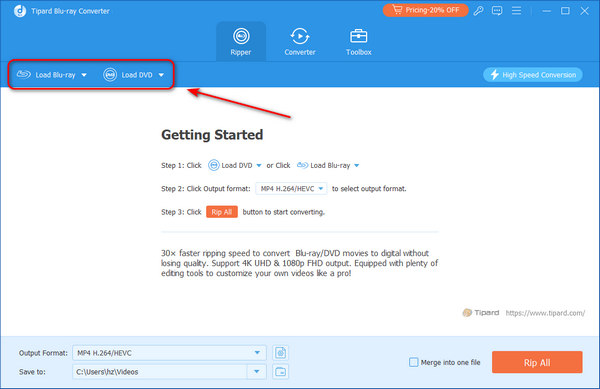
1. Load Blu-ray
Run this software and select Ripper tab. Click Load Blu-ray or Load DVD to load Blu-ray or DVD.
2. Choose Output Format
Select an output format like MP4, MKV, MOV, etc. You can also adjust the quality, encoder, frame rate, bitrate, etc.
3. Rip Blu-ray
Click the Rip All button in the bottom-right corner to start ripping the Blu-ray/DVD on your computer immediately.


Liam
Student

My friends recommended it to me. He was like this is the most on fleek Blu-ray ripper for Blu-ray zealot. That's quite for sure after I use it! It's the fastest Blu-ray ripping software I've ever tried!

Elijah
IT Engineer
With it, I made it to extract my Blu-ray and DVD movies. To be honest, the ripping speed really crazy fast! It takes only less than 10 mins to rip my 3-hour duration Blu-ray movie! Mind blowing!

Harper
Photographer
Really a next level Blu-ray ripper. I can rip my Blu-ray movie disc very quickly, only about 10 mins. What's impressive is that it can rip Blu-ray losslessly to MKV and MPG. That's awesome!
What is the best file format for Blu-ray ripping?
MKV is the best format when you rip a Blu-ray, because it will keep all the audio tracks and subtitles and the best quality of the original Blu-ray files.
How can I check my Tipard Blu-ray Converter registration code?
Tipard will send the registration code to your email address which you use to purchase the software. Check it in your email (Maybe in the Trash or Spam album).
Is it safe to use Tipard Blu-ray Converter?
Yes, it's totally safe to use Tipard Blu-ray Converter. Moreover, it can even help you rip a Blu-ray disc while bypassing encryption or region lock.
How long does it take to rip Blu-ray?
The time you spend on ripping Bu-ray depends on the titles and the movie length. Especially the Blu-ray disc size is large, the time will be longer.

Your Best Blu-ray Ripping Solution!
100% Clean & Safe
30-Day Money Back Guarantee
100% Clean & Safe
30-Day Money Back Guarantee