

- Part 1. What Is a Video Converter?
- Part 2. Shortlist of Best Video Converter Tools
- Part 3. How We Tested the 10 Video Converters
- Part 4. Master Comparison of the 10 Video Converters
- Part 5. 5 Best Video Converter Software on Windows and Mac
- Part 6. 5 Best Video Converters Free Online
- Part 7. What You Need from a Video Converter
- Part 8. FAQs of Video Converter
Key Takeaways:
We've tested over 20 desktop and online video converter tools and finally settled on the top 10 that deliver the best performance and features. If you prefer high output quality with fast conversion speed, Tipard Video Converter Ultimate is the best overall. If you are a professional video editor who wants high customization and adjustments, HandBrake is the best choice. If you want a stable and fast online tool, select CloudConvert. Keep reading to check other excellent and reliable video converter tools.
In the fast-paced world of digital content creation, video formats are more than just file extensions—they are the backbone of your post-production workflow. Yet, nothing halts productivity faster than a dreaded "Unsupported Format" error or a codec mismatch when importing crucial footage into suites like Adobe Premiere Pro or DaVinci Resolve. To eliminate these compatibility bottlenecks, a professional-grade video converter has evolved from a simple backup utility into an indispensable bridge for hardware and software synergy.
An elite video converter must deliver more than basic transcoding; it requires intelligent architecture to handle next-gen codecs like HEVC (H.265), AV1, and Apple ProRes without compromising visual fidelity. Whether you need GPU-accelerated 4K/8K rendering for high-end edits or lossless remuxing for media libraries, the ideal tool seamlessly balances speed, stability, and container versatility. This comprehensive guide reviews the premier desktop and online video converters engineered to master these technical demands and optimize your creative workflow.

- Part 1. What Is a Video Converter?
- Part 2. Shortlist of Best Video Converter Tools
- Part 3. How We Tested the 10 Video Converters
- Part 4. Master Comparison of the 10 Video Converters
- Part 5. 5 Best Video Converter Software on Windows and Mac
- Part 6. 5 Best Video Converters Free Online
- Part 7. What You Need from a Video Converter
- Part 8. FAQs of Video Converter
Part 1. What Is a Video Converter?
A video converter is a specialized software tool or web service designed to change the encoding format, codec, or container of a digital video file from one standard to another. At its core, the conversion process involves decoding the original compressed video data, re-encoding it using a different compression algorithm (such as converting H.264 to AV1 or HEVC), and repacking it into a compatible container format like MP4, MKV, or MOV.
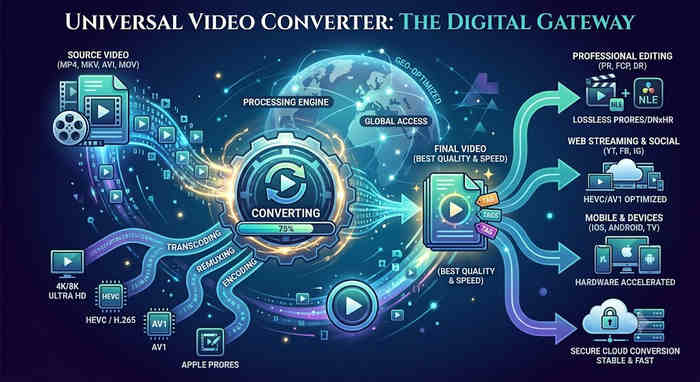
Beyond simple file extension changing, professional video converters allow users to manipulate critical parameters, including resolution (e.g., upscaling 1080p to 4K), bitrate, frame rate, and audio tracks. By altering these variables, a video converter serves two vital industry purposes: resolving strict cross-platform compatibility issues between various hardware/software suites, and compressing massive raw files into streamlined sizes optimized for web streaming, mobile playback, or archival storage without sacrificing visual fidelity.
Part 2. Shortlist of Best Video Converter Tools
In an era where video content dominates every platform, the bridge between raw footage and a polished masterpiece is a reliable encoder. After testing dozens of tools, we have identified the top three video file converters that define the current industry standards for speed, precision, and accessibility.
The Best Overall: Tipard Video Converter Ultimate
For industry professionals and power users, Tipard Video Converter Ultimate remains our definitive top recommendation. Unlike standard transcoders that spike CPU overhead and trigger thermal throttling, Tipard leverages full GPU-driven 120× hardware acceleration to process massive 4K/8K batch conversion queues almost instantly. With native support for over 500 container and codec combinations, including Apple ProRes and next-gen AV1, alongside an intelligent, built-in AI upscaling engine, it stands as the most versatile and efficient desktop media deployment suite on the market.
The Best Open-Source Choice: HandBrake
If your post-production workflow demands granular, frame-level encoding control without a premium price tag, HandBrake is the undisputed open-source gold standard. As a powerhouse open-source video converter, it offers unparalleled depth in x265/HEVC advanced parameters and Constant Quality (CRF) settings. While it lacks the integrated timeline editing and AI-driven upscaling features found in premium desktop suites, its peerless precision for deep technical encoding remains unmatched in the free software ecosystem.
The Best Online Solution: CloudConvert
For rapid, browser-based tasks, CloudConvert sets itself apart with its exceptional remuxing (transmuxing) capability. Rather than subjecting your files to a heavy, lossy re-encoding process, CloudConvert allows you to seamlessly swap container formats (like MKV to MP4) by directly copying the underlying audio and video streams. This architecture preserves a strict 1:1 original quality with zero generational loss, a sophisticated feature that is an absolute rarity for an online video converter.
Our Verdict:
While open-source encoders and web-based utilities offer basic functionality, Tipard Video Converter Ultimate delivers the definitive synergy of full-throttle GPU acceleration and intelligent automation, ensuring your high-res media workflow is never throttled by hardware bottlenecks or complex codec limitations.
Part 3. How We Tested the 10 Video Converters
Test Environment & Methodology
To ensure the consistency and accuracy of our results, all the desktop video converter software and online tools were tested on a standardized high-performance system to eliminate hardware bottlenecks.
- Operating System: Windows 11 Pro / macOS Golden Gate
- Processor: Intel Core i7-12700H (14 Cores, up to 4.7 GHz)
- Memory: 32GB RAM (16GB+16GB Dual-Channel configuration)
- Graphics: NVIDIA GeForce RTX 3060 (6GB GDDR6) with the latest Studio Drivers for stable hardware acceleration.
- Storage: 1TB NVMe Gen4 SSD (Read speeds up to 7000MB/s) to ensure no I/O throttling during high-bitrate ripping.
Testing Samples
We curated a diverse library of source materials to push these video converters to their limits.
- 4K Video: A 60fps 4K HEVC (H.265) master file with a 100Mbps bitrate.
- Random Videos: with various resolution, bitrate, and frame rate in MP4, MKV, MOV, AVI, WMV, WebM, and MTS format.
- ProRes Footage: 10-bit Apple ProRes 422 HQ files used to test professional-grade transcoding.
- Physical Media: A 50GB encrypted Blu-ray disc (AACS protected) and a standard commercial DVD-9.
- Audio Integrity: Multi-channel DTS-HD Master Audio and Dolby TrueHD tracks for pass-through testing.
Testing Criteria
The following criteria were used to evaluate each video converter:
- Conversion Speed: Measures the time taken to convert a video file from one format to another, whether it is a desktop video converter that utilizes GPU acceleration or an online converter that operates online.
- Output Quality: We checked for "artifacting," color shifts, and frame drops. We also verified if the video converters can maintain high bitrates while significantly reducing file sizes.
- Format Support & Versatility: A great video converter must handle advanced codecs like AV1, HEVC, Apple-ProRes and standard codecs like H.264 and MPEG-4 in MP4, MKV, MOV, and many other containers.
- Feature Set: We also check what other features each video converter has, like AI upscaling, basic video editing features, video compressor, and more.
- UI/UX & Workflow Efficiency: We looked for "One-Click" solutions for beginners and depth of advanced settings (bitrate, frame rate, sample rate) available in professional video converter programs.
Our Commitment to Integrity
All tests were conducted independently by our editorial team at Tipard Studio. We do not accept payment for "Top Pick" rankings or inflated performance scores. Each result, whether it is the 30× conversion speed of our top-rated video converter software or the limitations of free online tools, is based on real-world data captured in our lab. Our goal is to provide a transparent, evidence-based guide that reflects the actual performance you will experience on your own machine.
Part 4. Master Comparison of the 10 Video Converters
Check the two comparison tables below for a detailed breakdown of each video converter's capabilities. You can select your desired online or desktop video converter.
Comparison of Video Converter Software
| Video Converter Software | GPU Acceleration | AI Tools | Max Output | Top Feature | Target User |
|---|---|---|---|---|---|
| Tipard Video Converter Ultimate | 120× (NVENC/Intel/AMD) | Yes (Upscaling/Denoise) | 8K / 4K / HDR | Most stable high-bitrate engine. | All-Level Pro |
| Any Video Converter | Supported (Standard) | Basic Filters | 4K | Integrated DVD burning tools. | Prosumer |
| HandBrake | Limited (QSV/VCE) | No | 4K | Granular x264/x265 parameter control. | Technical Expert |
| Movavi Video Converter | Supported (High-speed) | Yes (Basic AI) | 4K | Extremely intuitive drag-and-drop UI. | Beginner |
| Shutter Encoder | Supported (Manual Configuration) | Yes (AI real-life upscaling) | 8K / HDR / 10-bit | Lossless Rewrap and Cut. | Advanced Video Editors |
Comparison of Online Video Converters
| Online Video Converter | Primary Focus | AI Features | Max File Size (Free) | Cloud Efficiency | Privacy & Security |
|---|---|---|---|---|---|
| CloudConvert | Industry Standard | Professional Parameter Tuning | Unlimited (Limit by time) | Elite (Multi-server) | ISO 27001 Certified & Encryption |
| Kapwing Video Converter | Social Media Creation | Full AI Suite (Auto-Cut/Subs) | 1 GB | High (Built-in Cloud Editor) | Auto-delete after 24h |
| Online-Convert | Technical Accuracy | Basic Restoration Tools | 100 MB | Moderate (Stability Focus) | SSL Encryption & Data Isolation |
| FreeConvert | Batch Processing | Auto-Optimization Mode | 1 GB | Exceptional (Parallel Tasks) | 256-bit AES Encryption |
| VEED.IO Video Converter | Marketing Automation | Advanced AI (Voice/Denoise) | Unlimited (With Watermark) | High (Full Creative Suite) | Enterprise-grade Protection |
Part 5. 5 Best Video Converter Software on Windows and Mac
While web-based video converters offer quick convenience, many power users eventually reach a breaking point. As one Reddit user has ever put it: "So far, I've used a bunch of different websites but I would like to settle for a better option like proper software." This sentiment highlights the common frustrations with online converters, hidden file limits, privacy concerns, and the lack of advanced codec control.
For those ready to move beyond browser-based compromises, offline video converters provide the robust stability required for professional workflows. Discover our tested and proven desktop video converters below.
1. Tipard Video Converter Ultimate
In a landscape where production efficiency is critical for creators, Tipard Video Converter Ultimate stands out by redefining the boundaries of desktop media processing. While conventional utilities heavily tax your CPU and trigger thermal throttling, Tipard leverages comprehensive, GPU-driven Hardware Acceleration, native to NVIDIA NVENC/CUDA, AMD AMF, and Intel Quick Sync architectures, to achieve a staggering 120× transcoding speed. This enables the near-instantaneous processing of intensive 4K/8K batch conversion queues while leaving your CPU free to handle other heavy multitasking demands.
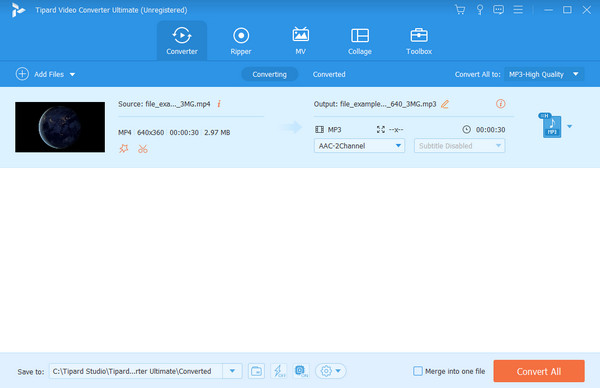
Beyond unmatched rendering speed, this premier transcoding suite serves as an essential bridge for cross-platform hardware and software compatibility. Supporting over 500 media containers and codecs, including Apple ProRes, HEVC (H.265), and next-gen AV1, it ensures your multi-format output is perfectly optimized for both high-end non-linear editing (NLE) timelines and lightweight, mobile-ready web delivery. For power users, this desktop video file converter software offers granular parameter optimization, granting total control over bitrate allocation (VBR/CBR), frame rates, and precise GOP structures. Furthermore, its integrated AI Upscaling engine employs sophisticated neural networks to enhance low-res legacy footage, utilizing deep learning algorithms to upscale resolution, eliminate artifacts, and execute temporal denoising with a single click.
Additionally, this professional-grade 4K video converter features an integrated, timeline-focused editor to refine your assets pre- or post-conversion. Users can seamlessly crop dimensions, adjust aspect ratios, split clips, and embed cinematic color LUTs or secure watermarks. Fully optimized for cross-platform hardware infrastructure, the software executes these creative enhancements smoothly without demanding high-end workstation specs, ensuring a fluid, latency-free media workflow on any system architecture.
Main Features of Tipard Video Converter Ultimate:
- Provide full hardware acceleration to convert large high-bit 4K/8K/HDR/10-bit videos quickly.
- Utilize advanced AI upscaling technology to enhance your videos without quality loss automatically.
- Provide many output video and audio codecs, formats, bitrate options, resolutions, frame rates, and more.
- Offer many practical and helpful editing features to polish and trim your videos.
- Support video and audio remuxing to convert files losslessly.
- This video converter provides very fast video conversion speed.
- It has a clear interface and simple workflow.
- You can keep the original visual quality if you choose Same as Source.
- The total CPU usage is very low when you turn on hardware acceleration.
- This video converter cannot help you generate subtitles.
2. Any Video Converter
Any Video Converter (AVC) distinguishes itself not as a pure transcoder, but as an ambitious, AI-augmented multimedia Swiss Army knife. This video converter for Windows and Mac is frequently cited for its dedicated neural networks that excel at resolution upscaling and clarity restoration. However, AVC's unique personality comes with a catch: these advanced AI modules must be downloaded as isolated payloads, resulting in a fragmented user experience and a monolithic storage footprint. Furthermore, its heavy processing algorithms are notoriously resource-intensive, demanding high-end hardware and high-VRAM GPUs to avoid choking standard or legacy systems.
From a cost-to-value perspective, AVC enforces a complex, modular pricing structure that inflates the total cost of ownership compared to all-in-one rivals. Its free tier functions strictly as a heavily gatekept trial, aggressively locking professional-grade presets and high-bitrate export options behind a paywall. For creators seeking a seamless, out-of-the-box 4K video converter, AVC's constant component updates and steep hardware barriers can create friction in a fast-paced production pipeline.
For routine, mainstream transcoding, AVC easily covers the essentials by supporting dominant containers and next-gen codecs like H.264, HEVC, and AV1. Yet, this video converter software completely falls short for high-end post-production; if your editing workflow requires broadcast-grade intermediate codecs like Apple ProRes 422, this tool is non-viable. Ultimately, AVC prioritizes a broad, jack-of-all-trades media ecosystem over the specialized, hyper-efficient encoding standards demanded by industry professionals.
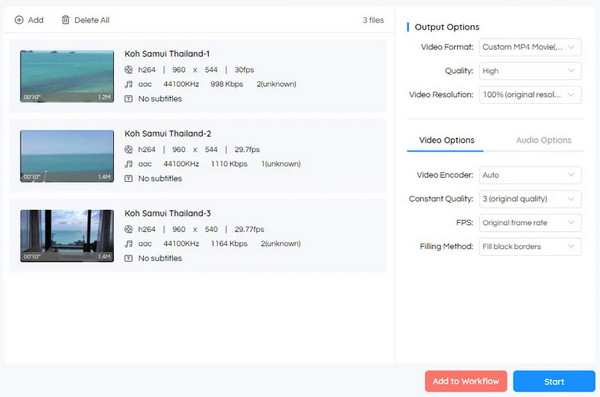
- This video converter provides many advanced features for video conversion and enhancement.
- It offers many standard output profiles for standard playback or editing.
- The interface is fashionable and user-friendly.
- The workflow is easy to understand for beginners.
- It provides detailed file info for the input and output files.
- There are no modern output codecs, like AV1, in this video converter.
- The customization options are limited.
- It is packed with many other features that a user might not need from a video convert.
3. HandBrake
HandBrake remains the definitive open-source gold standard for desktop video transcoding. While its output ecosystem is strictly confined to the web-standard trio, MP4, MKV, and WebM containers, this video converter offers unparalleled depth in low-level codec customization. For technical power users, HandBrake's standout capability is its meticulous Frame Rate (FPS) management, providing native support for both Constant Frame Rate (CFR) and Variable Frame Rate (VFR/Peak) streams. This extreme granularity is indispensable for eliminating audio-to-video synchronization drift in complex professional non-linear editing (NLE) timelines.
Furthermore, this powerful open-source video encoder grants advanced users absolute authority over critical compression parameters, including fine-tuned x265 Constant Rate Factor (CRF) metrics and hardware-level deinterlacing filters (YADIF/BWDIF). However, because HandBrake video converter prioritizes pure-play software encoding to maximize compression ratios, its rendering process can cause severe CPU bottlenecks during high-volume production. For creators managing massive 4K/8K batch workflows, Tipard Video Converter Ultimate represents a vastly superior alternative, unleashing full GPU-driven 120× hardware acceleration to deliver the extreme, latency-free efficiency required for modern multi-format deployment.
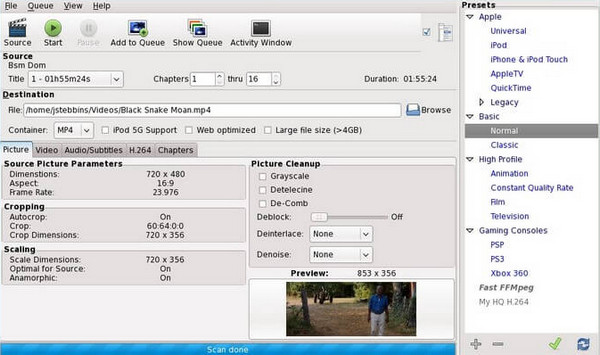
- HandBrake video converter supports decent GPU acceleration as a free video converter.
- It also provides deep customization on video parameters, including codec, frame rate, bitrate, etc.
- It offers many output codecs, including modern AV1 10-bit and legacy ones.
- HandBrake works fast and stably on Windows, macOS, and Linux
- There's no built-in video editing capabilities in HandBrake video converter.
- It's difficult for beginners to use or even understand the interface.
- HandBrake lacks a remux feature, only offering transcoding.
You May Also Like:
4. Movavi Video Converter
Movavi Video Converter is a widely acclaimed solution that seamlessly bridges the gap between professional-grade video converter and intuitive, user-centric design. This powerful multimedia video converter is renowned for its proprietary SuperSpeed conversion technology, which leverages lightning-fast remuxing (transmuxing) to shift container formats instantly without triggering a full re-encoding cycle. By directly copying video and audio streams, it preserves a strict 1:1 original visual fidelity with zero generational loss. For content creators requiring rapid asset deployment, the application offers over 200 tailored hardware presets optimized for the modern mobile ecosystem, including the latest flagship iPhones, iPads, and Android devices.
Beyond its clutter-free interface, Movavi Video Converter excels in automated workflow optimization and local data security. It provides a localized processing environment, guaranteeing your proprietary raw footage remains entirely on your local workstation throughout the compilation lifecycle. Harnessing full-throttle hardware acceleration powered by NVIDIA NVENC, Intel Quick Sync, and AMD AMF, Movavi eliminates system latency to deliver a friction-free experience. This video converter program stands as a highly dependable 4K video converter for both aspiring novices and time-constrained professionals managing tight production deadlines.
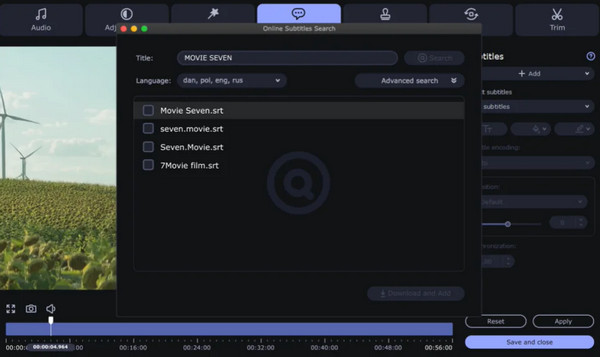
- It enables lightning-fast format switching without re-encoding to maintain 1:1 original quality.
- Movavi features over 200 pre-configured profiles optimized for the latest mobile devices and gaming consoles.
- This video converter offers a streamlined, drag-and-drop user experience that significantly flattens the learning curve for beginners.
- It can leverage NVIDIA, Intel, and AMD technologies to ensure efficient processing of high-bitrate 4K footage.
- Most premium features and high-speed updates are locked to payment.
- The integrated editing toolkit is rudimentary compared to more robust, dedicated post-production software.
- The free version adds a prominent watermark and restricts conversion length, limiting its utility for evaluation.
5. Shutter Encoder
Shutter Encoder is widely recognized as the definitive open-source Swiss Army Knife for high-end post-production, offering an uncompromising multimedia mastering experience. Far beyond standard file changing, this FFmpeg-powered video converter integrates a sophisticated suite of creative neural networks, including AI-driven Video & Photo Upscaling (2× and 4× models) for extreme resolution enhancement, and an advanced AI Animation module designed for precision frame interpolation. From seamless lossless remuxing (rewrapping) to professional-grade colorimetry adjustments and LUT embedding, this video converter provides the technical depth required to eliminate the most complex file compatibility issues within non-linear editing (NLE) suites like Adobe Premiere Pro.
Performance-wise, this robust cross-platform video converter freeware supports comprehensive hardware acceleration across NVIDIA NVENC, AMD AMF, and Intel Quick Sync architectures. However, to prioritize master-grade output fidelity, this feature is intentionally disabled by default. By utilizing pure CPU-based software encoding natively to maximize bitrates and eliminate compression artifacts, the tool guarantees absolute visual precision, though it will severely tax your processor during heavy tasks. For production workflows prioritizing throughput, hardware acceleration can be manually engaged to unlock blazing-fast 4K/8K batch processing, perfectly reflecting this utility's philosophy of placing granular engineering control back into the hands of the professional editor.
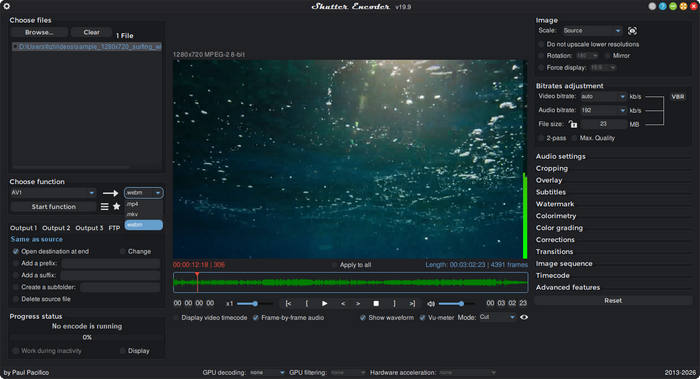
- It is compatible with various operating systems, like macOS, Windows, and Linux.
- This video converter provides many advanced output functions.
- It offers a large and versatile preview window.
- It offers many AI features even though it's a free video converter.
- Hardware acceleration is not enabled by default.
- The video editing features are difficult to use.
- The installation is not that easy.
Part 6. 5 Best Video Converters Free Online
Online video converters exist, too! They are alternatives to the video converter software discussed in the previous post. However, they need a strong internet connection to function. See the top 5 online converter tools below.
1. CloudConvert
CloudConvert is a very popular free online video converter that offers a sophisticated, ad-free environment for professional workflows. Its video conversion engine is exceptionally robust, supporting cutting-edge codecs such as AV1, HEVC (H.265), and H.264. A standout feature for quality-conscious editors is the "Copy" (Remuxing) functionality, which allows you to change file containers (e.g., MKV to MP4) without re-encoding, ensuring 1:1 original quality retention. For power users, this freeware video converter online provides deep granular control over technical parameters, including resolution, aspect ratio, and constant bitrate (CBR) settings.
CloudConvert excels as a high-fidelity video to audio converter, supporting professional formats like MP3, M4A, FLAC, and AAC. However, despite its versatility, the video file converter's "Preset" configuration option can be ambiguous for non-technical users. These presets define the balance between encoding speed and compression ratio, yet the interface lacks descriptive guidance on how each setting impacts final visual fidelity. But anyway, CloudConvert is a reliable and powerful free online video converter.
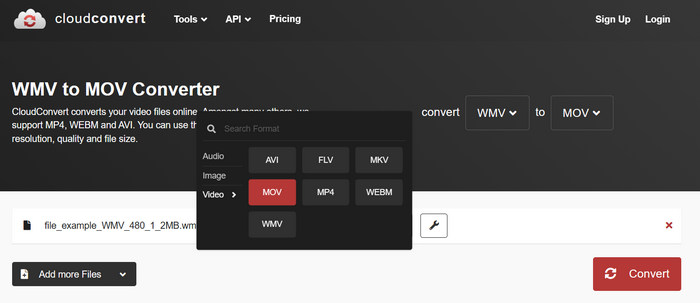
- You can import video from local storage, URLs, and online storages.
- Provide modern output codecs and configurations as a freeware online video converter.
- The interface is clean, easy-to-understand, and doesn't have ads.
- Offer a free online video to audio converter feature, like MP4 to MP3 conversion.
- Some customization options are difficult to understand.
- The output quality is not that satisfactory.
2. Kapwing Video Converter
If you need to edit videos online, Kapwing is a good video converter. Kapwing Video Converter elevates the standard online conversion process by integrating a Pro-grade AI Creative Suite directly into your browser. This online video converter's standout AI features, such as Smart Cut (which automatically removes dead air) and AI-powered Subtitle Generation, drastically reduce the time spent on manual post-production. For creators working with social media assets, its AI Video Enhancer can intelligently upscales resolution while stabilizing shaky footage, making it a versatile hub for high-impact content refinement.
However, this versatility comes with strategic trade-offs in output control. While Kapwing Video Converter supports mainstream delivery formats like MP4, MOV, and GIF, it is primarily optimized for web video editing. Professional users may find the lack of high-bitrate intermediate codecs (such as ProRes) or advanced GOP (Group of Pictures) settings a limiting factor for heavy-duty editing. Additionally, while the cloud-based processing is remarkably fast, the platform’s free tier often imposes strict file size and duration caps, positioning this online video converter tool as a tool best suited for rapid, AI-driven content creation rather than high-fidelity long-form archiving.
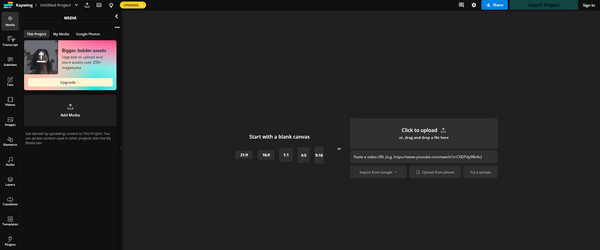
- Provide standard output video formats.
- Offer many fascinating AI and editing features.
- Save your projects and output videos in cloud and allow you to share videos to social media.
- It's not a dedicated video converter, but primarily a web-based editing tool.
- No output codec options available.
3. online-convert
Online-Convert is a well-established video converter in the web-based transcoding space, offering a surprisingly deep array of video conversion parameters for a free platform. This freeware video converter online allows users to manually define critical technical specs, including bitrate, aspect ratio, frame rate, and specific video codecs. However, this granular control comes with a steep learning curve; the interface can be overwhelming for beginners, and its input engine occasionally struggles with non-standard encoding profiles, leading to compatibility errors when importing high-bitrate or "edge-case" MP4 and MKV files.
From a utility perspective, while it serves as a powerful online video converter for small assets, it faces significant scalability issues. The free tier strictly enforces a 100MB file size limit, which is increasingly restrictive for modern high-definition footage. Furthermore, the lack of intuitive tooltips for its advanced settings means that without a foundational understanding of video engineering, users may find it difficult to achieve the optimal balance between visual fidelity and file compression.
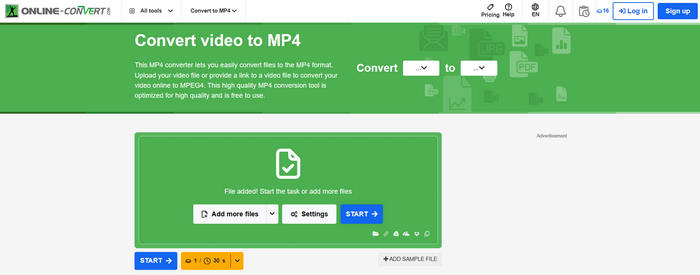
- Provide many dedicated video converter tools, like video to audio converter and video to MP4 converter.
- Support video file input from local or online storage.
- Provide deep and flexible customization in video conversion settings.
- You cannot adjust the video and audio codecs.
- The customization options are nearly useless for non-professional users.
4. FreeConvert
FreeConvert stands as one of the most resilient browser-based utilities for high-capacity workflows. Distinguished by its generous 1GB free file size limit, this free online video converter far exceeds the constraints of typical online converters, making it a viable option for modern 1080p and short 4K clips. The video converter platform streamlines the conversion process with a seamless drag-and-drop interface, while its underlying FFmpeg-driven engine ensures high-fidelity output across over 1,500 file conversions.
Beyond simple accessibility, FreeConvert offers a "Pro-level" advanced settings panel, allowing users to fine-tune video codecs (such as HEVC or H.264), adjust volume, and even hardcode subtitles directly into the output. From a security standpoint, this freeware video converter implements 256-bit SSL encryption and an automated deletion policy that purges data from its servers within four hours. This balance of massive file support and enterprise-grade privacy makes it a top-tier choice for those who need desktop-class power within a web interface.
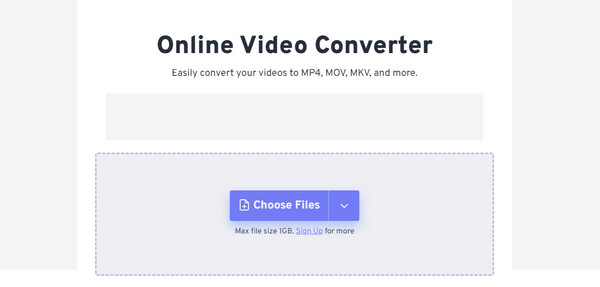
- Provide many modern and legacy output codecs.
- Support batch conversion.
- Offer video rotator and video flip features and manage subtitles.
- There are many ads on the webpages.
5. VEED.IO Video Converter
While often categorized as a cloud-based editor, VEED.IO video converter offers a significantly more robust video conversion engine than most of its browser-based competitors. It distinguishes itself from tools like Kapwing by providing an "Advanced" export mode, where users can manually adjust critical technical parameters such as resolution (up to 4K), frame rate (FPS), and even audio sample rates. This granular control makes this online video file converter and editor a preferred choice for creators who need to ensure their social media assets meet specific platform bitrates without leaving their workspace.
However, VEED.IO Video Converter's professional-grade depth is closely tied to its premium tiers. While the free version allows you to explore its sophisticated AI subtitle and audio cleaning tools, the most essential conversion features, including high-bitrate 1080p/4K exports and the removal of the platform watermark, are strictly reserved for paid subscribers. For editors balancing tight deadlines with the need for technical precision, VEED provides a powerful, all-in-one suite, provided they are willing to invest in its professional ecosystem.
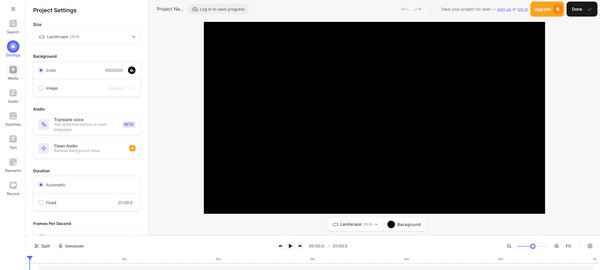
- Offer many stunning video enhancement and editing features.
- Provide multiple video configuration features compared with other web-based editor tools.
- Store your output files in cloud storage.
- The interface is a bit complicated.
- The conversion feature is still not fully optimized.
Part 7. What You Need from a Video Converter
Finding the "best" video converter isn't about picking the one with the most buttons; it's about finding the one that resolves your specific workflow bottlenecks. Whether you are a professional editor or a casual viewer, here are the critical pillars to consider:
1. Conversion and Processing Speed
Video processing is one of the most resource-intensive tasks for a computer.
- The Need: If you deal with 4K or 8K files, software-only encoding will turn your PC into a space heater for hours.
- What to Look For: Ensure the video converter software supports Level-3 Hardware Acceleration (NVIDIA NVENC, AMD, Intel Quick Sync, and Apple VideoToolbox). This shifts the heavy lifting from your CPU to your GPU, potentially boosting speeds by up to 60×.
2. Format Versatility & Future-Proof Codecs
A video converter is only as good as its library.
- The Need: You need a tool that can support most standard containers, from legacy AVI to modern standards.
- What to Look For: Look beyond standard MP4. Your ideal tool should support HEVC (H.265), AV1 (for web efficiency), and ProRes (for professional editing). This video converter should also offer optimized presets for the latest devices, like iPhone 18.
3. The "Lossless" Factor: Remuxing vs. Transcoding
Sometimes, you don't need to change the video quality; you just need to change the "container" (e.g., MKV to MP4).
- The Need: Preservation of 1:1 original quality.
- What to Look For: Seek a "Copy" or "Remux" feature. This allows the video converter software to bypass the re-encoding process entirely, giving you a new format in seconds with zero quality loss.
Part 8. FAQs of Video Converter
What is the difference between "Remuxing" and "Transcoding"?
Transcoding decodes and re-compresses the video into a new codec (e.g., HEVC/H.265 to AV1 or ProRes). This allows you to change bitrates (VBR/CBR) or add subtitles, but it takes time and can slightly reduce quality. Remuxing just changes the file container (e.g., MKV to MP4) without altering the video data. It bypasses re-encoding entirely, offering 1:1 lossless quality and near-instant speed.
Why is GPU Hardware Acceleration important, and do online tools have it?
It directly impacts conversion speed and system performance. Online converters process your video files on remote cloud servers, so your local GPU doesn't matter. However, because server resources are shared, online tools often limit file sizes and run much more slowly than local hardware acceleration.
What are common video formats that can be converted?
Today, MP4, MOV, WebM, and MKV are the most commonly used video formats. MP4 remains the universal standard for compatibility, while MOV is optimized for the Apple ecosystem. WebM serves as the high-efficiency choice for web-native playback, and MKV stands as the premier container for advanced multi-track and subtitle customization.
Which is the best video converter?
You can choose from leading video converter tools like Tipard Video Converter Ultimate, HandBrake, Shutter Encoder, and CloudConvert. They offer extensive format and codec support, allowing you to customize bitrate, resolution, and frame rate for optimal performance on any program or device.
How long does video conversion take?
The duration of video conversion is defined by the interplay between file complexity and hardware efficiency. For instance, transcoding a 10-minute 4K video to H.264 can take less than 2 minutes with hardware acceleration, whereas shifting to the highly efficient AV1 codec via CPU encoding might extend that duration to over an hour. Beyond the processor, a mechanical hard drive (HDD) often acts as a silent bottleneck; its limited sequential read/write speeds can stifle a high-performance CPU, forcing it to idle while waiting for data. Ultimately, the choice of codec and the presence of an SSD are the primary factors determining whether your conversion finishes in a coffee break or takes an entire afternoon.
Conclusion
With a vast landscape of offline and online converters available, selecting the right one depends on your specific needs for speed and precision. While each tool in our top 10 list offers unique advantages, Tipard Video Converter Ultimate stands out as the industry leader. Supporting over 500 formats and delivering up to 120x faster conversion speeds via hardware acceleration, it is the definitive choice for professionals who refuse to compromise on efficiency.
More Reading


About the Author


 Tipard Video Converter Ultimate