

Video editing is the process of selecting, arranging, retouching, and enhancing footage to create a final product. It is far more than trimming clips. After editing, the video feels intentional, professional, engaging, and trustworthy. However, a poorly edited clip can feel sloppy, boring, or blurry even if the footage itself is high quality. This article identifies and reviews the top 15 free and premium video editor software and apps based on professional testing.

Key Takeaways
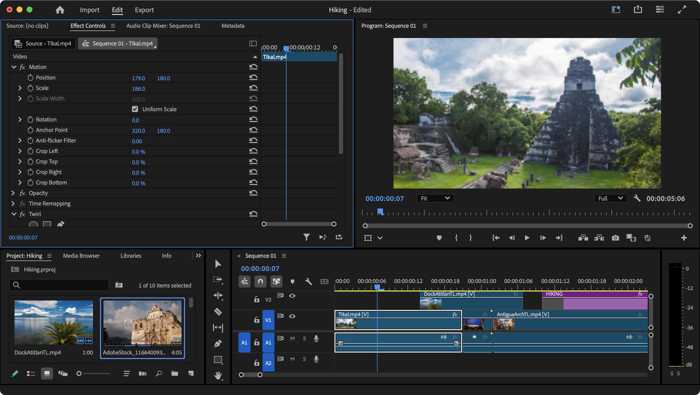
Adobe Premiere Pro Video Editor is the industry standard. It is equipped with almost all tools and features for video editing and post-production, like a workplace. It makes sense that many movie studios use Adobe Video Editor to generate super-high-quality videos.
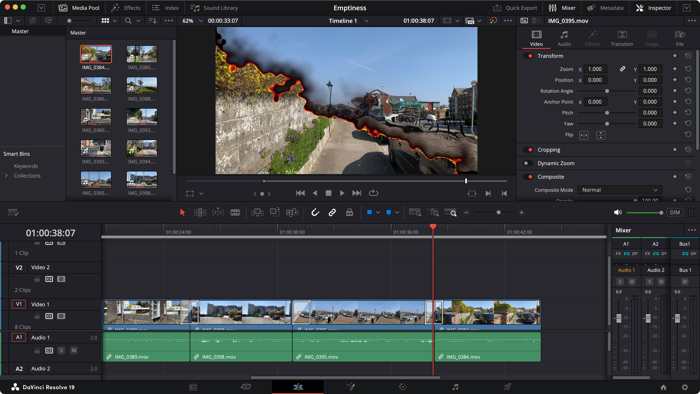
DaVinci Resolve is an excellent color-grading powerhouse. As an all-in-one video editor, it comes with a robust free version. The full version is widely used in blockbusters, Oscar-winning movies, TV shows, and commercials.
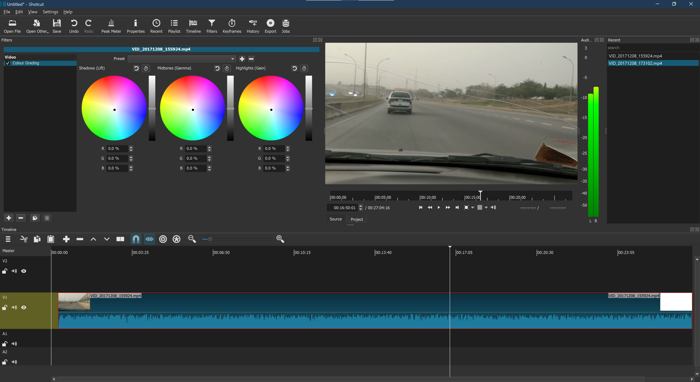
OpenShot Video Editor stands out as an open-source video editor. It supports many popular video and audio formats. Editing tools are straightforward yet surprisingly powerful for a free tool.
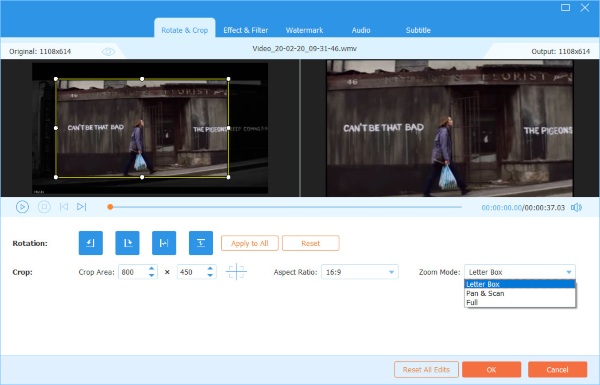
Tipard Video Converter Ultimate is a compact video editor software for macOS and Windows. It works for over 500 input and output formats. The built-in device presets make it a great video editor program for portable devices.
Part 1: Video Editor Benchmark Testing Methodology
To benchmark the best video editors for Windows and Mac, we tested them in our professional lab. Our framework is designed to be repeatable, fair, and applicable whether you are comparing other software or testing new versions.
Test Environment
To eliminate variables, the testing environment must be static.
CPU: Intel Core i5-14400F
GPU: NVIDIA GeForce RTX 4060 Ti
RAM: 32GB
Storage Type: SSD
Free Storage: Over 1TB
Operating System: Windows 11 64-bit
Mobile Devices: an iPhone 16 Pro and a Samsung Galaxy S25
Mac Computer: MacBook 5M Pro 2026
Test Media Selection
| Name | Resolution | Length | File Size | Format | Type |
|---|---|---|---|---|---|
| Clip A | 1080p | 4 minutes 26 seconds | 16.8MB | MP4 | YouTube music video |
| Clip B | 1080p | 50 minutes | 1.13GB | MKV | Documentary |
| Clip C | 720p | 5 seconds | 65KB | MP4 | Recording |
| Show MoreShow Less | |||||
During testing, we tried basic video editing features, such as trimming, merging, cropping, and more. Moreover, we tested advanced capabilities, such as AI-powered video retouching.
Test Software/Apps and Version
| Developer | |
|---|---|
| Tipard Video Converter Ultimate 10.5.20 | Tipard Studio |
| OpenShot Video Editor 4.0 | OpenShot Studios |
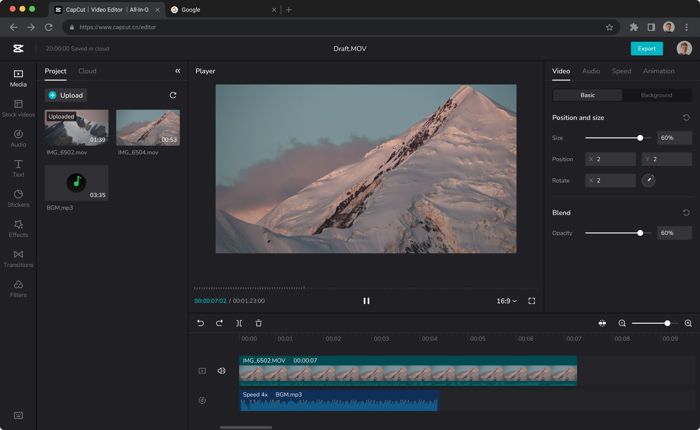
| CapCut Video Editor 19.3.0 | ByteDance |
| Canva Video Editor | Canva |
| Clipchamp Video Editor 4.5.10920.0 | Microsoft |
| Adobe Premiere Pro Video Editor 26.3.2 | Adobe |
| Movavi Video Editor 26.23.1 | Movavi |
| VSDC Free Video Editor 11.2.3.729 | Flash-Integro |
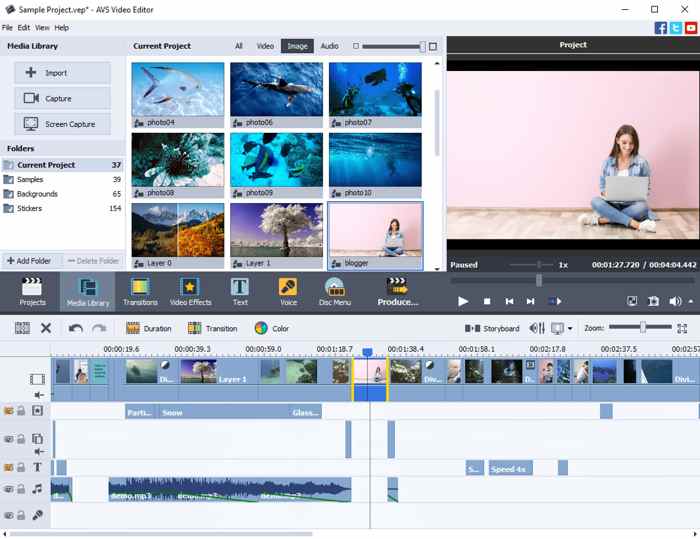
| AVS Video Editor 26.0.2 | Online Media Technologies |
| DaVinci Resolve 21 | Blackmagic Design |
| Shotcut Video Editor 25.01 | Dan Dennedy |
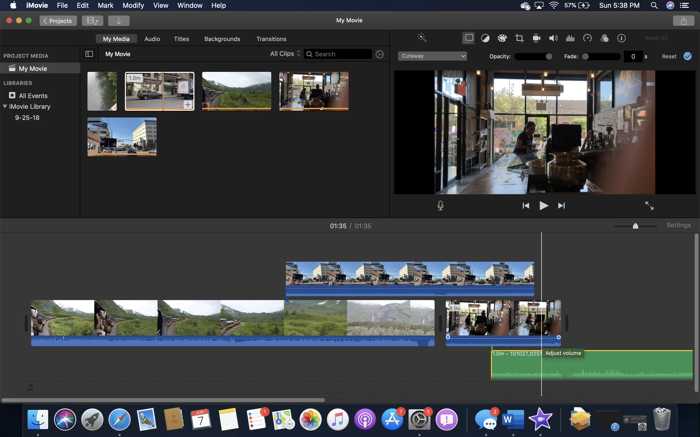
| Apple iMovie 10.4.3 | Apple |
| InShot Video Editor | Shantanu Pte |
| WeVideo | WeVideo |
| VivaVideo | Hangzhou Xiaoying Innovation Technology |
| Show MoreShow Less | |
Part 2: Video Editor Benchmark Evaluation Criteria
Editing Feature Benchmark
| Trim & Precision | Merge | Rotate | Effects & Compositing | Color Correction | Audio Editing & Mixing | |
|---|---|---|---|---|---|---|
| Adobe Premiere Pro | Industry standard video trimming | Advanced video merging | Full keyframed rotation | Deep After Effects | Lumetri Color panel | Multi-channel mixing |
| DaVinci Resolve | Highly precise trim mode | Advanced multi-track array | Distortion correcting | Professional node-based effects | HDR wheels and color space management | Fairlight Audio Daw |
| Movavi Video Editor | Frame-by-frame trimming | Drag-and-drop footage merging | One-click rotation | Good selection of effects | Manual color correction | AI voice isolation |
| Apple iMovie | Simple drag-to-trim | Clips merging tightly | Built-in rotating buttons | Basic video effects | Skin-to balance, match-color tools | Background hum reduction |
| VSDC Free Video Editor | Sub-pixel accurate trimming | Merge clips anywhere | Full rotation parameter | Blending modes | Color wheels, RGB curves, and full LUT adjustments | Built-in audio waveform |
| Shotcut Video Editor | Frame-by-frame splitting | Merge across infinite tracks | Comprehensive rotation | Chroma keying | Color wheels | Multi-channel monitoring |
| OpenShot Video Editor | Razor trimming tools | Fluid drag-and-drop merging | Rotation by a keyframe curves engine | Chroma keying | Basic color adjustments | Basic audio adjustment |
| AVS Video Editor | Precise clip trimming | Overlay tracks, titles, and audio | Simple rotation | Standard transition library | Basic color tuning panel | Basic audio balance |
| CapCut Video Editor | Intuitive split | Linear multi-layer track blending | Manual rotation | Massive library | Basic color wheel sliders | AI voice isolation and stock audio syncing |
| Canva Video Editor | Basic slider trimming | Merge clips linearly | Freeform rotating | Animation templates | No grading tools | Single-layer background audio track control |
| Clipchamp Video Editor | Basic split shortcut | Merge clips side-by-side automatically | 90-degree flip buttons | Packaged animated transitions | Basic color filters | Text-to-speech generation and volume parameters |
| Tipard Video Converter Ultimate | Frame-by-frame slipping and trimming | Merge clips linearly | 90/180/270-degree rotation | Basic video effect library | Adjust sliders for Brightness, Contrast, Saturation, and Hue | Basic tool to mute, swap out, or adjust delayed offset |
| WeVideo | Timeline splitting tools | Merge multi-track | Canvas rotation controls | Cloud-rendered transitions, Chroma keying | Basic opacity adjustment dials | Basic voiceover recording |
| InShot Video Editor | High-speed trimming, cutting, and splitting | Basic track stacking for overlays | Canvas rotation | Trending glitch effects | Basic tinting and curves control | Large sound effects |
| VivaVideo | Fast cutting and trimming | Storyboard grid compilation | Basic vertical/horizontal rotation | Pop-culture transitions | Basic color presets | Built-in sound effect library and multi-layer soundtrack mixing |
| Show MoreShow Less | ||||||
Key Findings
1. DaVinci Resolve and Adobe Premiere Pro are the best AI video editors for professional and high-end users. They are excellent at color correction and audio mixing. DaVinci Resolve combines video trimming, color balance, effects, and audio post-production.
2. OpenShot, Shotcut, and VSDC are good free video editors. OpenShot is balanced in its capabilities. Shotcut offers professional color wheels. VSDC integrates strong color correction tools.
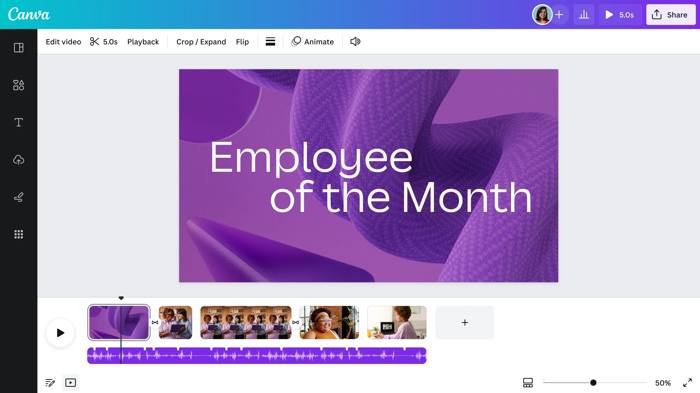
3. CapCut, Canva, Clipchamp Video Editor, and InShot are simple video-editing programs and apps for beginners, thanks to their intuitive designs, rich templates, and full music libraries.
4. Tipard Video Converter Ultimate is designed for users who wish to convert video formats after video editing.
Rendering Speed Benchmark
After trimming the test video clips, we evaluate the rendering speed of the best video editing programs and apps.
| Clip A | Clip B | Clip C | |
|---|---|---|---|
| DaVinci Resolve | 1 minute | 10 minutes | 5 seconds |
| Adobe Premiere Pro | 10 minutes | 30 minutes | 40 seconds |
| Apple iMovie | 2 minutes | 2 hours | 15 seconds |
| Tipard Video Converter Ultimate | 1 minute | 15 minutes | 8 seconds |
| CapCut Video Editor | 26 seconds | 18 minutes | 10 seconds |
| Movavi Video Editor | 2 minutes | 30 minutes | 12 seconds |
| VSDC Free Video Editor | 18 minutes | 1 Hour 26 minutes | 1 minute |
| Shotcut Video Editor | 5-6 minutes | 50-60 minutes | 2 minutes |
| OpenShot Video Editor | 4 minutes | 2 hours 12 minutes | 1 minute |
| AVS Video Editor | 4-5 minutes | Over 2 hours | 1 minute 5 seconds |
| InShot Video Editor | 45 seconds | 30 minutes | 2 seconds |
| Canva Video Editor | 12 minutes | 1 hour 42 minutes | 2 minutes |
| Clipchamp Video Editor | 4 minutes | 45 minutes | 40 seconds |
| WeVideo | 3 minutes | 3 hours | 15 seconds |
| VivaVideo | 2 minutes | 32 minutes | 36 seconds |
| Show MoreShow Less | |||
Key Findings
1. Tier 1: DaVinci Resolve Video Editor, Adobe Premiere Pro, Apple iMovie, and Tipard Video Converter Ultimate. They are hyper-fast when rendering videos in our test.
2. Tier 2: CapCut Video Editor, Movavi Video Editor, and VSDC Free Video Editor. They run fast due to a lightweight design and are highly optimized for customer-grade PCs.
3. Tier 3: Shotcut Video Editor, OpenShot Video Editor, AVS Video Editor, and InShot Video Editor. Their video rendering speed is rated moderate.
Hardware Acceleration Benchmark
| Hardware Acceleration | Notes | |
|---|---|---|
| DaVinci Resolve | Multi-GPU Computing and GPU-accelerated OpenFX | Only for NVIDIA's NVENC/NVDEC, AMD, Intel, Apple |
| Adobe Premiere Pro | Mercury Playback Engine | Only for NVIDIA's NVENC/NVDEC, AMD, Intel, Apple |
| Apple iMovie | ProRes and Video Encode Engines | Apple Silicon Media Engines |
| Tipard Video Converter Ultimate | Level-3 Hardware Acceleration | For NVIDIA, AMD, Intel |
| CapCut Video Editor | Hardware-accelerated H.264/H.265 HW+ decoders | |
| Movavi Video Editor | Standard GPU acceleration | For NVIDIA, AMD, Intel |
| VSDC Free Video Editor | GPU Acceleration is available for Pro | |
| Shotcut Video Editor | CPU multi-threading | FFmpeg Framework |
| OpenShot Video Editor | Libopenshot | |
| AVS Video Editor | Minimal Legacy GPU Profiles | |
| InShot Video Editor | Optimized explicitly for mobile architectures | Apple A-series/M-series or Qualcomm Snapdragon |
| Canva Video Editor | Server side only | Remote Cloud Arrays |
| Clipchamp Video Editor | Browser-level GPU acceleration | Chromium WebGL/WebGPU |
| WeVideo | Server side only | Remote Cloud Arrays |
| VivaVideo | Optimized explicitly for mobile architectures | Apple A-series/M-series or Qualcomm Snapdragon |
| Show MoreShow Less | ||
Key Findings
1. DaVinci Resolve and Adobe Premiere Pro integrate industry-standard features with mature GPU acceleration. Their performances are great on high-end computers and laptops.
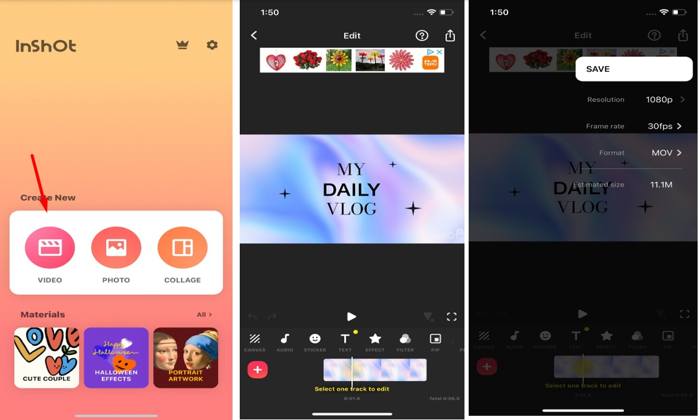
2. InShot Video Editor and VivaVideo are optimized for mobile. The Android video editor of InShot, for example, uses the MediaCodec API for hardware-accelerated encoding and decoding.
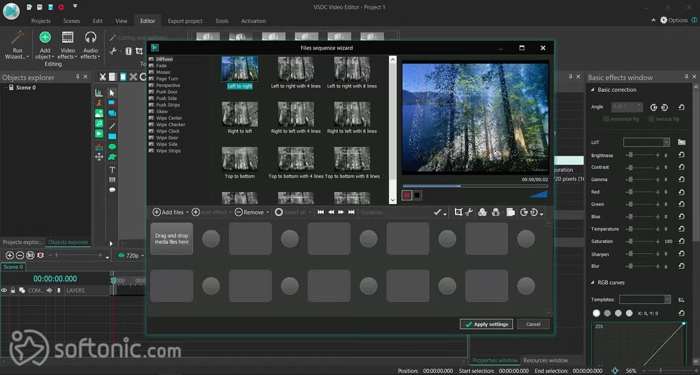
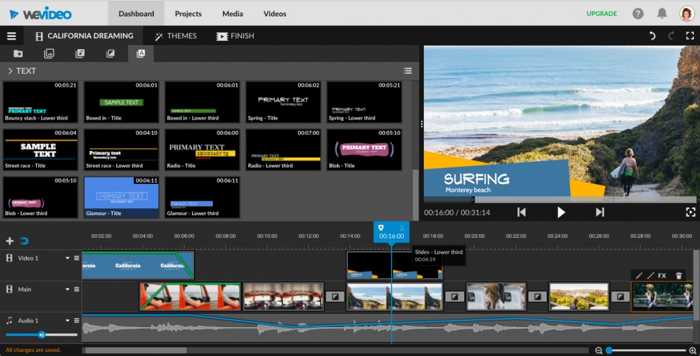
3. VSDC Free Video Editor lacks hardware acceleration in the free version. Canva Video Editor and WeVideo are free web video editors. All rendering happens on remote servers.
Export Quality Benchmark
| Resolution Support | H.264/H.265 Codec | |
|---|---|---|
| DaVinci Resolve | Up to 32K UHD | No in free version |
| Adobe Premiere Pro | Up to 8K | Support |
| Apple iMovie | Up to 4K | Support since macOS High Sierra |
| Tipard Video Converter Ultimate | Up to 8K | Support |
| CapCut Video Editor | Up to 4K | Support |
| Movavi Video Editor | Up to 4K UHD and Cinema 4K | Support |
| VSDC Free Video Editor | Up to 8K | Support |
| Shotcut Video Editor | Up to 8K | Support |
| OpenShot Video Editor | Up to 16K UHD | Support |
| AVS Video Editor | Up to 4K UHD and DCI 4K | No support H.265 export |
| InShot Video Editor | Up to 4K | Support |
| Canva Video Editor | Up to 4K | Support |
| Clipchamp Video Editor | Up to 4K UHD | Support |
| WeVideo | Up to 4K UHD | Support |
| VivaVideo | Up to 4K | Support |
| Show MoreShow Less | ||
Key Findings
- Almost all the best video editing software supports the H.264 codec. Therefore, it is the primary choice for daily video editing.
- H.265 is a new codec that produces better quality and smaller file size. However, only a subset of video editors supports H.265. CapCut, Shotcut, Tipard Video Converter Ultimate, and VSDC are good options.
- Adobe Premiere Pro and DaVinci Resolve are the best options to produce super-high-quality videos; however, they require high-end hardware.
Ease of Use Benchmark
| Interface | Presets | |
|---|---|---|
| DaVinci Resolve | Professional | Layout presets |
| Adobe Premiere Pro | Professional | Effect, transitions, and animation presets |
| Apple iMovie | Clean | |
| Tipard Video Converter Ultimate | Intuitive | Export presets |
| CapCut Video Editor | Intuitive | Filter and sticker presets |
| Movavi Video Editor | Intuitive | Output presets |
| VSDC Free Video Editor | Ribbon | Color presets |
| Shotcut Video Editor | Outdated | Export presets |
| OpenShot Video Editor | Clean | Web preset |
| AVS Video Editor | Intuitive | Graphic and audio effect presets |
| InShot Video Editor | Intuitive | Theme presets |
| Canva Video Editor | Drag-and-drop | Presets for social media |
| Clipchamp Video Editor | Streamline | Aspect ratio presets |
| WeVideo | User-friendly | Export presets |
| VivaVideo | Mobile-optimized | Rich set of presets |
| Show MoreShow Less | ||
Key Findings
1. For a wide range of templates and quick operation, CapCut and Tipard are great options. They provide the richest templates and presets, making them easy to get started.
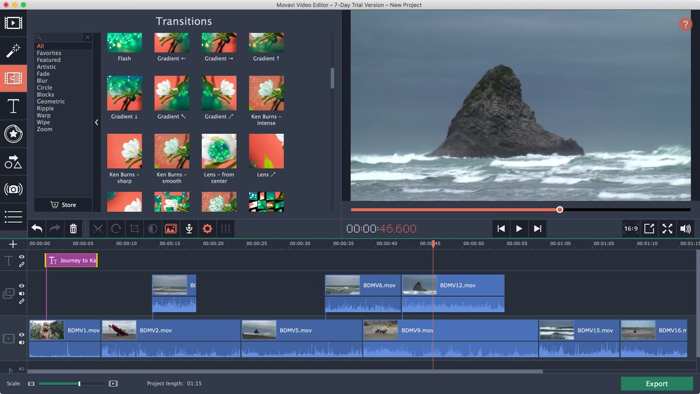
2. For a balance between ease of use and capabilities, Movavi, Clipchamp, and InShot offer practical presets for various scenarios, including video color correction.
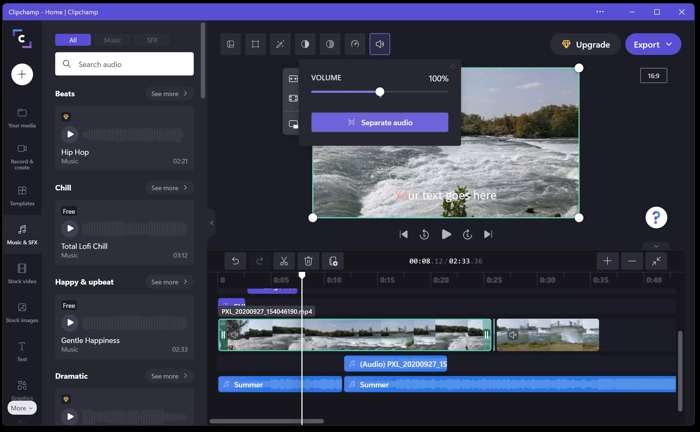
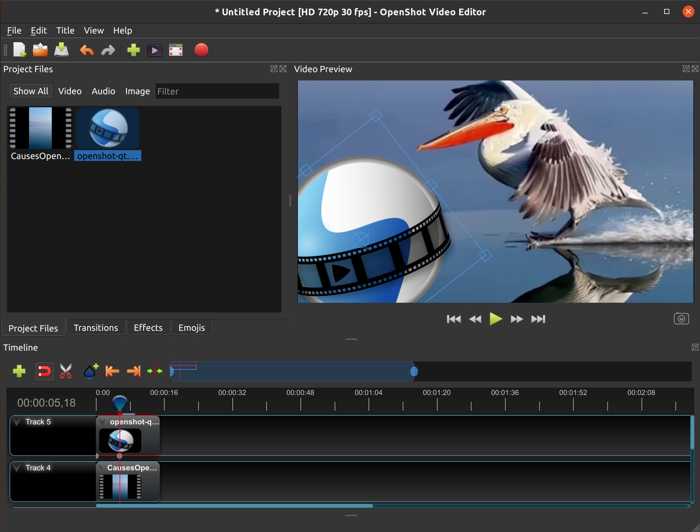
3. For free and open-source options, Shotcut and OpenShot offer a wealth of built-in presets and deep customization.
Format Compatibility Benchmark
| Input Formats | Output Formats | Codecs | |
|---|---|---|---|
| DaVinci Resolve | MP4, M4V, MOV, AVI, WebM, MXF, MTS, etc. | MP4, MOV, MXF | H.264/H.265, Apple ProRes, DNxHR |
| Adobe Premiere Pro | MP4, MPEG, 3GP, MOV, M4V, WMV, AVI, etc. | MP4, MPEG-4, AVI, MOV | H.264, HEVC/H.265, Apple ProRes, DNxHD, MJPEG, MPEG-2, MPEG-4 |
| Apple iMovie | MOV, MP4, M4V, AVI, MPG, DV, HDV | MP4 and MOV | Apple ProRes, Apple Intermediate Codec (AIC), AVCHD, H.264, DV, Motion JPEG |
| Tipard Video Converter Ultimate | Over 500 formats | Over 500 formats | H.264, H.265/HEVC, AV1, VP9, VP8, Apple ProRes, DNxHD, XAVC, AVC-Intra, DV, MPEG-2, MPEG-4, DivX, Xvid, M-JPEG |
| CapCut Video Editor | MP4, MOV, M4V, AVI, MKV, WebM, 3GP, FLV, WMV | MP4 and MOV | H.264, HEVC/H.265, AV1 |
| Movavi Video Editor | 3GP, AVI, M2TS, MKV, MOV, MP4, MPG, WMV | MP4, AVI, MOV, MKV, WMV, WebM | H.264, MPEG-4, MJPEG, ProRes, Theora |
| VSDC Free Video Editor | AVI, MP4, MKV, MPG, WMV, 3GP, FLV, MOV, WebM, RM/RMVB, SWF | AVI, MP4, MKV, MOV, WMV, FLV | H.265/HEVC, H.266/VVC, ProRes, DNxHD, FFV1, CineForm, MJPEG, VP9 |
| Shotcut Video Editor | All formats FFmpeg supported | MP4, MOV, MKV, WebM | FFmpeg codec library |
| OpenShot Video Editor | MP4, AVI, MOV, MPEG, FLV, WMV, MKV, WebM | MP4, MOV, AVI, WebM | FFmpeg codec library |
| AVS Video Editor | MP4, M4V, MOV, MKV, WEBM, AVI, DVD, VOB, MPG, WMV, 3GP, FLV, M2TS, TS | AVI, MP4, MOV, MKV, WMV, DVD, GIF | H.264, MPEG-4, MPEG-2, MJPEG, H.263 |
| InShot Video Editor | Main video formats | MP4 | H.264/H.265 |
| Canva Video Editor | AVI, MOV, GIF, M4V, WEBM, MKV, MP4, MPEG | MP4 | H.264, ProRes |
| Clipchamp Video Editor | MP4, MOV, WEBM, AVI, DIVX, FLV, 3GP, WMV, VOB, DCM, MKV | MP4 | H.264 |
| WeVideo | 3GP, AVI, DIVX, DV, M4V, MOV, MP4 | MP4 | H.265, VP8, VP9 |
| VivaVideo | Popular video formats | MP4 | H.264/H.265 |
| Show MoreShow Less | |||
Key Findings
1. For professional workflows, DaVinci Resolve and Adobe Premiere Pro are the top choices. They offer deep support for rich and professional codecs.
2. For the best free options, Shotcut and OpenShot leverage the FFmpeg library to support an extremely wide range of codecs.
You May Also Like:
AI Feature and Video Template Benchmark
| Key AI Features | Video Templates | |
|---|---|---|
| DaVinci Resolve | IntelliSearch, Speech Generator, CineFocus, UltraSharpen, Motion Deblur, Face Age Converter, Blemish Remover | No |
| Adobe Premiere Pro | AI Assistant | Project templates |
| Apple iMovie | Magic Movie | Trailers templates |
| Tipard Video Converter Ultimate | AI Video Enhancer: Upscaling to 4K/8K, Denoise, Color Correction, Stabilization | Rich library |
| CapCut Video Editor | AI Edit, AI Story Maker, AutoCut, AI Clipper, Auto Captions, AI Video Generation | Rich library |
| Movavi Video Editor | Auto Captions, Motion Tracking, Background Removal, Noise Reduction, Silence Removal | Large collection of templates |
| VSDC Free Video Editor | Title templates | |
| Shotcut Video Editor | AI Speech‑to‑Text – powered by OpenAI Whisper, AI Text‑to‑Speech | Filter templates |
| OpenShot Video Editor | Local AI‑powered Masks | Title templates |
| AVS Video Editor | AI Video Enhancement | Basic templates |
| InShot Video Editor | AI Effects, Auto Captions, AI Background Removal, AI Photo/Video Enhance, AI Smart Collage | Custom templates |
| Canva Video Editor | AI Video Generation powered by Google Veo 3 | Huge library |
| Clipchamp Video Editor | Auto Compose, AI Voiceover Generator, AI Subtitle Generator, AI Silence Removal, AI Background Noise Reduction, AI Background Removal | Customizable templates |
| WeVideo | AI Assist Suite | Template library |
| VivaVideo | AI Video Generation, Auto Captions, AI Avatars, AI Voice Cloning, Image to Video, AI HD Restore | Rich templates |
| Show MoreShow Less | ||
Key Findings
1. DaVinci Resolve and Adobe Premiere Pro offer professional-grade AI tools, from intelligent search and speech generation to footage organization.
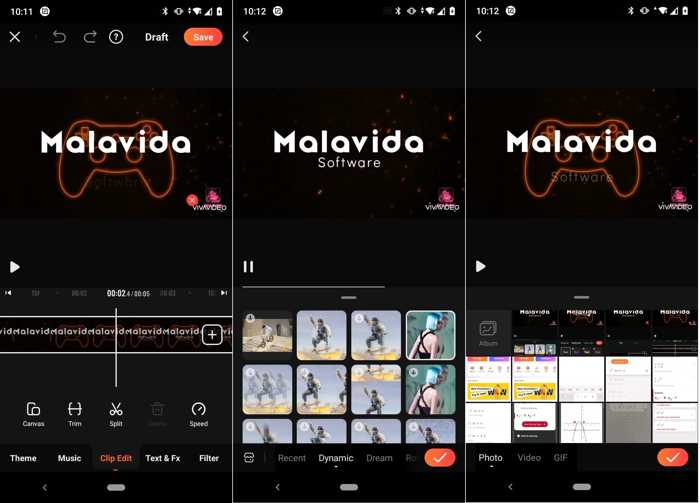
2. CapCut and VivaVideo lead the way in AI-powered video generation, supporting content creation from text and image prompts.
1. Tipard Video Converter Ultimate is an excellent choice for AI-driven video enhancement.
Part 3: Video Editor Benchmark Results
Benchmark Category Weight Distribution
| Category | Weight | Source Benchmark |
|---|---|---|
| Feature Set | 10% | -Editing Feature Benchmark |
| Video Quality | 30% | -Export Quality Benchmark |
| Performance and Speed | 20% | -Hardware Acceleration Benchmark -Rendering Speed Benchmark |
| User Interface | 20% | -Ease of Use Benchmark |
| Compatibility | 10% | -Format Compatibility Benchmark |
| AI Integration | 10% | -AI Feature and Video Template Benchmark |
| Show MoreShow Less | ||
Top 15 Video Editors Quantitative Master Scoreboard(on a scale of 1.0-10.0)
| Rank | Software | Features | Video Quality | Speed | Interface | Compatibility | AI | Final |
|---|---|---|---|---|---|---|---|---|
| #1 | DaVinci Resolve | 9.8 | 10 | 10 | 10 | 10 | 10 | 9.88 |
| #2 | Adobe Premiere Pro | 9.8 | 9.6 | 9.4 | 10 | 10 | 9.8 | 9.7 |
| #3 | Movavi Video Editor | 9.6 | 9.5 | 9.6 | 9.6 | 9 | 9.2 | 9.48 |
| #4 | OpenShot Video Editor | 9.1 | 9.8 | 9 | 9.2 | 9.2 | 9 | 9.41 |
| #5 | Apple iMovie | 9.5 | 9 | 9.8 | 9.6 | 8.2 | 9 | 9.28 |
| #6 | CapCut Video Editor | 9 | 9 | 9.8 | 9.8 | 9.1 | 9.4 | 9.28 |
| #7 | VivaVideo | 8.6 | 9 | 9.6 | 9 | 9 | 9.4 | 9.25 |
| #8 | InShot Video Editor | 8.9 | 9 | 9.5 | 9.3 | 8.9 | 9.4 | 9.25 |
| #9 | WeVideo | 8.6 | 9 | 9.5 | 9.2 | 9 | 9.1 | 9.22 |
| #10 | Shotcut Video Editor | 9.2 | 9.6 | 8.9 | 8.5 | 9.5 | 8.9 | 9.21 |
| #11 | Tipard Video Converter Ultimate | 8.2 | 9.4 | 9.4 | 9.4 | 9.4 | 8.9 | 9.17 |
| #12 | AVS Video Editor | 8.9 | 9 | 9.1 | 9.4 | 9.4 | 8.9 | 9.05 |
| #13 | Clipchamp Video Editor | 8.3 | 9 | 9 | 9.1 | 8.9 | 9.5 | 9.01 |
| #14 | VSDC Free Video Editor | 9 | 9.5 | 8.6 | 9.5 | 9.1 | 0 | 8.98 |
| #15 | Canva Video Editor | 8.5 | 9 | 8.6 | 9.4 | 8.8 | 9.3 | 8.92 |
| Show MoreShow Less | ||||||||
Professional Video Editors vs Lightweight Video Editors
| Professional Video Editors | Lightweight Video Editors | |
|---|---|---|
| Video Quality | Support 10-bit, ProRes, DNxHR | Support H.264/H.265 8-bit |
| Performance | Deep GPU Acceleration | Rely on CPU or Basic GPU Acceleration |
| Price | Subscription and Expensive | Affordable or Free |
| AI Integration | A wide range of AI-powered tools | Basic AI features |
| Hardware Requirements | High-end | Average devices |
| Learning Curve | Steep | Gentle |
| Users | Professional editors Commercial projects | Social media creators Beginners and students Vloggers |
| Show MoreShow Less | ||
Part 4: FAQs of Video Editor Benchmark
What is the best AI video editor?
CapCut Video Editor integrates a wide range of AI-powered video editing features.
Is DaVinci Resolve really free?
DaVinci Resolve offers a free version with limited advanced features. To unlock all features, you have to purchase the studio version.
What is the best 100% free video editor?
OpenShot Video Editor is completely free to use since it is an open-source project.
Conclusion
This article reviewed the top 15 video editors on Windows, macOS, Linux, Chromebook, iOS, and Android devices. Some of them are completely free to use. Others require a subscription or license. Follow our review to discover the right tool according to your situation. Tipard Video Converter Ultimate, for example, is designed for basic video editing and video conversion.

All-in-one video toolbox: convert, edit, upscale, enhance, and compress your videos easily
100% Clean & Safe
100% Clean & Safe

More Reading

About the Author


 Tipard Video Converter Ultimate