
Many people are now into vlogging. Social media sites like YouTube, TikTok, and Instagram let users create videos and share them with the world. Vlogs can cover travel, food, gaming, daily life, or hobbies. They can also become a source of income.
If you want to start vlogging or already have clips to edit, our write-up can help. We reviewed the best vlog editing software in detail to help you find one that suits your vlog style or gives you the editing tools you need.
Part 1: Best Vlog Editing Software at a Glance
See how these vlog editing programs compare at a glance. We cover their main tools, platforms, AI features, and free options to help you spot the right fit faster.
| Software | Key Strength | AI Tools | Platform | Free Version |
|---|---|---|---|---|
| Tipard Video Converter Ultimate | Wide format support and many video tools. | ✓ | Windows and Mac. | Trial available. |
| Adobe Premiere Pro | Precise editing and professional tools. | ✓ | Windows and Mac. | Trial available. |
| Final Cut Pro | Smooth Magnetic Timeline workflow. | ✓ | Mac and iPad. | Trial available. |
| DaVinci Resolve | Editing, color, effects, and audio in one program. | ✓ | Windows, Mac, and Linux. | ✓ |
| CapCut | Templates and AI-powered editing. | ✓ | Web, Windows, Mac, iOS, and Android. | ✓ |
| PowerDirector 365 | AI tools and detailed timeline editing. | ✓ | Windows and Mac. | Trial available. |
| iMovie | Magic Movie and Storyboards. | Smart editing tools. | Mac, iPhone, and iPad. | ✓ |
| Show MoreShow Less | ||||
How We Tested
We looked at the main tools that matter when making a vlog. We also checked each vlog editor's current features and platform support.
- We checked the vlog editing tools.
- We looked at supported devices and platforms.
- We checked AI and smart editing features.
- We looked at export and format options.
- We checked free and paid access.
- We compared tools that help with common vlog tasks.
- We also considered how easy each program is to use.
The goal was simple. We wanted to see what each program can really offer for everyday vlog editing.
Part 2: How We Choose the Best Vlog Editing Software
Your editing needs should guide your choice. Pick a tool that fits your style, device, and skill level.
- For easy edits and format changes, Tipard Video Converter Ultimate offers wide format support and useful video tools.
- Adobe Premiere Pro gives you more control when working on complex video projects.
- For Mac users, Final Cut Pro offers a smooth editing workflow.
- For complete video production, DaVinci Resolve combines editing, effects, color, and audio.
- For social content, CapCut speeds up edits with templates and AI tools.
- For smart editing, PowerDirector adds useful AI features to your workflow.
- For simple Apple vlogs, iMovie keeps the editing process quick and easy.
Part 3: 7 Best Vlog Editing Programs – Our Top Picks
1. Tipard Video Converter Ultimate
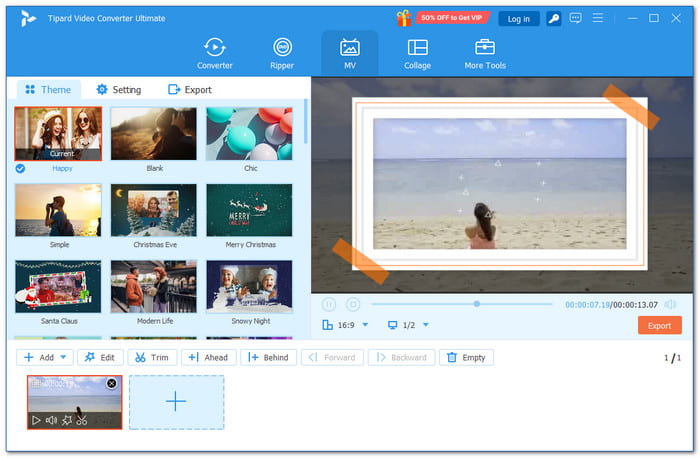
Best for: Vlog creators who want wide format compatibility and easy editing.
It clearly earns a spot among the best vlog editing software options. Tipard Video Converter Ultimate brings your clips together in one easy place.
Grab videos from your phone, camera, or other sources. Then, give them a fresh look with AI tools, crop, trim, rotate, and merge options. Better yet, 51 MV themes and 45 collage templates help make every scene pop.
Key Features:
- Converts videos to widely supported formats, like MP4 and MOV.
- Gives you 42 filters to change the look of your videos.
- Supports various video aspect ratios, from 16:9 to 9:16.
- Adds image or text watermarks for branding and protection.
- Exports videos in high quality, including 4K and 8K.
- Includes many useful tools in one place.
- Combines videos and images easily.
- Provides fast rendering speeds.
- Offers a beginner-friendly interface to make vlog editing easier.
- Free trial has file and feature limits.
2. Adobe Premiere Pro
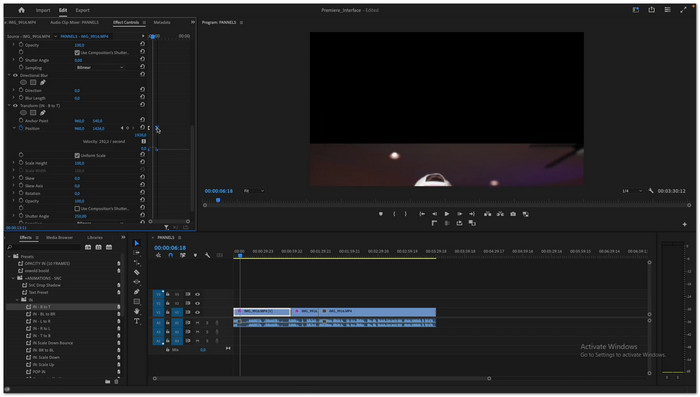
Best for: Detailed vlog editing with advanced control.
As a vlog editing program, it works well for detailed cuts, audio editing, effects, and large video projects. Its newer mobile version also lets you edit on iPhone and Android devices. This makes it easier to work on your videos across different devices.
Key Features:
- Easy and precise timeline editing.
- AI tools that help with editing.
- Advanced tools for video and audio.
- Gives you good control over complex edits.
- Offers many tools for creative projects.
- Subscription-based access.
- It can take time to learn.
3. Final Cut Pro
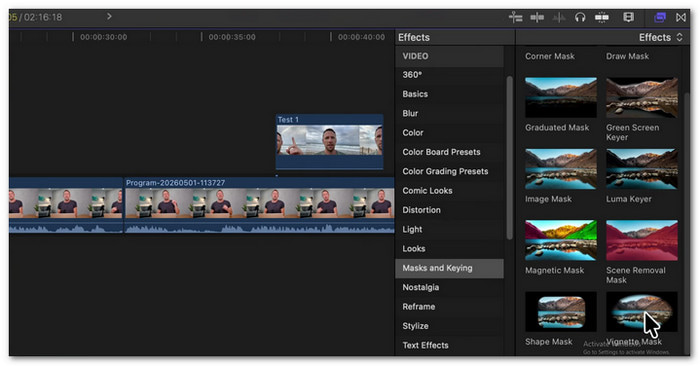
Best for: Creating polished vlogs within the Apple editing setup.
Built around a smooth editing flow, Final Cut Pro is one of the best video editing software for vlogging. It uses its Magnetic Timeline to keep clips in sync. It can also create captions, isolate subjects, track objects, and adjust colors. Its AI tools add more speed to common editing tasks.
Key Features:
- Automatic captions.
- Magnetic Mask for subject isolation.
- Object tracking and smart reframing.
- Makes video editing smooth and easy.
- Has good tools for color and sound.
- Mac-focused workflow.
- Some iPad features have limits.
4. DaVinci Resolve
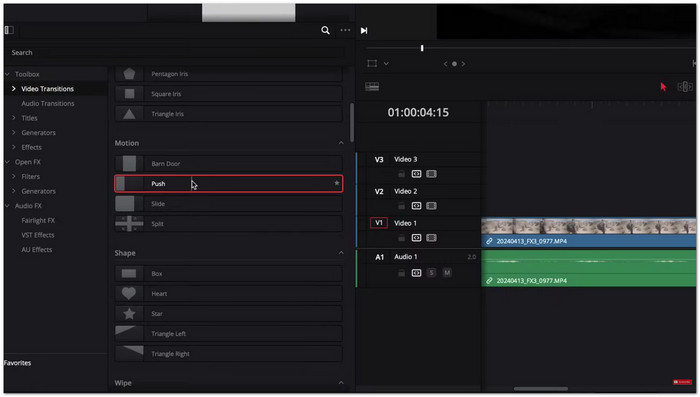
Best for: Building detailed vlogs with editing, color, effects, and audio in one program.
One workspace can handle the whole vlog process here. DaVinci Resolve is a good video editing software for vlogs. It combines editing, color work, visual effects, motion graphics, and audio. Its Cut page also speeds up simple edits.
Key Features:
- Advanced color grading.
- Fusion visual effects.
- Fairlight audio editing.
- Offers many useful tools for free.
- Works on Mac, Windows, and Linux.
- The interface may be hard to learn.
- Some advanced AI tools need Studio.
5. CapCut
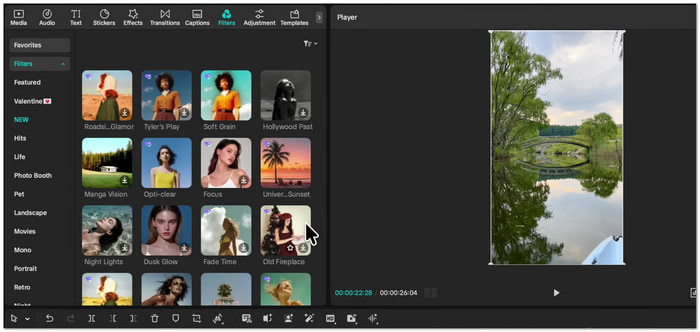
Best for: Fast vlog edits with AI tools and ready-made creative elements.
Quick edits can move from raw clips to finished content with CapCut. As an AI video editor for vlogs, it brings AI tools, auto captions, background removal, text-to-speech, templates, and online editing together. It also supports tools for creating content for YouTube, Instagram, TikTok, and other platforms.
Key Features:
- Automatic subtitles.
- Background removal.
- Ready-made social media templates.
- Offers many templates to choose from.
- Many AI editing tools.
- Some features require payment.
- Complex projects may need more advanced editing tools.
6. CyberLink PowerDirector 365
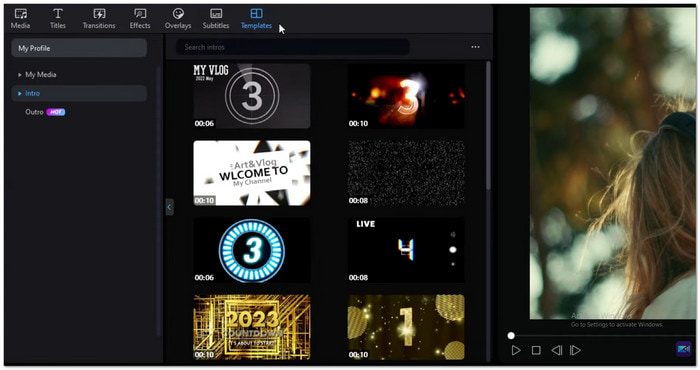
Best for: Vlog editing that mixes AI automation with detailed timeline control.
PowerDirector 365 adds AI to many parts of the editing process. Its Agentic Editor can plan and build edits from plain-language instructions. It can also clean footage, remove objects, create captions, generate narration, and adjust videos for different platforms. These tools make it a good vlog editing software for creators who want faster edits.
Key Features:
- AI object and background removal.
- Auto captions and text editing.
- Multi-track timeline editing.
- Offers a large library of creative assets.
- Strong mix of AI and manual tools.
- The many tools and options may be hard to learn at first.
- Premium features need a subscription.
7. iMovie
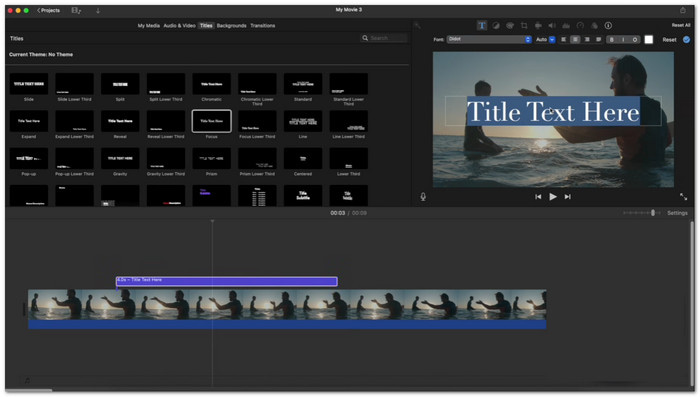
Best for: Creating clean and polished vlogs with simple editing tools across Apple devices.
iMovie is a basic video editor for vlogs. It allows you to add text, music, transitions, and cut clips. Additionally, it is compatible with Mac, iPad, and iPhone and supports 4K videos.
Key Features:
- Step-step storyboards.
- Tools for cinematic videos.
- Split-screen and green-screen effects.
- Free on Apple devices that are compatible.
- Fewer advanced tools than Final Cut Pro.
- Apple device support is required.
Part 4: FAQs of Vlog Editing Software
How long should a vlog be?
A YouTube vlog often runs for 8 to 20 minutes. Still, there is no fixed length. Keep it long enough to tell your story without adding extra scenes.
What video format is best for vlogs?
MP4 is a good choice for vlogs. It works well with H.264 video and AAC audio. This format also works on many devices and video platforms.
Where can I upload my vlog after editing?
You can upload your vlog to YouTube, Facebook, Instagram, TikTok, or other video platforms. Check each platform's video rules before posting.
Conclusion
There you go! You have discovered the vlog editing programs. Which one meets your needs? Is it Tipard Video Converter Ultimate, Adobe Premiere Pro, Final Cut Pro, or another tool? Surely, each has something useful to offer. Share your pick with us in the comment section. We want to know your thoughts!

All-in-one video toolbox: convert, edit, upscale, enhance, and compress your videos easily
100% Clean & Safe
100% Clean & Safe

More Reading

About the Author

 Click here to join the discussion and share your comments

 Tipard Video Converter Ultimate