

A DVD ripper is a software program designed to back up physical video DVDs to digital videos. Every time a new movie DVD from Disney, Warner Bros or Paramount is released, or a homemade DVD is recorded, it is a good idea to rip and back up the disc to MP4 on a PC or Mac for future playback on digital devices. We tested the top 15 software programs in our professional lab and shared the results.

Key Takeaways
We selected the top three DVD ripper software choices from our testing based on their DVD decryption, ripping speed, capability to rip DVD to MP4, output quality, and rich profiles.
- Tipard DVD Ripper is the first choice for ripping encrypted DVDs, offering a balance between speed and output quality.
- MakeMKV DVD ripper excels at lossless DVD ripping, providing the basic capabilities to preserve original video quality, all video, audio, subtitle tracks, and chapters.
- HandBrake DVD ripper remains the industry standard for open-source DVD rippers, offering a free way to convert homemade DVDs into digital videos.
Part 1: Why It Matters to Select a DVD Ripper
Choosing the right DVD ripper software is essential because it directly affects how well you preserve the video quality. However, there are too many programs on the market. It is difficult to discover the proper option for your needs.
Therefore, we researched the top DVD rippers and share the results with details. So that users can choose an appropriate option based on the software's features and their needs.
Part 2: DVD Ripper Benchmarks from Real Tests
Methodology
To obtain objective results, we tested the top 15 DVD ripper applications in our professional laboratory and actual real-world playback scenarios. We use common commercial DVDs and ISO images to test each application's performance and assess output quality, audio sync, subtitle rendering, hardware acceleration, disc menus, and more.
Test Hardware Configuration
Operating System: Windows 11 64-bit
CPU: Intel Core i5-12400
RAM: 48GB DDR4
GPU: NVIDIA GeForce RTX 4060 Ti(8GB VRAM)
Optical Disc Drive: Standard Desktop DVD-ROM
Test DVDs
We used a commercial movie DVD and a homemade DVD to test for both encoding efficiency and structure parsing ability under practical conditions:
| Disc | Commercial DVD(Rush Hour) | Home-made DVD |
|---|---|---|
| Profile | Feature-length encrypted movie | Multi-chapter episodic DVD |
| Content | Main Title(98 minutes) | Target chapter 6(40 minutes) |
| Target video | H.265 MP4 transcoding | Lossless ripping |
| Focus | Re-encoding efficiency, video quality control, CPU usage | Video quality enhancement, multi-chapter navigation handling |
Tested Software and Version
- Tipard DVD Ripper 10.1.56
- MakeMKV 1.18.4
- HandBrake 1.11.2
- WinX DVD Ripper 8.22.3
- DVDFab DVD Ripper 13.0.6.5
- MDRP DVD Ripper for Mac 14.2
- MacX DVD Ripper Pro 6.9.0
- DumboFab DVD Ripper V7.3.2
- EaseFab DVD Ripper 5.9.1
- Freemake Video Converter 6.0.1
- WonderFox DVD Ripper Pro 20.5
- VLC Media Player 3.0.23
- Leawo DVD Ripper 13.0.0.7
- Aurora DVD Ripper 1.6.2
- VideoSolo BD-DVD Ripper 2.1.52
Test Process
Firstly, evaluate functionalities. We assessed the core features for each DVD ripper for Mac, Windows, and Linux, including support for DVDs, ISO images, and DVD folders as inputs, as well as the output options. We also checked the bonus and advanced features, like video editing capabilities.
Secondly, test performance. Using the commercial DVD and homemade disc, we performed a full rip to an SSD while monitoring the CPU and GPU usage. That enabled us to verify whether the software effectively used hardware acceleration to optimize performance and reduce system load.
Thirdly, verify output quality. We compared the output video files to identify playback errors and check the video quality.
Fourthly, compare and categorize. We summarized these results in the following report, detailing the features and reviews of each DVD ripper to help you choose your best DVD ripper.
Copy Protection Bypassing Benchmark
| Decrypt DVD | Access Disc | Load Titles | Overall(0-5) | |
|---|---|---|---|---|
| Tipard DVD Ripper | Yes | Success | Fast | 5 |
| DVDFab DVD Ripper | Yes | Success | Fast | 5 |
| MakeMKV | Yes | Success | Slow | 4.5 |
| WinX DVD Ripper | Yes | Success | Normal | 4.5 |
| WonderFox DVD Ripper Pro | Yes | Success | Slow | 4.5 |
| MacX DVD Ripper Pro | Yes | Success | Normal | 3 |
| EaseFab DVD Ripper | Yes | Success | Normal | 3 |
| Leawo DVD Ripper | Yes | Success | Normal | 2 |
| VideoSolo BD-DVD Ripper | Yes | Success | Slow | 2 |
| VLC | No | Manual | Manual | 2 |
| Freemake Video Converter | No | Success | Very Slow | 2 |
| HandBrake | No | Require libdvdcss | Normal | 1 |
| MDRP DVD Ripper for Mac 14.2 | No | Manual | Slow | 1 |
| Aurora DVD Ripper | Yes | Failed | Failed | 1 |
| DumboFab DVD Ripper | No | Failed | Failed | 1 |
Key Findings
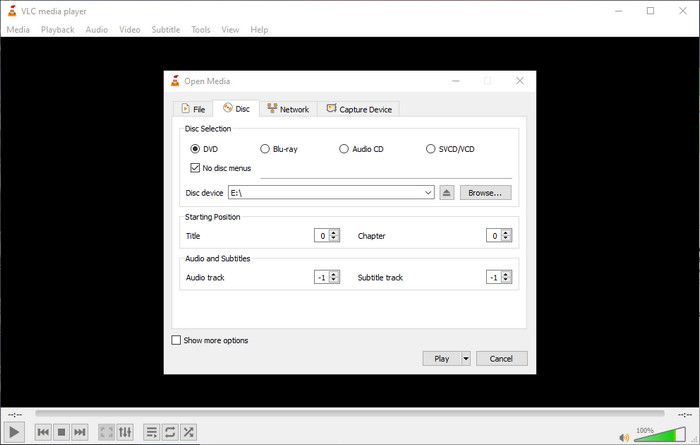
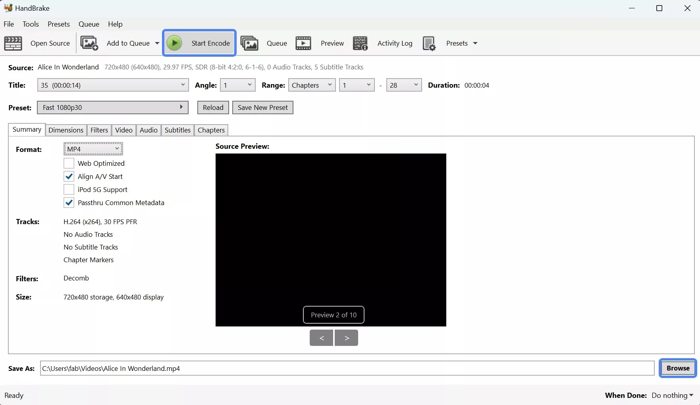
- 1. Learn the encryption of your DVDs. CSS, for example, is a common copyright protection. Almost all commercial DVDs are encrypted by CSS. Region code limits commercial DVDs to play in specific countries. Sony, Disney, and other professional studios utilize more sophisticated encryption. Most DVD ripper freeware cannot bypass CSS or Region code, such as HandBrake and VLC. Therefore, they are not the first choice for ripping commercial DVDs.
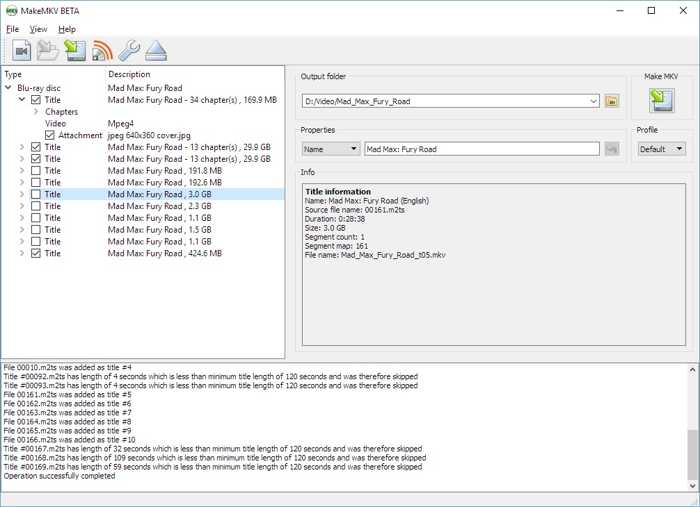
- 2. MakeMKV decrypts DVDs with the online database. It can bypass CSS and most Region codes. If you want to 1:1 copy your DVDs to digital videos and don’t mind the large output file size, it is a good free option.
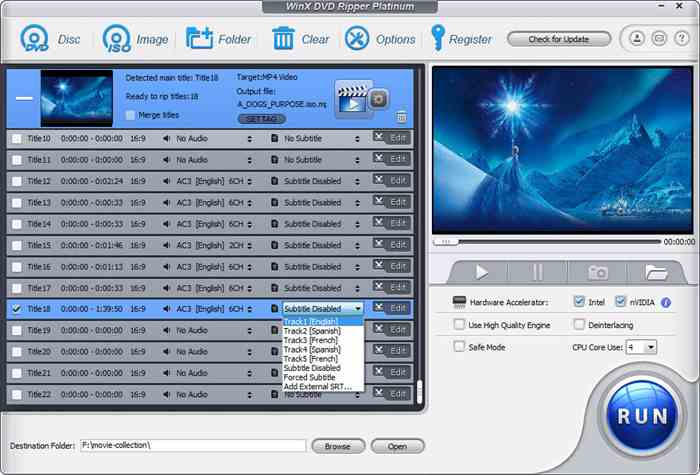
- 3. Professional DVD rippers, such as Tipard DVD Ripper, DVDFab DVD Ripper, WinX DVD Ripper, and WonderFox DVD Ripper Pro, are equipped with powerful decryption engines and regularly updated to cope with new encryptions. They usually decrypt most DVD encryptions.
Ripping Speed Benchmark
| Hardware Acceleration | CPU and GPU Usage | Ripping Speed for Rush Hour (FPS) | Ripping Speed for Home-made DVD(FPS) | |
|---|---|---|---|---|
| Tipard DVD Ripper | Yes | 3-10% | 300 | 375 |
| DVDFab DVD Ripper | Yes | 5-20% | 287 | 355 |
| WinX DVD Ripper | Yes | 50% | 255 | 315 |
| WonderFox DVD Ripper Pro | Yes | 7-25% | 267 | 302 |
| MacX DVD Ripper Pro | Yes | 10-28% | 249 | 298 |
| EaseFab DVD Ripper | Yes | 18-30% | 256 | 289 |
| Leawo DVD Ripper | Yes | 20-32% | 266 | 283 |
| VideoSolo BD-DVD Ripper | Yes | 33-50% | 217 | 220 |
| Aurora DVD Ripper | Yes | 40-51% | 160 | 189 |
| MakeMKV | No | 3-20% | 145 | 184 |
| DumboFab DVD Ripper | No | 42-54% | Failed | 155 |
| MDRP DVD Ripper for Mac 14.2 | No | 50-62% | Failed | 135 |
| HandBrake | Yes | 90-98% | Failed | 100 |
| Freemake Video Converter | No | 78-85% | Failed | 78 |
| VLC | No | 80-91% | Failed | 35 |
Key Findings
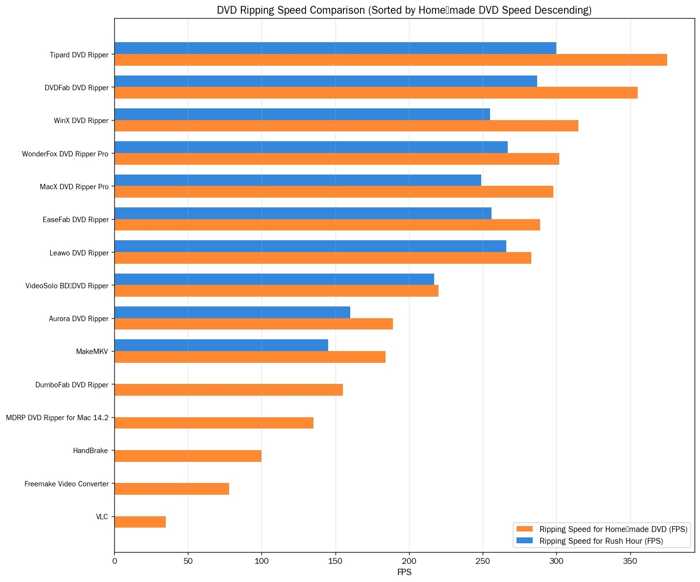
- 1. The DVD ripping speed varies, depending on your choice: lossless ripping or compression transcoding. MakeMKV, for example, can only perform lossless ripping. Therefore, it takes a longer time to complete the process.
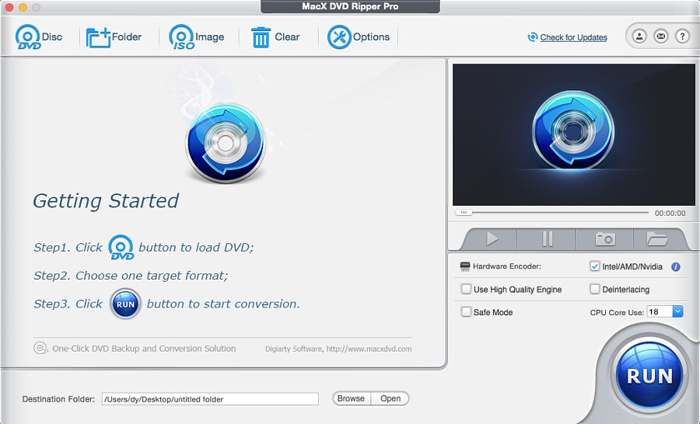
- 2. Paid DVD rippers, such as MacX DVD Ripper Pro and EaseFab DVD Ripper, integrate hardware acceleration. That can improve the performance effectively.
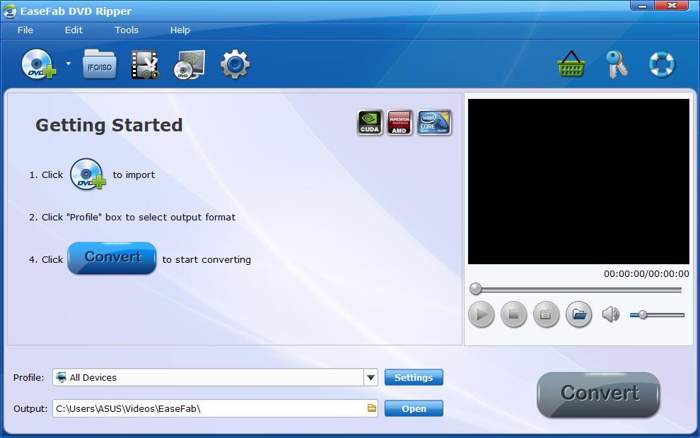
- 3. If you want to rip DVDs efficiently, compress the DVD videos into the MP4 format. The paid software is the best rated DVD ripper.
Input and Output Option Benchmark
| Input Formats | Output Formats | Resolution | |
|---|---|---|---|
| Tipard DVD Ripper | DVD, ISO, DVD folder | Over 200 video and audio formats | Up to 8K |
| DVDFab DVD Ripper | DVD, Blu-ray | MP4, MOV, MKV, AVI, WMV, etc. | Up to 8K |
| WinX DVD Ripper | DVD, ISO, DVD folder | MP4, AVI, MPEG, MOV, M2TS, etc. | Up to 1080p |
| WonderFox DVD Ripper Pro | DVD, ISO, DVD folder | MP4, AVI, MOV, MKV, etc. | Up to 1080p |
| MacX DVD Ripper Pro | DVD, ISO, DVD folder | MP4, MOV, M4V | Up to 1080p |
| EaseFab DVD Ripper | DVD, ISO, DVD folder | MP4, AVI, MPEG, MOV, M2TS, etc. | Up to 4K |
| Leawo DVD Ripper | DVD, ISO, DVD folder | MP4, AVI, MPEG, MOV, M2TS, etc. | Up to 4K |
| HandBrake | Unprotected DVD | MP4(.M4V), MKV, WebM | Up to 4K |
| MakeMKV | DVD, Blu-ray, ISO | MKV | 480p |
| VideoSolo BD-DVD Ripper | DVD, ISO, DVD folder | MP4, MOV, M4V | Up to 1080p |
| VLC | DVD | MP4, MKV, AVI, and more | Depend to DVDs |
| Freemake Video Converter | Unprotected DVD | AVI, MP4, WMV, MKV, MP3, etc. | Depend to DVDs |
| MDRP DVD Ripper for Mac 14.2 | DVD, ISO | MP4, MOV, M4V | Up to 1080p |
| Aurora DVD Ripper | DVD | AVI, MP4, WMV, MKV, MP3, etc. | Up to 1080p |
| DumboFab DVD Ripper | DVD | MP4, MKV, AVI, and more | Up to 1080p |
Key Findings
- 1. Most DVD rippers support DVDs, ISO images, and DVD folders as the input format. HandBrake and Freemake Video Converter only support unprotected discs.
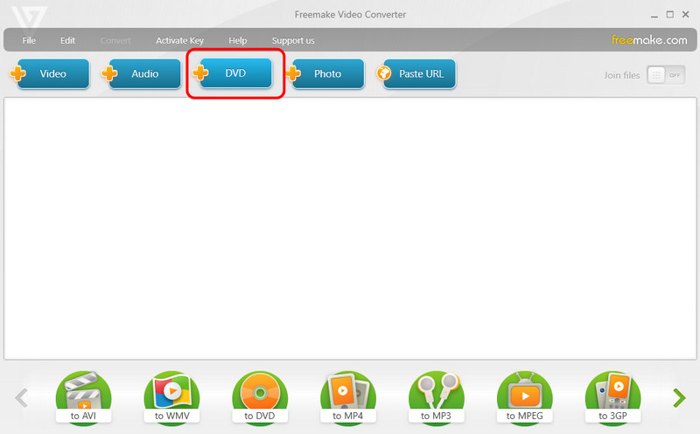
- 2. Paid DVD rippers, like Aurora DVD Ripper, offer a wide range of output formats for video and audio. MakeMKV can only produce MKV files. HandBrake is a solid option to rip DVDs to MKV and MP4.
- 3. Furthermore, some paid DVD rippers can rip DVDs for portable devices, such as Tipard DVD Ripper.
- 4. If you want to produce ultra-high-quality videos from DVDs, a paid DVD ripper application is the best choice.
Stability and Reliability Benchmark
| Freeze | Crash | Readability | Stability | |
|---|---|---|---|---|
| Tipard DVD Ripper | No | No | Handle commercial DVDs and scratched discs | No errors and never malfunctioned |
| DVDFab DVD Ripper | No | No | Handle scratched DVDs | Stable due to GPU acceleration |
| WinX DVD Ripper | 1 | No | Handle scratched DVDs | Stable during high-speed ripping |
| WonderFox DVD Ripper Pro | No | 1 | Handle most commercial DVDs | Freeze when using external DVD drives |
| MakeMKV | No | No | Depend hardware | Lossless ripping with a low error rate |
| MacX DVD Ripper Pro | No | No | Handle partial commercial DVDs | Result in stuttering in the output video |
| EaseFab DVD Ripper | No | No | Rip partial commercial DVDs | There are bugs, but support team can fix them |
| Leawo DVD Ripper | No | 1 | Rip partial commercial DVDs | Crash issue is reported frequently |
| HandBrake | No | No | Cannot rip commercial DVDs | Bugs in frame rate conversion |
| VideoSolo BD-DVD Ripper | No | 2 | Cannot rip new released DVDs | Stable and fast |
| VLC | No | No | Cannot rip commercial Blu-ray | Stable, but slow |
| Freemake Video Converter | No | 2 | Cannot rip commercial DVDs | Stable, but basic |
| MDRP DVD Ripper for Mac 14.2 | No | 1 | Cannot rip new released DVDs | Instable due to repeated crashes |
| Aurora DVD Ripper | 1 | No | Cannot rip new released DVDs | UI freezes when loading encryption DVDs |
| DumboFab DVD Ripper | 1 | No | Cannot rip new released DVDs | Issues when editing videos |
Key Findings
- 1. The stability of DVD rippers depends on their built-in capabilities, such as whether they can handle encrypted DVDs and damaged discs.
- 2. Tipard DVD Ripper and WinX DVD Ripper received positive comments for stability, but HandBrake and DumboFab showed issues in various areas.
- 3. If you want to rip commercial DVDs, especially newly released discs, you’d better use a reputable DVD ripper.
Part 2: Overall Benchmark Findings: Beyond Speed and Conversion Time
Comparison coverage determines whether a tool is available in a specific condition. The right choice depends on the intended result. MakeMKV prioritizes disc backup, while Tipard DVD Ripper and DVDFab DVD Ripper prioritize edited playback files.
- 1. Choose DVD backup or playback conversion. Select MakeMKV when menus, tracks, titles, and disc structure must remain available. Choosing a paid DVD ripper is necessary when full-disc backup and compressed video files are both required.
- 2. Match protection handling to the source library. Choose Tipard DVD Ripper for encrypted or region-restricted DVDs. Select HandBrake for home-made DVDs when repeatable encoding settings are more important.
- 3. Presets or manual output control. Freemake Video Converter rips DVD content to specific phones, consoles, and computers with presets. Paid DVD rippers usually provide title, audio, and subtitle selection.
- 4. Beyond speed. Ripping DVDs is more than speed. The success rate and other benchmarks are crucial, too.
Part 3: DVD Ripper Benchmark Results Overview
Benchmark Category Weight Distribution
| Category | Weight | Source Benchmark |
|---|---|---|
| Decryption | 20% | Copy Protection Bypassing Benchmark |
| Ripping Speed | 30% | Ripping Speed Benchmark |
| Resource Efficiency | 20% | Ripping Speed Benchmark |
| Output Resolution | 15% | Input and Output Option Benchmark |
| Stability and Reliability | 15% | Stability and Reliability Benchmark |
Top 15 DVD Rippers Quantitative Master Scoreboard(on a scale of 1.0-10.0)
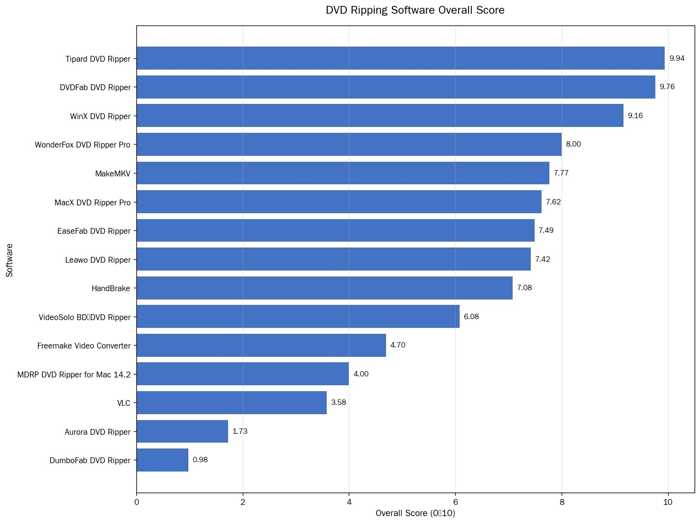
| Rank | Software | Decryption | Speed | Resource | Resolution | Stability | Final |
|---|---|---|---|---|---|---|---|
| 1 | Tipard DVD Ripper | 10 | 10 | 10 | 9.6 | 10 | 9.94 |
| 2 | DVDFab DVD Ripper | 10 | 9.7 | 10 | 9 | 10 | 9.76 |
| 3 | WinX DVD Ripper | 8.2 | 10 | 9 | 8.6 | 9.5 | 9.16 |
| 4 | WonderFox DVD Ripper Pro | 9.5 | 8 | 5 | 8.5 | 9.5 | 8.00 |
| 5 | MakeMKV | 3.5 | 8.8 | 8.5 | 9.2 | 9 | 7.77 |
| 6 | MacX DVD Ripper Pro | 6.5 | 6.8 | 9 | 8 | 8.5 | 7.62 |
| 7 | EaseFab DVD Ripper | 9 | 9.2 | 9 | 3.5 | 4 | 7.49 |
| 8 | Leawo DVD Ripper | 8.8 | 9.1 | 9 | 3.5 | 4 | 7.42 |
| 9 | HandBrake | 6.8 | 7 | 4 | 8.8 | 10 | 7.08 |
| 10 | VideoSolo BD-DVD Ripper | 4.5 | 6 | 3 | 8.5 | 10 | 6.08 |
| 11 | Freemake Video Converter | 7 | 5 | 1.5 | 7 | 3 | 4.70 |
| 12 | MDRP DVD Ripper for Mac 14.2 | 4 | 4.5 | 1 | 5 | 6 | 4.00 |
| 13 | VLC | 3 | 3 | 1 | 5.5 | 7 | 3.58 |
| 14 | Aurora DVD Ripper | 2 | 1.5 | 1 | 2.5 | 2 | 1.73 |
| 15 | DumboFab DVD Ripper | 1 | 1 | 0.5 | 1.5 | 1 | 0.98 |
Part 4: FAQs of DVD Ripper Benchmark
Are DVD rippers illegal?
The answer depends on the regulations in your country. In the United States, for example, copyright law makes it unlawful to break DVD DRM when ripping commercial DVDs.
Will ripping a DVD ruin it?
No, ripping a DVD will not ruin it. The process copies the content to digital video files.
What is the best free DVD ripper for Windows 11?
HandBrake is the best free DVD ripper to rip unencrypted DVDs to MP4 or MKV. If you don’t mind the large output file size, MakeMKV can copy DVDs to video files 1:1.
Conclusion
We evaluated the top 15 DVD ripper software programs across protection handling, source coverage, performance, output control, and stability. We compared measurable capabilities, from supported source types, hardware acceleration, and more. Tipard DVD Ripper ranked first with an overall score of 9.94 out of 10 because it balances broad source import, CSS bypassing, batch exports, and excellent performance.

Rip DVD to 500+ Video/audio formats with AI Upscaling
100% Clean & Safe
100% Clean & Safe

More Reading




About the Author


 Tipard DVD Ripper