


About | Privacy Policy | Terms of Use | Support | Contact Us
Copyright © 2026 Tipard Studio. All Rights Reserved.

Windows

Rip your favorite Blu-ray/DVD movies or videos to popular formats

Powerful software to play Blu-ray/DVD videos and audio

Create Blu-ray disc/folder/ISO file with your own video

Backup/Copy your favorite Blu-ray to disc/folder/iso files
Mac

Rip your favorite Blu-ray/DVD movies or videos to popular formats on Mac

Powerful software to play Blu-ray and popular video formats on Mac
Windows

Rip DVD to any popular video format quickly of full quality

Create DVD from videos and burn video to DVD/Blu-ray freely

Copy DVD to DVD disc/folder/ISO files in a 1:1 ratio
Mac

Rip DVD to any popular video format quickly of full quality on Mac

Burn or author a DVD from videos with subtitles and chapters on Mac

Copy DVD to DVD disc/folder/ISO files in a 1:1 ratio on Mac
Windows

Rip DVD, convert 4K video, edit, and upscale videos to 5K/8K

Repair broken videos with high accuracy and support many formats

Convert any video to MP3, MP4, MOV, WAV, and other 350 formats

Upscale resolution, optimize brightness and remove video noise

The easiest tool to capture screen, game, audio, etc. with high quality

Convert any 2D video to 3D video and convert 3D to 2D video

Convert 4K video to 4K/1080P and common videos

Convert TS video to various popular video/audio formats
Mac

Rip DVD, convert 4K video, edit, and upscale videos to 5K/8K on Mac

Repair broken videos with high accuracy and support many formats on Mac

Convert any video to MP3, MP4, MOV, WAV, and other 350 formats on Mac

Upscale resolution, optimize brightness and remove video noise on Mac

The easiest tool to capture screen, game, audio, etc. with high quality on Mac

Convert any 2D video to 3D video and convert 3D to 2D video on Mac

Convert 4K video to 4K/1080P and common videos on Mac

Convert TS video to various popular video/audio formats on Mac
Desktop

Rip and convert DVDs to MP3 and support other audio formats

Reset Windows Admin and Standard user account password in seconds

Accurately Convert any PDF file to Word with OCR

Convert PDF to Word, Excel, HTML and Image with OCR
Online

Easily remove watermarks from many image file formats free online
Tipard All Music Converter app is the best audio converter software. It can convert almost all music/audio file many online digital videos for free from the audio file to iTunes, iPhone, iPod, Android and any MP3 players, etc. directly with higher audio quality and fast speed.
It is the comprehensive audio converter that is specially designed to convert almost any audio and video files. It is also compatible with iTunes and different devices, like any MP3 players, iPhone, iPod, iPad, Samsung, HTC and other analog Android devices.
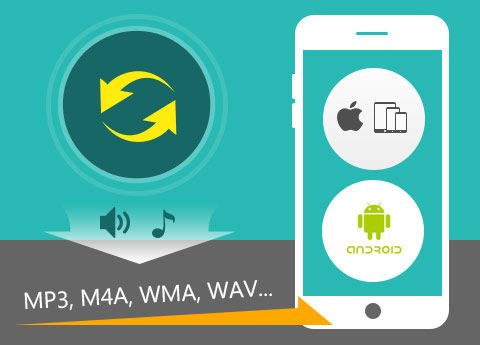
This Music Conversion software has the ability of converting music between different formats on Mac. The formats that can be converted include MP3, M4A (iTunes/iPod), WMA, WAV, AIFF, AAC, FLAC, Apple Lossless (ALAC), RA, RAM, OGG, AU, AIF, APE, CUE etc. and the supported target formats include MP3, PCM, ALAC, EAC-3, FLAC, VMD, AAC, AC3, AIFF, AMR, AU, FLAC, WMA, WAV and so on. But it can't convert protected music so far.
Under this function, you are allowed to change your favorite song to the format that is compatible with your personal players. All the converted audio files can be played free by almost all media players such as iPod Touch/Nano/Shuffle, iPad Pro/Mini/Air, iPhone 6s/6s plus/6/6 plus/5s/5/4s, all common MP3 Players, Samsung, HTC, and other Android devices, Zune, PSP, etc. In all, it provides a convenient and fast way to convert music for those non-professional music fans.
How to grab my favorite song from a movie on Mac? With the help of this Audio File Converter, you can extract and convert any background songs and audio files from MP4, AVI, FLV, MOV, WMV, MKV, TS, etc. video to MP3, etc. What's more, if you download many online digital videos for free from Dailymotion, Vevo, some sites, you can also realize the conversion with the app. Many HD videos are also highly supported, and the audio quality is lossless. Therefore, this is a suitable choice for those movie fans fond of dialogue or background music. And this converter is highly support Mac OS X 10.5 or above.
With the edit function, you have the right to merge several videos or songs together and convert them to a single piece of music. No matter how many files you merge, you will get lossless tone quality. Meanwhile, you are empowered to decide the length of the audio you mean to convert with the help of trim function. You can just choose your favorite part to convert. This is helpful to making a ringtone or dance music piece. At the same time, under the effect function, you have the choice of adjusting the volume according to your own wish. By these adjusting functions, you are capable of making a piece of music out of your own. Actually these are very professional audio editing features for those non-professional audio addicts.
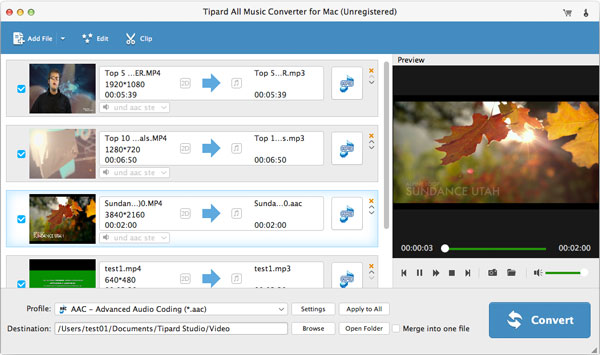
It provides you with high converting quality at ultra-fast converting speed. And has no limits on the amount of conversions. There are many options for you to choose, not only refers to the output formats, but also the adjustable effect and the length. This Music Converter is specially designed for common users, so the operation is very easy. Just a few clicks and you could finish the whole conversion process on Mac. You'll be familiar with the operation after using it for a couple of times. Super-high conversion speed, high-quality acoustic effect, humanized functions, simple operation and user-friendly interface, all these factors will give you the most wonderful user experience.


Preview before conversion
You can preview or pre-listen MP3 audio files or videos before conversion.

High Speed Conversions
Amazing 6X faster speed than other audio converter app with the high quality.

Auto-update
The auto-update function makes it possible for this converter to update to the latest version automatically. So don't worry to be out.

Batch Convert
If you have several audio to converted, choose all files and just one click to help you batch conversion.

Quincy:This All Music Converter turns out so convenient for me. It helps me grab MP3 file directly from a MP4 source video file. So, I can enjoy the music anytime and anywhere.

Gladys: Put the movie into your MP3! I'm not joking. This sound converter software enables you to do so! What powerful function!

Salvatore:The description of the software attracted me to buy it. And the result proves to match the description. It's so powerful, fast and convenient!
Rip DVD disc, folder, iso files to 2D/3D video formats and set 2D/3D video editing at your preference.