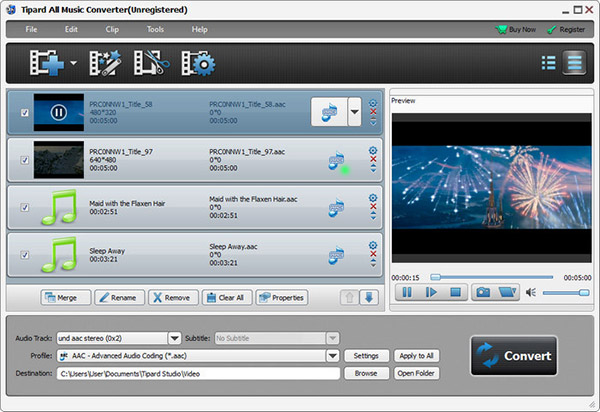
Tipard All Music Converter is a powerful audio converting app to convert songs/videos to any audio formats. Under its conversion function, you are allowed to convert music/audio to MP3, WAV, and WMA and so on. Also it can extract audio from downloaded Spotify music, local MP4 video or online video downloaded from online sites and convert them to MP3 or rest audio formats at ultra-fast converting speed. Besides, it makes you feel free to adjust the volume and the length of your desired music.
Tipard All Music Converter is a kind of powerful audio converter app which is characterized by ultra-fast converting speed, high-quality conversion result and easy-to-operate design.
The best Music Converter enables you to convert any MP4/AVI/FLV/MKV/ VOB/ TS/WMV/M4V/ASF, etc. videos (include HD/1080p) to any popular music formats, such as MP3, AAC, WMA, M4A, AC3, AIFF, FLAC, OGG,WAV, AMR, ALAC and so on. With the help of the Audio converting software, you are also empowered to extract the sounds from online videos downloaded from Soundcloud, Bandcamp, Vimeo, Audiomack, etc. All these extracted or converted audio files are compatible with iTunes, and almost all media players like iPod, iPhone, iPad, MP3 players, Android devices, etc. The Music Converter also helps you decrease the file size without losing quality. But the protected music or audio files are not been supported. And it's highly support Windows 11/10/8/7 and more.

The most popular music file known by us should be the MP3 format. This MP3 Audio Converter software is capable of converting song's formats to and from MP3.The convertible and supported target format still include AIFF, FLAC, OGG, AU, AIF, AAC, AC3, AMR, WMA, WAV, ALAC and so on. At the same time, the All Music Converter also works as music converter, Spotify Music Converter, Apple(iPod) music converter, media converter and then you can enjoy your music/audio on any media players, iPod Touch/Nano/Shuffle, iPhone 15/iPhone 15 Plus/iPhone 15 Pro/iPhone 15 Pro Max, iPhone 14/iPhone 14 Plus/iPhone 14 Pro/iPhone 14 Pro Max/iPhone 13/iPhone 13 Pro/iPhone 13 Pro Max/iPhone 13 mini/iPhone 12/12 Pro/12 Pro Max/12 mini/11/11 Pro/11 Pro Max/XS/XS Max/XR/X/8/7/6, and Android phones free..

With the assistance of the edit function, you are allowed to merge several videos or songs together and convert them to a single piece of music. No matter how many media files you merge, you will get lossless tone quality. Besides, you are free to decide the length of the music you mean to convert under the trim function. It's also possible for you to choose your favorite part to convert. This provides a convenient way to make ringtone or dance music piece. At the same time, the effect function gives you the right of adjusting the volume according to your own wish. With these adjusting functions, you get the ability of making a piece of music out of your own. Actually these are very professional music editing features for those non-professional music fans.

Tipard All Music Converter gives you high converting quality as well as ultra-fast converting speed. It provides you many options to choose, not only refers to the output formats, but also the adjustable effect and the length. This Audio Converter is specially designed for common users, so the operation is simple enough. The whole conversion process can be finished with just a few clicks. You'll be familiar with the operation of this All Music Converter after using it for a couple of times. Super-high conversion speed, high-quality acoustic effect, humanized functions, simple operation and user-friendly interface, all these design factors will give you the most wonderful user experience.

Preview before conversion
You are capable of previewing any MP4 and video or MP3 audio added or edited before the conversion starts.

Auto-update
The auto-update function makes it possible for this converter to update to the latest version automatically.

Snapshot your favorite scene
With the help of Snapshot function, you can grab your favorite moment and save it as image file.

Convert all audio files in bulk
This Audio Converter has no limits on the amount of conversions. You can convert all files in bulk.

Charles:This All Music Converter is just like its name. It can convert all music to other popular audio formats, making it possible to play any music piece on my iPod.

Eli: Really useful software! It has the ability to turn a video piece into music. And I can enjoy it on my MP3 player.

Caron:The good impression lasts from the trial stage till now. I haven't found any problem in operation. Easy design and powerful function!
Convert DVDs and videos to popular video/audio formats, then you sync them to digital device for playback.


Home | About | Privacy Policy | Terms of Use | Affiliate | Support | Contact Us
Copyright © 2024 Tipard Studio. All Rights Reserved.