

- Part 1. Comparison of Top 8 AI Video Upscalers
- Part 2. Shortlist of Editor's Top-Pick AI Video Upscalers
- Part 3. 3 Best AI Video Upscalers on Windows and Mac
- Part 4. Top 3 AI Video Upscalers Online
- Part 5. Top 2 AI Video Upscalers on iOS and Android
- Part 6. How to Choose Your Best AI Video Upscaler
- Part 7. FAQs of AI Video Upscaler
Key Takeaways
AI video upscaling helps make blurry or low-quality videos clearer. It can improve them to HD or even up to 8K. This guide compares desktop, online, and mobile tools so you can easily pick the right one.
- Tipard Video Converter Ultimate offers AI upscaling with noise removal, stabilization, and color correction.
- AVCLabs Video Enhancer AI and Adobe Premiere Pro give advanced AI enhancement and full editing control.
- Picwand, Media.io, and Topaz Labs provide fast online upscaling up to 4K or higher.
- CapCut and Wink: Video Enhancer & Editor support immediate mobile AI upscaling and social media editing.
High-quality video matters today. It makes your content look clear and professional. Whether for work or personal use, a strong AI video upscaler can help improve your footage fast.
Good thing, this write-up covers many AI video upscalers available offline, online, and mobile. We tested, reviewed, and compared each one, so you can easily find the right one. We want you to have the freedom to choose what fits your comfort and device.

- Part 1. Comparison of Top 8 AI Video Upscalers
- Part 2. Shortlist of Editor's Top-Pick AI Video Upscalers
- Part 3. 3 Best AI Video Upscalers on Windows and Mac
- Part 4. Top 3 AI Video Upscalers Online
- Part 5. Top 2 AI Video Upscalers on iOS and Android
- Part 6. How to Choose Your Best AI Video Upscaler
- Part 7. FAQs of AI Video Upscaler
Part 1. Comparison of Top 8 AI Video Upscalers
| AI Video Upscalers | Platform Type | Usability | Max Output Resolution | File Size Limits | Video Enhancement Tools |
|---|---|---|---|---|---|
| Tipard Video Converter Ultimate | Desktop | Easy for beginners. | Up to 8K. | No strict limit. | AI upscale, noise removal, video stabilization, and color correction. |
| AVCLabs Video Enhancer AI | Desktop | Easy automatic tools. | Up to 8K. | Depends on system resources. | Face enhancement, object removal, colorization, and denoise. |
| Premiere Pro | Desktop | Hard for beginners. | Up to 8K. | No fixed limit. | Color grading, motion graphics, audio tools, and stabilization. |
| Picwand | Web | Easy one-click use. | Up to 4K. | Upload limits apply. | Noise reduction, anime upscaling, and color fix. |
| Media.io | Web | Simple browser use. | Up to 4K. | Max 5-minute video limit. | Upscale, denoise, color boost, and sharpness fix. |
| Topaz Labs | Web | Medium learning curve. | Up to 4K. | No strict limit. | Frame interpolation, sharpening, and detail recovery. |
| CapCut | Mobile | Basic for beginners. | Up to 4K. | Depends on the device storage. | Filters, effects, basic enhancement, and timeline editing. |
| Wink: Video Enhancer & Edit | Mobile | Easy AI editing tools. | Up to 4K. | App-based limits. | Face retouch, AI upscaling, background removal, and captions. |
| Show MoreShow Less | |||||
Part 2. Shortlist of Editor's Top-Pick AI Video Upscalers
The most dependable AI video upscalers for desktop, web, and mobile use are displayed in this shortlist. Real videos, not demos, were used to test each tool. Real clarity, speed, and usability are the main priorities.
How We Tested
To give a fair review, each AI video upscaler was tested using the same setup and method.
All tools were run on a standard desktop system with AMD Radeon Vega 3 Graphics and AMD Athlon 3000G CPU.
We used mixed test videos. These include 360p, 480p, and 720p clips. The clips include animations, real footage, and low-light scenes.
Each tool was checked using the same points:
- Video clarity after upscaling.
- Noise removal and sharpness gain.
- Stability during processing.
- Speed of export and rendering.
- Ease of use for beginners.
- Output quality at 1080p and 4K.
Editor's Top 3 Picks
1. Tipard Video Converter Ultimate
This tool is a balanced option. It is easy to use and fast. It has AI video upscaling that can fix noise, improve stability, and adjust color. It also supports many video formats and is good for daily editing and video enhancement.
2. AVCLabs Video Enhancer AI
This tool focuses on strong AI enhancement. It improves faces, restores old videos, and removes noise. It can upscale videos up to 4K or even 8K.
3. Topaz Video AI
It is known for deep AI processing. It rebuilds video detail frame by frame. It improves motion, sharpness, and clarity.
Part 3. 3 Best AI Video Upscalers on Windows and Mac
1.Tipard Video Converter Ultimate
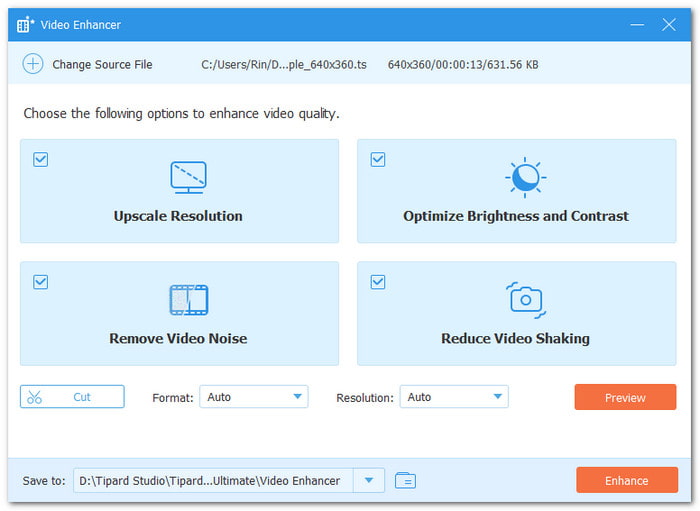
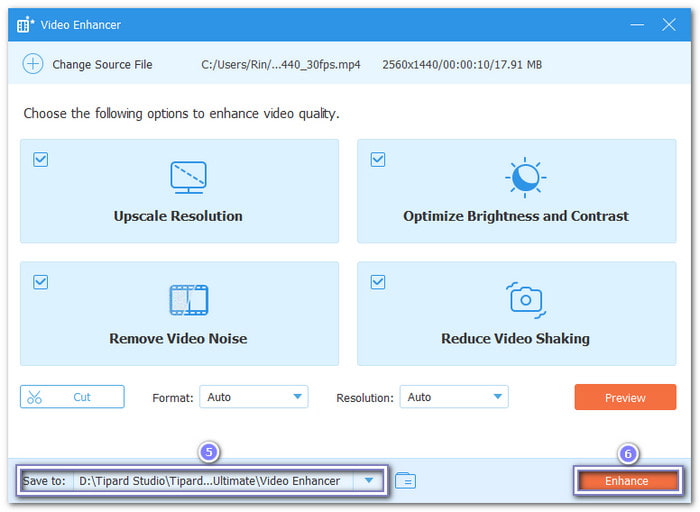
Offline video upscaling gives faster work. It keeps your files private. No upload needed. No internet delay. You can experience this using the best AI video upscaler, Tipard Video Converter Ultimate. It offers a dedicated video enhancer to upscale videos with AI. It also gives noise reduction, deshaking, and color correction for cleaner and smoother clips.
In addition, it supports large 4K and low-resolution videos for editing and upscaling without lag. You will be surprised that it supports almost all video formats, making it easy to work with any video file you have.
Beginner's guide:
Step 1 Open Tipard Video Converter Ultimate after installation on your computer.
Step 2 Go to the More Tools tab. Then, choose the Video Enhancer tool.
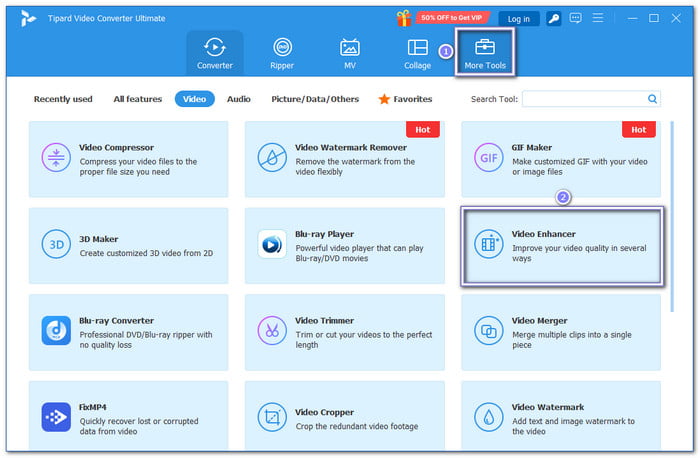
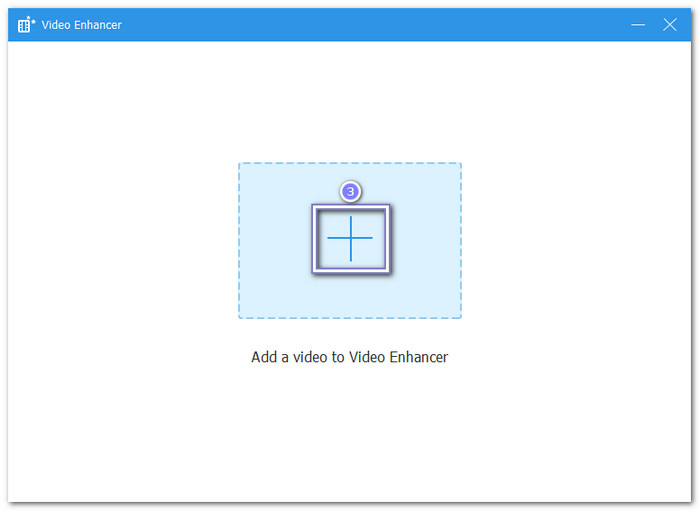
Step 3 Hit the Add button and import the video file you want to upscale. You can also select and drop it.
Step 4 Turn on Upscale Resolution. You can also select Remove Video Noise, Reduce Video Shaking, and Optimize Brightness and Contrast for better clarity.
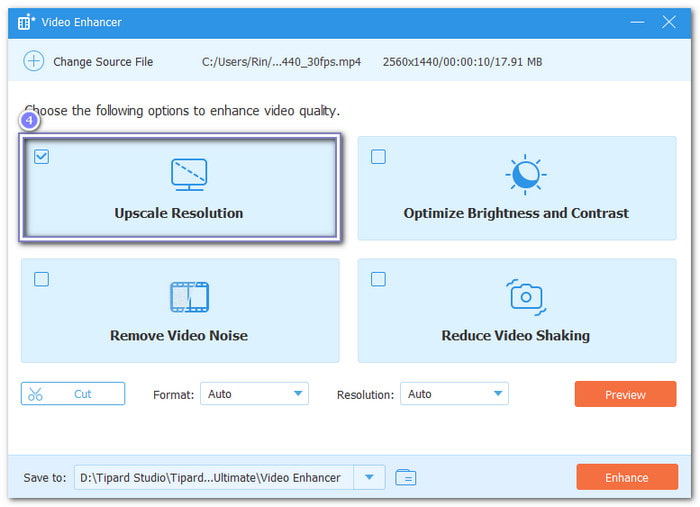
Step 5 Set output folder. Then, click Enhance to start AI upscaling and save your improved video.
Platform: Windows & Mac.
Pricing: Starts at $18.00.
Key Features:
- Trim unwanted start or end portions.
- Real-time video preview before saving.
- Upscale resolution up to 4096×2160 (4K).
- Export video to MP4, MOV, MKV, AVI, WMV, or WebM.
- Extra tools like a compressor, a watermark remover, and a video reverser.
- Basic interface with a short learning curve for beginners.
- Works as a video converter, basic editor, and AI video upscaler.
- Full hardware acceleration using Intel, AMD, and NVIDIA for faster processing and batch tasks.
- Free version limited to 5 files only.
2. AVCLabs Video Enhancer AI
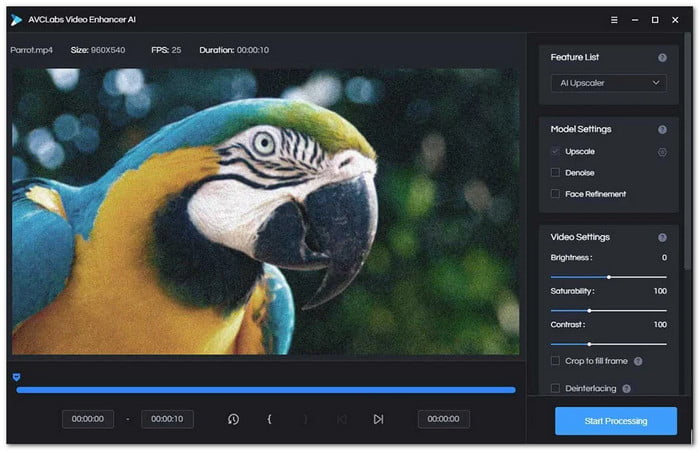
Unlike many AI video upscalers that only sharpen clips, this AI video resolution upscaler tool also restores old footage, removes objects, and protects privacy with face blur. AVCLabs Video Enhancer AI uses AI models for colorizing, denoising, stabilization, and 8K upscaling with fast GPU-powered processing on Windows and Mac.
Platform: Windows & Mac.
Pricing: Starts at $39.95.
Key Features:
- AI object remover.
- AI video stabilization.
- Batch video processing.
- 4K and 8K video upscaling.
- Black-and-white video colorizer.
- Offline local video processing.
- Fast GPU-accelerated export.
- Strong face enhancement tools.
- Expensive for casual users.
- Needs a powerful computer.
3. Premiere Pro
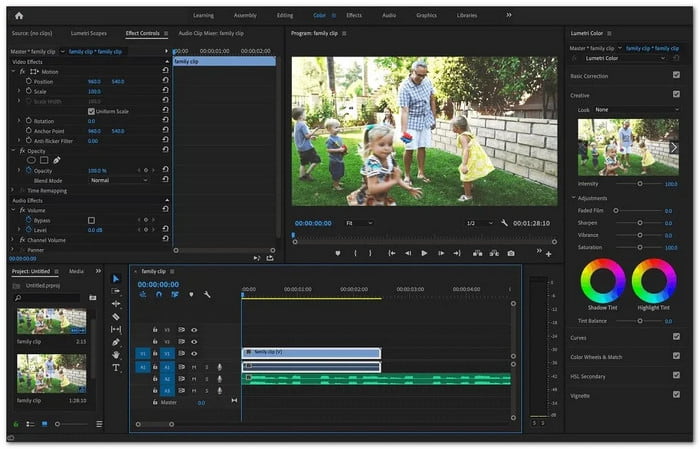
Like AVCLabs, Premiere Pro AI upscale old videos with AI tools. But unlike it, it gives full editing control for movies, social media clips, and TV projects. It supports advanced color grading, AI audio cleanup, motion graphics, and stabilizing video for professional video production on Windows and Mac.
Platform: Windows & Mac.
Pricing: Starts at $22.99.
Key Features:
- Lumetri Color tool.
- Warp Stabilize support.
- Keyframe video controls.
- Motion graphics templates.
- Background noise cleanup.
- Wide video format support.
- Powerful editing workspace.
- Fast rendering performance.
- Hard for beginners.
- Expensive monthly plans.
Part 4. Top 3 AI Video Upscalers Online
1. Picwand
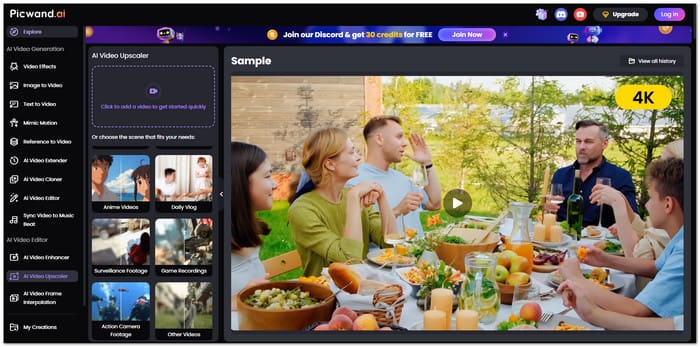
Unlike heavy desktop upscalers, this browser tool keeps things simple and fast. Picwand AI Video Upscaler can upscale videos to 4K, remove blur, reduce noise, and restore missing details with one click. It also improves anime clips, old videos, and low-quality recordings without difficult settings or downloads.
2. Media.io
media.io ai video upscaler
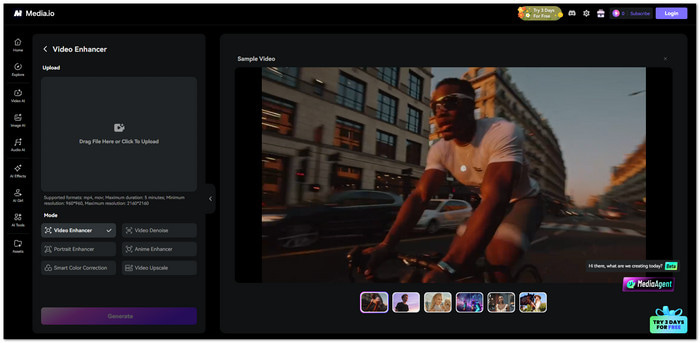
Unlike Picwand, Media.io AI Video Upscaler focuses more on automatic color fixes, noise cleanup, and sharper textures for social media clips, ads, and presentations. It can upscale videos up to 8× and works directly inside your browser without installing a program.
3. Topaz Labs
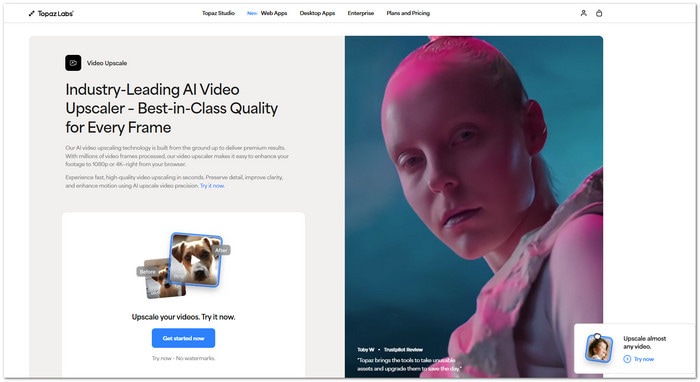
Topaz Labs AI Video Upscaler uses AI trained on millions of video frames to restore missing details. It makes motion clearer, smooths video changes, reduces blur, and improves old clips. It can turn them into clean 1080p or 4K videos with preview tools and simple preset options.
Part 5. Top 2 AI Video Upscalers on iOS and Android
1. CapCut
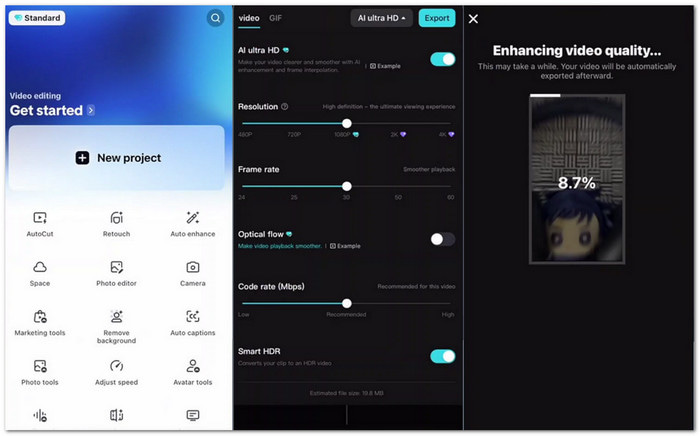
Unlike desktop AI upscalers with complex controls, CapCut AI Video Upscaler gives mobile users a quick way to improve video clarity through higher export resolutions like 1080p and 4K. It also offers an easy timeline editor, simple clip controls, and smooth exporting for polished social media videos on iPhone and Android.
2. Wink: Video Enhancer & Editor
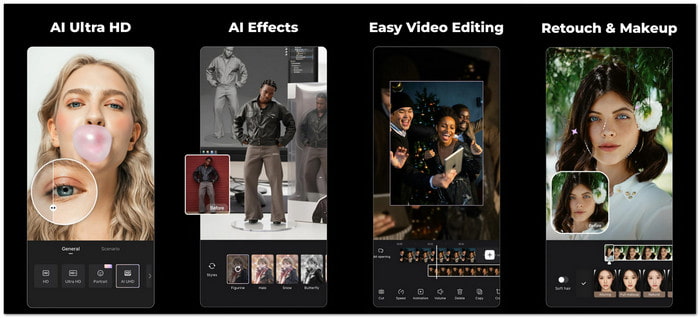
Do you want more than basic video sharpening on your phone? Wink: Video Enhancer & Editor focuses heavily on AI enhancement and beauty tools. It can upscale blurry clips to 4K, remove unwanted objects, add subtitles, retouch faces, and create anime-style effects for social media content on iOS and Android.
Part 6. How to Choose Your Best AI Video Upscaler
Choosing the right AI video upscaler depends on what you need. The best choice is the one that fits your skill level, budget, and video goals.
Start by checking your main use. If you want quick results, choose tools with automatic AI upscaling. If you need professional control, go for advanced editors.
Here are simple points to guide you:
Key Features:
- Pick easy tools for fast and simple video fixing.
- Choose AI upscaling if you want a higher resolution, like 4K or 8K.
- Check extra tools like video color correction, noise removal, and stabilization.
- Look at the format support for your video files.
- Consider speed if you handle large or many videos.
- Check the price if you need long-term use.
Part 7. FAQs of AI Video Upscaler
Do free AI upscalers add watermarks?
Yes. Many free or "freemium" tools add watermarks to push upgrades. Some desktop or open-source tools may export without watermarks. Always check export settings first.
What video format works best for AI upscaling?
MP4 is usually best. It is broadly supported and maintains good quality. MOV is also good for editing. MKV is better for high-quality storage. Avoid heavily compressed files for best results.
Is AI video upscaling safe to use?
Yes. It is safe when you use trusted tools from official websites or verified sources.
Conclusion
We hope that one of our AI video upscaler free and paid options is perfect for what you need. If you are a Windows or Mac user, Tipard Video Converter Ultimate is a strong choice. Just enable the Upscale Resolution option, and you will have your improved video in no time.

All-in-one video toolbox: convert, edit, upscale, enhance, and compress your videos easily
100% Clean & Safe
100% Clean & Safe

More Reading




About the Author


 Tipard Video Converter Ultimate