

- Part 1. Official Ways to Access Free OnlyFans Content
- Part 2. How to Find Free OnlyFans Videos in Scroller
- Part 3. How to Get OnlyFans for Free on Reddit
- Part 4. How to Get OnlyFans for Free with OnlyFans APK Mod
- Part 5. Security Alert: The Dangers of Free OnlyFans APK Mods
- Bonus. How to Securely Save Free OnlyFans Videos for Offline Viewing
Looking for ways to explore OnlyFans free without a subscription? In 2026, many creators use free trial links and promotional profiles as their primary marketing tools. This guide covers the safest, most ethical ways to find free content, from official promo links to verified community hubs. We also address why you should avoid dangerous OnlyFans APK Mods and show you how to securely save your favorite free clips for offline viewing using professional tools.

- Part 1. Official Ways to Access Free OnlyFans Content
- Part 2. How to Find Free OnlyFans Videos in Scroller
- Part 3. How to Get OnlyFans for Free on Reddit
- Part 4. How to Get OnlyFans for Free with OnlyFans APK Mod
- Part 5. Security Alert: The Dangers of Free OnlyFans APK Mods
- Bonus. How to Securely Save Free OnlyFans Videos for Offline Viewing
Part 1. Official Ways to Access Free OnlyFans Content
If you're wondering how to get free OnlyFans leaked videos without violating any terms, the best place to start is with the official methods offered by the platform and its creators. Many OnlyFans content creators provide free subscriptions, discounted promotions, or even free accounts as a way to attract new followers. These offers often give full access to selected premium videos and posts for a limited time.
You can find them by:
- Visiting the creator's social media accounts.
- Looking for promo links or free version offers in their bios.
- Using OnlyFans' own search and filter tools to find free accounts or discounted content.
These official options are safe, legal, and respectful to the creators, making them the smartest starting point for free access to OnlyFans free content.
Part 2. How to Find Free OnlyFans Videos in Scroller
If you're exploring how to get OnlyFans for free, Scroller can be a helpful tool for discovering publicly shared content. Scroller offers a smooth, image-focused browsing experience that lets you easily view posts where users sometimes share free previews, free links, or leaked content from OnlyFans creators. While it doesn't directly host OnlyFans material, it shows you leaked videos you might be looking for. Here's a step-by-step guide on how to use Scroller efficiently: just remember to stay within legal and ethical boundaries.
Step 1 Visit the main site of Scroller and search for keywords like free OnlyFans, OnlyFans previews, or specific creator names.

Step 2 Log if needed by clicking the Login button on the bottom-right side of our web tab.

Step 3 Browse through the site and look for the free OnlyFans videos you have been looking for. Be aware that some videos you may be looking for are not there, as some creators do not want to share their content for free.
Step 4 Stick to ethical browsing, only engage with public or creator-approved content and avoid illegal leaks.
Part 3. How to Get OnlyFans for Free on Reddit
Reddit is one of the best places to check out if you're looking for free OnlyFans videos. Many creators and fans share free links, previews, and even full content in different subreddits. Most content creators nowadays also promote their free pages on Reddit to attract new people. Using the right search terms and communities, Reddit can be a treasure trove of free OnlyFans content. Please use it respectfully and avoid posting anything that violates privacy or platform rules.
Step 1 Visit Reddit via the website or app and search for keywords like free OnlyFans or specific OnlyFans creator names.
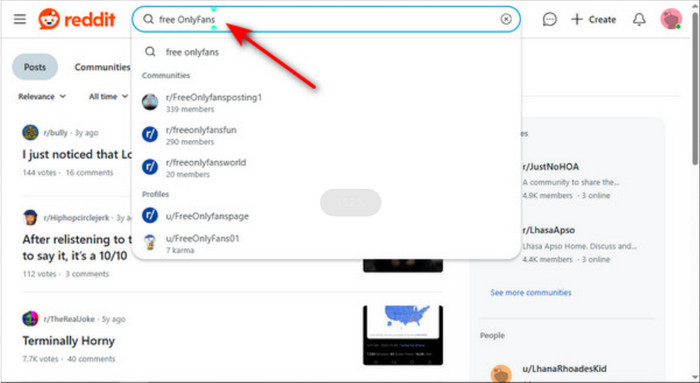
Step 2 Join active subreddits such as r/OnlyFansFree, r/OnlyFansPromos, or r/NSFW411, where users and creators share free links, previews, and promos.
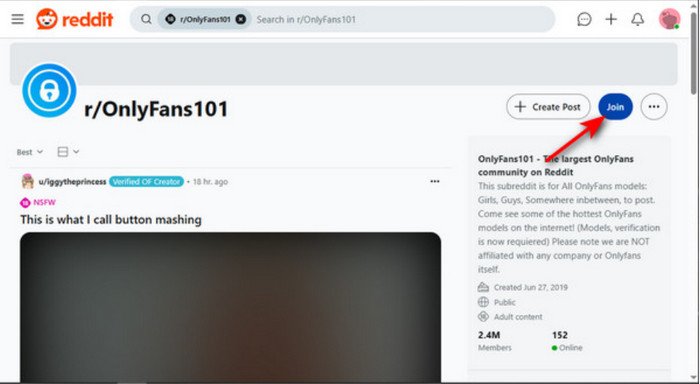
Step 3 Browse top or hot posts to find the most reliable and active content; check comments for additional links or updates.

Note: Avoid illegal free OnlyFans leaked videos and respect content boundaries by supporting creators through their legitimate pages whenever possible.
Part 4. How to Get OnlyFans for Free with OnlyFans APK Mod
The other method people use to access OnlyFans for free is by using a free OnlyFans app, often called APK mods. These are unofficial versions of the app that attempt to escape payment restrictions and unlock premium OnlyFans content without a subscription or payment.
While this may seem appealing, it carries lots of risks. OnlyFans does not approve APK mods and are usually found on third-party sites. They can expose your device to malware, data theft, and legal problems. Many of these mods are fake, outdated, or do not work.

If you still choose to explore this route, proceed with extreme caution:
- Only download free OnlyFans APKs from trusted, verified sources (if any exist).
- Use antivirus software and test on a secondary device.
- Never input your real OnlyFans login or payment details.
However, the safest and most ethical alternative is to take advantage of official free version or Reddit promos. Using APK mods can put your privacy and device in danger due to the applications not being checked thoroughly, as they come from a third-party site.
Part 5. Security Alert: The Dangers of Free OnlyFans APK Mods
Be extremely cautious of websites promising "OnlyFans Premium APK Mods" or "Unlocked Apps".
In 2026, cyber threats have become more sophisticated. These modified apps are almost always malware-laden tools designed to steal your browser cookies, personal data, or financial information. Instead of risking your device's security with illegal free OnlyFans apps, it is safer to use official free links and save the content locally using a trusted screen recorder.
Bonus. How to Securely Save Free OnlyFans Videos for Offline Viewing
After accessing free OnlyFans content, the smartest way to save it is by using a reliable screen recorder. Tipard Screen Capture is our top recommendation. It allows you to record videos and audio in the best quality, with no lag, even during long recordings. You can clip, upscale, and adjust video settings effortlessly to match your preferences. Once recorded, your videos can be saved locally or shared instantly on social platforms. Whether you're keeping content for offline viewing or curating clips for private use, Tipard provides a secure and easy-to-use solution. It's the perfect tool for preserving your favorite OnlyFans videos without compromising quality or performance. Follow the steps below to learn how to screen record OnlyFans.
Step 1 Install and Launch Software
The first thing you will want to do is to download the software by clicking the download buttons available below. Install the downloaded file; after you have installed it, go to your desktop and click the shortcut of the software to launch it.
Step 2 Set Capture Layout
After you have launched the software, the main page of the recorder will pop up on your screen. Now, click on the On/Off switch of the screen capture and system sound. By toggling these settings, you will be able to record a certain layout on your screen and record the sound of the video you are recording.

Step 3 Start Recording
After you have set up your layout, you can now start recording. You can accomplish this by clicking the big REC button on the main page of the software. Your saved videos will be saved in the local directory of the software.

Conclusion
Now that you know how to get free OnlyFans videos through safe and effective methods, you can explore content responsibly. Stick to legal options and use tools like the ones we have mentioned above to save videos securely and in high quality.
More Reading




About the Author


 Tipard Screen Capture