

Today, recording video is easier than ever before, thanks to high-end smartphone lenses. However, poor video quality is a major challenge for ordinary people. If you take a video with blur, shaking, noise, or low resolution, don't worry; there are some famous AI-powered tools, such as Fotor Video Enhancer. Does it truly deliver 4K clarity, or is it just hype? This article aims to explore its key features and other information.

Part 1: Fotor Video Enhancer Review
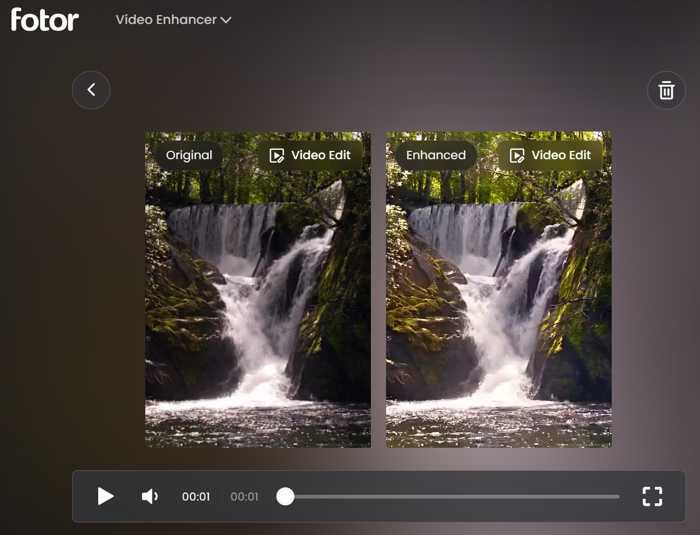
Fotor Video Upscaler specializes in AI-powered quick fixes and resolution upscaling for common video flaws, serving as a dedicated rescue tool for low-resolution, blurry, noisy, or shaking footage. The target users include time-poor creators. It helps users instantly achieve quality boosts without technical skills.
Key Features of Fotor Video Enhancer Online
- Upscale video resolution up to 4K with 60 fps with AI and deep learning.
- Automatically analyze videos and enhance the content.
- Offer presets for video enhancement.
- Sharpen details, unblur video, and increase video clarity.
- Automatically balance saturation while preserving natural skin tones.
- AI distinguishes artistic darkness from unwanted obscurity.
- Include a photo editor for enhancing, unblurring, or retouching photos.
- Remove, change, and blur the background.
- Work online and offer a mobile app for iOS and Android.
Fotor Video Enhancer Pricing
| Monthly | Per Month Yearly | |
|---|---|---|
| Basic Plan | $0 | $0 |
| Pro Plan | $10.99 | $3.99 |
| Pro+ Plan | $23.99 | $5.83 |
| Max Plan | $49.99 | $13.99 |
Besides, Fotor offers subscription credit packages:
| Monthly | Yearly | |
|---|---|---|
| 200 Credits | $13.99 | $69.99 |
| 500 Credits | $25.99 | $143.99 |
| 1000 Credits | $49.99 | $259.99 |
| 2000 Credits | $99.99 | $459.99 |
| 5000 Credits | $239.99 | $1099.99 |
| 10000 Credits | $459.99 | $1999.99 |
Fotor Video Enhancer Review
- Integrated a simple interface.
- AI-powered video enhancement up to 4K.
- Preview the effect quickly.
- Offer various video editing features.
- Cloud-based processing eliminates the need for expensive GPU hardware.
- Video enhancement lacks custom options.
- Support only three video formats: MP4, MOV, and WebM.
- Preview 3 seconds for free.
- HD download requires a subscription.
Bottom Line
Fotor AI Video Upscaler is a part of Fotor's suite of visual media tools. It can upscale video online. If you want to retouch a short video clip quickly, it is a good choice. However, it cannot process long videos due to the limitations of the internet connection.
Part 2: How Fotor Video Enhancer Works
Step 1 Visit the Fotor Video Enhancer Online page in your browser.
Step 2 Log in to your account or sign up for a new account with your email address.
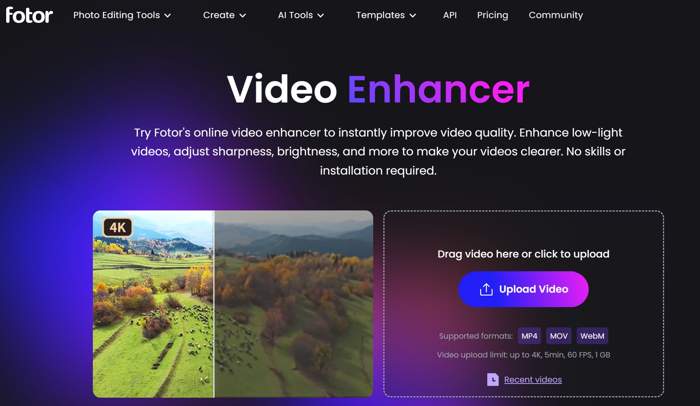
Step 3 Click the Upload Video button to upload a video you want to process. You can upload a video up to 5 minutes, with a file size of less than 1GB.
Step 4 After uploading, select an upscaling model and choose a resolution.
Step 5 Click the Generate button to begin enhancing the video online. Make sure that your account has enough credits.
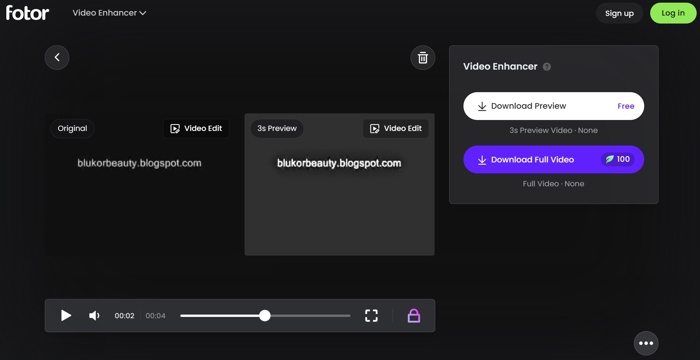
Step 6 Then, you will see a comparison between the original and enhanced video.
Step 7 Finally, click the Download Full Video button to save or share the enhanced video.
Part 3: Fotor Video Enhancer vs AVCLabs Video Enhancer vs Tipad Video Converter Ultimate
To help you make the best decision, we compared Fotor Video Enhancer and the top alternatives: AVCLabs Video Enhancer and Tipad Video Converter Ultimate. We hope that our lab testing results are helpful.
| Fotor Video Enhancer | AVCLabs Video Enhancer | Tipad Video Converter Ultimate | |
|---|---|---|---|
| Primary Role | Online AI video quality booster | Professional AI upscaling tool | All-in-one video converter and enhancer |
| Key Capabilities | One-click clarity Color enhancement | AI upscaling to 8K Denoising Face refinement Colorization and stabilization | AI video upscaling Denoise Color correction Remove shaking Format conversion |
| Platform | Web based | Windows and macOS | Windows and macOS |
| Speed | A few seconds to a minute | A 60-second may take 15-30 minutes | Fast, with GPU acceleration |
| Pricing | Start at $3.99 per month | Between $39.95 to $299.90 | $18.00 per month and $56.00 lifetime |
| Strength | Simple and no installation Instant video enhancing | Industry-level AI restoration for videos Facial enhancement | Fast Include video editing tools Video format conversion |
Which One Should You Choose?
If you are a social media user, such as TikTok and YouTube, or a casual user who needs a quick, effortless boost for short video clips, choose Fotor Video Enhancer. If you are a film enthusiast, archivist, or quality purist who wants to restore old videos or upscale low-resolution clips to 4K, choose AVCLabs. If you want to enhance video quality and convert formats, choose Tipard Video Converter Ultimate.
Conclusion
This article reviewed Fotor Video Upscaler, one of the best AI-powered video enhancer tools online. Now, you should understand what it can do, its pricing, benefits, and drawbacks. The information can help you make a better decision. Moreover, we compared Fotor with top alternatives, such as Tipard Video Converter Ultimate, so that you can choose the right video enhancer for different situations.

All-in-one video toolbox: convert, edit, upscale, enhance, and compress your videos easily
100% Clean & Safe
100% Clean & Safe

More Reading



About the Author

 Click here to join the discussion and share your comments

 Tipard Video Converter Ultimate