

HitPaw Video Enhancer is among the best video enhancers you can access to enhance videos. This tool can offer various basic and advanced AI models, allowing you to improve your video for a better and more satisfying viewing experience. So, if you are interested in using this software to beautify your clips, you can check this post. We will offer an honest review of the program by introducing its features, pros, cons, overall performance, and more. Thus, check this article and learn more about HitPaw Video Enhancer.

Part 1. What is HitPaw Video Enhancer
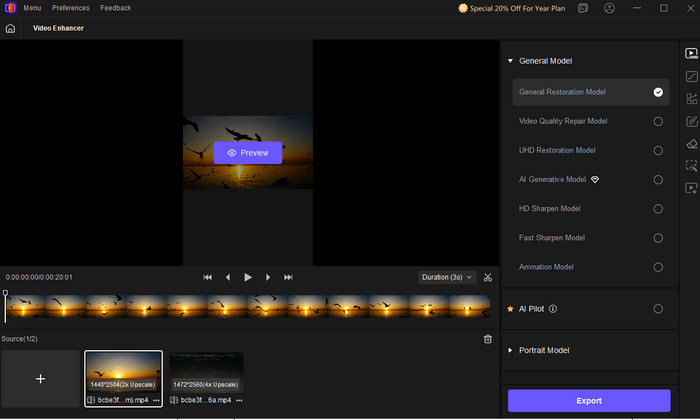
HitPaw Video Enhancer is an advanced AI-powered tool that is capable of editing videos. It has various video-enhancing models you can use to enhance your footage. Plus, it is capable of turning your low-quality videos into 8K. The best part here is that you can use its free version to check its capabilities. What's more, it has a user-friendly interface that lets you utilize all the functions easily and smoothly, making it an ideal editor for all users.
Part 2. Key Features: What HitPaw Video Enhancer Does
What can HitPaw AI Video Enhancer actually do? Well, there are various features you can access for the betterment of your videos. To explore its core features, check all the details below.
Upscale Videos
One of the core features of the program is to upscale videos effectively. With its artificial intelligence technology, you can upscale your video up to 8K, resulting in a satisfying viewing experience. This feature is ideal if you want to improve your old, low-quality videos.
Noise Reduction
The noise reduction feature is available on HitPaw. With this feature, you can eliminate any grains or blur from your videos. This is helpful if you capture your video on a low-spec mobile phone in a low-light area.
Offer Various AI Models
The HitPaw Video Enhancer for Mac and Windows can also offer various AI models. Some of the AI models you can use that can help you enhance your videos are the General Restoration Model, Video Quality Repair Model, UHD Restoration Model, Fast Sharpen Model, and more. With these AI models, you can ensure to enhance your videos based on your preferences.
Color Correction
Do you have a video with a dull color or a faded-like appearance? Well, those kinds of colors from the video might be boring to watch. Thanks to HitPaw's Color Correction feature, you can enhance, improve, and correct video color effectively. It can even automatically adjust the video saturation, brightness, and contrast for vibrant output.
Video Stabilization
If you are dealing with action shots, then you might find the video more shaky compared with normal videos. With the video stabilization, you can reduce the shakiness of the clip, allowing you to get a smooth motion and a professional look.
Supports Various Video Types and Formats
HitPaw VikPea can also support various types of videos. You can enhance vlogs, documentaries, anime, instructional videos, and more. Aside from that, the software can also support various input formats. It includes MOV, MKV, MP4, AVI, FLV, M4V, WMV, and more. With that, you won't encounter any compatibility issues during the import process.
Part 3. Detailed Review of HitPaw Video Enhancer
Want to dig deeper into HitPaw Video Enhancer? Then, you can read all the details below as we provide the tool's pros, cons, performance, and other important parameters.
Good Things about HitPaw Video Enhancer
- The video enhancer can offer a fast and smooth video upscaling process.
- It supports a drag-and-drop feature for an easier video import process.
- The video enhancer can deal with multiple videos at once.
- With the tool's specialized AI models, you can enhance any elements from your videos.
- The video enhancer's main interface is clean and comprehensive.
Drawbacks of HitPaw Video Enhancer
- The tool is resource-intensive. A weaker PC may struggle with enhancing videos.
- To enhance and upscale video up to 8K, you have to get the subscription plan.
- The processing speed might be slower when dealing with larger and longer videos.
Performance
When it comes to the software's overall performance, we can tell that it is doing well. Regarding the upscaling quality, it can deliver a crisp output, resulting in a better playback. Plus, its video noise reduction is ideal since it reduces the grain and blur from the video. In addition, when talking about stability, the program is reliable. You can enhance your videos smoothly and won't encounter any trouble during the process.
User Experience
After using the tool for enhancing videos, we can tell that it is an ideal tool for both skilled and non-professional users. With its straightforward layout, you can enhance videos easily. However, its free version has various limitations. The free version can save your video with a watermark. To remove the watermark from the video, you have to access its paid version.
HitPaw Video Enhancer Price
As we have mentioned, HitPaw Video Enhancer is not 100% free. You can only use its free version with various limitations. If you are planning to access the enhancer's paid version, the price will start at $9.99 per month. This plan is better since it will remove the watermark on the enhanced video. You can even save the file to 8K resolution, which is ideal for playing videos satisfactorily, especially on a larger screen.
Part 4. Top Alternative to HitPaw Video Enhancer
When enhancing videos, we can tell that HitPaw Video Enhancer is among the best tools you can access. However, if you cannot afford the plan to save the video to 8K, then you must look for another video enhancer that can enhance videos up to 8K for free. In that case, we suggest using Tipard Video Converter Ultimate.
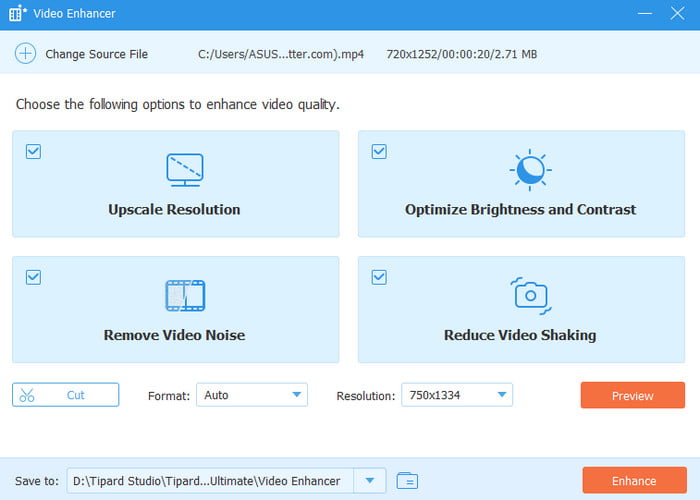
This program is a perfect replacement for HitPaw. This program has a stable and fast process for enhancing your videos. Plus, since it is lightweight, you can ensure a smooth enhancement process even on low-spec computers. What we like here is that the software can offer easy-to-use video enhancement tools with AI techniques, ideal for giving an accurate result after the process. You can even optimize video brightness and contrast, reduce video shake, and remove video noise. Lastly, with its level-3 hardware acceleration, you can edit, decode, and re-encode videos effectively. Thus, if you need the best alternative for HitPaw, feel free to use Tipard Video Converter Ultimate.
Conclusion
With this detailed review of HitPaw VikPea, you have explored its core features, advantages, drawbacks, pricing, performance, and more. You can even tell that it is among the most effective video enhancers out there. However, since you can't save the video with the best quality using the free version, it would be better to use another free video enhancer, like Tipard Video Converter Ultimate. This program can successfully enhance your video up to 8K without spending a penny, making it the best alternative for HitPaw.
More Reading


About the Author


 Tipard Video Converter Ultimate