

Screen Studio has become the ideal screen recording software for Mac users. With its sleek UI and advanced features, professionals and content creators can make better recording tutorials, product demos, and presentations. So, in this review, we will explore more about the overall capabilities of the program. We included its description, features, pros, cons, and more. After that, we will also introduce another helpful recorder you can use for an effective recording process. Without anything else, read this review and get more insights about Screen Studio.
Part 1. An Introduction to Screen Studio
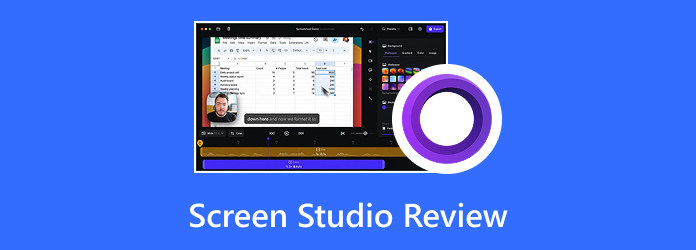
Screen Studio on Mac is an exceptional screen recording software designed to assist creators in creating polished and professional-quality videos with minimal effort. The recorder emphasizes smooth animations, customizable backgrounds, making tutorials, automatic zoom, and making presentations without requiring heavy post-editing.
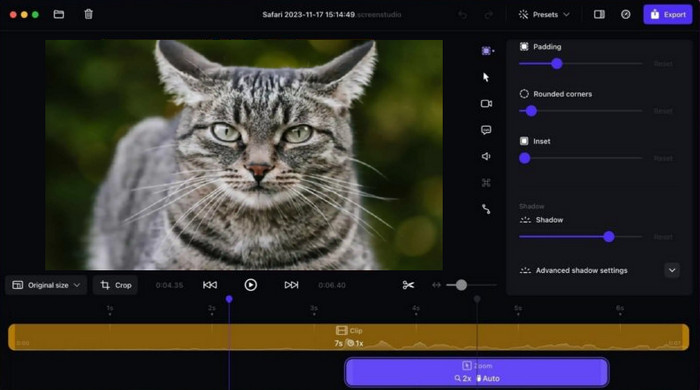
Furthermore, the recorder integrates seamlessly with Apple devices, letting iPad and iPhone screen capture alongside Mac recordings. Its comprehensive interface and automation features set it apart from basic recorders, making it a premium tool for educators, content creators, developers, and other professionals who value polish, clarity, and efficiency in their workflow.
Platform and Specifications
You can access the recorder on your macOS Ventura 13.1 or later. In addition, the recommended processor is Apple M1 or newer for better performance. It also supports some Intel Macs, such as MacBook Pro (2018+) and MacBook Air (2020+). When it comes to memory requirements, you must have a minimum of 8GB RAM.
Part 2. Key Features of Screen Studio
If you want more information about the capabilities of Screen Studio, it would be better to read everything in this section.
Record Screen
One of the key features of the software is to record anything from your screen. With this feature, you can capture any video, record a Zoom meeting, create a tutorial video, and more. The best part here is that you can do everything you need smoothly since it has a comprehensive layout, making it perfect for non-professional users.
Automatic Zoom
The software can automatically zoom in on key actions while recording. It ensures that viewers don't miss necessary details. Plus, this feature can save more time by eliminating the need for manual zoom edits in post-production. Lastly, this automatic zoom feature is ideal for demos and tutorials where highlighting specific steps is important.
Customizable Backgrounds
The customizable background feature is also available on this program. A clean and simple background can be used to replace distracting or cluttered desktop graphics. This keeps the audience's attention on the information being presented rather than the surroundings. It is also ideal for business presentations and instructional videos, when clarity is crucial.
iPhone and iPad Recording
The good thing about Screen Studio is that you can access and utilize it on your iPhone and iPad for recording your screen. This feature is perfect for educators or developers who want to demonstrate mobile workflows. It even ensures consistency across platforms and simplifies multi-device tutorials.
High-Quality Export
After the recording process, the software allows you to export the video in crisp resolution with optimized compression. This way, it can balance the clarity and file size of the file. With this feature, you can ensure you get the best video quality for a better viewing experience. It also lessens the hassle of re-encoding or worrying about the playback quality.
Part 3. Detailed Review of Screen Studio
After exploring all the features of Screen Studio, we can tell that it is an ideal recording tool for Apple users. Now, if you need more details about the recorder, especially its pros, cons, ratings, and more, you must also read everything in this section.
Advantages of Screen Studio
- Friendly User Interface - What we like about the recorder is that it has a simple user interface. With its layout, you can record and customize everything easily and smoothly, making it also an ideal tool for both skilled and non-professional users.
- Export to 4K - After the recording process, you can export the video with up to 4K resolution, allowing you to get the best quality for a satisfying video playback.
- Offers Basic Editing Tools - Another good thing about the recorder is that it can offer some basic editing tools. You can trim the video, cut, speed up, and more, making your footage better.
Drawbacks of Screen Studio
- Mac-Only Platform - The recorder is only available on Mac platforms. This means that you cannot access this program on Windows.
- Premium Pricing - Screen Studio is incapable of offering a free version (free trial only). If you want to enjoy the capabilities of the recorder, you must access its premium version.
Personal Screen Studio Rating
Overall Performance
After using the Screen Studio for recording the screen, we can tell that it is reliable and powerful. It can give you the features you need and ensure that you'll achieve the result you want after the process. It can even give you an understandable layout, helpful tools, and a smooth export process. Thus, if you need a remarkable recorder for Mac and other Apple devices, consider using Screen Studio.
Is Screen Studio free?
Unfortunately, no. The program is not 100% free. It can only offer its free trial version, allowing you to check the recorder's capabilities. After the trial version, you must get the premium version to access its overall features without any restrictions.
Part 4. Versatile Alternative for Screen Studio
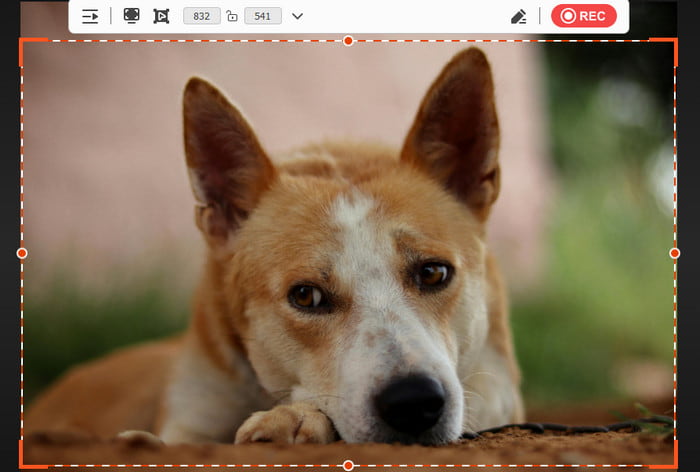
Do you want a Screen Studio for Windows? Then, the best versatile alternative you can use is Tipard Screen Capture. This recorder is available on both Windows and Mac, making it more accessible for users. Plus, it has a simple UI with a high stability level. It can even support long-duration recording without encountering any stutter or lag. What we like about this program is that it can offer annotation tools, which are perfect when creating tutorial videos. You can even access its Screenshot feature, allowing you to take a screenshot of your screen during the recording process. Lastly, you can record long-form videos and save them in a smaller file size, ensuring that you won't encounter any storage space issues. Thus, if you want the best replacement for Screen Studio, using Tipard Screen Capture is the best choice.
- It can record both video and audio with the best quality.
- It supports various output formats, including AVI, MP4, WMV, MKV, FLV, MOV, etc.
- The program can customize the screen size for better recording.
- The Preview feature is available for checking the recorded content.
To get more insights about the two screen recorders, you can check all the information in the table provided below.
| Tipard Screen Capture | vs. | Screen Studio |
|---|---|---|
| Windows and Mac | Platform Support | Mac |
| • Records screen, video, audio, webcam, and external devices. • Supports cursor highlighting and click effects |
Recording Features | • Automatic zoom, smooth cursor animation. • Customizable backgrounds. • iPhone/iPad integration |
| Up to 4K | Output Quality | Up to 4K |
| • Simple UI with customizable screen size. • Preview option after recording |
Ease of Use | • Sleek, modern UI designed for professionals. • Minimal editing required |
| Suitable for general users, gamers, and professionals needing versatile recording across devices. | Best Use Cases | Ideal for developers, educators, and content creators needing polished tutorials and demos. |
Conclusion
Thanks to this detailed Screen Studio review, you have learned everything, especially its detailed description, core features, advantages, drawbacks, ratings, and more. The only problem here is that it has various limitations when using its free trial version. Thus, if you need the best alternative, you can use Tipard Screen Capture. This screen recorder can offer more features for free. You can even access it on both Windows and Mac computers, making it more accessible. The best part here is that you can record your screen and export it with a satisfying quality, ideal for a satisfying viewing experience.
More Reading
About the Author


 Tipard Screen Capture