

Key Takeaways
- Tipard Screen Capture, Bandicam, Screen Recorder 4K, AZ Recorder, and Screen Recorder - Record Video offer 4K recording.
- Each 4K screen recorder was compared by recording quality, features, formats, and compatibility.
- Tipard Screen Capture makes 4K recording easy with a simple setup and saving steps.
A smooth recording experience starts with the right tool. It helps keep every detail clear. A 4K screen recorder captures sharp videos. It keeps the quality high without unwanted lag. It is useful for gameplay, tutorials, meetings, and presentations. This guide lists the top 5 4K screen recorders to help you find the right choice.

Part 1. Shortlist of the 5 4K Screen Recorders
Here are five 4K quality screen recorders. They provide high-quality capture, useful tools, and smooth recording options for different needs.
- Tipard Screen Capture
Records 4K videos with sharp quality, GPU acceleration, and efficient file compression. - Bandicam
Captures computer screens, games, and devices with 4K UHD recording support. - Screen Recorder 4K - With Mic & System Audio
Records screens, tabs, and windows in 4K with audio support. - Screen Recorder - AZ Recorder
Records mobile screens, gameplay, and livestreams with editing tools. - Screen Recorder - Record Video
Creates 4K videos with FaceCam, streaming, and editing features.
Part 2. Side-by-Side Comparison of 4K Screen Recorders
| Factors | Tipard Screen Capture | Bandicam | Screen Recorder 4K - With Mic & System Audio | Screen Recorder - AZ Recorder | Screen Recorder - Record Video |
|---|---|---|---|---|---|
| Supported Platforms | 4K Screen Recorder on Mac and Windows. | Windows and Mac. | Chrome and Chromium browsers. | Android devices. | iOS devices. |
| Maximum Recording Quality | Up to 4K UHD with original quality. | Up to 4K UHD video. | Up to 4K screen recording. | Supports up to 4K on compatible devices. | Up to 4K video recording. |
| Recording Modes | Screen, window, webcam, and audio recording. | Screen, game, webcam, and device recording. | Full screen, tab, and window capture. | Screen recording, facecam, and livestream. | Screen, FaceCam, and dual-camera recording. |
| Audio Recording | System audio and microphone support. | System sound and voice recording. | Mic and system audio together. | Internal audio and microphone support. | Audio commentary and screen sound support. |
| Editing Tools | Basic recording tools and annotations. | Drawing and Bandicut integration. | Limited editing features. | Built-in video and image editor. | Advanced video editing tools. |
| Output Formats | MP4, WMV, MOV, AVI, and more. | MP4 and AVI formats. | WebM format. | Many mobile video formats. | Common mobile video formats. |
| Show MoreShow Less | |||||
Part 3. Detailed Review of Top 5 4K Screen Recorders
1. Tipard Screen Capture
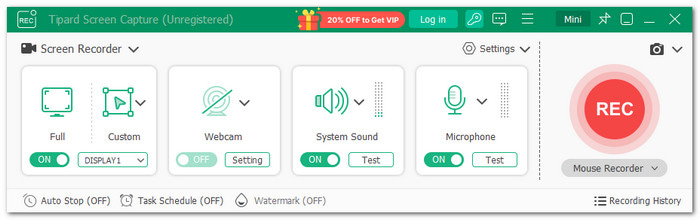
Enjoy clear videos, smooth recording, and better control over your screen captures with a powerful 4K screen recorder. Tipard Screen Capture helps create high-quality recordings while keeping the process simple.
It can record in 4K or the original resolution. It preserves the natural quality and crisp details in your videos. Additionally, full GPU acceleration is used to record with minimal CPU usage. AV1 and HEVC codecs are also available for smaller file sizes without sacrificing video quality.
Key Features:
- Captures entire screens, individual windows, or particular areas of the screen.
- Captures system sound, microphone voice, or both at once.
- Adds text, shapes, arrows, and notes during recording.
- Makes mouse movements and clicks easier to notice.
- Sets timers and limits for automatic recording sessions.
- Screen record on iPhone and Android.
- Creates watermark-free recordings.
- Supports many video formats.
- Mirrors and records mobile screens.
- The free version has recording limits.
2. Bandicam
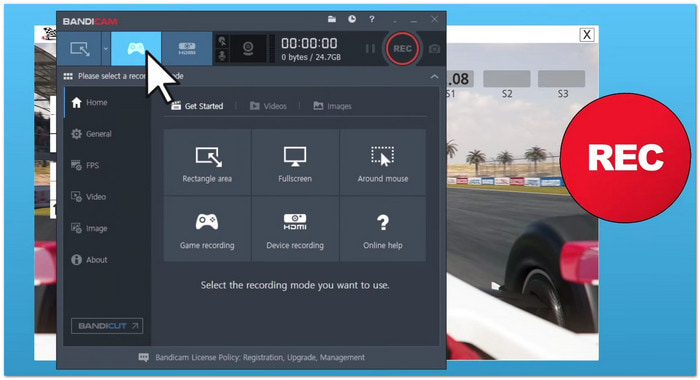
Bandicam works as a 4K screen recorder for PC. It captures screen activity, games, and external devices while keeping high video quality. It supports 4K UHD game recording and smooth capture. It also offers tools that help users create tutorials, record gameplay videos, etc.
Key Features:
- Records screens, games, and devices.
- Supports 4K UHD video recording.
- Adds webcam overlays during recording.
- Includes real-time drawing tools.
- Keeps original video quality.
- Supports high compression recording.
- Offers many recording modes.
- The free version adds a watermark.
- Advanced tools need a paid plan.
3. Screen Recorder 4K - With Mic & System Audio
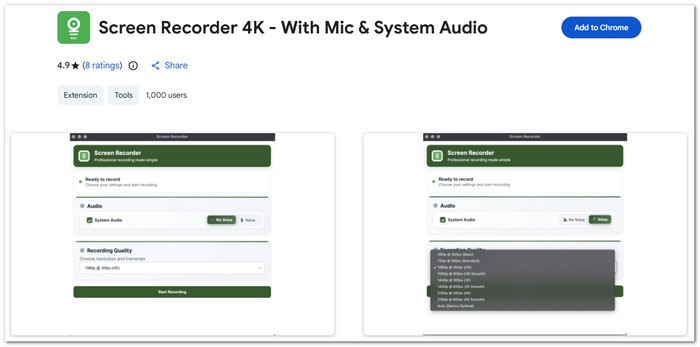
Screen Recorder 4K is a reliable 4K screen recorder extension. It lets users record screens, tabs, and windows directly from Chrome. It captures both system sounds and microphone audio. The extension keeps recordings private by saving videos directly on the device.
Key Features:
- Records up to 4K resolution.
- Captures system and mic audio.
- Saves videos in WebM format.
- Works without account sign-up.
- Easy one-click recording process.
- Keeps recordings stored locally.
- Has no watermark or time limit.
- Only supports Chromium browsers.
- Offers limited editing options.
- Uses WebM as the main format.
4. Screen Recorder - AZ Recorder
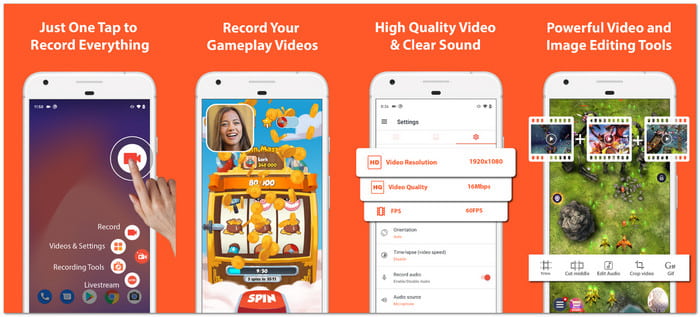
Recording mobile screens becomes easier with AZ Screen Recorder. It is a dependable 4K screen recorder for Android devices. This app lets users capture videos, edit clips, and share content from one place. It supports screen recording with internal audio, facecam reactions, and live streaming. It also includes tools for screenshots and image editing.
Key Features:
- Records screens with audio support.
- Creates facecam recording videos.
- Edits videos after recording.
- Streams screens on social platforms.
- No watermark on recordings.
- Supports up to 4K recording.
- Includes built-in editing tools.
- Some 4K features depend on devices.
- Contains optional in-app purchases.
- Designed only for Android users.
5. Screen Recorder - Record Video
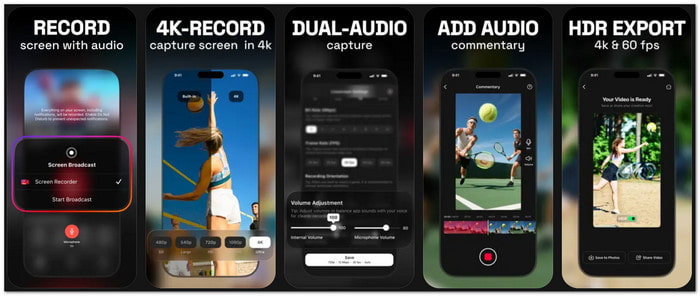
Create more than simple screen captures with Screen Recorder - Record Video. It is a useful 4K screen recorder app for creating high-quality videos. It combines recording, editing, facecam, and streaming tools in one platform. It allows users to add reactions, voice comments, text, and effects. It also supports direct streaming to platforms like YouTube, Twitch, and Facebook.
Key Features:
- Records videos in up to 4K.
- Adds live facecam reactions.
- Supports game streaming platforms.
- Converts videos into GIFs.
- Includes a powerful video editor.
- Supports dual camera recording.
- Offers many sharing options.
- Requires a subscription for full access.
- Some features may need more storage.
- Advanced tools can feel complex.
Part 4. How to Use a 4K Screen Recorder
Creating high-quality 4K screen recordings is simple with Tipard Screen Capture. Follow the steps to capture clear videos with smooth audio and high-quality output.
Step 1Get Tipard Screen Capture on Windows or Mac. Complete the installation before using the software.
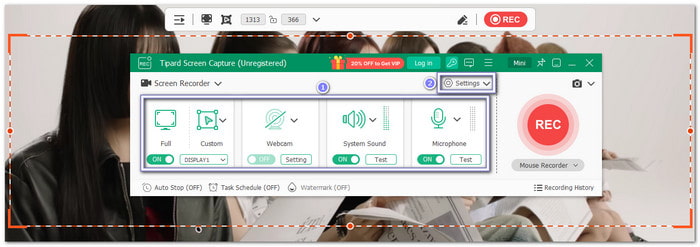
Step 2Open Tipard Screen Capture and start setting up your screen recording. Select the capture area, audio source, and 4K quality settings. Adjust the options before starting your recording.
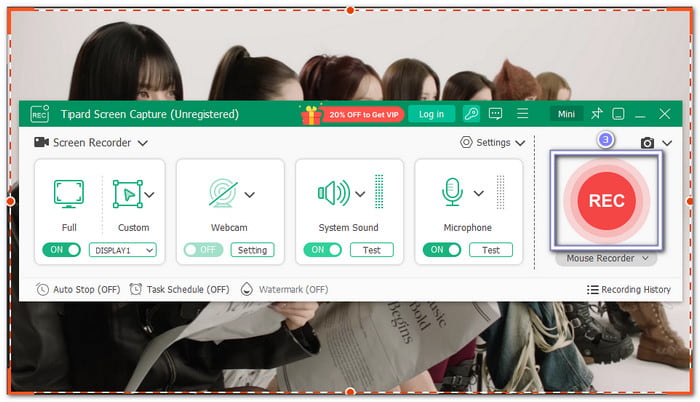
Step 3Click the REC button to begin recording. Use tools like annotations and mouse effects when needed.
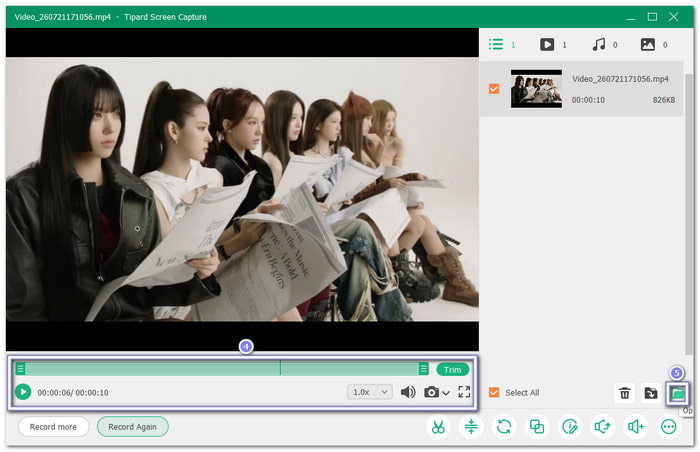
Step 4If you have already reached the end, click the Stop button. Check the result, and proceed to export your 4K video with high-quality output.
Part 5. FAQs of 4K Screen Recorder
How long can I record in 4K?
You can record in 4K for hours if you have enough storage space. The recording time depends on your video settings, file format, and codec. It also depends on your computer's performance.
How many GB is 1 hour of 4K video recording?
One hour of 4K recording usually takes around 15 GB to 45 GB with compressed formats like H.264 or HEVC. Higher-quality formats can use much more storage.
Is it better to record in 1080p or 4K?
Choose 4K for sharper videos and better editing flexibility. Choose 1080p if you need smaller files or easier sharing online.
Conclusion
A free 4K screen recorder helps you capture clear moments with ease. One of them is Tipard Screen Capture. You will enjoy a simple recording while keeping every detail sharp!

Record full screen, portion, window, game, and phone seamlessly without lag
100% Clean & Safe
100% Clean & Safe

More Reading


About the Author


 Tipard Screen Capture