Old videos often look blurry, noisy, or faded. Some also have low resolution, which does not look good on modern TVs or monitors.
Fortunately, UniFab helps fix these problems with AI. It can improve video quality with only a few clicks. You do not need editing skills to use it. The program does most of the work for you.
Below is a closer look at what UniFab is, what it can do, and whether it is worth using, as well as its best alternative.

Part 1. What Is UniFab
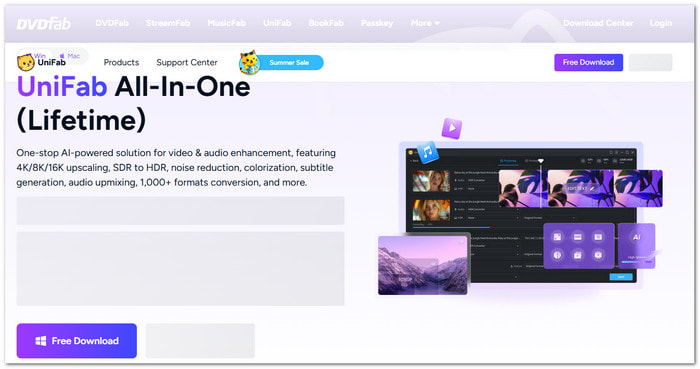
UniFab is an AI video and audio enhancement program made by DVDFab. It is designed to improve the quality of old, low-resolution, or low-quality videos. The program uses AI to study each frame. Then, it improves the video automatically.
You do not need to edit every part by hand. Just add your video, choose the AI model, and start the process. UniFab handles the rest.
It can sharpen blurry details. It can remove noise. It can improve colors. It can also increase the video resolution. It helps old videos look cleaner and more modern.
UniFab also supports video conversion. Besides improving quality, it can change videos into different formats for easier playback on different devices.
Overall, UniFab is made for beginners and experienced users. It offers an easy way to restore videos without learning a complex editing program.
Part 2. Main Features of UniFab
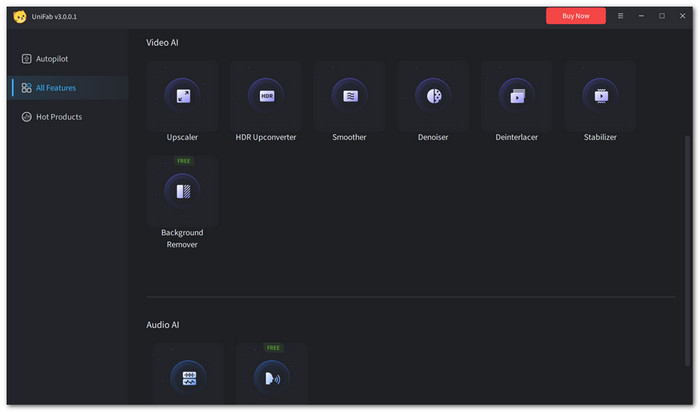
The best part of UniFab is its UniFab Video Enhancer module. It uses AI to improve videos in different ways. Every tool works automatically. It saves time and makes video enhancement much easier.
1. AI Video Upscaling
The UniFab Video Upscaler feature increases video resolution while keeping the picture clear. It can enhance SD and HD videos to 4K, 8K, or even 16K. The AI also adds missing details, reduces blurry edges, and makes the picture look sharper.
2. AI Denoise
Videos taken in dimly lit areas frequently have digital noise or grain. AI Denoise eliminates these undesirable areas. Additionally, it lessens compression artifacts. A smoother and cleaner video is the result.
3. SDR-to-HDR Conversion
Older videos usually have limited colors and brightness. The UniFab HDR Upconverter AI feature improves SDR videos by converting them into HDR10 or Dolby Vision. Colors become richer. Bright areas look more vivid. Dark areas keep more details for a better viewing experience.
4. AI Deinterlace
Many old TV recordings and camcorder videos use interlaced video. UniFab AI Deinterlace changes them into progressive video. It removes flickering lines. It also smooths jagged edges.
5. Animation Model
Anime and cartoons need a different type of AI processing. UniFab includes a special AI model for animated content. It improves sharpness and resolution while keeping the original art style. It also helps avoid unwanted changes to lines and colors.
Part 3. Detailed Review of DVDFab UniFab
DVD UniFab is more than a simple video upscaler. It combines several AI tools in one program. It is easy to learn. It also supports both Windows and Mac. Below is a closer look at its pricing, system details, strengths, and weaknesses.
Pricing
UniFab offers several purchase options based on the features you need.
- Video Enhancer AI Lifetime: $129.99
- Video Enhancer AI 1-Year License: $99.99
- UniFab All-In-One Lifetime: $319.99
The lifetime plans are a better choice if you plan to use the program for many years. The yearly plan costs less at first, but it must be renewed.
Tech Specs
| Feature | Details |
|---|---|
| Operating System | Windows 7, 8, 8.1, 10, and 11 |
| macOS Support | Yes |
| GPU Acceleration | NVIDIA CUDA, AMD, and Intel Quick Sync |
| Maximum Output Resolution | Up to 16K |
| AI Processing | Local AI processing on your computer |
| Batch Processing | Yes |
| Input | Common video formats |
| Output | Popular video formats such as MP4 and MKV |
| Best Hardware | Modern multi-core CPU with a supported GPU |
| Speed | Hardware acceleration can greatly speed up video processing. DVDFab states it can reach up to 50× faster under supported hardware and workloads. Actual speed depends on your computer and video settings. |
| Show MoreShow Less | |
Pros & Cons
- Excellent AI video upscaling results.
- Simple and beginner-friendly interface.
- Effective denoise video and video restoration.
- Supports batch video processing.
- Offers multiple AI enhancement tools in one program.
- Expensive compared with some competitors.
- Requires powerful hardware for faster processing.
- Large videos can take a long time to enhance.
- Some details may not look perfect in difficult scenes.
- Best features are limited to higher-priced plans.
User Experience
UniFab offers an easy-to-use and beginner-friendly interface. All you have to do is add your video, pick an AI model, and choose the output settings. Even for novice users, the tools are simple to locate thanks to the clear interface.
The AI handles most of the work automatically, so you do not need many manual adjustments. Processing speed depends on your computer, especially your GPU. Overall, UniFab makes video enhancement quick, simple, and easy to follow.
Ratings
UniFab received a 4.5/5 rating on Trustpilot, showing that many people are satisfied with its performance, ease of use, and overall video enhancement features.
Part 4. Best Alternative to DVDFab UniFab
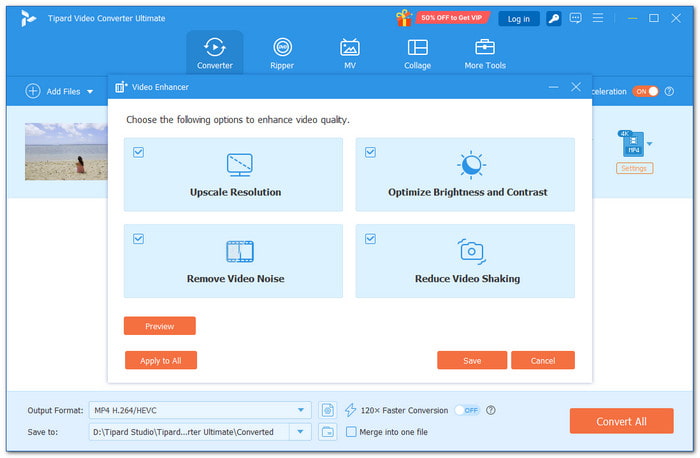
DVDFab UniFab offers strong AI tools, but its expensive plans and hardware needs may not fit every user. For those looking for a simpler choice, Tipard Video Converter Ultimate becomes a great alternative.

- Upscales videos, improves quality, and reduces noise with smart tools.
- Rips, creates, and clones DVDs for easy storage and playback.
- Trims, crops, adds effects, creates collages, and makes music videos.
- Uses batch processing and GPU acceleration to produce faster results.
- Converts 500+ formats, including 4K, 5K, 8K, and HD videos.
It provides an easy video enhancer that improves quality with just a few clicks. It also has a powerful video converter that supports many formats and keeps videos sharp. Plus, you can upscale videos in batches, making it faster and easier to improve multiple files at once.
Part 5. FAQs of DVDFab UniFab
Is UniFab safe to use?
Yes, UniFab is a safe and legitimate program developed by DVDFab. Download it from the official website for safety.
Can UniFab work well with 8GB RAM or an integrated GPU?
UniFab may open on systems with 8GB RAM or integrated graphics, but it may not run smoothly. AI video processing needs more power.
Is UniFab SDR-to-HDR conversion real HDR?
UniFab uses AI to improve SDR videos and create HDR10-compatible output. It is more advanced than a simple brightness or color filter. However, it cannot add details that were not captured in the original video. It can make videos look more vivid. However, it does not replace true HDR recording or professional color grading.
Conclusion
Did you get the details you wanted about DVDFab UniFab? We would love to hear your thoughts about it.
We also recommend Tipard Video Converter Ultimate. It is especially a must if you want a simpler and more affordable video enhancer. It also offers powerful conversion tools for better results.

All-in-one video toolbox: convert, edit, upscale, enhance, and compress your videos easily
100% Clean & Safe
100% Clean & Safe

More Reading

About the Author