

Quick Answer:
Can PS5 play DVD? Yes, but it depends entirely on your PS5 hardware configuration. The PlayStation 5 versions with a disc drive can play standard DVDs and Blu-rays perfectly. However, all-digital models require a specific accessory or alternative workflow.
With Sony's recent bombshell announcement that it will completely end physical game disc production by January 2028, physical media on PlayStation is entering its twilight era. If you still cherish your physical DVD/Blu-ray movie collection, here is everything you need to know about playing them on the current PS5 lineup.
Does PS5 play DVDs? In this comprehensive exploration, we'll dive into this pertinent question, unraveling the compatibility of the PS5 with DVDs, outlining the methods to harness this feature, and uncovering the optimal approach for relishing DVDs and Blu-ray discs on this extraordinary gaming console. We will explain the compatibility of the PS5 with DVDs and show you how to enjoy your DVD collection.

Part 1. Can PS5 Play DVD?
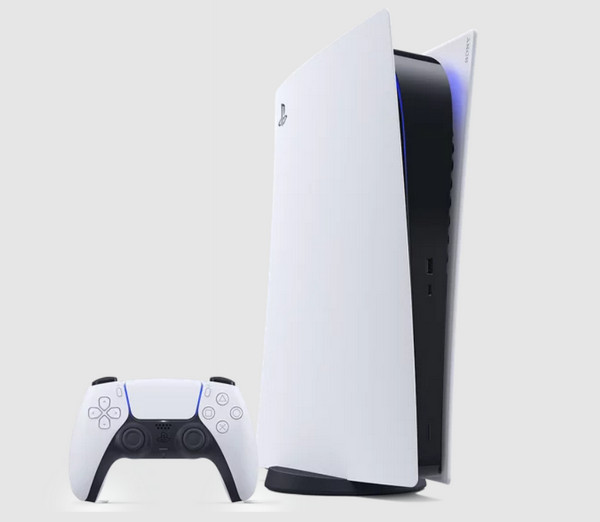
Not every PS5 is built the same. While some support discs out of the box, others require Sony’s modular upgrade, and older digital models are completely locked out.
Refer to the verified compatibility matrix below to find where your console stands:
| Exact PS5 Model & Version | Has Built-in Disc Drive? | Supports Sony Detachable Drive? | Can Play DVDs? |
|---|---|---|---|
| PS5 Launch Disc Edition (2020 / Thicker) | Yes | N/A (Drive is integrated) | Yes (Plug & Play) |
| PS5 Launch Digital Edition (2020 / Thicker) | No | No (Hardware unsupported) | No |
| PS5 Slim Disc Edition (2023-Present) | Yes | N/A (Drive included/removable) | Yes (Plug & Play) |
| PS5 Slim Digital Edition (2023-Present) | No | Yes (Sold separately) | Yes (After installing official drive) |
| PS5 Pro (2024-Present) | No | Yes (Sold separately) | Yes (After installing official drive) |
| Show MoreShow Less | |||
What DVDs Can PS5 Play?
Here, you can see what types of DVDs and Blu-ray version PS5 support:
- Ultra HD Blu-ray
- Blu-ray Disc (BD-ROM)
- Blu-ray Recordable/Rewritable (BD-R/RE) for BDAV and BDMV
- DVD-ROM
- DVD Recordable/Rewritable (DVD-R/RW2) in video mode and VR mode3
- DVD+R/RW
- Hybrid discs (supporting multiple formats)
- AVCHD format (supported for playback)
- CPRM (Content Protection for Recordable Media) supported
The PlayStation 5, specifically the standard edition, offers robust compatibility with various disc formats. However, it's crucial to note that while the standard edition supports DVD playback, the digital edition lacks a disc drive, restricting DVD movies, Blu-ray, or disc-based game playback. Users seeking DVD functionality should opt for the standard edition to harness the PS5's comprehensive disc compatibility.
Part 2. How to Play a DVD on PS5?
Does PlayStation 5 play DVDs? Whether it's your favorite movies, TV series, or cherished DVD collections, the PS5 allows users to immerse themselves in a cinematic experience. Let's dive into the simple steps to enjoy your DVDs on the PS5 and unlock the entertainment possibilities it offers.
Step 1 Connect to the Internet
If this is your first time playing a DVD on your PS5, ensure your console is connected to the internet. Sony requires a one-time online activation to license and unlock media disc playback.
Step 2 Insert the DVD Correctly
Insert the DVD into the disc slot. The correct direction depends entirely on how your PS5 is positioned.
Step 3 Launch the Disc Player
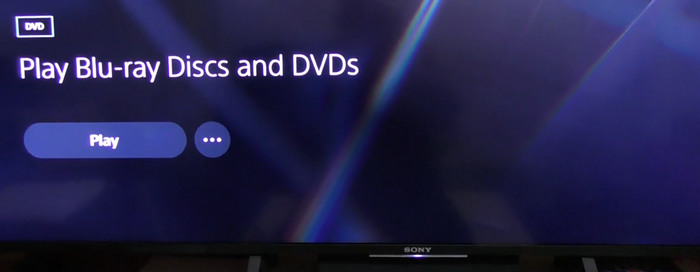
In most cases, the PS5 will automatically recognize the DVD and start playback on its own. If it doesn't, just select the Disc Player tile that appears directly on your Home screen row and press the X button on your controller.
Step 4 Control Playback
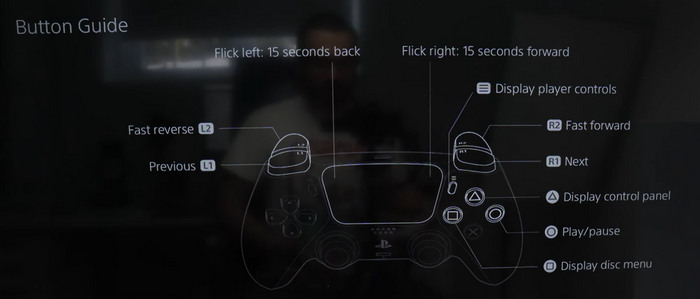
Once the movie starts, use your DualSense wireless controller or a PS5 Media Remote to navigate the DVD's main menu. You can press the Options button on your controller to bring up the control panel to pause, fast-forward, rewind, or select specific chapters.
Part 3. The Best Way to Play Blu-ray DVDs on Your PC Without Limits
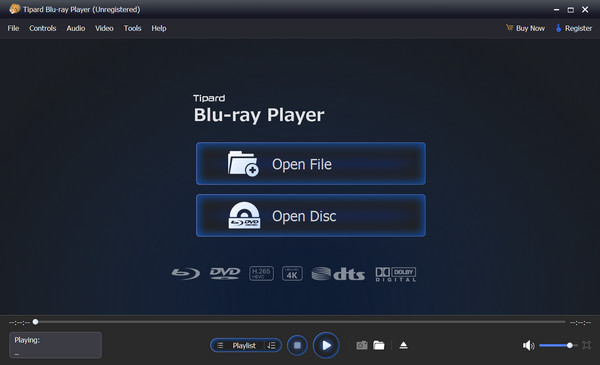
Experience unparalleled entertainment on your PC with the Tipard Blu-ray Player! Say goodbye to limitations and welcome a world of cinematic freedom. Unlike console-based solutions, Tipard offers an unrivaled experience, allowing you to indulge in your entire Blu-ray and DVD collection hassle-free. With its seamless playback, customizable settings, and user-friendly interface, Tipard becomes your go-to choice for immersive movie nights. Elevate your viewing experience today with the best video player software on PC to play all formats, where quality meets limitless possibilities!
Key Features:
- It is accessible on Windows 7/8/10/11 and Mac, offering flexibility across various OS.
- Seamless playback of Blu-ray discs, folders, and ISO image files with no limitations.
- Select audio and subtitle tracks easily for the Blu-ray or DVD playing on the screen.
- Adjust the playing window size and aspect ratio based on watchers' needs.
- It delivers high-quality video and audio performance for DVD and Blu-ray content.
- Users can enjoy sharp, detailed 4K UHD and 1080p HD video playback.
- Beyond Blu-ray and DVD, it also supports various video formats to cater to diverse media.
- It is designed with a user-friendly interface, making it easy to navigate and control.
Part 4: FAQs on Does PS5 Play DVDs
What Discs Can PS5 Play?
The standard edition of the PlayStation 5 has a built-in Ultra HD Blu-ray disc drive, allowing it to play various disc formats. It includes playing physical game discs designed for the PS5 and Blu-ray discs and DVDs. However, the PS5 Digital Edition lacks a disc drive, meaning it cannot play any physical discs, including DVDs or Blu-rays.
Can PS5 Play Region-Free DVDs?
No, the PS5 DVD player is region-locked. It can only play DVDs that match your console's hardware region, or discs that are encoded as Region-Free (Region 0). If you want a region-free DVD player, Tipard Blu-ray Player is a good option.
Does PS5 Upscale DVD Playback?
Yes, the PS5 has the capability to upscale DVD content. When playing DVDs on the PS5, the console can enhance the visual quality by upscaling the standard-definition content to higher resolutions, such as 1080p or 4K, depending on your display settings.
Can PS5 Play 3D Blu-ray Discs?
As of the latest information available, the PS5 does not support 3D Blu-ray playback. Unlike its predecessor, the PlayStation 4, which had 3D Blu-ray support, the PS5 does not include this feature.
Why won't my PS5 play DVDs?
The PS5 can play standard DVD-Video discs, but if a DVD won't play, it’s usually due to region code restrictions, unsupported disc types like burned DVDs or PC software discs, a scratched or dirty disc, or outdated system software. So, you can check the disc type, clean it, ensuring it's region-compatible, and update the PS5 firmware to resolve playback issues.
Conclusion
Can PS5 play DVD? Yes, most PS5 models, especially newer models, can play DVDs with or without Sony's official detachable disc drive. Note that, legacy PS5 digital editions have no way to play DVDs or Blu-rays. By the way, if you want to play DVDs and Blu-rays on your computer with the original video quality, you can consider Tipard Blu-ray Player. It is a very lightweight player with wide input support. You can also play MP4, MOV, MKV, WebM, VOB, and many other standard or rare formats and codecs.

Play Blu-rays and multimedia files with the best video and audio quality
100% Clean & Safe
100% Clean & Safe

More Reading




About the Author


 Tipard Blu-ray Player