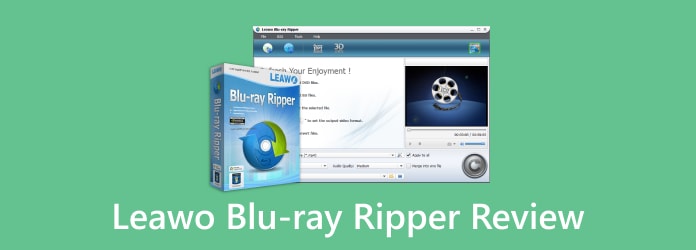
If you are looking for a way to convert Blu-ray discs into digital video files, you may have heard about Leawo Blu-ray Ripper. It is a popular Blu-ray conversion tool that allows users to rip Blu-ray discs, Blu-ray folders, and ISO files into common video and audio formats.
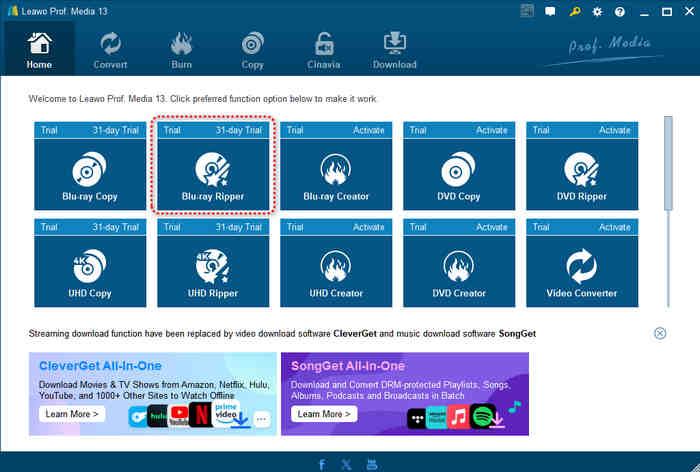
However, many users are confused about one thing: Is Leawo Blu-ray Ripper a standalone application? The answer is no. Unlike some dedicated Blu-ray ripping software, Leawo Blu-ray Ripper is a Blu-ray ripping module integrated into Leawo Prof. Media.
In this Leawo Blu-ray Ripper review, we will test and analyze its features, supported formats, performance, price, advantages, disadvantages, and whether it is a good choice for Windows and Mac users.
Part 1: What Is Leawo Blu-ray Ripper?
Leawo Blu-ray Ripper is a Blu-ray conversion feature inside Leawo Prof. Media. It is designed to help you remove the copy protections of physical Blu-ray discs and convert Blu-ray content into digital formats, like MP4, MOV, and more.
With this tool, users can:
- Rip Blu-ray discs to MP4, MKV, MOV, AVI, and other video formats
- Extract audio from Blu-ray movies
- Convert Blu-ray folders and ISO files
- Preserve original video quality
- Customize output video settings
- Convert Blu-ray movies for smartphones, tablets, and media players
Because it is part of Leawo Prof. Media, users cannot download Leawo Blu-ray Ripper as an independent program. When searching for Leawo Blu-ray Ripper free download and install it, users will find the application is actually Leawo Prof. Media.
This integrated design is convenient for users who need multiple media tools in one application. However, users who only want a simple Blu-ray ripping program may find the software package larger than necessary.
Part 2: Key Features of Leawo Blu-ray Ripper
1. Rip Blu-ray Discs to Popular Video Formats
The main purpose of Leawo Blu-ray Ripper is to convert Blu-ray content into digital video files. It supports many popular formats, including: MP4, MKV, MTS, WMV, WebM, and more. Moreover, it supports multi-track containers, which means that you can keep the audio tracks and subtitle tracks from your Blu-ray movie.
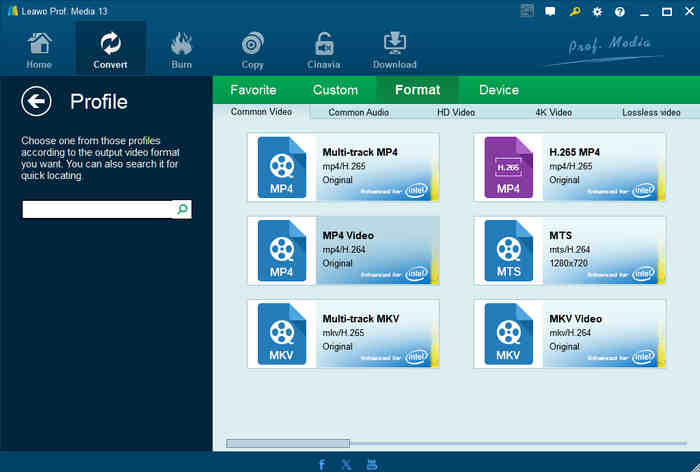
This makes it easier to watch Blu-ray movies on computers, smartphones, tablets, smart TVs, and other devices without using a physical disc. You can choose different output profiles depending on their devices. For example, you can select iPhone, iPad, Android devices, or game consoles as the output target.
2. Support Blu-ray Disc, Folder, and ISO Files
A useful feature of Leawo Blu-ray Ripper is that it not only works with physical Blu-ray discs, but can also load:
- Blu-ray folders
- Blu-ray ISO image files
- DVDs, ISO images, and folders
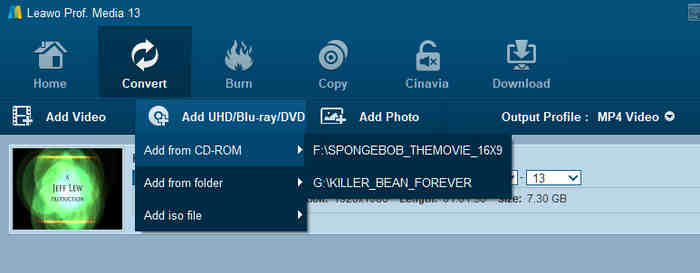
This is helpful for users who already have Blu-ray backups stored on their computers and DVD collections. After loading the Blu-ray source, Leawo Prof. Media analyzes the movie content and allows users to select the main movie, subtitles, audio tracks, and other elements before conversion.
3. Preserve Blu-ray Video Quality
Many users worry that ripping Blu-ray movies will reduce image quality. Leawo Blu-ray Ripper provides several output options to balance quality and file size. It supports HD video conversion and can output high-resolution videos depending on the source Blu-ray quality and selected settings. However, we find that Leawo Blu-ray Ripper cannot remux a Blu-ray to lossless MKV format. Although you can find an "Original" tag on some output choices, they are not real, for the output video codec is H.265, different from the H.264 in standard Blu-rays.
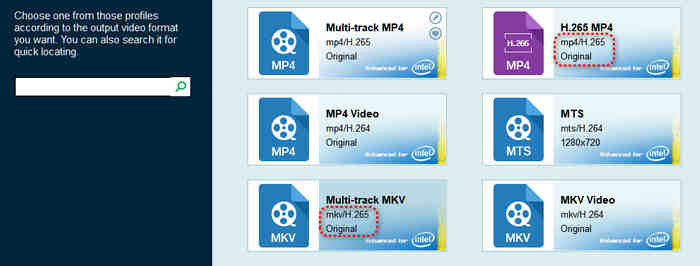
But luckily, Leawo Blu-ray Ripper still provides many output formats with customizations. Users can adjust video resolution, bitrate, frame rate, codec settings, and audio parameters. For users who want smaller file sizes, lower bitrate settings can reduce storage usage. For users who prefer better quality, higher settings can preserve more details.
4. Convert Blu-ray Audio Tracks and Subtitles
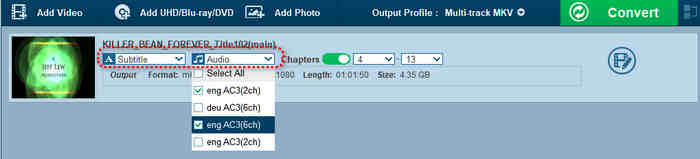
Blu-ray movies often contain multiple audio tracks and subtitles. Leawo Blu-ray Ripper allows users to select different audio languages, subtitle tracks, and audio channels. This feature is useful for international movie collections where users want to keep specific languages or subtitles. Although Leawo Blu-ray Ripper cannot keep the original audio streams (containing DTS and Dolby), subtitle and audio management, a necessary function, is still available.
5. Built-in Video Editing Tools
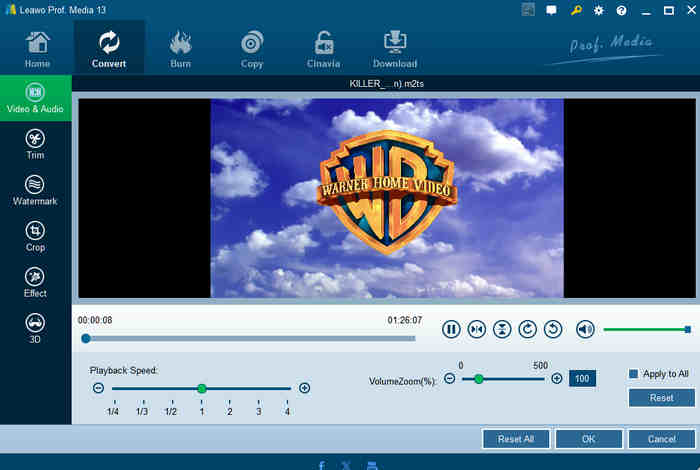
Since Leawo Blu-ray Ripper is included in Leawo Prof. Media, it also provides basic editing functions before conversion. Users can:
- Trim unwanted video parts
- Crop video frames and change aspect ratio
- Add watermarks to the ripped video
- Adjust brightness, contrast, and other visual settings
- Add basic 3D effects to your ripped Blu-ray video
These tools are not designed to replace professional video editors, and Blu-ray movies may not need further editing, but they are useful if you need to do your own customizations, and Leawo Blu-ray Ripper can consider that.
Part 3: Leawo Blu-ray Ripper for Mac: Does It Work Well?
Maybe you are a MacBook user and want Leawo Blu-ray Ripper for Mac. The good news is that Leawo Prof. Media provides a Mac version with Blu-ray ripping functionality. The interface is similar to the Windows version, so you can load Blu-ray discs, ISO images, or BDMV folders and convert them into digital formats.
However, it seems that Leawo doesn't pay much attention to the Mac version, as you can find that the official guide page of Leawo Blu-ray Ripper for Mac uses screenshots of the Windows version. Therefore, if you are a Mac user, you can download and try this software yourself.
Part 4: Master Review of Leawo Blu-ray Ripper
1. Leawo Blu-ray Ripper Decryption Test
Can Leawo Blu-ray Ripper Rip Protected Blu-rays? Yes, it can bypass AACS, BD+, and MKB, as well as region restrictions. The company also says that the decryption process takes place automatically when the source disc is loaded. From a user perspective, this is convenient because you do not need to manually configure a separate decryption tool before starting the conversion.
Our Decryption Test Result: Leawo Blu-ray Ripper really can deal with Blu-ray encryptions and region codecs. Its support for common Blu-ray protection technologies is one of its strongest features.
2. Leawo Blu-ray Ripper Conversion Speed Test
Blu-ray movies can be very large. A single movie may occupy tens of gigabytes, so ripping can take much longer than converting a normal MP4 file. Leawo advertises GPU hardware acceleration and claims up to 50× faster conversion under suitable conditions. It says the software can use technologies including NVIDIA CUDA, Intel Quick Sync, and AMD APP.
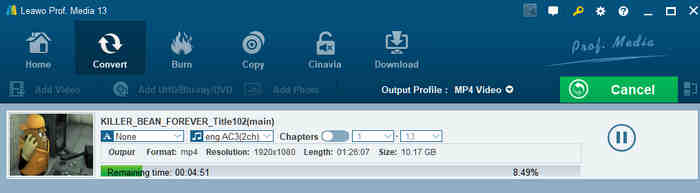
Our Speed Test Result: Leawo Blu-ray Ripper can transcode a 40 GB Blu-ray movie in 20 minutes. That speed is very satisfactory.
3. Leawo Blu-ray Ripper Stability Test
Speed is useful, but stability is just as important. We tested whether Leawo Blu-ray Ripper crashes, the CPU usage, whether subtitles and audio tracks remain synchronized, and whether multiple conversions can be completed consecutively.
Our Stability Test Result: Leawo Blu-ray Ripper can work stably if you only need to remux or transcode your Blu-rays. If you want to trim your Blu-ray or customize the output options, you may encounter lags and even crashes. From our tests, Leawo Blu-ray Ripper tends to crash when you preview each video clip during the editing process.
Pros and Cons of Leawo Blu-ray Ripper:
- Leawo Blu-ray Ripper has strong and stable Blu-ray decryption abilities.
- Because it is included in Leawo Prof. Media, users get more than a Blu-ray ripper. The package also includes video conversion, Blu-ray copying, and Blu-ray creation tools.
- The software supports many video and audio formats, making converted files compatible with different devices.
- It is easy to check all titles and chapters in your Blu-ray and preview them.
- The editing feature is not stable, usually causing crashes.
- It is not convenient to browse the output presets.
- It is not easy to find the editing feature because there are many symbols on the interfaces that have no text prompts.
Leawo Blu-ray Ripper Pricing
Leawo Blu-ray Ripper offers two pricing plans:
- $44.95 for an annual subscription
- $99.95 for a lifetime license
Both of them are only workable on one PC or Mac. If you only need to rip a few Blu-rays, maybe the annual license is a good choice.
Is Leawo Blu-ray Ripper Worth It?
If you only need a simple Blu-ray ripper, a dedicated Blu-ray conversion program may provide a more focused experience. But if you want Blu-ray ripping plus video conversion, Blu-ray copying, and media creation features, Leawo Prof. Media Blu-ray Ripper is worth considering.
Part 5: The Best Alternative to Leawo Blu-ray Ripper
If you need a stabler alternative to Leawo Blu-ray Ripper, you can consider Tipard Blu-ray Converter. It has stronger hardware decoding and encoding abilities, helping you seamlessly edit and convert your Blu-ray movies without lag or crash.
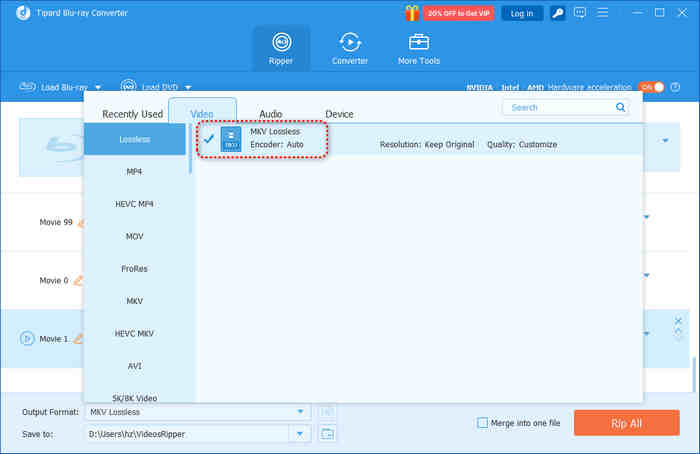
Moreover, Tipard Blu-ray Converter supports remuxing, letting you rip Blu-ray to an MKV lossless format with the original video streams, audio streams, and subtitle tracks. You'll be able to enjoy the original Dolby audio effects with cinematic visuals on your PC, Mac, iPhone, or Home Theater.

- Handle AACS, BD+, region locks, Cinavia, and other legacy or new encryptions.
- Rip Blu-ray to MKV, lossless MKV, MP4, WMV, and MOV with modern video parameters.
- Rip standard Blu-rays, 4K Blu-rays, and homemade Blu-rays without errors.
- Support level-3 hardware acceleration to transcode Blu-ray movies quickly.
| Feature | Leawo Blu-ray Ripper (Prof. Media) | Tipard Blu-ray Converter |
|---|---|---|
| Software Type | Blu-ray ripping module in an all-in-one media suite | Dedicated Blu-ray ripper |
| Blu-ray Conversion |  |
|
| Blu-ray ISO/Folder | |
|
| Video/Audio Formats | 180+ formats | 500+ formats |
| Video Editing | Basic editing tools |
Basic and stable editing tools |
| Other Media Tools | Copy, burn, convert, and more |
Focuses mainly on Blu-ray decryption and conversion with stable and practical editing features |
| Hardware Acceleration | |
|
| Ease of Use | Easy, but customization options are difficult to locate | Simple and focused workflow with apparent prompts |
| Long Conversion Stability | Good | Excellent: smooth conversion without crashes or freezes |
| Best For | Users looking for an all-in-one media toolkit | Users who want a stable and dedicated Blu-ray converter |
Part 6: FAQs of Leawo Blu-ray Ripper
Is Leawo Blu-ray Ripper free?
No. It provides a free trial version, but the full version requires a paid license.
Is Leawo Blu-ray Ripper crack safe?
No. Cracked versions may contain security risks and should be avoided. The official version is safer and receives updates.
Can Leawo Blu-ray Ripper keep original audio?
No, it can't; Leawo Blu-ray Ripper doesn't have the "Remuxing" feature, which means it cannot keep the original audio streams. Like HandBrake, Leawo will inevitably transcode your Blu-ray audio to another format and codec.
Conclusion
This Leawo Blu-ray Ripper review provides a comprehensive introduction to its features and demonstrates the pros, cons, and limitations with our earnest tests. Although it has shortcomings, it is still worth using to digitize your Blu-rays.
However, if you want to personalize your Blu-rays with editing features and audio/subtitle management, you should resort to a more effective alternative, like Tipard Blu-ray Converter. It lets you adjust titles, chapters, audio tracks, and subtitle files. Even when you frequently switch between different chapters and titles during editing and previewing, the program remains responsive without lag.
Rip Blu-ray to Digital Format with the Best Quality
100% Clean & Safe
100% Clean & Safe

More Reading
About the Author