

Did you know that Google has launched an app just for YouTube creators? That app is YouTube Create! It is designed to make video editing easier and faster for both beginners and experienced YouTubers. In this post, you will learn everything about YouTube Create, including its main features, performance, pros and cons, and some great alternatives if you want more options.

Part 1. Quick Introduction to YouTube Create
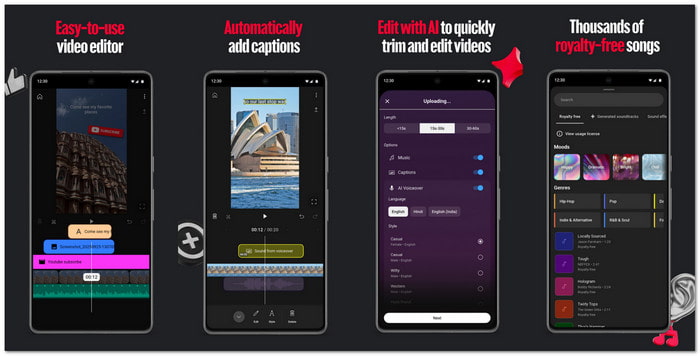
YouTube Create is a free video editing app made by Google for users who want to make videos fast and easy. It works well for both long videos and YouTube Shorts. The app lets you edit, enhance, and upload videos straight to YouTube without needing a complicated program.
Platforms Supported
YouTube Create works on Android devices with version 8.0 or newer and on iPhones XR or newer running iOS 17 or later.
Main Features
Are you curious about all the cool tools the YouTube Create video editing app has? Take a look at its main features below!
- Editing Tools: Trim, cut, crop, and move clips on a simple timeline.
- Audio Tools: AI-powered audio cleanup removes background noise. You also get thousands of royalty-free music tracks and sounds.
- Auto-Captions: Automatically add subtitles in select languages.
- Effects & Transitions: Filters, transitions, and effects to make videos look polished.
- Text & Stickers: Add animated text, emojis, and moving images.
- Direct Upload: Post videos straight to your YouTube channel.
- AI Tools (Beta): "Edit with AI" helps draft videos, and "generate video" can create 8-second clips from text.
Part 2. Detailed Review of YouTube Create App
Do you want to dig deeper into the YouTube Create app? If yes, please continue reading. You will learn essential information about its performance, user reviews, troubleshooting tips, and pros and cons.
Performance
YouTube Create works best for short videos like YouTube Shorts because it makes trimming, adding transitions, and syncing audio easy.
The app runs smoothly on many devices, including older iPhones like the 12 Pro Max, which shows it is well optimized. It lets you export videos in 720p or 1080p, but longer videos may fail to export, so it is better suited for short content.
The audio cleanup feature works well, removing background noise about 85% of the time. AI tools like auto-captions, voiceover, and AI-assisted editing are helpful, though some users notice bugs in these features.
User Reviews
As of early 2026, YouTube Create for Android and iOS has a mixed rating of about 3 stars. Users like the app because it is easy to use, has a large royalty-free music library, contains no ads, and allows direct uploading to YouTube.
On the other hand, some users report frequent crashes, especially during export, limited advanced editing features compared to competitors, and performance issues with long videos over two hours.
Overall, it is praised for simplicity and speed but struggles with stability and heavy editing tasks.
Troubleshooting
Even though YouTube Create is easy to use, it can run into some problems. Most issues are common in beta apps, but there are simple ways to fix them.
- App Crashes: Sometimes YouTube Create for iOS and Android closes by itself while editing or exporting. The first thing to try is clearing the app cache. It can fix minor problems. If the app still crashes, it may be a bug in the beta version. In that case, waiting for an update is usually the only solution.
- Export Failures: Some videos fail to export, especially if they are long. To fix this, try shortening the video or exporting it in 720p instead of 1080p. YouTube Create works best with short videos, so heavy projects may not always finish exporting.
- Black Screen on Import: When importing a video or image, you might see a black screen. It usually happens if the file type is not supported or the file is too large. To avoid this, check the file format and size before importing.
With these tips, most problems in YouTube Create can be fixed quickly. It is still a beta app, so occasional bugs are normal.
- Background noise is removed effectively in most videos.
- You can post videos straight to your channel without another app.
- Trimming and arranging clips is fast and easy, even for beginners.
- Thousands of music tracks and sound effects are available without copyright worries.
- The YouTube Create app for iPhone and Android is completely free to use and has no annoying ads.
- Editing multiple clips or large videos may lag.
- The app can be unstable because it is still in beta.
- Features like horizontal flip are not available yet.
- Some tools and effects found in other editors are missing.
- Works best for short videos; longer videos can cause issues.
Part 3. Top 2 YouTube Create Alternatives
YouTube Create is still in beta, so it has some limits and occasional bugs. If you want more features and stability, you can try the alternatives listed below!
1. CapCut
Platforms: Android & iOS
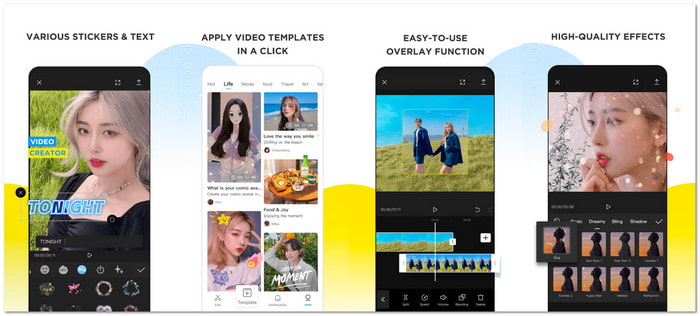
This YouTube Create for iPhone and Android has over 1 billion downloads. Bytedance makes it and is one of the best video editors for YouTube. It allows you to trim, merge, or split clips, add cool effects, use keyframe animation, slow-motion, and chroma key for professional-looking edits. The app also has AI features like auto captions, text-to-speech, motion tracking, and background removal.
Key Features:
- Use keyframe animations for smooth transitions.
- Apply slow-motion, zoom effects, and speed curves.
- Stabilize videos and remove backgrounds automatically.
- Add auto captions and text-to-speech in many languages.
- Fast and beginner-friendly interface.
- Library of trending effects and templates.
- AI tools for captions, upscaling, and editing.
- The free version supports 4K exports and most tools.
- Certain AI and cloud features need the internet.
- Some effects and assets require CapCut Pro.
- Occasional lag on low-end devices or large projects.
2. Tipard Video Converter Ultimate
Platforms: Windows & Mac
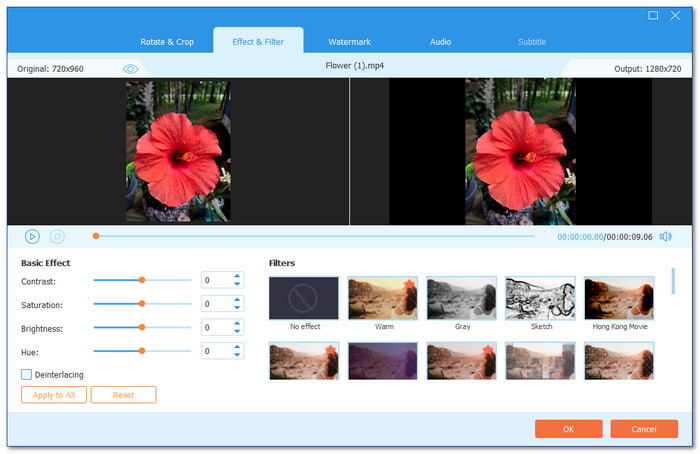
If you are looking for the best YouTube Create for PC, Tipard Video Converter Ultimate is the top choice. It provides AI-driven video enhancement features. AI upscale improves video resolution. AI denoise cleans up audio and video. AI color correction makes videos brighter and sharper.
It also has practical video editing features. These include trimming, cropping, merging clips, and applying filters. With hardware acceleration support, it can process videos fast. Moreover, it includes YouTube video presets. You can export videos in the best format and resolution for YouTube, like 1080p HD, 4K, or 8K.
Key Features:
- Add an audio track and adjust volume and delay.
- Apply from a wide selection of 51 themes and 42 filters.
- Supports YouTube standard aspect ratios, like 16:9, 9:16, or 1:1.
- Support YouTube video formats, such as MP4, MOV, and AVI.
- Combine many videos into one seamless project for easy editing.
- Allows you to add soft or hard subtitles.
- Change video format, frame rate, and resolution.
- Add text or image watermarks to customize your videos.
- Adjust basic effects like brightness, contrast, saturation, and hue.
- Full access to all features requires upgrading to the paid version.
Conclusion
We hope this post helps you understand what YouTube Create is and what it can do. If it meets your needs, feel free to use it for quick and easy video editing. But if you need more advanced features, you can try its alternatives. CapCut is great for mobile editing, while Tipard Video Converter Ultimate works on Windows and Mac.
More Reading

About the Author


 Tipard Video Converter Ultimate