

Making a single video from several clips is simple when you know how to YouTube combine videos. You can use desktop software for full control, online tools for a quick merge, or YouTube Studio for longer videos. First, gather your clips. Then follow the steps below to create a smooth, polished final video.

Important First Step: Download Your Videos
Before you can merge your clips, you need to save them to your device. This is the first step in learning how YouTube merges videos. Find the video you want on YouTube, then add ss before youtube.com in the URL. For example, change https://www.youtube.com/watch?v=dQw4w9WgXcQ&list=RDdQw4w9WgXcQ&start_radio=1 to https://www.ssyoutube.com/watch?v=dQw4w9WgXcQ&list=RDdQw4w9WgXcQ&start_radio=1
After loading a page, one can press the Download button, choose the desired format, and save the video. Carry this on with all the clips you would like to mix, and in this way, everything will be prepared before proceeding to the next step.
Method 1. Using Desktop Software (The Most Powerful Way)
For the smoothest results, desktop software is the top choice. Tipard Video Converter Ultimate works as a video merger for YouTube, letting you join multiple clips quickly. It is possible to edit and trim, change formats, and retain high quality. The interface is easy; hence, even novices can combine videos without being confused. Drag and drop your files, make them into one professional video. The control and flexibility provided by Tipard is impossible with online tools.
Step 1 Download the software now on your PC by clicking the appropriate download button that we have here. Then, follow the installation process that it requires before you can use it.
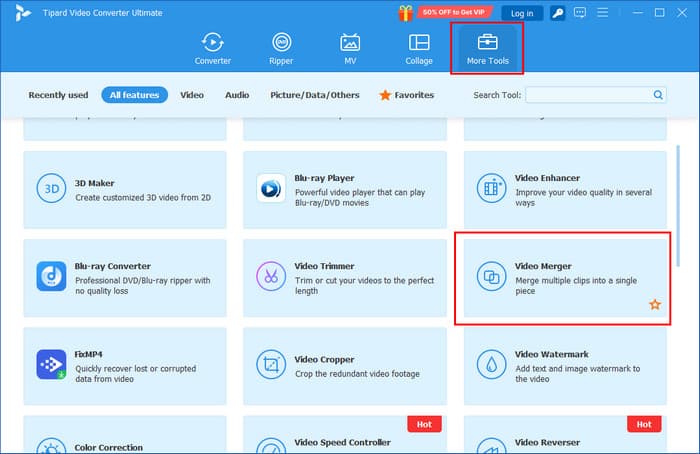
Step 2 Go to the More Tools > Video Merger to merge multiple clips into one. After you click that, there will be a new window that appears. Click the + button to import all the videos in here that are saved on your PC.
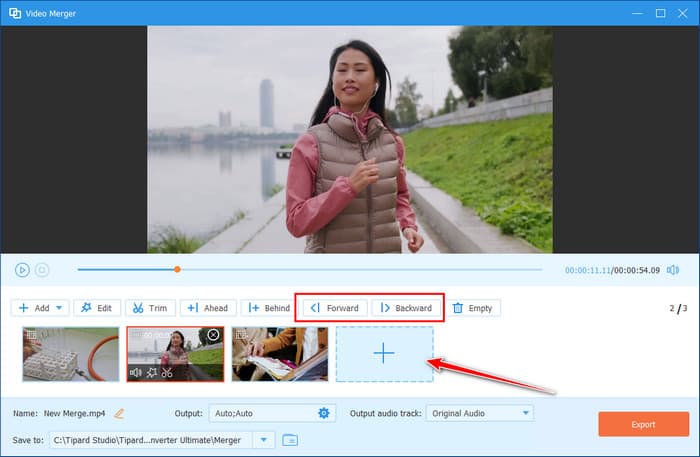
Step 3 Now that you have uploaded all the videos, you can arrange them according to your needs by clicking the clip and choosing whether forward or backward.
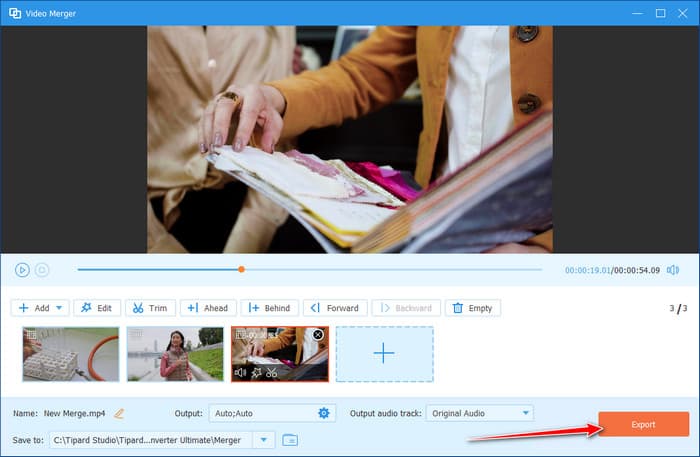
Step 4 To merge all the videos into one, click the Export button.
This method is best if you want full control and high-quality results. Desktop software like Tipard is ideal for professional-looking videos and longer projects. It requires installation but offers unmatched flexibility and editing options, like creating GIFs from YouTube videos and more.
Method 2. Free Online Video Mergers (The Easiest Way)
1. Apowersoft Video Merger Online
Apowersoft offers a free, web-based tool that makes merging multiple video clips fast and simple. It is designed for beginners but also gives enough flexibility for users who want more control over their final video, like what Adobe Video Merger has to offer. The tool preserves video quality and supports popular formats, making it a reliable choice when you want to know how to combine videos on YouTube.
Step 1 Go to apowersoft.com/free-online-video-merger and click Upload File or drag your video clips into the upload area.
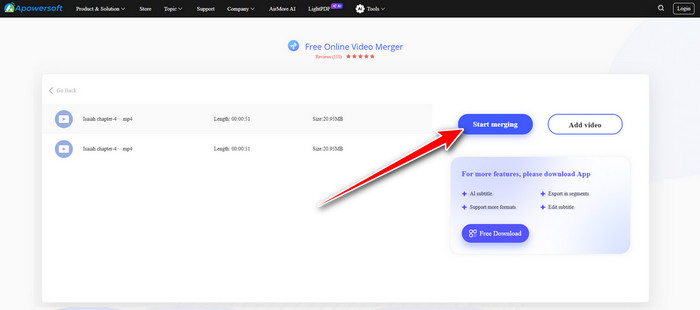
Step 2 Click the Add Video to upload more videos here that you want to be merged into a single clip.
Step 3 Click Start Merging to process your videos and wait until it is ready.
While it may not offer as much control as desktop software, it's fast, convenient, and keeps your video quality intact.
2. WorkinTool Video Merger Online
WorkinTool offers a free, web-based video merger that is simple and fast to use. It requires no installation or sign-up, making it ideal for beginners who want to know how do you combine two videos on YouTube. You can upload multiple clips, arrange them in order, and export a single merged video quickly.
Step 1 Go to WorkinTool Video Merger Online, click plus, and select the clips you want to merge from your device.
Step 2 Arrange the videos in the order you want them to appear by dragging them, and select the output format and resolution if needed.
Step 3 Tick Convert, wait for the tool to process your videos, and download the final merged video to your device.

WorkinTool Video Merger Online is perfect for beginners or anyone who needs a quick, free solution without software installation. While it may not have advanced editing features, it is fast, easy to use, and preserves video quality, making it a suitable option for merging videos online.
Method 3. The "YouTube Studio" Method (For Streams & Long Videos)
YouTube Studio is an easy way to merge videos with other ones, but you do not need to download them. This approach is effective with streams, long videos or already uploaded content. It is not literally a process of uniting files into one video, but it enables you to play them in order using playlists. It is an easy and free way how to combine videos together on YouTube without additional software.
Step 1 Go to YouTube Studio and click Content from the left-side panel. Tick the checkboxes beside the videos you want to merge.
Step 2 In the top menu bar, click Playlist. Choose an existing playlist or create a new one for the merged videos.

Step 3 Click Save to add the selected videos to the playlist. Open the first video in the playlist and play it; the videos will play continuously in order.
This method is ideal for viewers who want to create continuous playback without editing software. It is completely free and works well for long or live videos. However, it does not produce a single merged file, so it's best suited for playlists and streaming purposes.
Can I Combine Videos Directly on the YouTube Website?
No, you cannot just assemble videos in one file on the site of YouTube site. YouTube lacks an editing tool that can combine various videos into one. The site lets you create playlists with videos or format clips in YouTube Studio to play one after another, although this does not make a new combined video file.
If you want to know how to merge 2 videos on YouTube, you will need to use desktop software like Tipard Video Converter Ultimate or a free online video merger tool. These tools let you join multiple clips into one video before uploading to YouTube.
Conclusion
The preferences for the tools to use to merge videos depend on their requirements. Such desktop programs as Tipard provide complete control and quality results. There are also free online mergers like Apowersoft, Clideo and WorkinTool, which provide quick solutions that are beginner-friendly. YouTube Studio is used to assemble endless playlists, but it does not generate a large audience.
Overall, whether you want professional editing or a quick, online fix, using a reliable YouTube video combiner ensures your clips come together smoothly and efficiently, ready to share with your audience.
More Reading




About the Author


 Tipard Video Converter Ultimate