

Key Takeaways
- 1080p is also known as Full HD.
- It is still worth it in 2026 since it can provide a good viewing experience.
- To upscale, optimize, and convert 1080p, using Tipard Video Converter Ultimate is the best choice.
What is a 1080p resolution? Well, it refers to a high-definition video resolution. It can play 1,920 pixels across the screen horizontally and 1,080 pixels vertically. The 1080p resolution is also known as Full HD. It is also widely used in television, streaming platforms, and monitors. But are you wondering if this resolution is still good in 2026? Read this guide and learn more about the resolution and its differences with other resolutions.

Part 1. Detailed Introduction to 1080p
What does 1080p mean? 1080p is also called 'Full HD.' It is a video resolution that measures and plays 1,920 pixels across the screen horizontally and 1,080 pixels vertically. The good thing about the resolution is that it offers sharp and detailed visuals, making it one of the most standard resolutions for streaming platforms, television, and monitors. Additionally, its clarity and balance quality, and file size have made it the best resolution for everyday viewing and professional use.
Furthermore, 1080p can offer a more immersive and crisp experience, compared with other resolutions like 480p and 720p. In addition, it remains more reliable than 4K and 8K due to compatibility, affordability, and support across devices. With that, if you want to watch videos or play games, 1080p is among the best resolutions you can rely on for a better experience.
Common Specs of 1080p
To get more details about the common specs of 1080p, you can check the information below.
- Resolution: 1920 × 1080 pixels
- Aspect ratio: 16:9 (widescreen)
- Progressive Scan: Each frame is drawn in full, and there is no interlacing.
- FrameFrame rates: Commonly, the frame rates in 10800p are 24, 30, and 60 fps.
- FrameGood Bitrate for 1080p: Typically 8-12 Mbps for streaming.
- FrameStandard use: Streaming platforms, monitors, televisions, gaming consoles, and Blu-ray discs.
Part 2. Resolution Comparison: 1080p vs. 720p vs. 1440p vs. 4K
Besides 1080p, there are more resolutions you can use for watching and streaming. To learn some of them, you can check the comparison table below.
| Resolution | Also known as | Pixel Count | Ideal Aspect Ratio | Best Use | Performance Impact |
|---|---|---|---|---|---|
| 720 | HD | 1280 × 720 | 16:9 | • Basic streaming • Small screens • Low bandwidth |
Very light, fast recording and conversion |
| 1080 | Full HD | 1920 × 1080 | 16:9 | • Standard TVs • Monitors • Streaming • Blu-ray • Gaming |
Moderate demand, widely supported |
| 1440 | Quad HD | 2560 × 1440 | 16:9 | • Gaming • Professional work • Mid-range monitors |
Higher demand, a balance between clarity and speed |
| 4K | Ultra | 3840 × 2160 | 16:9 | • Large TVs • Cinema-quality video • Professional editing |
Very demanding; recording, converting, and upscaling take longer and require hardware acceleration. |
With the comparison table above, you can now get more insights about the different video resolutions, from 720p to 4K. Plus, if you want to improve the video quality, you can turn your videos into 4K, since it can offer the sharpest details. However, you must know that it can produce a large file size and take more time to record, upscale, and convert. For a smoother workflow when dealing with 4K, you must access a reliable media converter with better and full hardware acceleration. It ensures instant processing and smoother performance without encountering overloading issues in your system.
Part 3. Is 1080p Still Good in 2026
After learning the definition of 1080p, you might wonder if the resolution is still good in 2026. Well, 1080p is still an ideal video resolution in 2026. It remains practical and common, thanks to its balance of compatibility, quality, size, and efficiency. While higher resolutions such as 2K, 4K, and 8K dominate a premium display, the 1080p resolution can still offer sharp visuals without the heavy storage, bandwidth, and processing demands of UHD formats. For users, like content creators, gamers, and casual users, we can say that 10800p resolution can give you the best experience without encountering any issues.
Pros of 1080p for Users
- When it comes to compatibility, there is no doubt that this resolution is better than other higher resolutions.
- The resolution is performance-friendly. You can easily record, stream, and edit 1080p since it requires less powerful hardware.
- Compared with 2K, 4K, and 8K, 1080p can offer a lower file size, ideal for storing files on your device.
Cons of 1080p for Users
- The detail of 10880p is not as sharp as 1440 or 4K, especially on wider and larger screens.
- It will also become less future-proof once the 4K becomes the standard.
- In 1080p vs 4K, 1080p is not ideal for high-end production since professionals prefer higher resolution.
Application of 1080p in Various Fields
Entertainment: Some Blu-ray discs, streaming platforms, and gaming consoles still use 1080p for mainstream content.
Video Production: 1080p is ideal for video production. YouTube creators might find the video editing and uploading process smoother and faster.
Gaming: E-sports players prefer 10800p resolution since it can offer smoother performance and higher frame rates.
Mobile Devices: Mobile devices use 1080p resolution to balance clarity with battery efficiency. Almost all mobile devices also support 1080p more than other higher resolutions.
Part 4. How to Optimize, Upscale, and Convert 1080p Videos
1. Tipard Video Converter Ultimate
Do you want to optimize, upscale, and convert your 1080p videos? In that case, you must use an ideal program to achieve the result you need. So, if you are looking for an ideal software, we suggest using Tipard Video Converter Ultimate. The program can ensure that you can get the result you need. You can convert your 1080p video with full hardware acceleration for a smoother process. The batch conversion feature is also available so that you can deal with multiple files in a single go. It can also support various input and output formats so that you won't encounter any compatibility issues. Plus, you can upscale your video to 4K if you want to. You can even optimize the video by adjusting various parameters. With that, for a smoother procedure, using Tipard Video Converter Ultimate is the best choice.

- It can offer full hardware acceleration.
- The program can support various input formats, such as MP4, MOV, M4V, AVI, WMV, MKV, and more.
- It can offer a fast conversion speed of up to 120× faster.
- The software can also offer basic editing tools, such as effects, trimmer, cropper, watermark, etc.
To convert, optimize, and upscale your 1080p, you can follow the steps below.
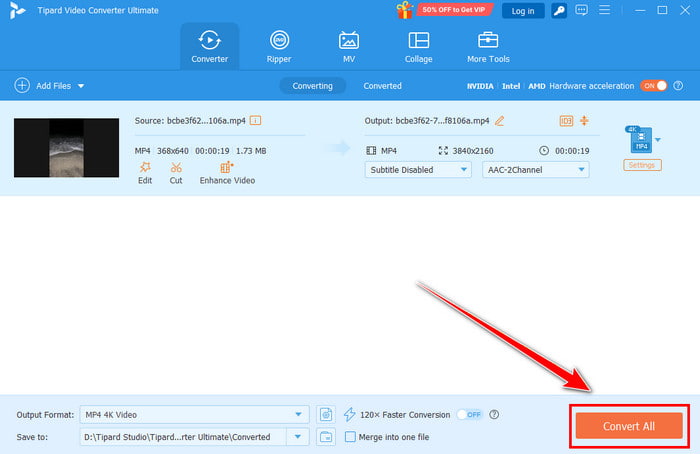
Step 1 Access Tipard Video Converter Ultimate by clicking the Free Download button provided above.
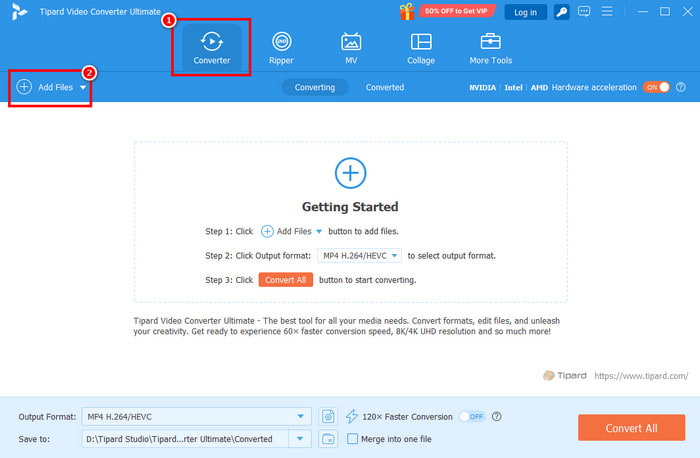
Step 2 From the interface, go to the Converter and tap + Add Files to insert your 1080p video.
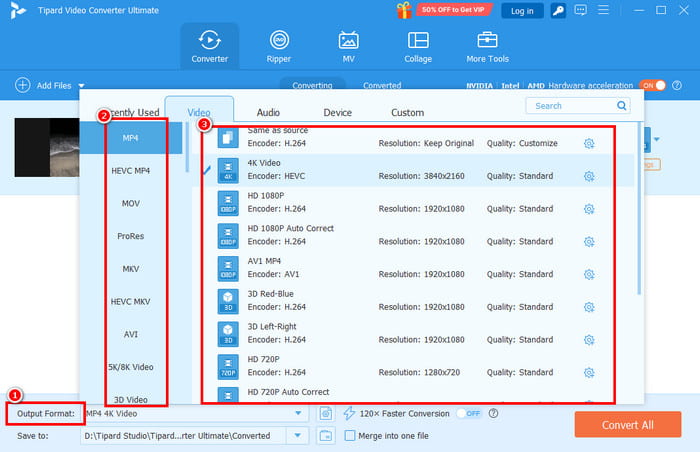
Step 3 Then, go to the Output Format to choose your preferred format. You can also upscale the video by choosing your desired video quality, like 4K.
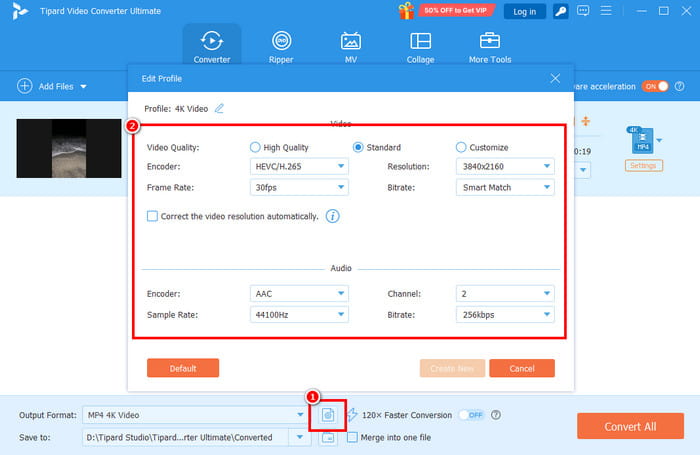
Step 4 To optimize your video, go to the Settings section and adjust the parameters based on your needs.
Step 5 Lastly, you can start tapping the Convert All button to start the conversion process. Once done, you can check your final video on your computer.
Conclusion
Now you know what 1080p is. You even explored its common spec, its differences with other resolutions, the pros, cons, and its application in other fields. So, if you want to learn more about 10800p, you can use this guide as your go-to reference. Plus, if you want to convert, upscale, and optimize your 108000p videos, you can rely on Tipard Video Converter Ultimate. This software ensures that you can instantly convert your videos, upscale them to 4K, and optimize them for better performance, making it the most powerful program on your Windows and Mac.
All-in-one video toolbox: convert, edit, upscale, enhance, and compress your videos easily
100% Clean & Safe
100% Clean & Safe

More Reading

About the Author


 Tipard Video Converter Ultimate