

If you have ever watched an old or low-resolution video and wished it looked clearer, you are not alone. Many users deal with blurry clips, pixelated recordings, or videos that do not look good on modern screens. This is where an open source AI video upscaler can help. In this article, you will learn what video upscaling is, how open source tools use AI to improve video quality, and which options are worth trying. You will also see an easier alternative if technical tools feel overwhelming.

Part 1. What Is Open Source Video Upscaler
An open source video upscaler is a tool designed to increase video resolution using publicly available source code. This means anyone can inspect, modify, or improve how the software works. Most open source upscalers are developed by researchers and independent developers who want to enhance video quality without restricting users to paid or closed systems. When upscaling a video, such as converting 480p to 720p or 1080p, traditional methods simply stretch the image, often resulting in blur. In contrast, open source tools usually rely on AI models that analyze each frame and attempt to reconstruct missing details.
Many people prefer an open source AI video upscaler because it offers greater control and flexibility. Users can tweak settings, understand how the process works, and avoid forced subscriptions. This makes these tools especially useful for restoring old videos, anime clips, low-resolution recordings, or archived footage. Transparency is another major advantage. Since the code is public, users can trust what the software is doing on their system. For developers, these tools also serve as valuable learning resources for studying and experimenting with AI upscaling techniques.
However, open source video upscalers do come with drawbacks. Many are not beginner-friendly and may require command-line knowledge or complex setup processes. High-quality results often demand powerful GPUs, and there is usually no official customer support. While these tools are undeniably powerful, they are not always the most convenient choice. Understanding both their strengths and limitations can help you decide whether an open source video upscaler is the right solution for your needs.
What Makes an Open Source Video Upscaler Different?
| Feature | Open Source Upscaler | Commercial AI Upscaler |
|---|---|---|
| Source code | Publicly available for inspection and modification | Closed |
| Cost | Usually free | Paid |
| Customization | High | Limited |
| AI model control | Advanced | Automatic |
| Support | Community-based | Official support |
Part 2. 5 Best Open Source Video Upscaler Online/Offline
Below are some of the most commonly used open source video upscaling tools today. Each one has strengths and weaknesses. The best choice depends on your experience level and your hardware.
1. Video2X
- GitHub Availability: /k4yt3x/video2x
- Language: Python
- Platform: Windows, Linux
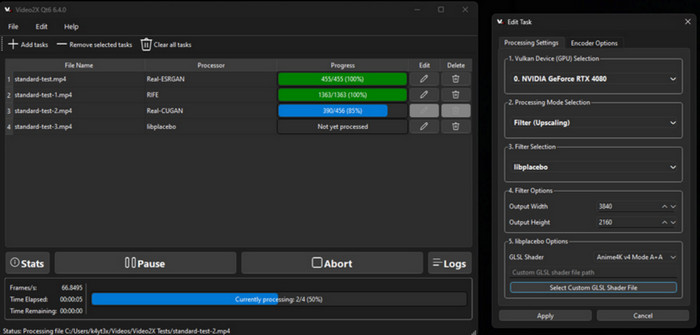
Video2X is a popular open-source tool designed for upscaling videos by utilizing AI models like Waifu2x and Real ESRGAN. It supports various formats and allows batch upscaling, providing flexibility for users. However, the setup process can be tricky for beginners, and it requires Python to run.
- Great for users who want control over the process
- Supports multiple formats
- Allows batch upscaling
- Open-source and flexible
- Setup can be complex for newcomers
- Requires Python and technical configuration
2. Waifu2x
- GitHub Availability: /nagadomi/waifu2x
- Language: Lua / C++ / CUDA
- Platform: Windows, Linux, macOS
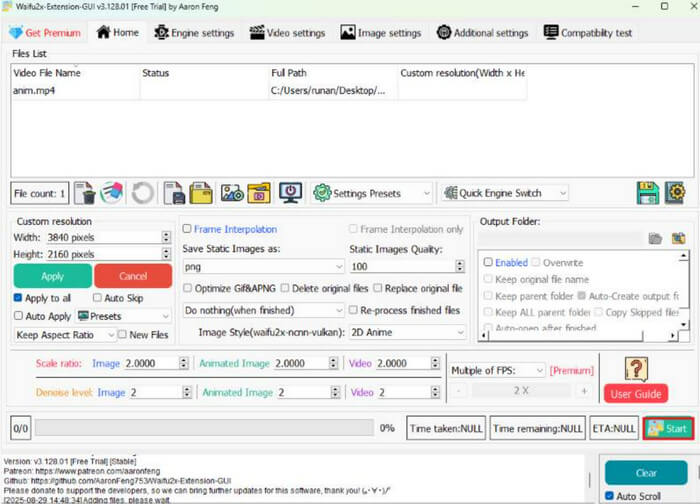
Initially built as an anime-focused image upscaler, Waifu2x has expanded to video processing, emphasizing denoising and sharper line work. It excels with animated material, though real-world footage often sees weaker gains. Despite available GUIs, many users depend on command-line scripts, which may feel intimidating for beginners today.
- Excellent for anime and animated videos
- Reduces noise and enhances clarity
- Open-source and highly flexible tool
- Simple for animated content
- Less effective for real-world videos
- May require scripts for use
3. Real-ESRGAN
- GitHub Availability: /xinntao/Real-ESRGAN
- Language: Python
- Platform: Windows, Linux, macOS
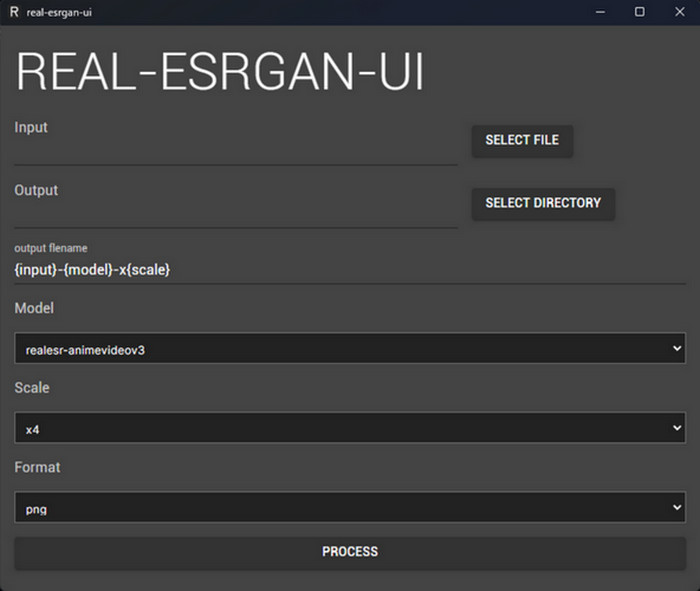
Real ESRGAN is an open-source video upscaling tool that delivers impressive results for both images and videos, especially for real-world footage. While its performance is remarkable, it demands a powerful GPU and requires a complex installation process involving Python and the command line.
- Exceptional results for real-world videos
- Powerful upscaling model
- Widely used in both image and video upscaling
- Open-source and well-supported
- No easy interface for beginners
- Requires a strong GPU
4. Cupscale
- GitHub Availability: /n00mkrad/cupscale
- Language: C# (.NET/WPF)
- Platform: Windows
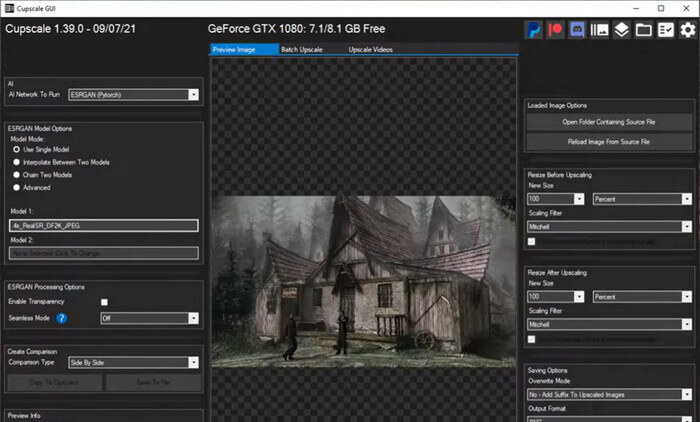
Cupscale is a community-driven GUI that connects various AI video upscaling models, making the process more accessible. Though it simplifies the process compared to command-line tools, it's still experimental and may not be stable on all systems.
- Easy to use with a visual interface
- Supports multiple AI models
- Community-driven and open-source
- Simplifies the learning curve for newcomers
- Experimental and may not be stable on all systems
- Stability issues on some systems
5. Anime4K
- GitHub Availability: /bloc97/Anime4K
- Language: GLSL / HLSL / Java / C++
- Platform: Windows, Linux, macOS
Anime4K is an open-source real‑time video upscaler originally designed to improve anime playback by using fast edge‑aware scaling algorithms instead of heavy AI models. It can be used in players like MPV or integrated into workflows to upscale video on the fly with minimal lag, especially for 2D content. While it's not a deep‑learning super‑resolution model like Real ESRGAN, it's one of the few true open‑source video upscalers that works smoothly for many types of animation and some live‑action footage.
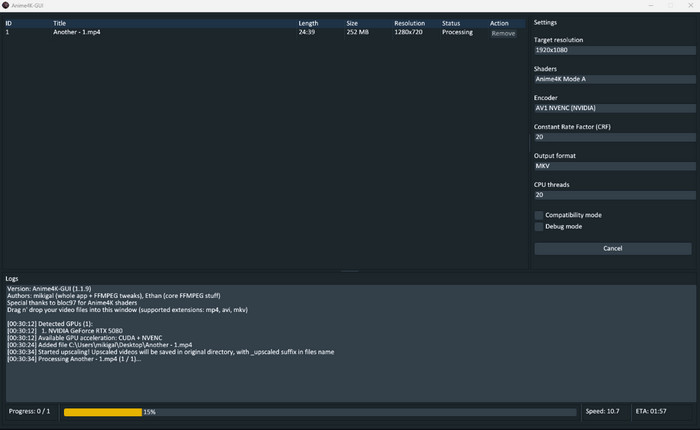
- Open‑source and free to use tool
- Real‑time upscaling with low latency in supported players
- Works well for anime and other 2D content
- Doesn't require heavy AI hardware to run efficiently
- Not as powerful as deep‑learning upscalers for detailed enhancement
- Best results often limited to animated/line‑art content rather than complex live‑action scenes
Part 3. Best Video Upscaler to Enhance Video Quality in One Click
Most open-source AI upscalers lack a truly user-friendly interface, often requiring complicated setups and technical know-how. That's why using software that works with just a few clicks can make a huge difference when upscaling videos. If you're looking for something simple yet powerful, we have the right solution for you.
Tipard Video Converter Ultimate is a solid choice if you want to improve video quality using the upscaling tool. The whole process is very straightforward and only takes a few clicks, so even if you have no technical background, it's easy to get started. You just pick the video you want to enhance, and the software does the work for you.
If you want your video to look sharper but don’t want to deal with complicated controls, this tool makes upscaling quick and simple. On top of upscaling, Tipard Video Converter Ultimate also includes handy extras like a 3D maker, DVD tools, and built-in video and audio editors, making it a convenient all-in-one solution for everyday use.
- Very easy to use with a clean, beginner-friendly interface
- One-click video upscaling with minimal setup required
- Includes extra tools like video/audio editing, DVD tools, and format converter
- Works well for quick quality improvements and supports conversions across almost all video formats
- Perfect for learning how to improve video quality without dealing with complicated settings.
- Not open-source and requires a paid license for full features
- Limited customization for users who want fine-grained control over AI settings
How to Use Tipard Video Converter Ultimate:
Step 1 To acquire the software, simply click the Free Download button below. Double-click the downloaded file to install it on your device. Launch it afterward.
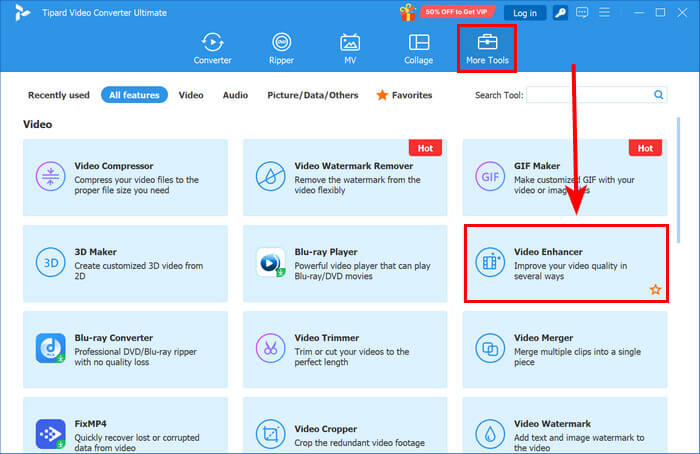
Step 2 On the main interface, go to the More Tools tab and select Video Enhancer. Click the Add button to add the video you want to upscale, or simply drag and drop the file directly into the interface.
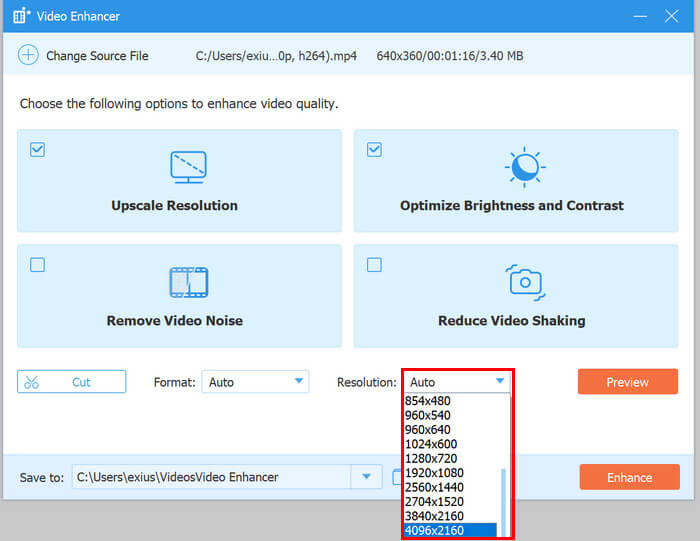
Step 3 In the Upscale Resolution section, check the box to enable upscaling or manually select your preferred output resolution. Click Preview to view the result, then click Enhance to start the upscaling process.
Part 4. Who Should Use Open Source Video Upscalers?
You can choose an open-source video upscaler if:
- You want free solutions.
- You enjoy customization.
- You have GPU hardware.
- You are good at or want to enjoy technical setups.
Choose a commercial video upscaler if:
- You want one-click enhancement.
- You don't want command line tools.
- You want customer support.
- You are not interested in technical setups.
Part 5. FAQs of Open-Source Video Upscaler
Is there a free open source AI video upscaler?
Yes. Several free open source AI video upscalers are available, including Video2X, Real-ESRGAN, Waifu2x, and Anime4K. These tools allow users to upscale videos locally without subscription fees or cloud uploads.
Can Real-ESRGAN upscale videos?
Yes, Real-ESRGAN can be used for video upscaling, but it is not originally designed as a complete video editor or video upscaling application. Instead, it is an AI-based super-resolution model that improves image quality and can be integrated into video workflows.
Does video upscaling require GPU?
A GPU is not always required, but it is highly recommended for AI-based video upscaling. Deep learning models such as Real-ESRGAN rely heavily on GPU acceleration because processing thousands of video frames requires significant computing power.
Conclusion
Improving video quality can be done in different ways, and open-source video upscalers offer strong flexibility and control. However, they often come with one common issue: the user interface can be intimidating for beginners. These tools are typically designed for users who do not mind spending time on manual setup and experimentation to achieve better results.
If you are looking for a quicker and more straightforward way to improve video quality, Tipard Video Converter Ultimate is a go-to tool that is user-friendly and requires no technical knowledge.
More Reading
About the Author


 Tipard Video Converter Ultimate