

Some people need slideshows every single day. They might be part of their jobs, studies, or other daily activities that require presentations. It is the primary visual learning enhancement that is commonly used nowadays. There are countless ways to create a slideshow, which online and offline tools can be used.
Icecream Slideshow Maker is considered one of the top tools that can be considered. Most users find it convenient to make slideshows because of the straightforward process it offers. However, some users want more features, which makes the tool lacking. There are more pieces of information you need to know about the tool. Kindly scroll below to discover them.

Part 1. What is Icecream Slideshow Maker?
Icecream Slideshow Maker is a creation tool that targets beginner users. It focuses more on giving a smooth slideshow-making experience to its users, who are novices, than on providing advanced features. It is mainly produced to be compatible with different Windows models and versions. Accessing it on a Mac is impossible due to incompatibility.
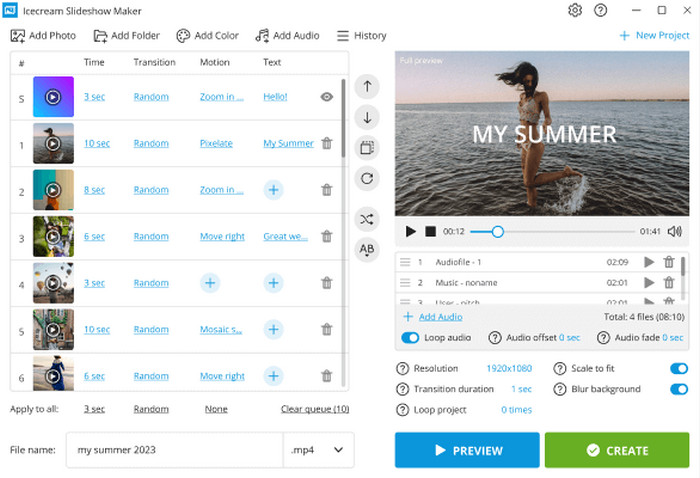
The mentioned tool allows you to turn your photos into a video slideshow, where music, transitions, and texts can be added with a few clicks. Ensure that you get the tool from its official website to perform a safe Icecream Slideshow Maker download. Countless untrusted websites offer the tool, which is too risky for your Windows computer. It can also be used as a reverse video editor for videos you want to add to your slideshow.
Part 2. Key Features of Icecream Slideshow Maker
Before using a tool, it is important to know its key features. In this case, you will know how to use it, and you will be familiarized with the operations it can perform. The key features of the tool can be discovered below.
1. Drag-and-Drop Method
The importing process of Icecream Slideshow Maker is simple. It is due to the drag-and-drop method it supports. Compared to other slideshow makers, you need to import the photos or videos individually.
2. Music, Texts, and Transitions Can Be Added
Photos and videos are some of the media files that can be added to a slideshow using the tool. The good thing is that it also supports music, text, and transitions. This way, you can make your slideshow more engaging. The Icecream Slideshow Maker free download version supports them.
3. Supports Multiple Export Formats
Not all tools that allow you to make a slideshow support all media formats. Icecream Slideshow Maker supports some of the famous formats. It includes MOV, AVI, MP4, and WebM.
4. YouTube and Google Drive Platforms are Supported
YouTube and Google Drive are some of the platforms where you commonly upload slideshows. The tool offers a direct upload to these platforms, making the export process convenient and fast.
5. Works on Low-end PCs
Some tools are resource-intensive. In this case, you will need a powerful PC to operate them. Icecream Slideshow Maker is different. It works smoothly on low-end PCs.
Part 3. Detailed Review of Icecream Slideshow Maker
The key features of Icecream Slideshow Maker are indeed helpful for novices. Besides them, there is other information that will help you know the tool even more! Below are the pros, cons, user reviews, ratings, etc.
- The tool is very easy to use, which is best for beginners or novices.
- It supports fast slideshow creation.
- It has stable and safe software.
- It is best for personal projects that you want to make quickly.
- It has a clean and simple interface, where you may see and operate the features quickly.
- It can be used as a video merger for the videos you want to add to the slideshow.
- It limits you to limited control, including its export settings.
- It does not support advanced editing tools since it focuses on beginners.
- Arranging the photos will be harder because the tool supports small preview thumbnails.
- The tool will have a hard time processing large projects, including 4K.
1. User Reviews
Icecream Slideshow Maker is a tool that has been used by multiple individuals. We have gathered the user reviews, depending on their experience with the tool. Based on the real user feedback, the tool is very easy to use as a beginner. They call it a tool that is very fast for creating a simple presentation. Also, users say that it works well with the simple slideshows for basic projects.
On the other hand, some Icecream Slideshow Maker users experienced bad operations. They say that the tool limits the feature and export options. Also, performance issues and bugs are experienced by some users. It includes slow rendering, disappearing random sliders, crashing during the longer projects, and more. Additionally, they say that this tool has weak customer support.
2. Ratings
Different platforms offer Icecream Slideshow Maker. It includes G2, SourceForge, and its official website. You can see the table below showing their difference.
| Platform | Ratings | Quantity of Reviews | Meaning |
|---|---|---|---|
| G2 | 4.5 / 5 Stars | 1 to 3 Users | High, but not quite reliable due to the numbers. |
| SourceForge | 1 / 5 Stars | 4 Users | Low |
| Official Website | 4.7 / 5 Stars | 7,000+Users | Biased and filtered testimonials. |
3. Free vs. Pro Version
Icecream Slideshow Maker offers a pro and free version. Below is the Icecream Slideshow Maker Free vs Pro version table, which can help you determine their differences. Kindly scroll below to know the mentioned information.
| Feature | Free Version | Paid or Pro Version |
|---|---|---|
| Price | Free | $19.95/Year or $40 for Lifetime |
| Number of Photos on Each Slide | Limited to 10 Photos | Unlimited |
| Output Resolution | Limited Options | 4K, 2K, and Full HD Export |
| Music & Audio Tools | Available | Full Control and More Flexible |
| Commercial Use | Not Allowed | Available and No Restrictions |
Part 4. Top Alternative to Icecream Slideshow Maker
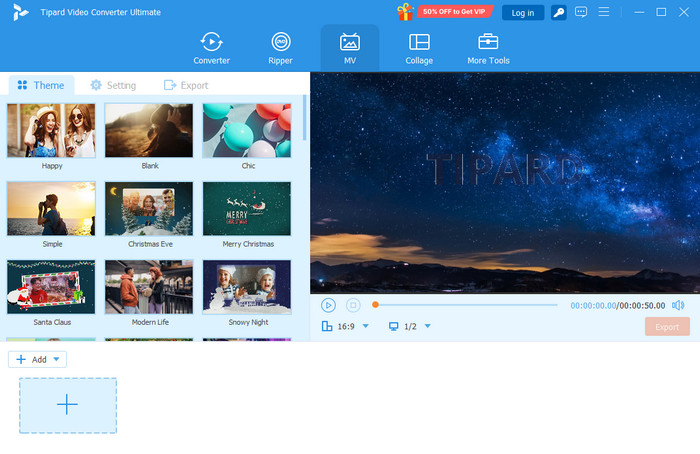
Some might find Icecream Slideshow Maker for PC lacking. If so, you indeed need an alternative to the tool. Tipard Video Converter Ultimate is the most suggested! Therefore, you can make your slideshows even more informative and engaging. One difference is that this tool is available on Mac.
Furthermore, it supports many standard and popular output video formats, including ProRes, MP4, MOV, AVI, MKV, and more. The tool offers many beautiful templates for your slideshows. The title feature can create very beautiful visuals. Also, it has additional features for your media files. It includes the Collage, Converter, Ripper, and more tools.
Conclusion
The Icecream Slideshow Maker free and pro versions are explained in this post. It helps you decide which one you will be using. The pros, cons, key features, ratings, user experience, and the best alternative are introduced. Tipard Video Converter Ultimate is that tool! It offers beautiful templates for your slideshows. Downloading it will help you know more about the tool.
More Reading




About the Author


 Tipard Video Converter Ultimate