

Creating a training video is one of the most effective methods to demonstrate processes, share knowledge, and engage learners in a clear and visual format. Whether you are guiding a new employee, imparting knowledge to students, or guiding customers through products, a well-made video can make complicated information easy to understand. In this tutorial, we will walk you through the important methods to create the best training videos using an excellent video editor. With that, start reading this article, and learn more about the discussion.

Part 1: Why You Should Create a Training Video
Making a training video is an ideal move if you want to deliver information in a way that is clear, easy to revisit, and engaging. Compared to text-based guides, video combines visual and audio to make learning more memorable and effective. To get more insight into why you need to create training videos, you can check the details below.
Improve Understanding
Videos can show and demonstrate procedures step by step. With this technique, you can make a complicated task easier to grasp. Plus, learners can see exactly how a certain thing is done rather than just reading about it. This is perfect if you want to show how to do sports, how to cook, how to fix things, and more.
Consistency in Training
A tutorial video ensures that every viewer receives the same message. This way, it can reduce miscommunication and maintain the quality across individuals and teams.
Accessibility and Flexibility
You should create a tutorial video if you want your users to watch it anytime and anywhere. This is ideal for remote learners or busy professionals who need flexible learning options. With this strategy, you don’t have to show the demonstration again and again.
Part 2: Key Elements of an Effective Training Video
An effective tutorial video combines structure, clarity, and engagement. It is to ensure that learners retain and absorb information. Among the most important elements are clear objectives, concise explanations, interactive features, and engaging visuals that keep viewers/audience involved.
Clear Learning Objectives
Every training video should start with identifying the core objective. Learners need to know exactly what skills or information they will obtain after watching the video. This can set expectations and help measure success.
Engaging Visuals and Audio
To make the video content easier to comprehend, using engaging animations, visuals, and clear narration is a must-have. Visual demonstrations are helpful for step-by-step processes, while adding music to a video can add tones.
Structured Content
Training videos must avoid overwhelming viewers with too much information at once. To improve retention and keep attention, it is better to break content into short and structured segments. This way, learners can focus while watching.
Interactive Elements
When making tutorial videos, it is better to add quizzes or icebreakers. It is ideal if you want an active participation from your viewers. It is also perfect for learners who want to apply knowledge immediately and reinforce understanding.
Relatable Scenarios
Aside from giving quizzes to the learners, it is better to provide real-world situations. It makes the training more memorable and practical. Viewers/learners can connect to their own experiences, which increases application and engagement.
Part 3: Excellent Software to Create Training Videos
Are you looking for the best program that can let you create and edit your training videos? In that case, we recommend using Tipard Video Converter Ultimate. With this video editor, there is no doubt that you can get the result you need. It can even offer all the basic and advanced video editing features powered by AI. It includes a video enhancer, trimmer, cropper, watermark remover, upscaler, add subtitle, and more. The best part here is that you can get the best quality of your video up to 4K. Plus, you can save your training video in various formats, such as MP4, M4V, WMV, AVI, FLV, MOV, and more. Thus, if you need the best editor that can help you craft/create effective and engaging training videos, look no further than Tipard Video Converter Ultimate.
To learn how to create training videos effectively, you can use the provided instructions below.
Step 1 Start downloading Tipard Video Converter Ultimate on your computer. Then, launch its interface to start editing your training videos.
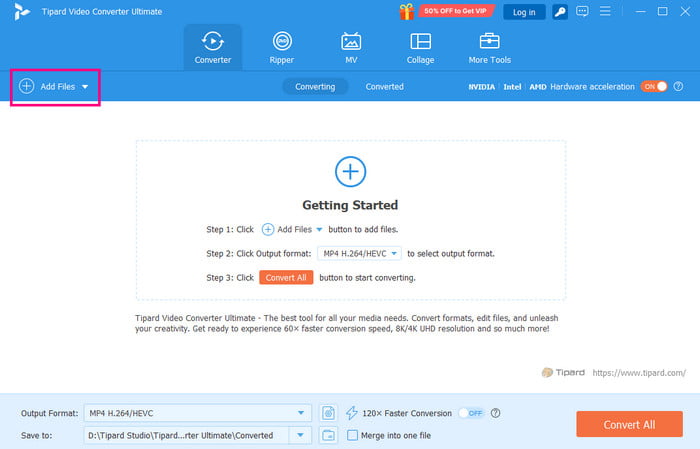
Step 2 Tap the Add Files button to start adding the tutorial video. Note that you can add any video with any format since the software is capable of doing so.
Step 3 Go to the Edit feature and start editing your videos. You can go to the Effects and Filters section to add some effects to your videos.
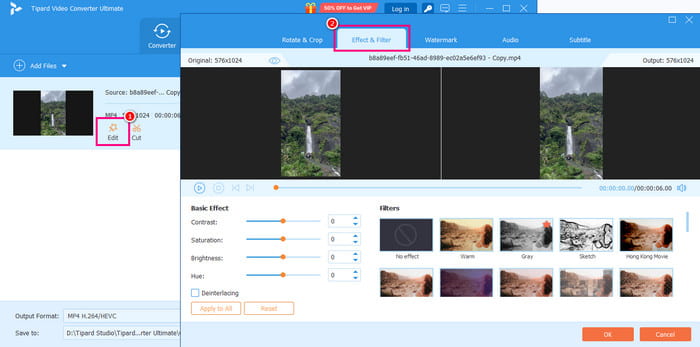
You can even adjust the video brightness, saturation, hue, and contrast.
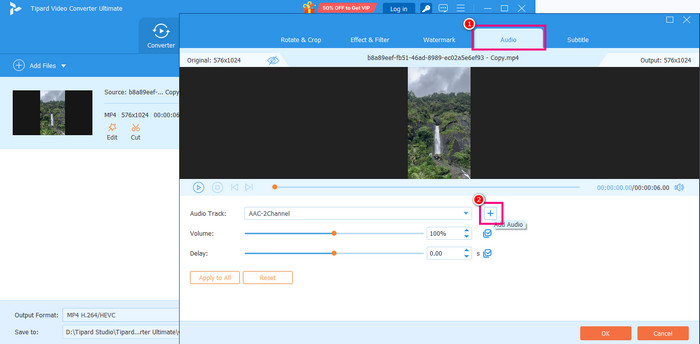
Step 4 Proceed to the Audio section and tap Plus to add music or a sound effect to your video.
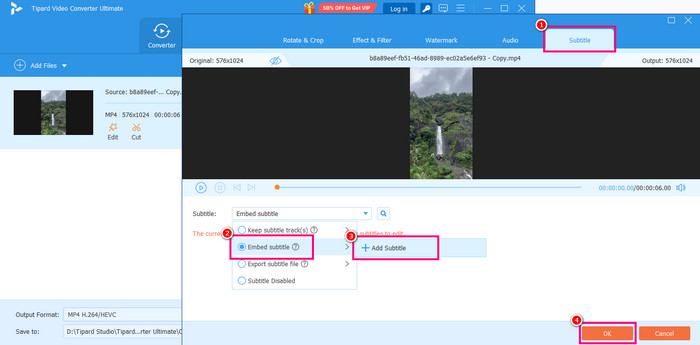
Step 5 You can also go to the Subtitle section and tap Plus to add subtitles to your video. It is perfect if you want to make your content engaging. Once done, click the OK button below.
Step 6 Lastly, you can go to the Output Format section to choose your desired output format. You can even pick your preferred video quality for up to 4K.
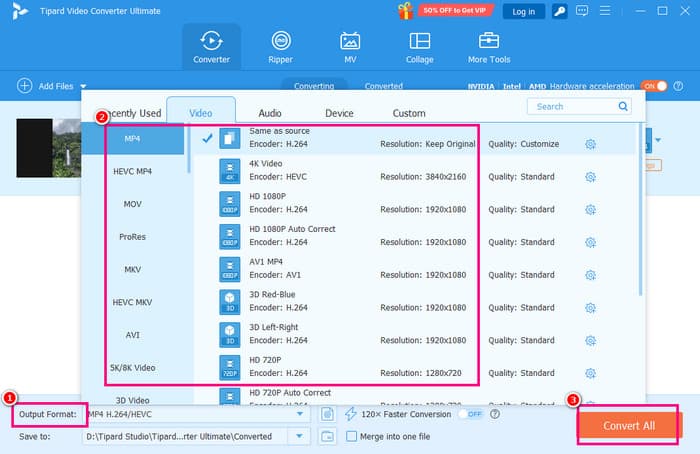
Hit the Convert All function to start the final saving process.
To learn how to make a training video, you can always rely on this method since it has all the features you need. You can even save your video to a better quality, resulting in a satisfying playback. Thus, always access Tipard as your remarkable video editor.
Part 4: How to Optimize Your Training Videos
Optimizing your tutorial videos ensures that they are not just informative. It also must be professional, engaging, and accessible. See the details below and get more ideas about optimization techniques.
- Add Subtitles and Captions - Adding subtitles to MP4 and other videos can help you reach a wider audience.
- Use Professional Voiceovers - A good, professional voiceover adds credibility and keeps learners engaged. This lets you avoid monotone delivery.
- Incorporate Branding Elements - Inserting logos and branded templates reinforces your organization’s identity.
- Optimize Video Length - When creating a video, a 10-minute length will be ideal. Shorter content improves retention and makes it simple for learners to revisit specific topics.
Conclusion
To learn how to make a tutorial video, you should read all the information we have in this article. You will also learn how to optimize your training videos for better results. Plus, if you want to create the best tutorial video, it would be best to use Tipard Video Converter Ultimate. This video editor can give you all the basic and advanced features you need, allowing you to create effective and appealing training videos.
More Reading


About the Author


 Tipard Video Converter Ultimate