

- Part 1. Quick Recommendation: 12 Best TikTok Video Editors
- Part 2. Top 4 TikTok Video Editor Apps on Mobile
- Part 3. Top 4 TikTok Video Editors with AI Efficiency
- Part 4. Top 4 Reliable Desktop Video Editors for TikTok
- Part 5. How to Choose the Right TikTok Editor for Your Content Style
- Part 6. FAQs of TikTok Video Editor
Key Takeaways
- Know what features you should look for in a TikTok video editor
- Compare 12 recommended editors for mobile, AI-powered, and desktop editing.
- Discover how AI tools can speed up trimming, captions, and video enhancement.
- Explore why Tipard Video Converter Ultimate is a reliable desktop solution for creating high-quality TikTok videos.
If you want to make a viral TikTok video, you have to do more than just create good content. The editing process can help with pacing, accentuate important moments, and hold viewers attention until the very end. Choosing the right TikTok video editor is important because every tool offers different features, workflows, and creative options. This guide is for comparing the pros and cons of top editors by mobile, AI, and desktop, explaining the best functions, and which one is the best fit for your content style.
- Part 1. Quick Recommendation: 12 Best TikTok Video Editors
- Part 2. Top 4 TikTok Video Editor Apps on Mobile
- Part 3. Top 4 TikTok Video Editors with AI Efficiency
- Part 4. Top 4 Reliable Desktop Video Editors for TikTok
- Part 5. How to Choose the Right TikTok Editor for Your Content Style
- Part 6. FAQs of TikTok Video Editor
Part 1. Quick Recommendation: 12 Best TikTok Video Editors
| TikTok Video Editor's Name | Best For | Ease of Use | Platform Available |
|---|---|---|---|
| Tipard Video Converter Ultimate | Best Overall Editor on Windows and macOS | Easiest | Windows and Mac |
| CapCut | Beginners & Social Media Creators | Easy | Android, iOS, Windows, Mac, and Web |
| InShot | Quick Mobile Editing | Easy | Android and iOS |
| VN Video Editor | Free Advanced Editing | Average | Android, iOS, Windows, and Mac |
| Adobe Premiere Rush | Editing Across Devices | Average | Android, iOS, Windows, and Mac |
| Wondershare Filmora | AI Video Editing | Average | Windows and Mac |
| VEED.io | Browser-Based AI Editing | Easy | Web-based |
| Descript | Talking Head and Podcast Videos | Average | Windows and Mac |
| DaVinci Resolve | Professional Free Editing | Hard | Windows, Linux, and Mac |
| Adobe Premiere Pro | Professional Content Creation | Hard | Windows and Mac |
| Final Cut Pro | Professional Mac Editing | Hard | macOS |
| Canva Video Editor | Simple Template-Based | Easy | Web, Android, and iOS |
| Show MoreShow Less | |||
Part 2. Top 4 TikTok Video Editor Apps on Mobile
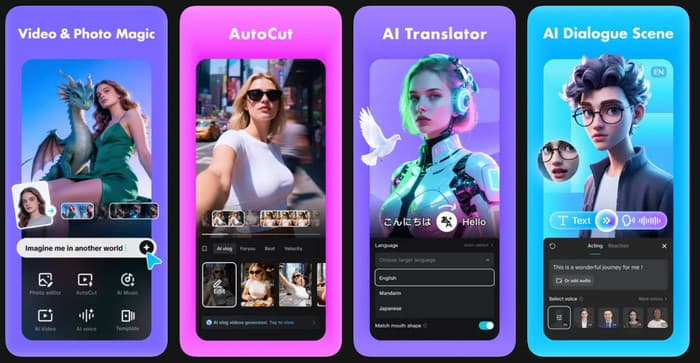
1. CapCut
CapCut is the official mobile video editor from ByteDance and one of the most popular apps for creating short-form content. As a CapCut TikTok video editor, it combines simple editing tools with AI-powered features, making it easy to trim clips, add captions, apply effects, and export high-quality videos. Its direct TikTok integration also helps creators publish content quickly.
- Beginner-friendly interface
- Fast editing workflow
- Direct TikTok integration
- Rich template library
- Some of the tools that use AI have a subscription fee.
- Selected templates with watermarks
Price:
- Free
- Pro starts at $9.99/month
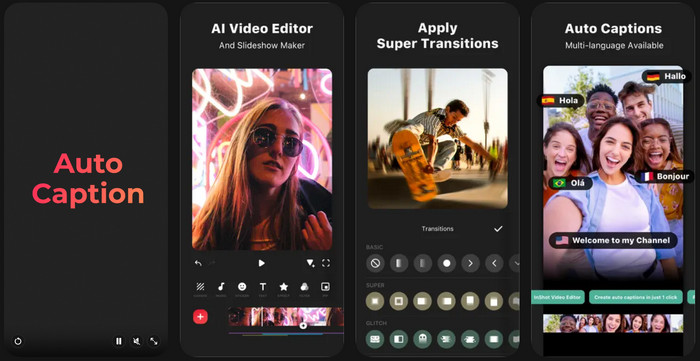
2. InShot
InShot is a user-friendly content creator mobile application designed for the creation of content on social networks. If you are looking for the best video editor for TikTok, this app offers an excellent balance of simplicity and functionality. It allows you to edit videos, add music, add texts, filters, resize canvases of vertical videos, and more. The app's clean interface will help you create high-quality TikTok videos without having to pick up advanced editing skills.
- Simple and user-friendly interface
- The basics of editing video fast.
- Supports a variety of aspect ratios
- High-quality video exports
- Watermark in the free version
- Ads appear on the free plan
- Lacks advanced editing features
Price:
- Free
- InShot Pro starts at $3.99/month
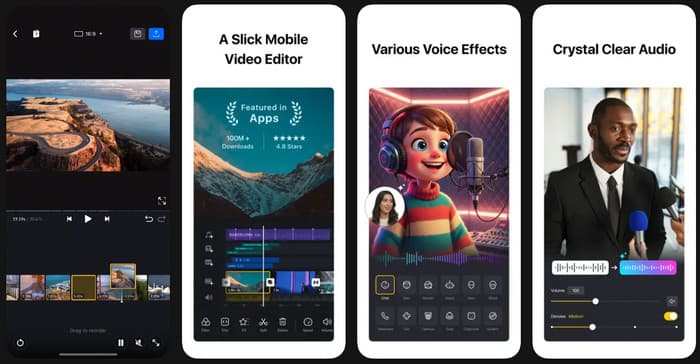
3. VN Video Editor
VN Video Editor is a free mobile editing app that provides advanced editing tools without adding watermarks to exported videos. Many creators consider it one of the best TikTok video editor options because it includes professional features such as keyframe animation, multi-track editing, and chroma key while remaining accessible to beginners. It is an excellent choice for users who want more creative control without paying for a premium subscription.
- Free with no watermark
- Powerful editing tools
- Supports 4K exports
- Aimed at novices and experts
- Smaller template library
- It may take some time to master the interface
- Limited AI-powered features
Price:
- Free
- Optional in-app purchases
4. Adobe Premiere Rush
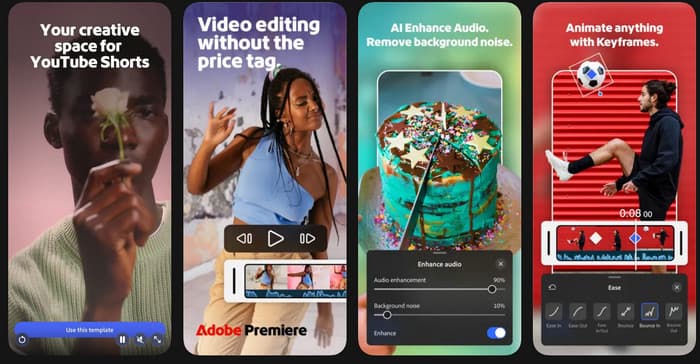
Adobe Premiere Rush is created for creators who edit movies on a number of devices. It's compatible with TikTok video maker, starting a project from your phone and editing it on your computer using Adobe Creative Cloud. It has all the necessary app tools for editing, motion graphics, and audio controls, making it a dependable choice for creating professional TikTok videos that have a smooth workflow.
- Easy and intuitive editing between devices
- A clean and neat interface
- High-quality export options
- Seamlessly connects to Adobe Creative Cloud
- The lack of advanced tools as compared to Premiere Pro
- You need to have an Adobe account to sync to the cloud
- Paid membership can cost a lot of money
Price:
- Free Starter Plan
- Adobe Express Premium starts at $9.99/month
Part 3. Top 4 TikTok Video Editors with AI Efficiency
1. Wondershare Filmora
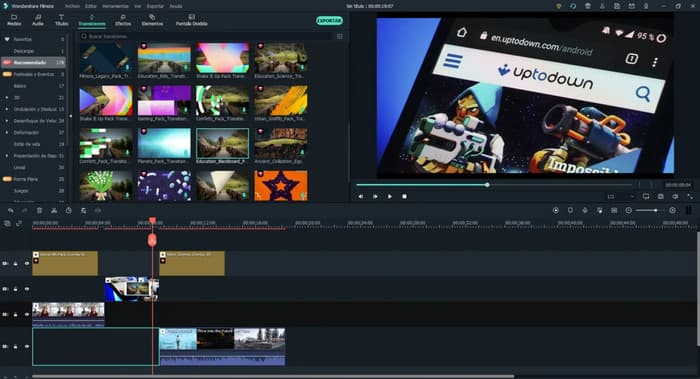
Wondershare Filmora combines traditional video editing with AI-powered tools, making it a great video editor for TikTok for creators who want to produce polished videos faster. Its AI features automate repetitive tasks such as background removal, audio cleanup, motion tracking, smart cutout, and text-to-video generation, making the work efficient. These tools reduce editing time while helping users create professional-looking TikTok videos with minimal effort.
- Beginner-friendly interface
- Powerful AI editing tools
- A large library of effects and templates
- Supports high-quality export of the video
- Some AI tools require a paid plan
- Free version adds a watermark
- Can be resource-intensive on older computers
Price:
- Free Trial
- Paid plans start at $49.99/year
2. VEED.io
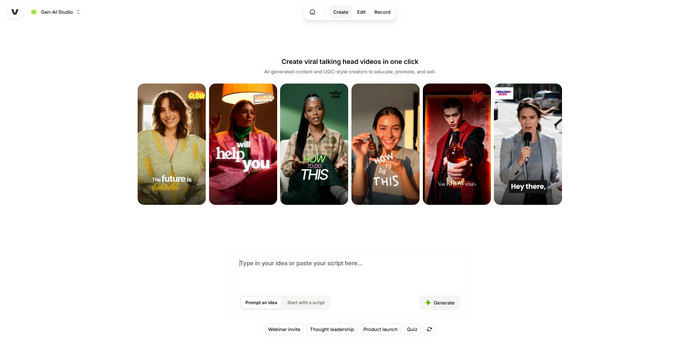
VEED.io is a browser-based AI TikTok video editor that allows users to edit videos online without installing software. It includes AI-powered subtitle generation, text-to-speech, eye contact correction, screen recording, and cloud collaboration tools. Since everything runs in a web browser, creators can edit and publish TikTok videos from almost any device with an internet connection.
- No software installation necessary
- Easy-to-use interface
- Fast subtitle generation
- Applicable to any up-to-date browser
- Requires a steady Internet connection
- Limited features in the free plan
- The quality of exports depends on the subscription
Price:
- Free
- Paid plans start at $12/month
3. Descript
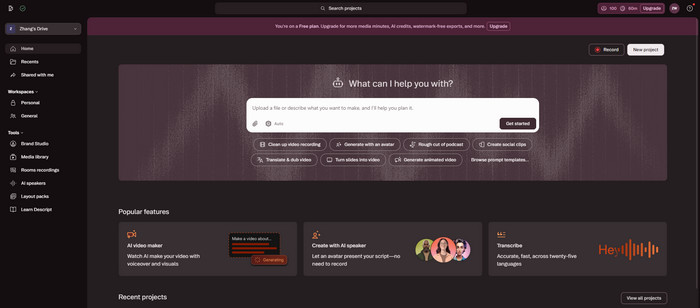
Descript is an AI video editor for TikTok that simplifies video editing by letting users edit videos as if they were editing a document. It automatically transcribes speech, removes filler words, generates captions, and supports AI voice cloning. These features make it an excellent option for tutorials, podcasts, interviews, and other talking-head TikTok videos.
- The ability to edit a text document using only the text is unique
- Accurate speech transcription
- Great for audio presentations
- Built-in recording tools
- Not as effective for complex visuals
- AI voices are a subscription service
- When using it for the first time, it is necessary to review how to use it
Price:
- Free
- Paid plans start at $16/month
4. Canva Video Editor
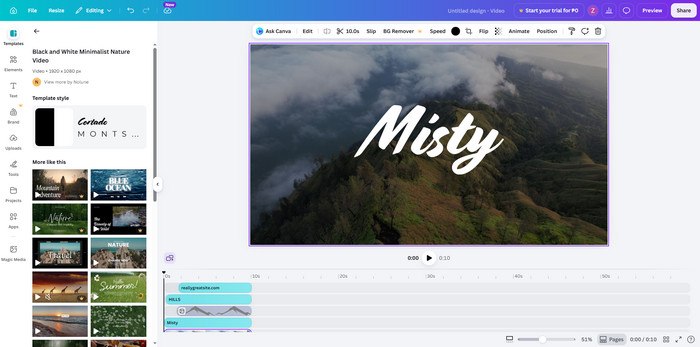
Canva Video Editor is a TikTok AI video maker that combines drag-and-drop editing with AI-powered design tools. It has pre-designed TikTok templates, features of TikTok Magic Studio, stock media, text animation, and one-click resize for social media. Users can produce attention-grabbing TikTok video content with ease, even for those who lack the technical expertise of video editing.
- Extremely easy to use
- Thousands of highly customizable templates
- Cloud-based editing
- Great for beginners, teams, and everything in between
- The app lacks advanced features for editing in the timeline
- Not all high-quality assets are available on Canva Pro
- Needs Internet connection
Price:
- Free
- Canva Pro starts at $12.99/month
Part 4. Top 4 Reliable Desktop Video Editors for TikTok
1. Tipard Video Converter Ultimate
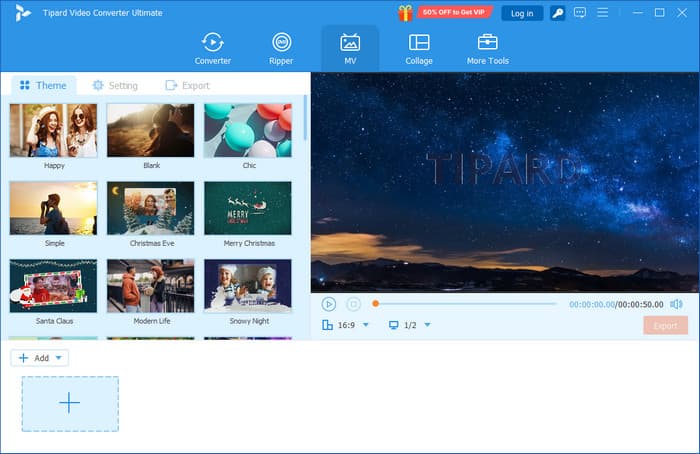
Tipard Video Converter Ultimate is an all-in-one TikTok video editor for Windows and Mac that helps creators edit, convert, and enhance videos before uploading them to social media. It supports almost every popular video format, so that you can import footage from smartphones, cameras, or other devices without compatibility issues.
The software also includes ready-made output presets for TikTok, Instagram, YouTube, Facebook, and other platforms, making it easy to export videos with the right resolution and format. In addition, it's built-in MV Maker and Video Collage templates help users create engaging short-form content without advanced editing skills.
- Supports all video and audio formats available
- Includes TikTok, Instagram, and YouTube export presets
- It features a built-in MV Maker and Video Collage templates
- Fast conversion with GPU acceleration
- Suitable for everyone with an easy to understand interface
- Free trial has feature limitations
- Fewer advanced timeline editing tools than professional software
- Available only for Windows and Mac
Price:
- Free Trial
- Paid plans start at $18.00/month
2. DaVinci Resolve
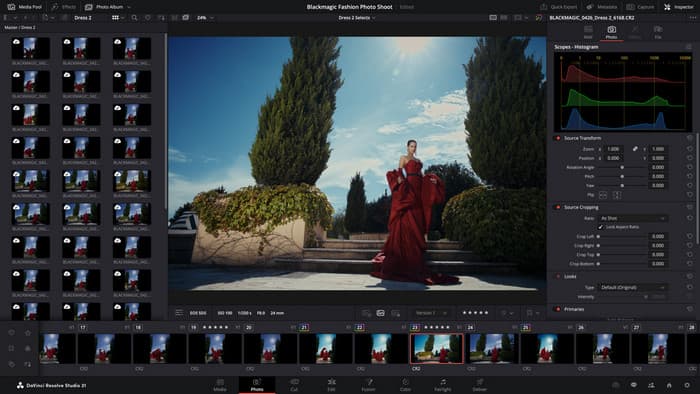
When editing videos is the goal, DaVinci Resolve is one of the most popular free video creators to edit TikTok videos without paying any subscription fee. It features video editing, high-end color correction, visual effects, and professional audio editing all in one application. It's a bit more complex, but it's fantastic for creators who are looking for TikTok videos that are more cinematic.
- Powerful free version
- World-class colour grading features
- The use of professional audio and visual effects
- Enables 4K and above resolution support
- Steep learning curve
- Requires a powerful computer
- The interface could be a bit daunting for the novice user
Price:
- Free
- DaVinci Resolve Studio: $295 (one-time purchase)
3. Adobe Premiere Pro
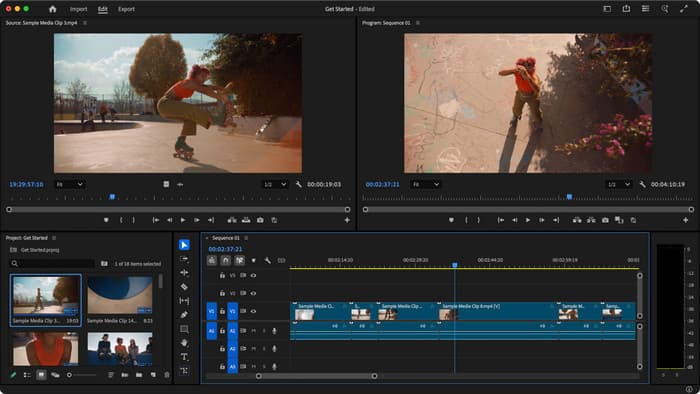
Many professionals consider Adobe Premiere Pro as the best PC video editor for TikTok because it offers advanced editing tools for creating high-quality short-form videos. It includes AI-powered features, multi-track editing, motion graphics, and seamless integration with Adobe Creative Cloud applications. It is well-suited for creators who need complete creative control over every project. Plus, you can use Premiere Pro to improve video quality.
- Professional editing features
- The integration with Adobe is very good
- AI-powered editing tools
- Frequent feature updates
- Subscription required
- Higher system requirements
- Learning curve for beginners
Price:
- Starts at $22.99/month
4. Final Cut Pro
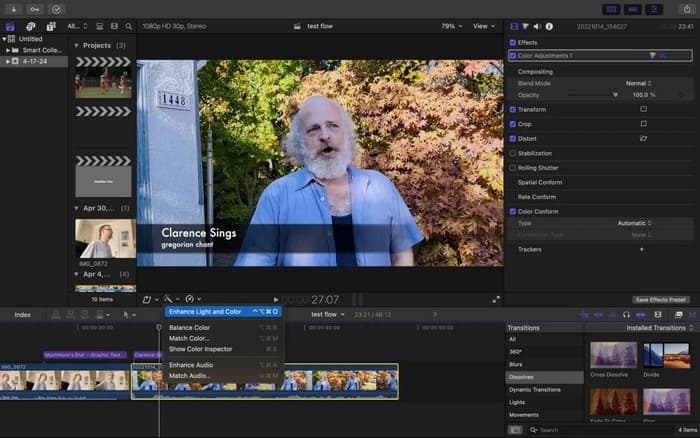
Final Cut Pro is a free TikTok video editor for PC alternative for Mac users through its free trial, offering optimized performance on Apple devices and professional editing features. It provides a Magnetic Timeline, fast rendering with Apple Silicon, advanced color grading, and cinematic effects, making it an excellent choice for creators who produce TikTok videos on macOS.
- Optimized for macOS
- Fast rendering performance
- Professional editing tools
- One-time purchase after the trial
- This feature is not available on Mac
- No Windows version
- Premiere Pro has more third-party plugins than Final Cut Pro
Price:
- Free Trial
- One-time purchase: $299.99
Part 5. How to Choose the Right TikTok Editor for Your Content Style
Choosing the right TikTok editor depends on how you create your videos. Some editors are made for quick edits on a phone, while others offer advanced tools for professional content. Here are a few things to consider before making your choice.
1. Choose Based on Your Skill Level
For the novice, search for an editor that has an intuitive interface and has templates pre-prepared. Simple-to-learn apps such as Canva Video Editor, InShot, and CapCut. Those with more experience in editing can make use of more sophisticated options in DaVinci Resolve and Adobe Premiere Pro.
2. Decide Which Device You Use
Consider the environment in which you edit your videos. Mobile applications offer the convenience of editing on the go, whereas desktop software provides a more robust environment for editing with additional options. If you are editing on both, it is easy to switch between devices using Adobe Premiere Rush.
3. Check the AI Features
AI can assist with editing, speeding up the process for you. The automatic caption, background removal, and intelligent cutout assist you in producing videos more easily. Veed.io, Descript, and Canva Video Editor have helpful AI tools, too.
4. Make Sure It Has the Right Export Options
Choose an editor that can export high-quality videos for TikTok. It is even better if it includes presets for other platforms like Instagram and YouTube. Tipard Video Converter Ultimate offers ready-made export settings so that you can save videos in the right format with one click.
5. Compare the Price
Many editors offer a free version that is suitable for basic editing needs. You can upgrade to a paid plan if you require additional effects or AI tools or if you want higher-quality exports. Choose the editor that you can afford and that satisfies your needs.
Part 6. FAQs of TikTok Video Editor
Does TikTok add a watermark to edited videos?
Yes. TikTok adds a watermark with your username when you download a video from the app. If you want a TikTok video without a watermark, edit and save it using a third-party video editor before uploading it to TikTok.
Why is TikTok's editing feature limited?
TikTok is made for quick and simple video editing. It has some simple tools, such as cutting, filters, text, and effects. Still, it lacks advanced features like multi-track editing, keyframe animation, and extensive color editing that you can find on dedicated video editors. Use a professional video editor for additional editing capabilities.
Can I edit TikTok videos on TikTok PC?
Yes, although it is limited to very basic editing. Before you post, you can cut video footage, add captions, and select a cover image. For more complicated editing, it's advisable to edit your video using desktop video editing software before uploading to TikTok.
Conclusion
Finally, you can now choose the right video editor for TikTok, depending on the editing style, skill level, and the features you are looking for. Mobile apps are great, AI offers a faster way to edit things out, and desktop software offers detailed video editing. With the right tool, you can create amazing TikTok videos faster, easier, and more enjoyable.

All-in-one video toolbox: convert, edit, upscale, enhance, and compress your videos easily
100% Clean & Safe
100% Clean & Safe

More Reading

About the Author


 Tipard Video Converter Ultimate