As the most professional and easy-to-use video converting tool, Tipard Video Converter provides you with powerful converting functions to help you convert any popular video, such as MPG, MPEG, MPEG2, SWF, FLV, VOB, MOD, MP4, H.264, M4V, AVI, WMV, 3GP, 3GPP, MOV, DivX, XviD, QuickTime Video, DV, MJPG, MJPEG, MPV, etc. to iPod and any other popular video format, like MP4, WMV, H.264/AVC, DivX, XviD, MOV, etc. Moreover, it can extract audio from video file and convert it to the audio format you need.
Preparation:Download and install Tipard Video Converter, and then start the converting operation.
Double click this video converter software, and click the "Add File" button to add the video file you want to convert.
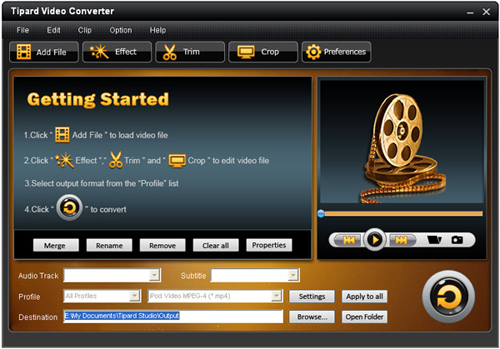
Based on the formats supported by your portable devices, you can select the output format for the movie from the "Profile" column and set the destination folder. Also you are allowed to select your preferred audio track and subtitle for your video.

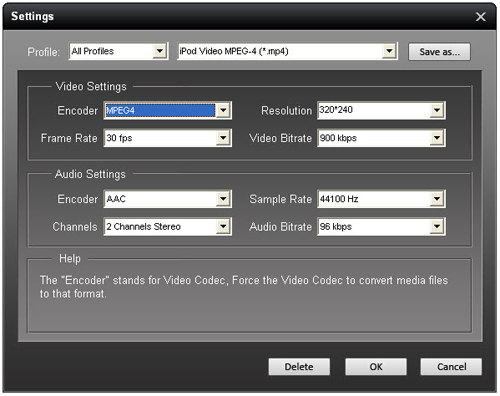
Detailed video and audio settings are provided by this Video Converter for you to adjust, such as video Encoder, Frame Rate, Resolution, Bitrate and audio Encoder, Channels, Bitrate, Sample Rate, etc. Even more, you can input your own parameters. The well-customized profile can be saved as "User-Defined" for your later use.
In addition, Tipard Video Converter also provides you with more assistant functions. You can trim any certain segment of a video, cut off the unwanted playing region, watermark video, merge video files into one, and preview the video effect before converting. Also you are allowed to adjust video effect on brightness, contrast, and saturation. Then you can get the customized output video effect.