

BurnAware is among the DVD-burning software you can access on your computer. What makes it a better tool is that it promises a smooth burning process, resulting in a better output. Now, if you want to learn more about the program, it would be best to check this article. We are here to give you a detailed and honest review of BurnAware, including its features, pricing plans, pros, cons, scores, and more. After that, you will also discover the best alternative to the tool for a better burning process. Thus, read here and learn more about the discussion.

Part 1. What Can BurnAware Do
BurnAware is an easy-to-use and user-friendly disc burning software created for both home and professional use. It lets users create and copy CDs, Blu-ray discs, DVDs, and M-Discs. The good thing about this software is that it is known for its lightweight design and lack of bloatware. It can even offer a robust set of features without overwhelming the user, which makes it a reliable alternative to the built-in Windows burning tools or any heavier commercial suites. Now, are you interested in exploring what the software can do? In that case, you can check its features below to get more insights.
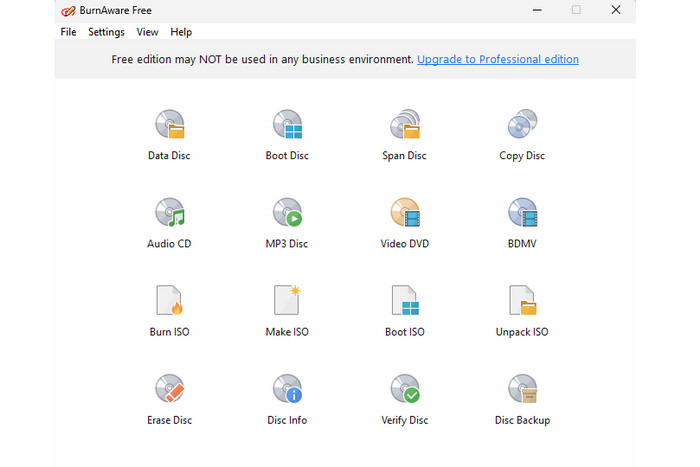
Burn Disc
The software's core feature is to burn discs. What makes the program powerful is that it can help you burn discs smoothly and quickly. You can even deal with various discs, such as DVDs, Blu-rays, CDs, and more. Additionally, you can ensure that you can get the best quality since the program is capable of maintaining the quality of your audio and media files.
Disc to ISO
BurnAware DVD Burner is also capable of turning your DVD into an ISO file. This feature is ideal if you want to save and keep your disc in a smaller file size and burn it in the near future. The good part about this feature is that you can save more items on your device without worrying too much about your storage space.
Copy Disc
This free DVD burning software is also capable of giving its Copy Disc feature. With the help of this feature, you can successfully copy your disc and transfer it to another disc. It is an ideal method if you want to create a backup of your file or get your collections for further preservation.
Offer a Simple User Interface
Another thing that the program can do is to provide you with an excellent and comprehensive user interface. With its understandable layout, you can access all the functions without encountering any difficulties. Aside from that, any user can access this software, especially non-professionals. Thus, for an effective and fast-burning process, choosing the software might be a wise choice.
Part 2. Detailed Review of BurnAware
From the previous section, you have learned its core features. Now, if you want to learn more about its advantages, disadvantages, pricing plans, and other information, you can check all the details below.
Price of BurnAware
Is BurnAware free? Well, the software can offer its free version for a simple burning process. However, if you want to access all of its features, especially the advanced ones, the best thing to do is to get its paid version. Besides the free plan, there are two more plans that you can access. To see all the plans and their features, you can view the comparison table below.
| Plans | BurnAware Free | BurnAware Premium | BurnAware Professional |
|---|---|---|---|
| Price | $0.00 | $29.95 | $39.95 |
| Features | • Burn data, audio, and video discs. • Make and burn ISO images. • Backup discs (copy to ISO images). |
• Burn data, audio and video discs. • Make and burn ISO images. • Backup discs.Video DVD converter. • Disc spanning and copying |
• Burn data, audio and video discs. • Make and burn ISO images. • Backup discs.Video DVD converter. • Disc spanning and copying • Data recovery and audio grabber. • Multiburn tool for ISO images. • Use in a business environment. |
Advantages of BurnAware
- The software has its free version to check its capability in terms of burning discs.
- Its main user interface is simple to follow.
- It can offer a smooth process of burning, creating, and copying discs.
- It also supports various output audio formats, such as MP3, WAV, FLAC, WMA, and more.
- What we like about the software is that it can deal with various discs, such as DVDs, Blu-rays, CDs and more.
- It can also burn a YouTube video to DVD, as well as other videos from various platforms.
Drawbacks of BurnAware
- The software doesn't offer a Mac version.
- There are no DVD editing options. With that, you have to access a separate program to enhance your file.
- The free version has various restrictions.
- The tool's layout is looking outdated, which might not be appealing enough to some users.
Our Test
Rating: 4 / 5 (rated by TechRadar)
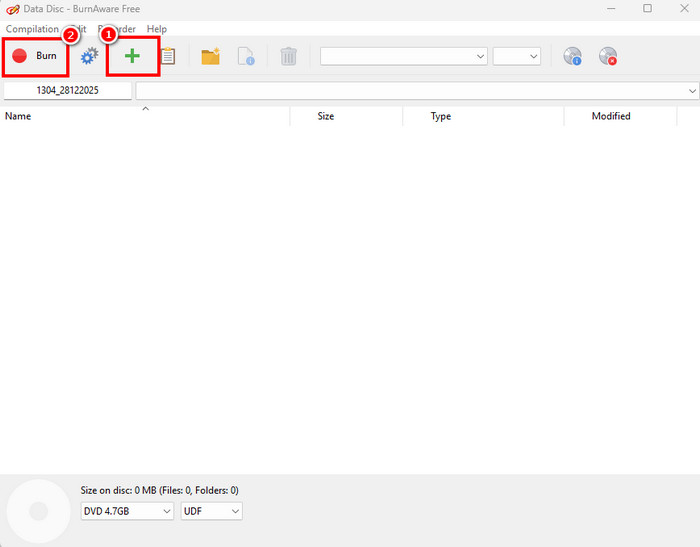
After using BurnAware DVD Burn software, we can tell that it is the most reliable DVD burning software. It can give you a comprehensive layout and all the features you need. Plus, you can access its free version, so there is no need for you to spend a single penny. Thus, when it comes to burning your disc, you can still operate this program.
Part 3. Best Alternative to BurnAware
BurnAware is an effective tool for burning discs. However, when using its free version, there are various restrictions that you might encounter, which makes the process annoying. Thus, if you want to replace BurnAware, we recommend using Tipard DVD Creator. With this DVD maker, you can ensure that you can get the result you need without any problem. The best part here is that its main interface is more appealing, and all of its functions are accessible. You can also add a DVD menu to your file for a better output. Unlike BurnAware, Tipard can also give you various editing functions, allowing you to enhance your file before the saving process. You can even insert audio and subtitle tracks, and burn a DVD with multiple disc drives. Thus, if you need the best alternative to BurnAware, it would be best to use Tipard DVD Creator.
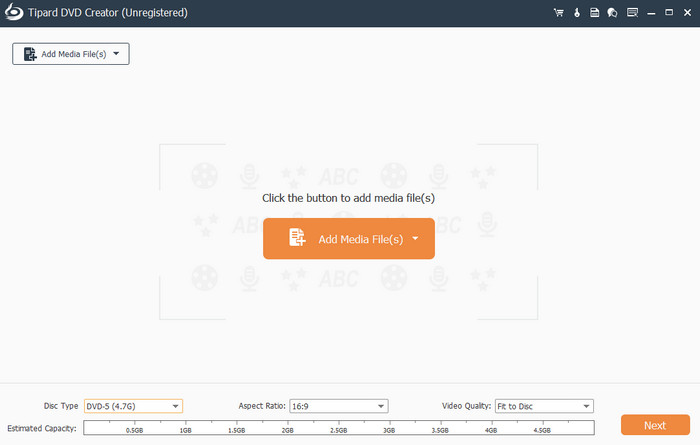
You can view the table below and learn more about Tipard DVD Creator and BurnAware software.
| Tipard DVD Creator | vs. | BurnAware |
|---|---|---|
| Simple and Engaging. | User Interface | Simple but outdated looking. |
| Fast | Burning Process | Fast |
 |
Offers a Customizable DVD Menu |  |
|
Offers Editing Features | |
| MP4, MKV, WMV, AVI, FLV, and more. | Video Formats Input | Limited |
Conclusion
BurnAware software is among the tools you can use to effectively burn your DVDs. It can even give you a smooth burning process. However, since its layout is looking outdated and has various restrictions when using the free version, this software might not be ideal for some users. With that, if you need an alternative to the tool, you can use Tipard DVD Creator. This program is ideal since it can offer all the features without any limitations. You can even access its editing features to ensure the best output after the burning and editing process. Thus, rely on this program and achieve your desired results.
More Reading
About the Author


 Tipard DVD Creator