

An Automatic Ripping Machine is a tool that simplifies the process of disc ripping. It can handle DVDs, Blu-rays, and CDs with less manual work. Do you want to know more about it? Like, what are its core key features? How does it work? Who is it for? Who should not use it? All you need to do is keep reading; this review covers them all.
Part 1. What is an Automatic Ripping Machine
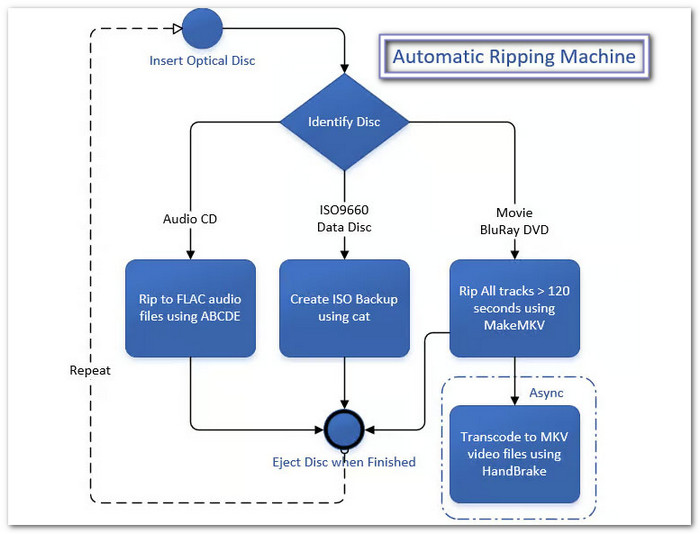
Automatic Ripping Machine (ARM) is an open-source tool for ripping DVDs, Blu-rays, and CDs. It runs on a server or computer. It can also run on a home NAS.
The best part is its hands-off design. Put a disc into the drive. ARM detects it and starts the right process. It can also name and sort the files for you.
This makes ARM useful for people who keep large media collections. It also works well with media servers such as Plex and Jellyfin.
Automatic Ripping Machine Core Features
- ARM detects a disc as soon as you insert it. It can handle DVDs, Blu-rays, CDs, and data discs.
- ARM checks online data to identify movies and TV shows. It can then create clean names and folders.
- ARM can work with tools like MakeMKV and HandBrake. It can also follow different paths for CDs and data discs.
- ARM can place jobs in a queue. It can also work with multiple optical drives.
- ARM can run without a monitor. Its web interface lets you check jobs and logs from a browser.
- Supported hardware can speed up video encoding. Options can include Intel Quick Sync and NVIDIA NVENC.
- ARM can send alerts when a job finishes. This saves you from checking the server repeatedly.
Part 2. How Does the ARM Automatic Ripping Machine Work
ARM works as an automation layer. It controls several tools behind the scenes. Each tool has a different job. Knowing how they work together can help with setting up the automatic ripping machine.
Disc Detection and Metadata
First, ARM detects the disc. It checks what type of disc it is.
ARM can also use the OMDb API to find media details. This helps it create useful names such as Movie Title (Year).
Clean names make it easier for Plex and Jellyfin to find your files.
The Extraction Phase
Next, ARM starts the needed ripping tool.
For video discs, this can include MakeMKV. The tool extracts the video data from the disc.
ARM then moves the files to the next step.
Ejection and Processing
The disc can be ejected after the first process is done. This lets you put in another disc.
The next task can then wait in a queue. ARM can send the files for encoding or other processing in the background.
This setup is useful when you have many discs to copy.
Tools That Work With ARM
ARM uses several tools to handle different jobs.
- MakeMKV: Extracts video from DVDs and Blu-rays.
- HandBrake: Converts large video files into smaller files. It can create formats such as MP4 and MKV.
- abcde: Rips audio CDs into digital music files.
- Docker: Helps run ARM and its required components in a single container. This makes Automatic Ripping Machine Docker setups useful on Linux systems such as Ubuntu and Unraid.
Part 3. Tips for Using an Automatic Ripping Machine
A few simple tips can make ARM (Automatic Ripping Machine) easier to set up, faster to run, and more reliable for your disc collection.
Use a Compatible Drive
Blu-ray and 4K UHD discs can have strong copy protection. A compatible drive and proper firmware may be needed for certain discs.
For 4K UHD use, many users rely on drives with LibreDrive-compatible firmware. Check your exact drive model before changing its firmware.
Use Fast Temporary Storage
Ripping and encoding can create large temporary files. An M.2 or NVMe SSD can help. A fast SATA SSD can also work well. This can reduce slowdowns during processing.
Add an OMDb API Key
An OMDb API key can help ARM find movie and show details. Add the key to your ARM setup if your version requires it. This helps ARM create better file and folder names.
Turn On Hardware Acceleration
Your hardware may help speed up video encoding. ARM can work with options such as Intel Quick Sync and NVIDIA NVENC when the setup supports them. This can decrease the load on your CPU. It can also make encoding much faster.
Part 4. Who Is the Automatic Ripping Machine Best For
The Automatic Ripping Machine is best for home media server users. It is a good choice if you have a large DVD, Blu-ray, or CD collection. It can save you from repeating the same steps for every disc. ARM is also useful for Plex, Emby, and Jellyfin users who want an automatic ripping machine to manage their media collection.
ARM works best for users who are comfortable with Linux, Docker, and server storage. You can load a disc and let ARM take over. It detects the disc, starts the needed tools, names the files, and moves them to your media folders.
That makes ARM a good pick for large collections and hands-off ripping. If you only have a few discs, a normal ripping app may be easier. ARM shows its real value when you have many discs to process.
Part 5. Who Should Not Use ARM
ARM is not a tool that works right away after you install it. It is not suited for people who do not know how to use servers, Docker, and other tech tools. If you want a simple app with easy buttons, ARM can be hard to set up and use.
Alternative Solution: Tipard Blu-ray Converter
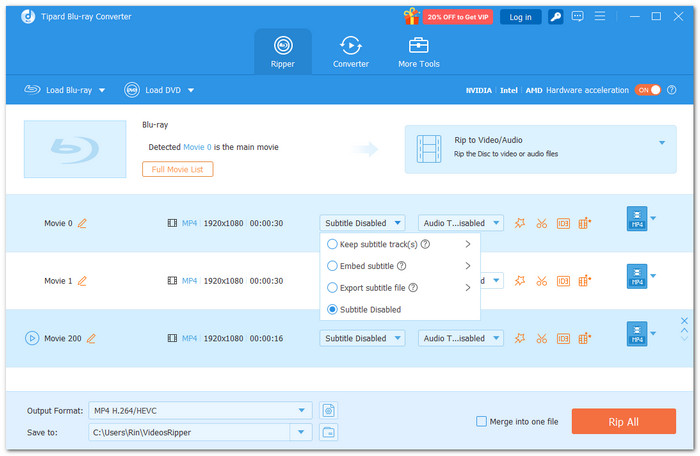
If the Automatic Ripping Machine seems too hard to use or you want more control, Tipard Blu-ray Converter is a simpler choice. It lets you pick what you want to rip. You can pick the title, chapter, audio track, and subtitle track you need.
Tipard Blu-ray Converter can also handle major Blu-ray and DVD protections, including AACS, BD+, BD-J, Cinavia, and region codes. You can choose formats such as MP4 or MKV. You can also fine-tune video and audio settings to get the output you want.
User Review from Trustpilot: Awesome team with a great program for Blu-ray and video. It also offers a lifetime plan. The customer service team is also quick to respond and fix bugs or issues. A solid choice for Blu-ray and video needs.
Ratings: 4.9/5 stars on the official website and 4.5/5 stars on Trustpilot.
Part 6. FAQs of the ARM Automatic Ripping Machine
Is the Automatic Ripping Machine available for Windows?
No. ARM is mainly designed for Linux-based systems. It is not a native Windows application.
What is the Automatic Ripping Machine default login?
ARM does not have a universal default login for every installation. The username and password can depend on how ARM was installed and configured.
Can ARM handle damaged discs?
It depends on the disc. Scratches and read errors can stop the ripping process. ARM cannot guarantee a successful rip from every damaged disc.
Conclusion
The Automatic Ripping Machine setup can save time when you have many discs to rip. It works well for home media servers. But some users may want an easier tool. Good thing, Tipard Blu-ray Converter offers simple controls and flexible output options. It makes it easy to choose how you want to rip and save your Blu-ray content.

Play Blu-rays and multimedia files with the best video and audio quality
100% Clean & Safe
100% Clean & Safe

More Reading


About the Author


 Tipard Blu-ray Player