

Want to convert DVD to WMV format? Well, some users still have collections of DVD files with personal recordings, movies, shows, and other content. The only problem is that almost all modern devices and media players don't support DVDs, resulting in playback errors. So, if you want to play your DVDs, the best solution is to turn them into a digital file. Thankfully, this tutorial will offer the best methods you can use to digitize your DVDs. Thus, read this guide and learn more about the best DVD to WMV conversion process.

Part 1. Why Convert DVD to WMV
Want to know why you must convert DVD to WMV format? Well, there are various reasons why converting your DVD is suggested. To explore some of them, you can check the information in this section.
Better Compatibility
In this modern era, DVDs are becoming outdated. Almost all modern devices and media players are incapable of supporting DVD, which can result in playback errors. For better compatibility and smooth playback, converting DVD to WMV is among the best solutions.
Smaller File Size
We can't ignore the fact that DVDs contain large file sizes. Since WMV uses efficient compression, you can expect a balanced file size and quality. It is ideal if you want to collect and store videos on your devices without worrying about your storage space.
Easier to Edit, Share, and Upload
WMV is more convenient than DVD in many ways. After converting the DVD to WMV, you can share the video online, edit it for video enhancement purposes, and upload it to social media for posting.
Preserve Content
You must convert DVD videos to WMV to preserve the content. Since DVDs are becoming obsolete, the best way to preserve the videos is to save them as a digital file. That way, you can keep them on your computers, hard drives, mobile devices, and other platforms. This can also let you access the videos easily.
Part 2. How to Choose the Best DVD to WMV Converter
With so many DVD to WMV converters out there, it might be confusing which to choose. In that case, let us give you some guidance you can follow when choosing the best tool for transcoding DVDs to WMV format.
Conversion Process
Since you are looking for the best converter, always check the conversion process. A good converter must offer a smooth conversion process with a fast conversion speed. This ensures that users can get the best result without consuming much time.
Simple User Interface
Always consider the main interface of the DVD to WMV converter. Some converters are easy to utilize, while some are not. If you are a beginner, always use a converter that has a comprehensive layout for a smoother conversion.
Supported Format
Besides WMV, the converter must also support a wide range of formats. That way, you can digitize your DVD to any format, like DVD to MP4, MKV, AVI, and more.
Output Quality
For a satisfying video playback, you must use a DVD converter that supports high-quality output resolution. Various tools can convert and save the video with the best quality. They can let you save the converted file to 1080, 4K, and even 8K.
Security and Privacy
A good DVD to WMV converter ensures that all your information and files are safe. Ensure that the converter you use won't share any of your data without your consent. You can also check some reviews on the internet to see what other people say about a certain converter.
Part 3. The Best Way to Convert DVD to WMV on Windows and Mac
Are you looking for the best DVD to WMV converter? In that case, we would like to introduce Tipard DVD Ripper. When it comes to converting and ripping DVDs, there is no doubt that this program can give you the result you need. It can support various WMV output presets for smoother playback. Plus, it can easily load and bypass DVD region locks and encryption, ensuring that you can deal with any DVD during the conversion process. What's more, you can tweak your content by adding and managing audio and subtitle tracks. Lastly, Tipard has a super-fast ripping process, allowing you to get the result in just a few seconds, making it a powerful DVD to WMV converter.
To rip a DVD to WMV, you can follow the instructions we have provided below.
Step 1Download and install Tipard DVD Ripper to your desktop. Then, start with the DVD to WMV conversion process. Ensure that your DVD is already inserted into your computer.
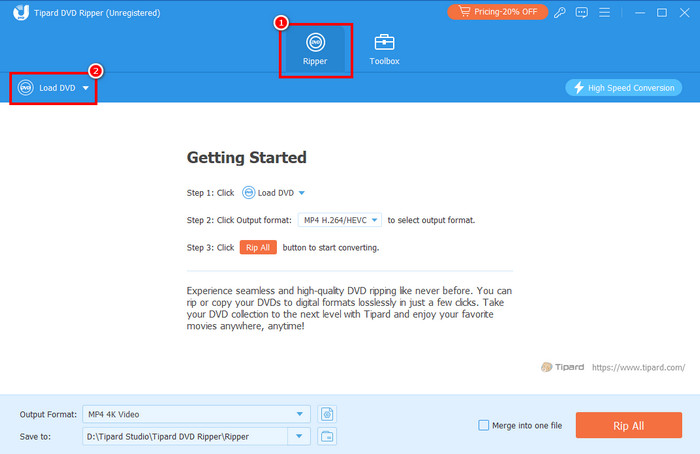
Step 2After you launch the interface, click the Ripper feature and add the DVD by clicking the Load DVD button.
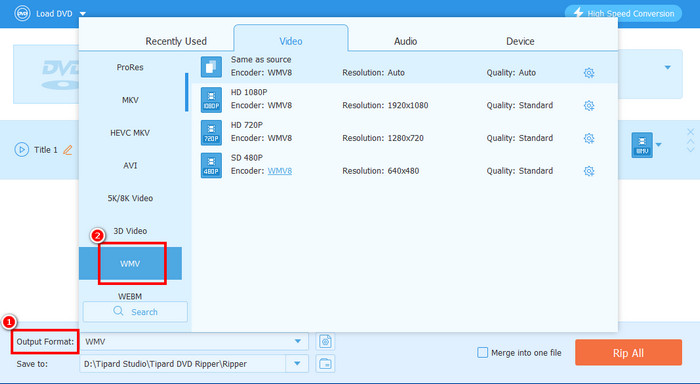
Step 3For the next process, proceed to the Output Format section and choose the WMV format. You can also select your desired frame rate, encoder, quality, and other parameters.
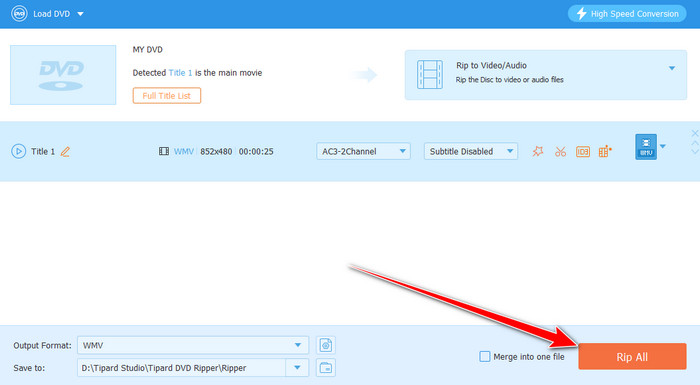
Step 4Finally, click the Rip All button below to start converting your DVD into WMV format. Once done, you can start playing, sharing, and editing your videos.
Part 4. Best Resolution when Converting DVD to WMV
Want to know about the best resolution when converting DVD to WMV? Well, for NTSC discs, the best resolution is 720×480. For AL discs, the ideal resolution is 720×576 since it matches the actual detail present in the source. These resolutions ensure that you can enjoy the content during the video playback.
Part 5. FAQs about Converting DVD to WMV
Is it easy to convert a DVD to WMV?
It depends on the converter or ripper you use. If you want a simple conversion process, you can access Tipard DVD Ripper. This software can offer a comprehensive user interface and smooth conversion process, making it a suitable converter for non-professional users.
Will the quality be the same after converting the DVD to WMV?
Most converters can preserve the original quality of the video after the conversion process. That way, you can enjoy the content without worrying about the output quality.
Can I batch convert a DVD to WMV?
Absolutely, yes. If you are using a converter or ripper that supports batch conversion, you can deal with multiple DVDs at once. Some of the converters you can use are Tipard DVD Ripper, DVDFab Ripper, Video2Many, and more.
Conclusion
To learn how to convert a DVD to WMV format, you can use the methods we have in this tutorial. You also explore the reasons why converting DVDs to WMV is necessary and how to choose the best converters. Plus, if you want to start converting your DVDs to WMV and other digital formats, instantly access Tipard DVD Ripper. This program can help you rip and convert DVDs to other formats easily and quickly, making it the best DVD converter for Windows and Mac.

Rip DVD to 500+ Video/audio formats with AI Upscaling
100% Clean & Safe
100% Clean & Safe

More Reading




About the Author


 Tipard DVD Ripper