

You have just finished a podcast episode, an interview, or a music project. Then you notice the audio was saved in several separate files. Now you need to put them together, but you do not want to spend hours learning complicated editing software. A good audio joiner can merge those recordings into a single track without changing the sound quality. In this guide, you will find seven useful tools, a comparison of their features, and simple steps that show how to combine audio files quickly and easily.

Part 1. Feature Matrix of the 7 Audio Joiners
| Audio Joiners Name | Merge Multiple Audio Files | Support Lossless Audio | Fade In/Out Feature | No File Size Limitation | Beginner-Friendly |
|---|---|---|---|---|---|
| Tipard Video Converter Ultimate | Supported | Supported | Supported | Yes | 5 out of 5 |
| Audacity | Supported | Supported | Supported | Yes | 3 out of 5 |
| Tipard Video Converter Ultimate | Supported | Supported | Supported | Yes | 5 out of 5 |
| Clideo Audio Joiner | Supported | Supported | Unsupported | No | 4 out of 5 |
| Audio Joiner (123 Apps) | Supported | Supported | Supported | No | 4 out of 5 |
| Adobe Express Audio Merger | Supported | Supported | Unsupported | No | 4 out of 5 |
| VEED.io | Supported | Supported | Supported | No | 4 out of 5 |
| FFmpeg | Supported | Supported | Unsupported | Yes | 2 out of 5 |
| Show MoreShow Less | |||||
Part 2. In-depth Review of the 7 Best Audio Mergers
1. Tipard Video Converter Ultimate [Best Overall]
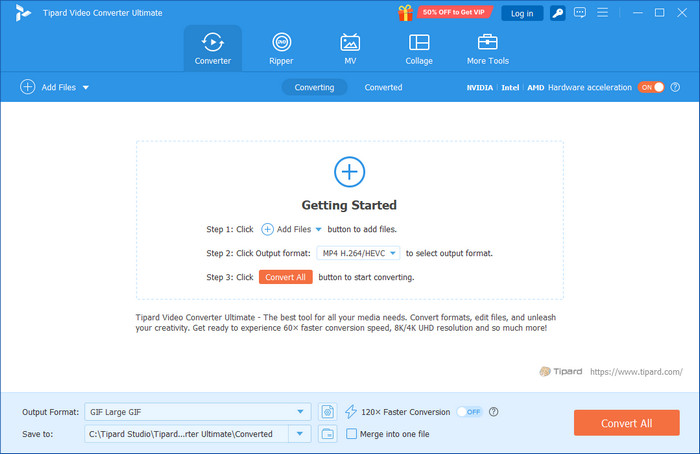
Sometimes, joining audio files is only part of the job. You may also need to clean up the sound, change the file format, or even extract audio from a video. That is where Tipard Video Converter Ultimate stands out. This audio merger keeps the process simple with a one-click merge option while giving you extra tools when you need them. It supports almost every audio format, exports to popular file types, and lets you improve audio quality before saving.
If you want one program that does more than merge files, this is the easiest recommendation.
- Quick and easy to use.
- Wide format compatibility.
- High-quality output.
- More than just an audio merger.
- Desktop software only.
- Some features require a paid license.
2. Audacity
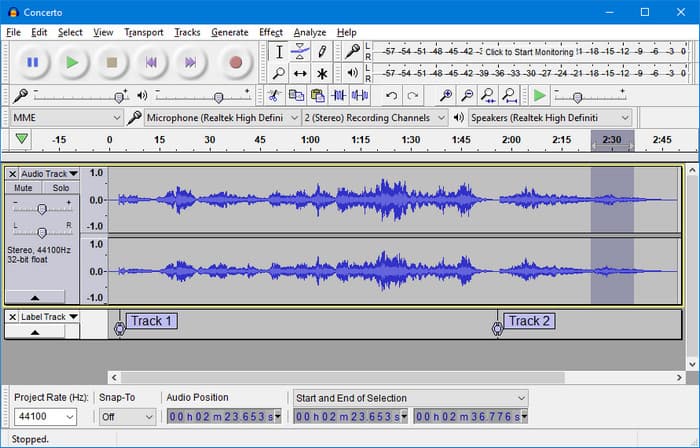
If you want more control over your recordings, Audacity is worth considering. This free desktop software works as an audio combiner while also offering professional editing tools for cutting, mixing, and enhancing audio. It takes more time to learn than most tools, but it gives you greater flexibility for detailed projects. However, Audacity is not available on Mac, which is why many are looking for an Audacity alternative for Mac.
- Open source and free.
- Powerful editing features.
- Supports good-quality audio export.
- Steeper learning curve.
- Interface feels outdated.
3. Clideo Audio Joiner
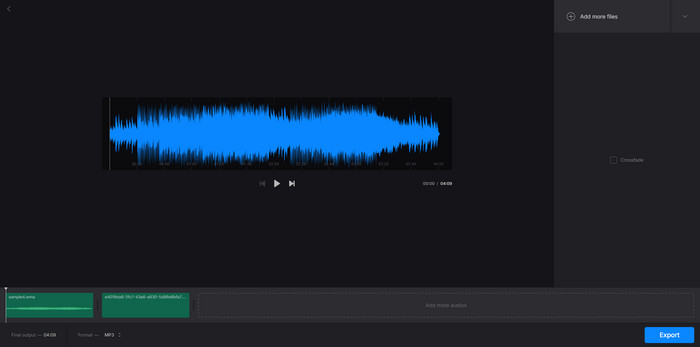
Clideo is an audio joiner online, which allows you to combine audio files right from the browser. It is made for consumers who prefer not to download software and just want a quick fix. Upload, arrange, and export the final track in a few clicks.
- No installation required.
- Simple and beginner-friendly.
- Applies to all devices with a browser.
- Requires an internet connection.
- There are restrictions on the free version.
4. Audio Joiner by 123Apps
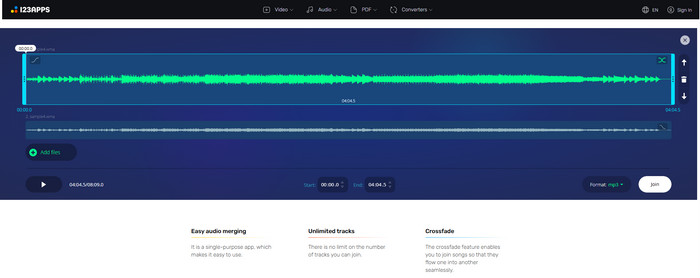
Audio Joiner by 123Apps is a basic audio file joiner that may be used to merge a number of audio files over the internet. It has hundreds of audio formats and allows you to shuffle files prior to export. It is ideal for simple merging jobs, but lacks a number of advanced editing options.
- Works with a variety of file types.
- Easy drag-and-drop interface.
- Free for basic use.
- Limited editing options.
- Upload speed will vary based on the connection.
5. Adobe Express Audio Merger
For easy editing projects, Adobe Express is a convenient tool to merge audio online if you already use the creative tools of Adobe. It enables the easy merging and editing of audio files. While it works well for quick edits, it is not built for advanced audio production.
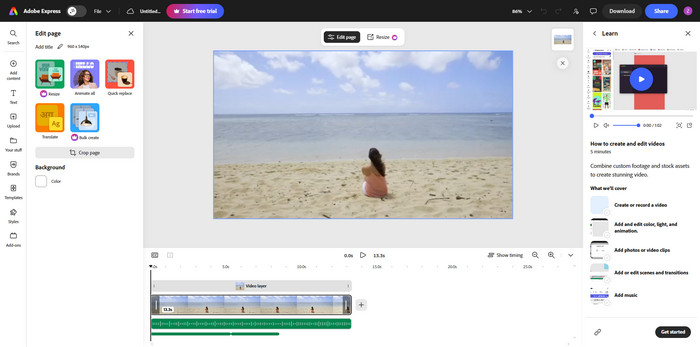
- Clean and modern interface.
- Easy to learn.
- Integrates with Adobe tools.
- Limited editing features.
- Some features require an Adobe account.
6. VEED.io
VEED.io combines audio and online video editing in one platform, making it a useful audio-video merger for content creators. You can merge audio tracks while editing videos for social media or presentations. However, users who only need audio editing may find the extra video tools unnecessary.
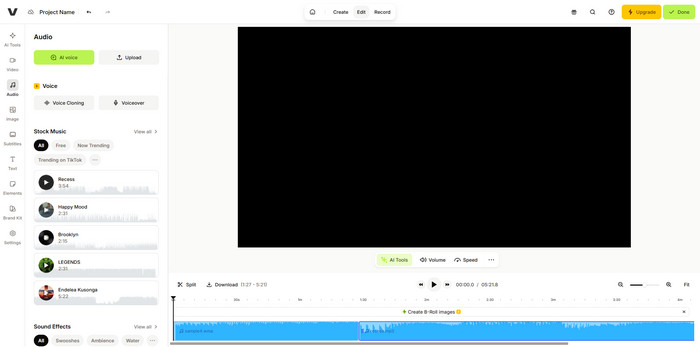
- Audio and video editing in one place.
- Easy to use.
- Browser-based platform.
- The free version has export restrictions.
- More video-focused than audio-focused.
7. FFmpeg
For experienced users, FFmpeg is a powerful audio file joiner if you are comfortable using command-line tools on your computer. It supports nearly every media format and merges audio without reducing quality. However, its lack of a graphical interface makes it less suitable for beginners, which is why many users have trouble when trimming a video on FFmpeg.
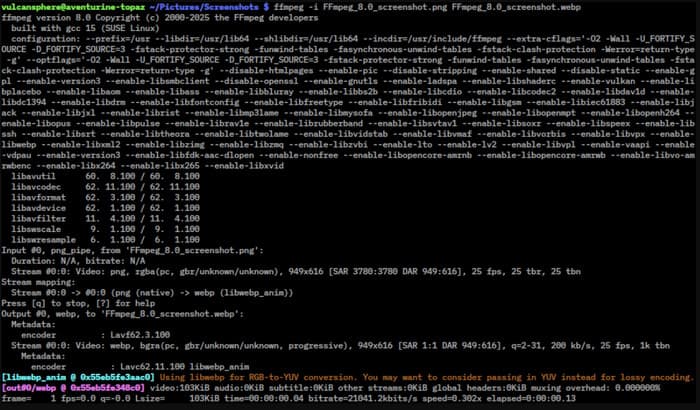
- Free of charge and very flexible.
- Works with virtually any media.
- Quick and trouble-free processing.
- Command-line interface only.
- Not beginner-friendly.
Part 3. Comparison of the 7 Audio Joiners
Not all audio joiners are the same. Some tools specialize in merging online faster, there are tools that offer better support for formats, and there are tools that have more sophisticated workflows. The comparison shown below will help you to make the right decision, as you can see the key differences.
| Tool's Name | Learning Curve | Export Process | Installation Required | Main Limitation |
|---|---|---|---|---|
| Tipard Video Converter Ultimate | Easiest | Fast export with support for MP3, WAV, FLAC, AAC, M4A, and many other formats | Yes | Some advanced features require the paid version |
| Audacity | Average | Export the project after selecting the desired format and quality settings | Yes | Takes more time to learn and requires more manual editing |
| Clideo Audio Joiner | Easy | Download the merged file after cloud processing is complete | No | Some advanced features require the paid version |
| Audio Joiner by 123 Apps | Easy | Export the merged audio in your chosen format | No | Offers only basic editing features |
| Adobe Express | Moderate | Export the finished project after cloud processing | No | Some features require an Adobe account or subscription |
| VEED.io Audio Joiner | Moderate | Render the project before downloading the final file | No | Better suited for video projects than audio-only editing |
| FFmpeg | Hardest | Generate the output file using terminal commands | Yes | Requires command-line knowledge and has no graphical interface |
| Show MoreShow Less | ||||
Part 4. Step-by-Step Tutorial: How to Combine Audio Files
Finding an audio joiner freeware that is easy to use can save you time, especially when you need to merge multiple recordings without losing quality. Tipard Video Converter Ultimate simplifies the process with its one-click merge feature, support for numerous audio formats, and fast export speed. Follow the steps below to combine your audio files into a single track.
Step 1 Download Tipard Video Converter Ultimate by ticking the download button below. Once the installer is downloaded, follow the on-screen instructions to complete the installation and launch the software.
Step 2 Open the program and click the Add Files or + button. Select all the audio files you want to merge, and they will appear in the conversion window.
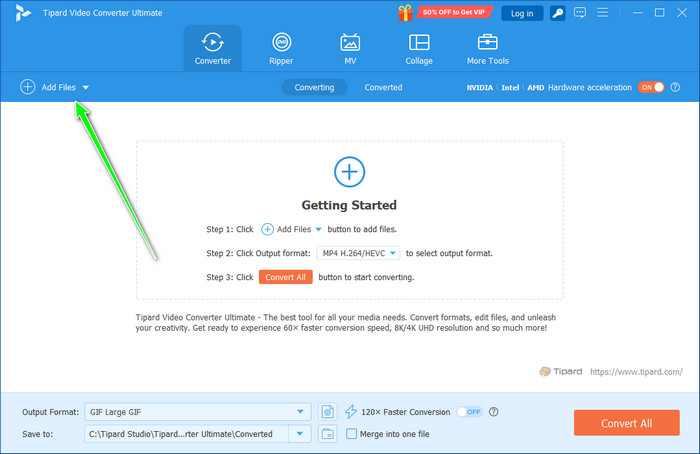
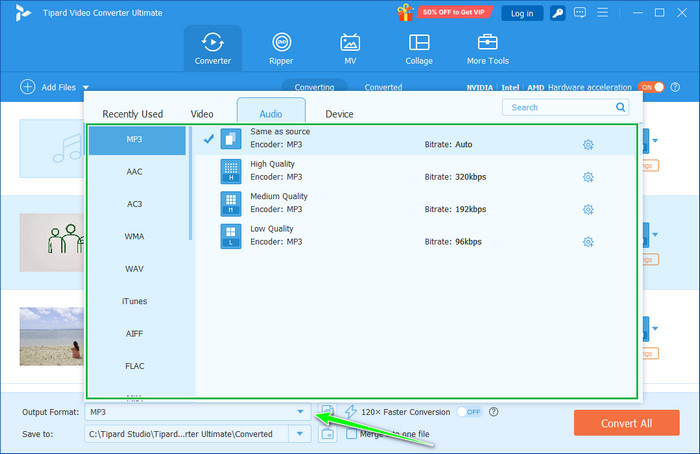
Step 3 Click the Output Format menu at the bottom of the interface. Open the Audio tab, then select your preferred format, such as MP3, WAV, FLAC, or AAC. You can also choose the output quality that best fits your needs.
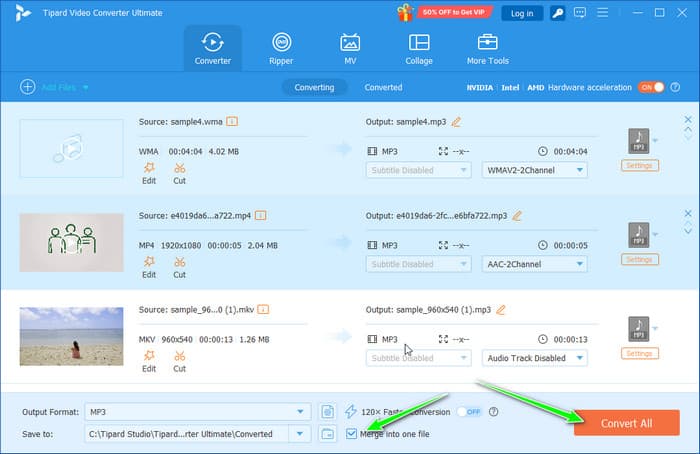
Step 4 Drag the audio files up and down the list to put them in the proper sequence. Next, select the Merge into one file option to bring them together as one audio track. When you're done, click Convert All to begin merging. Once the process is finished, a combined audio file will be saved in the specified output folder.
Part 5. FAQs of Audio Joiner
Does merging audio files reduce sound quality?
Not always. Using a good tool, exporting the file at the same or higher bitrate will maintain the original audio quality. Tipard Video Converter Ultimate is a desktop application that also supports lossless audio codecs for superior audio quality.
Can I merge audio files with different formats?
Yes. Some audio joiners can merge audio files of various formats, including MP3, WAV, M4A, AAC, and FLAC. Files are automatically converted to the output format of your choice during export by some tools.
Can I rearrange the order of audio files before merging?
Yes. The majority of audio joiners allow you to drag and drop audio files into the sequence you'd like to combine them in. This will make sure that the finished sound is what you want.
Conclusion
The ideal audio joiner will make your life easier, not harder. When comparing tools, evaluate the features that are most important, and select the option that works best for your projects. If you like a free audio joiner or perhaps a top-quality one, you are in the right place for making audio file merges with confidence.

All-in-one video toolbox: convert, edit, upscale, enhance, and compress your videos easily
100% Clean & Safe
100% Clean & Safe

More Reading
About the Author


 Tipard Video Converter Ultimate