

- Part 1. Overview of SMPlayer
- Part 2. What Can SMPlayer Play
- Part 3. What Makes SMPlayer Different From Other Media Players
- Part 4. How Good Is SMPlayer for 4K and High-Resolution Video
- Part 5. Important Features of SMPlayer
- Part 6. How We Tested the SMPlayer
- Part 7. More Review about SMPlayer
- Part 8. Best SMPlayer Alternative
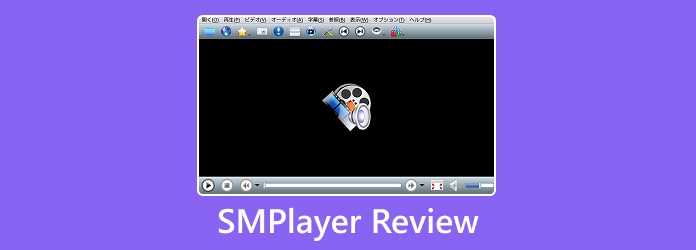
SMPlayer is a versatile media player that is capable of offering smooth playback and supporting a wide range of formats. The good thing here is that it is lightweight, making it an ideal program for all devices. So, are you interested in learning more about SMPlayer? Then there's a reason for you to read this article. We will give you a detailed review of the media player, introducing its features, advantages, limitations, and other parameters. Thus, read here and explore more about SMPlayer.
- Part 1. Overview of SMPlayer
- Part 2. What Can SMPlayer Play
- Part 3: What Makes SMPlayer Different From Other Media Players
- Part 4. How Good Is SMPlayer for 4K and High-Resolution Video
- Part 5. Important Features of SMPlayer
- Part 6. How We Tested the SMPlayer
- Part 7. More Review about SMPlayer
- Part 8. Best SMPlayer Alternative
Part 1. Overview of SMPlayer
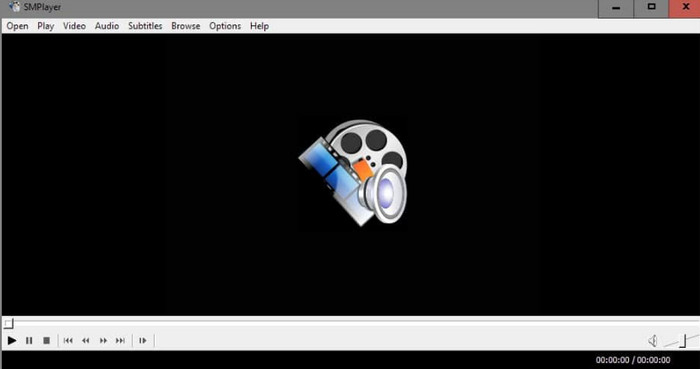
SMPlayer is an open-source and free video/audio player. It is designed to offer smooth playback for virtually any video or audio format without needing an external codec. What we like here is that it has an easy-to-operate interface, customizable features, and supports various platforms, like Windows and Linux. So, if you are looking for a versatile media solution, we can tell that SMPlayer is among the best options you can rely on.
Is SMPlayer Safe?
After downloading and operating the media player, we can say that it is safe to use. You can play your videos without worrying about the file and your information. It won't share your date with other platforms without your consent.
To get more information about the media player, you can check the table below.
| Feature | Details |
|---|---|
| Platform Support | Windows and Linux |
| Core Engine | MPlayer |
| Codec Requirement | None |
| Key Features | Resume playback, YouTube integration, subtitle support, customizable UI |
| License | Free and open-source |
Part 2. What Can SMPlayer Play
Wondering what you can play on SMPlayer? Well, the media player can handle various formats, thanks to its integration with MPlayer. It can support many popular video formats, including MP4, MOV, AVI, and WMV. It can also support audio formats, like MP3, FLAC, OGG, and AAC. In addition to that, it can also play DVD, Blu-ray, and online streams, including YouTube videos.
Part 3. What Makes SMPlayer Different From Other Media Players
The media player stands apart by offering a combination of built-in codec support, integrated online streaming, and playback memory. Compared with other video/audio players that require an external codec pack, SMPlayer can play almost any format. Plus, its resume playback feature remembers the exact point and settings of each file, saving users time revisiting footage. What's more, the media player includes YouTube integration, letting users browse and play online videos directly within the player. With these helpful features, combined with a customizable layout and subtitle download capability, we can tell that this player is ideal for all users.
Part 4. How Good Is SMPlayer for 4K and High-Resolution Video
What we like about the mediaplayer is that it is capable of dealing with 4K and other high-resolution formats. But its performance depends on the hardware and the MPlayer engine. On the latest systems with powerful GPU support, playback is smooth and stable, even for other formats, like HEVC. On the other hand, if you are using less powerful devices, users may experience occasional lag or stuttering when dealing with UHD files. While the player doesn't offer advanced video enhancement tools like other specialized media players, it can offer a reliable playback quality and supports hardware acceleration when properly configured, making SMPlayer the best platform for playing media files.
Part 5. Important Features of SMPlayer
Want to learn more about the capabilities of SMPlayer? In that case, proceed to this part and explore more about its features.
Subtitle
The good thing about SMPlayer is that it can support subtitles. You can add subtitles to the video to make your content engaging. It can even handle various subtitle formats, such as SUB, SRT, ASS, and SSA. Plus, you can customize your subtitle by changing the font style, size, and color.
Audio Tracks
SMPlayer can switch between multiple audio tracks in a piece of footage. It can also support external audio files for syncing with video playback. It also provides an audio equalizer and filters for fine-tuning audio quality.
Playback Controls
Another helpful feature you can access is the program's playback controls. What makes its controls unique is the Resume control. You can resume playback from the exact point where you left off. You can also slow down or speed up your videos based on your needs. Lastly, you can also loop a video for repeated viewing.
Customization
You can customize/personalize the SMPlayer skin and themes. It is ideal for making your layout appealing. The media player also supports keyboard shortcuts and mouse gestures for better and quicker control.
Part 6. How We Tested the SMPlayer
We tested the media player in many ways. If you want to learn more about how we check SMPlayer, you can read the details below.
- Installation and Setup - We checked the installation and setup process of the media player. Checking this process ensures that users can access the media player without any hassle.
- Format Compatibility - We also check the compatibility of the program. We played various formats, such as MP4, MKV, AVI, FLV, MP3, AAC, ALC, FLAC, WAV, and other video and audio formats.
- Playback Performance - Besides compatibility, we also evaluate the smoothness of playback for SD, HD, and 4K files. All users must know what kind of video they can play well.
- User Experience - Assessing the interface customization, like themes, skins, and shortcuts, is necessary for testing how it can become more engaging. We also check its playback controls, whether it can give better performance during playback.
Part 7. More Review about SMPlayer
Proceed to this section and get more details about the SMPlayer's advantages, drawbacks, and user reviews.
Good Things about SMPlayer
- The main interface of the media player is simple, making it accessible to all users.
- It can play numerous video and audio formats, preventing compatibility issues.
- Since the media player is free, all users can operate it without spending a penny.
Drawbacks of SMPlayer
- Ensure that you are using a high-end device when playing 4K or HEVC videos. Using older systems can result in lags or stutter.
- Even though the main interface is comprehensive, it may still look outdated compared with modern media players.
- The media player lacks editing tools for video enhancement.
User Reviews
- Positive Feedback - Users appreciate its reliability, subtitle support, and codec-free setup. They even highlight the resume playback feature.
- Critical Feedback - Some users report that there are occasional lags when dealing with high-resolution files.
- Overall Sentiment - SMPlayer is among the best media players that can deliver smooth video playback. It even excels in stability and compatibility, making it a strong replacement for some media players, like VLC.
Part 8. Best SMPlayer Alternative
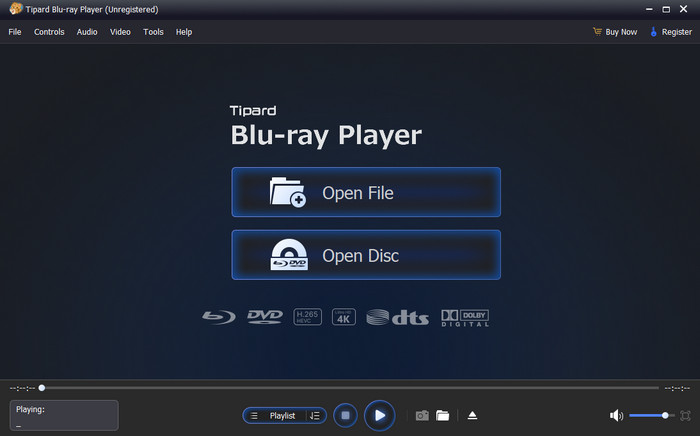
SMPlayer is an excellent media player that can give you a satisfying viewing experience. However, since it has a less modern user interface and performance issues when dealing with high-resolution content, you might look for another program. If that's the case, we recommend using Tipard Blu-ray Player. This media player can offer a better and more appealing user interface, making it perfect for all users. It can also play various formats and media, such as MP4, MKV, AVI, MOV, FLV, WMV, MP3, ALAC, WAV, M4A, AAC, Blu-ray, DVD, and more. It can also offer smooth media playback and let you enjoy the original quality of your video and audio. With that, if you are looking for the best replacement for SMPlayer, consider using Tipard Blu-ray Player.
Conclusion
Now, you have learned everything about SMPlayer Media Player. You even explored its features, advantages, drawbacks, and other important details. You can even play almost all video and audio formats. However, the player has a less modern interface and might give you a little bit of a performance issue when dealing with high-resolution videos. So, if you want a smoother playback, you can use Tipard Blu-ray Player as an alternative. It can also give you a modern and customizable user interface, making it the best media player for users.

Play Blu-rays and multimedia files with the best video and audio quality
100% Clean & Safe
100% Clean & Safe

More Reading



About the Author

 Click here to join the discussion and share your comments

 Tipard Blu-ray Player