

Have you ever felt disappointed after downloading a media player that did not deliver on its promises? Finding one that offers smooth playback, broad format support, and useful features can be harder than expected. PotPlayer has become a popular choice because of its fast performance, wide file compatibility, and advanced playback tools. In this review, you will learn what it offers, how it performs in real use, its strengths and weaknesses, and the best alternatives to help you decide if it is the right media player for you.

Part 1. Quick Verdict of PotPlayer
Daum PotPlayer is a powerful yet fast, high-performance, and flexible media player. Takes care of almost any popular video and audio format, without any need to install extra codecs, making it easy to play media files from the beginning. Solid playback power with advanced controls over subtitle, audio, and video quality, plus keyboard controls, providing greater control of the user's viewing experience.
Although the large number of settings may seem overwhelming for first-time users, its reliable performance and wide format support make it one of the strongest free media players available for Windows.
Part 2. What is PotPlayer?
PotPlayer is a free media player that does not require any codec packages to play almost all media formats in both video and audio formats. It is light, quick, and functional even with large and high-resolution videos. The player also knows where you last saw your watch stopped, so that you can resume at that time later.
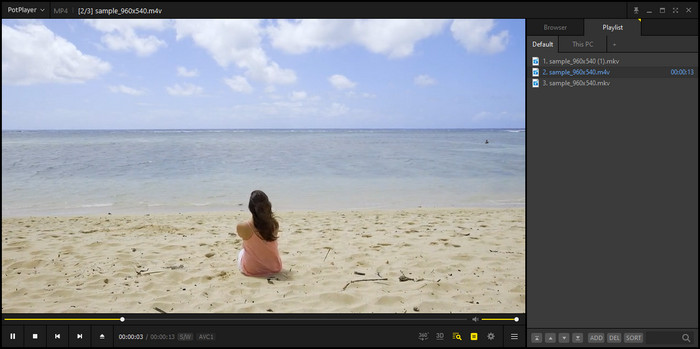
On top of that, it supports subtitles, screen capture, and many playback settings that you can adjust to fit your preferences. If you are looking for a PotPlayer download, you can expect a reliable media player that offers both simple playback and advanced features in one program.
Part 3. Key Features of PotPlayer
1. Supports Most Media Formats
It is almost impossible to meet a media file that can not be played without any extra codec packs needed with PotPlayer software. You can now open the various kinds of files immediately.
2. Plays Damaged and Incomplete Files
The player can open some damaged or partially downloaded files, which is useful when you need to preview a video before it finishes downloading.
3. Resumes Playback Automatically
It remembers the last position of your video, so you can continue watching from where you stopped without searching for the scene again.
4. Flexible Subtitle Support
PotPlayer media player works with popular subtitle formats and can also read embedded subtitles from many video files. You can adjust the size, position, and timing to improve readability.
5. Built-In Audio Controls
The built-in equalizer and audio settings let you customize the sound for music, movies, or other media without using another program.
6. Video Quality Adjustments
The brightness, contrast, saturation, and video settings can be adjusted to make the picture easier to see on your screen or to make adjustments based on your taste.
7. Customizable Interface
The PotPlayer for Windows 11 supports different skins and layout options, allowing you to personalize its appearance and controls.
8. Handy Keyboard Shortcuts
PotPlayer has provided shortcuts to the most common functions, including volume control, subtitle synchronization, scene change, zoom, and full-screen view.
9. Smooth High-Quality Playback
Hardware acceleration helps reduce CPU usage and keeps high-resolution videos running smoothly on supported devices.
10. Built-In Screen Capture
PotPlayer lets you take a PotPlayer screenshot or record short video clips while watching media. This allows you to save important moments without using another screen capture tool.
Part 4. Performance Benchmarks of PotPlayer
| Category | Result | Ratings |
|---|---|---|
| Staup Speed | Opens quickly and loads media files within seconds on mid-range to high-end PCs | 4.5 out of 5 stars |
| CPU Usage | Maintains low resource usage during regular video playback | 4.5 out of 5 stars |
| Memory Usage | Uses a reasonable amount of RAM while playing a single video file | 4 out of 5 stars |
| 4K Playback | Provides smooth playback with hardware acceleration enabled on supported devices | 4.5 out of 5 stars |
| Format Compatibility | Supports a wide range of video and audio formats without requiring extra codecs | 5 out of 5 stars |
| Playback Stability | Delivers reliable playback with minimal interruptions during extended use | 4.5 out of 5 stars |
| Show MoreShow Less | ||
Performance results may vary depending on your computer hardware, video files, and playback settings. If you use a PotPlayer portable version, performance may also depend on the storage device and system environment where the program runs.
Factors such as CPU, GPU, hardware acceleration, video resolution, and background applications can affect resource usage and playback quality. The ratings above are based on general usage experience.
Part 5. Interface and Customization of PotPlayer
PotPlayer Video Player provides a useful interface that can be customized according to the different uses and needs of users. The default layout helps players reach frequently used controls such as playing begin and end, subtitles, audio, and video controls. Despite the design not being as modern as some newer media players, it is still organized and functional for use on a daily basis.
The control that users can achieve with PotPlayer is one of its greatest benefits. Change skins, customize menus, adjust keybindings, and configure playback settings according to your preferences. It also lets subtitles, audio effects, video filters, and screen adjustments, all adjusted in detail, giving film fans who seek more control over their experience a choice that feels better.
Some users search for PotPlayer Android when they want to use the player on mobile devices. However, the official PotPlayer application developed by Kakao is only available for Windows and does not have an official Android version. Likewise, users looking for PotPlayer GitHub should know that the software is not open-source and does not have an official GitHub repository for its source code.
Overall, PotPlayer is a cross between a simple media player and advanced customization. For both laypersons and professionals, you can use its default settings, or you can dive into its many options to have a playback experience similar to your own.
Part 6. Pros and Cons of PotPlayer
Those who want a speedy and flexible media player prefer PotPlayer. It has a number of good features, but also a few minor things that could dent the experience. The primary good and bad of using them are summarized.
Pros of PotPlayer:
- Supports Many Media Formats
PotPlayer supports a variety of video and audio files and does not require extra codecs. - Smooth Performance
It optimizes the system resources and gives a smooth playback right from very high-quality videos. - Many Customization Options
Users can change skins, adjust playback settings, customize shortcuts, and modify the interface based on their preferences. - Advanced Playback Features
It includes useful tools such as subtitle controls, audio adjustments, video filters, playback speed settings, and hardware acceleration. - Free to Use
PotPlayer offers many advanced features without requiring a paid subscription or license.
Cons of PotPlayer:
- Can Be Difficult for Beginners
The large number of settings may feel overwhelming for users who only want a simple media player. - Windows Only
The official version is mainly designed for Windows users and does not offer official versions for other platforms. So, if you are looking for a PotPlayer on Mac, it is better to look for an alternative. - Classic Interface Design
Some users may find the interface less modern compared with newer media players.
The Truth About PotPlayer
PotPlayer is made for users who want more control over their media playback. Many users like its fast performance, wide format support, and customization options, which is why it is considered a video player for all formats. However, some users find the many settings confusing, especially during the first setup. Its classic design may not look modern, but it gives users more control over how they watch videos. Overall, PotPlayer is a great choice for users who enjoy customizing their experience, but it may feel overwhelming for beginners.
Part 7. Best PotPlayer Alternatives in 2026
PotPlayer is a robust media player; there are advanced options that some may not necessarily wish to use. Others like greater flexibility in use and controls. or more platforms. For a more basic media player, there are a number of other options to consider, including Tipard and VLC.
1. Tipard Blu-ray Player
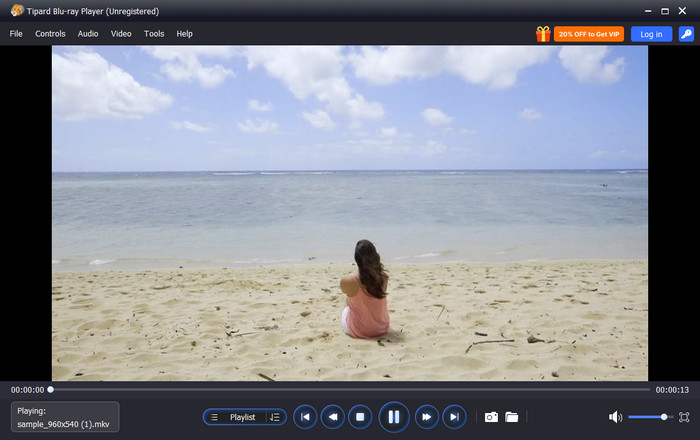
Tipard Blu-ray Player is an excellent alternative to PotPlayer for those who require straightforward, easy, and smooth media playback. It is compatible with Mac and Windows, and flexible for different users. Tipard has a lot of advanced settings like PotPlayer does, but it's more user-friendly than PotPlayer with familiar controls.
The program also includes a clean installation, meaning that no programs are included with it. Its users will open DVDs, Blu-ray discs, and videos instantly without having to go through the process of setting some complex controls. Tipard Blu-ray Player is a convenient solution for those who are not tech-savvy, as well as anyone looking for a media player that gets the job done.
2. VLC Media Player
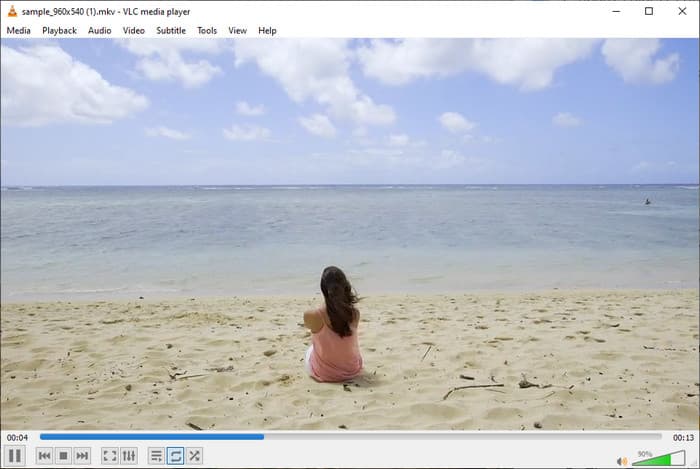
VLC Media Player is another popular alternative known for its wide format support and free access. It can play many video and audio files without installing extra codecs. However, its interface may feel less modern, and some features require users to explore the settings first.
PotPlayer vs. Tipard Blu-ray Player vs. VLC Media Player
| Features | PotPlayer | Tipard Blu-ray Player | VLC Media Player |
|---|---|---|---|
| Platform Support | Windows | Windows and Mac | Windows, Mac, and Linux |
| Interface | High customizable | Clean and familiar controls | Simple and functional |
| Blu-ray Playback | Limited | Supports Blu-ray discs, folders, and ISO files | Requires additional setup |
| Ease of Use | Better for advanced users | Simple and beginner-friendly | Easy but requires exploring settings |
| Subtitle Support | Advanced subtitle controls | Support multiple subtitle tracks | Support common subtitle formats |
| Audio Features | Equalizer and advanced settings | Audio track selection and playback adjustments | Audio filters and equalizer |
| Show MoreShow Less | |||
Part 8. FAQs of PotPlayer
Is PotPlayer safe to download?
Yes, PotPlayer is safe to download if it's from the source. Do not download it from unknown sites since it could be a modified version or have unwanted programs.
Is PotPlayer available on Mac or Android?
The official PotPlayer application is only available for Windows. There is no official PotPlayer version for Mac or Android devices.
Does PotPlayer need extra codecs?
No. PotPlayer includes built-in codecs that allow it to play most video and audio formats without installing additional codec packs.
Conclusion
If you are wondering, is PotPlayer safe? It is generally safe as long as you download it from the official source. It is a reliable media player with wide format support and many useful features. However, if you want a simpler player with easy controls and Blu-ray support, Tipard Blu-ray Player is a great alternative.

Play Blu-rays and multimedia files with the best video and audio quality
100% Clean & Safe
100% Clean & Safe

More Reading




About the Author


 Tipard Blu-ray Player