

Key Takeaways
- Converting MKV to MP3 is an ideal way to extract audio from video.
- Choosing the best MKV to MP3 converter is recommended to ensure a better, more effective conversion process.
- The best converter balances speed with audio quality for better playback.
- For a fast, smooth, and effective MKV-to-MP3 conversion, it is better to access Tipard Video Converter Ultimate.
What are the best MKV to MP3 converters? Converting MKV files to MP3 is necessary for users who want to extract/obtain audio from videos without keeping the bulky video format. This process even lets you play the files on any audio player. So, if you are searching for the best MKV-to-MP3 converters, check out this blog. We are here to introduce the best converters you can use in your browser and on your desktop to convert your MKV to MP3.

Part 1. Why Convert MKV to MP3
Why do you need to transcode .mkv to .mp3? Converting your MKV to MP3 format is ideal if you need the audio portion of the video, such as music tracks, podcasts, or lectures. The best part here is that it reduces file size, making storage and sharing more efficient. In addition, MO3 files are more universal, making them playable to almost all media and audio players without any compatibility issues. With the MKV-to-MP3 conversion process, you can play and enjoy the audio content on the go without large video files.
Part 2. Shortlists of Top 7 MKV to MP3 Converters
Read here and get simple insights about the best MKV to MP3 converters.
- Tipard Video Converter Ultimate - A feature-rich tool that transcodes MKV to MP3 with fast speed, lossless quality, and customizable audio settings.
- VLC - A free, open-source media player that can offer a video converter feature for simple conversion.
- Freemake Video Converter - It is a user-friendly converter that supports MKV to MP3 conversion along with many other popular formats, perfect for beginners.
- VideoProc Converter AI - A professional-grade, GPU-accelerated converter that instantly extracts MP3 audio from MKV files while offering advanced customization.
- FreeConvert - A web-based converter that provides straightforward MKV to MP3 conversion with options to adjust audio quality and file size.
- Convertio - A cloud-based converter that makes MKV to MP3 conversion possible and easy online, with support for multiple file sources.
- CloudConvert - A flexible online converter that integrates with cloud storage and offers customizable MKV to MP3 conversion settings.
Part 3. Detailed Review of the Best MKV to MP3 Converters
Want to get more information about the best MKV to MP3 converters? Then, see all the details in this section.
1. Tipard Video Converter Ultimate
One of the most reliable and powerful MKV to MP3 converters you can use is Tipard Video Converter Ultimate. This converter is ideal since it has all the features you need to achieve the result you need. It can even save your MP3 at up to 320 kbps. You can even choose your desired audio track. Additionally, it supports MKV input with various video codecs, bitrates, frame rates, and other configurations. It also has a super-fast conversion process, up to 120× faster compared with other converters.
Key Features
- The converter can support various audio formats, such as FLAC, WAV, M4A, AC3, and more.
- It can provide a comprehensive UI to enable a smoother, more effective conversion process.
- The software can transcode video to audio while preserving the quality for a better listening experience.
- The converter supports batch conversion of multiple files.
To convert MKV to MP3, you can check the steps below.
Step 1 Download and run Tipard Video Converter Ultimate. When the interface shows up, proceed to the next step.
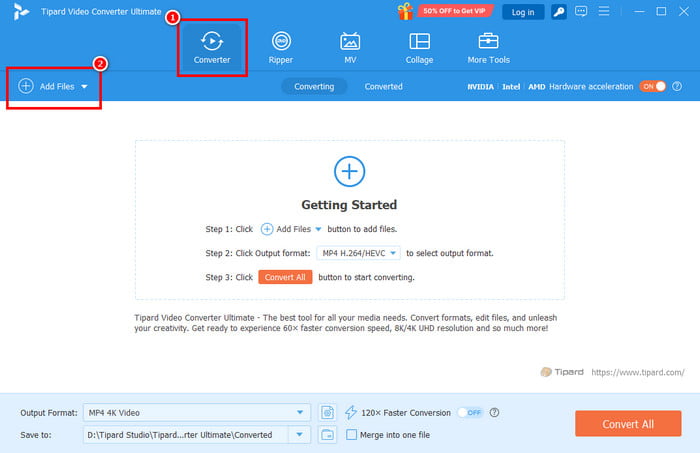
Step 2 Go to the Converter section and hit Add Files to add the MKV file you want to convert.
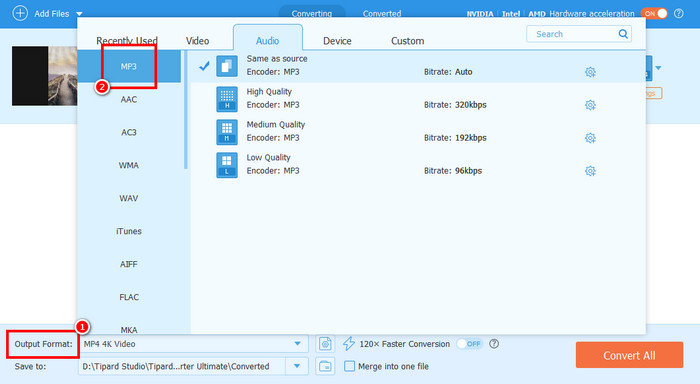
Step 3 Proceed to the Output Format section below and choose MP3 with your preferred audio quality.
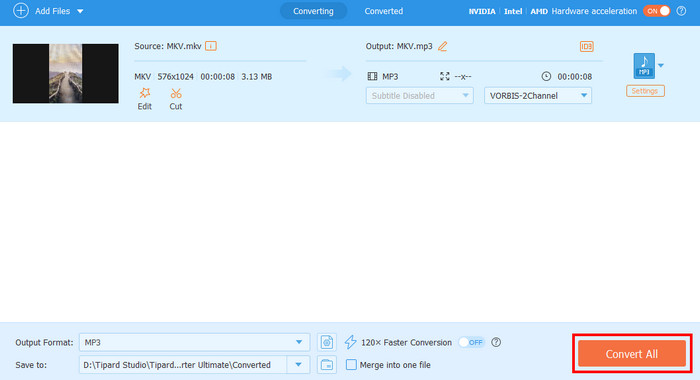
Step 4 Finally, hit the Convert All button below to start the final MKV to MP3 conversion process.
- The conversion process is simple, perfect for non-professionals.
- The program can adjust the audio sample rate and bitrate.
- The converter is compatible with both Mac and Windows operating systems.
- To access all the advanced features, you must get the paid version.
2. VLC Media Player
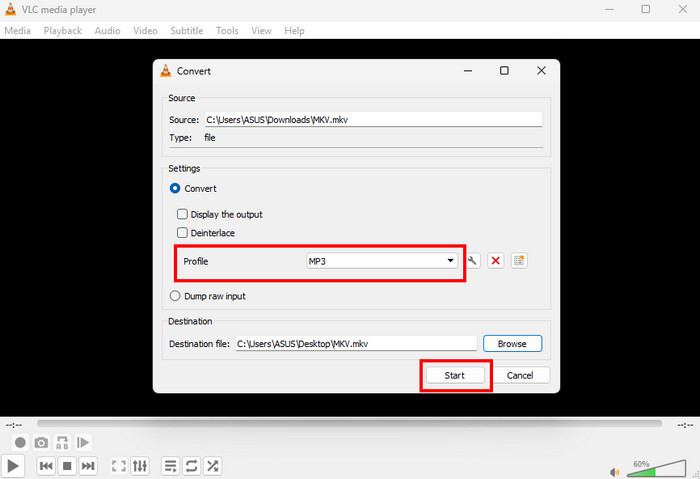
VLC is also an effective tool for MKV-to-MP3 conversion. Besides playing various media files, it can also offer its converter feature to transcode your videos into an audio format. Additionally, the file conversion process is simple thanks to its comprehensive UI. The only problem here is that the layout might look outdated to some users, who find it boring and unappealing. But you can still rely on this software to easily convert MKV to MP3.
- It is free to use.
- It can offer a simple and fast conversion process.
- There are times when the software crashes.
System Requirements: Windows 7+, macOS 10.10+, Linux, Android, and iOS
Starting Price: Free
Supported Video and Audio Formats: MP4, MKV, AVI, WMV, MP3, AAC, AC3, FLAC, WAV, etc.
3. Freemake Video Converter
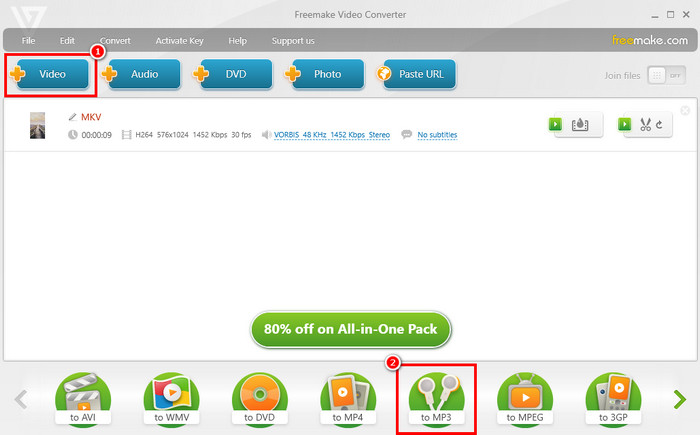
Are you a beginner and want to convert MKV to MP3 format easily and smoothly? In that case, you can try using Freemake Video Converter. With its simple, fast conversion process, Freemake is a go-to converter for users. It can also support batch conversion, allowing you to transcode more than one MKV file. Lastly, this software is free to use. The only problem here is that its advanced features are available only on the premium version.
- The program's main UI is comprehensive and perfect for non-professional users.
- It supports drag-and-drop features.
- The conversion speed is inconsistent.
System Requirements: Windows 7-11
Starting Price: $39.95
Supported Video and Audio Formats: AVI, MP4, WMV, MKV, FLV, SWF, MP3, AIFF, WMA, FLAC, etc.
4. VideoProc Converter AI
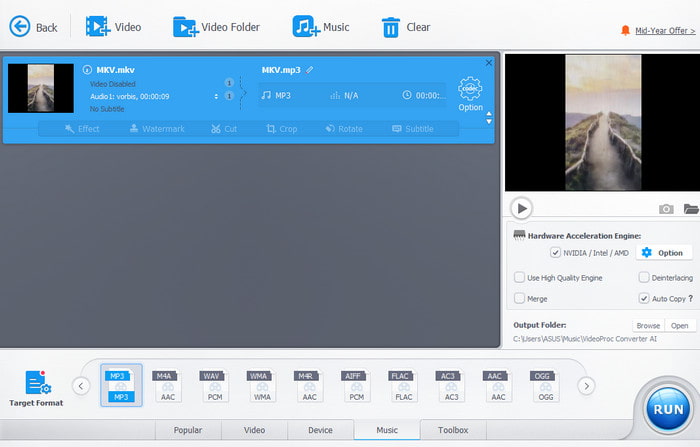
VideoProc Converter AI is a professional-grade software you can access on your computer. It stands out as an excellent MKV-to-MP3 converter thanks to its simplicity, conversion speed, and remarkable performance. It even supports full GPU acceleration, allowing users to extract audio without degrading quality. Moreover, it allows users to customize various parameters. It includes bitrate, channels, sample rate, and more. The only drawback here is that its free version comes with restrictions.
- With its AI-powered technology, it can provide accurate results.
- Its full GPU acceleration can give you smoother, faster conversion.
- It requires a high-end computer for better performance.
System Requirements: Windows 7+, macOS 10.13+ (AI features require macOS 10.15+)
Starting Price: $37.00
Supported Video and Audio Formats: AVI, MP4, WMV, MKV, FLV, SWF, MP3, WMA, OGG, FLAC, etc.
5. FreeConvert
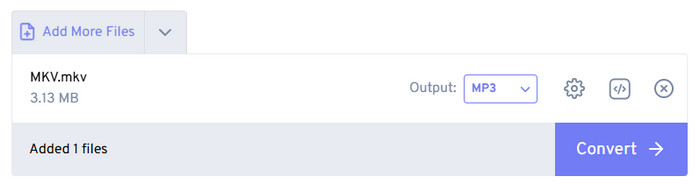
Looking for an online MKV-to-MP3 converter? Then, we recommend using FreeConvert. This web-based converter is helpful because it ensures you get the result you need after the conversion. It is also easy to use and can let you adjust the volume, change the codec, add fade effects, trim audio, and more. However, since it is an online converter, it always requires a stable, fast internet connection. Disturbing ads are also showing up during the conversion process.
- The tool can convert and edit videos.
- It is available on any web platform.
- Various ads are showing up during conversion.
System Requirements: Web-based
Starting Price: $12.99
Supported Video and Audio Formats: AVI, MP4, WMV, MKV, FLV, SWF, WMA, MP3, FLAC, AC3, AAC, etc.
6. Convertio
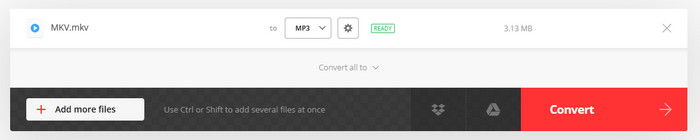
To convert an MKV file to MP3 online, you can also use Convertio. With this versatile converter, you don't need to install any software. What we like here is that the tool doesn't show any annoying ads. With that, you can convert your videos to audio without any interference. It also supports batch conversion to handle multiple files at once.
- The tool supports batch conversion for multiple conversion processes.
- Since it is also cloud-based, you can attach files directly from your computer, Google Drive, and Dropbox.
- The conversion process can be slower, especially with large files.
System Requirements: Web-based
Starting Price: $6.99
Supported Video and Audio Formats: AVI, MP4, WMV, MKV, FLV, SWF, MP3, AAC, WAV, M4A, etc.
7. CloudConvert

For our last online-based MKV to MP3 converter, we suggest using CloudConvert. This converter has become popular because of its flexibility and integration options. It has a smooth conversion process, an understandable layout, and batch conversion support. It also lets you customize sample rate, channel, codec, bitrate, volume, and more. You can also use this tool across all web platforms, making it more accessible to users. On the downside, the tool's performance relies on the internet.
- During the conversion process, you can adjust various parameters.
- The tool can also support various formats, such as MP4, MOV, FLV, AAC, AC3, FLAC, etc.
- A poor internet connection can also provide poor results.
- Advanced features are only available on the paid version.
System Requirements: Web-based
Starting Price: $10.00
Supported Video and Audio Formats: AVI, MP4, WMV, MKV, FLV, SWF, MP3, AAC, WAV, M4A, etc.
Part 4. How We Tested the Best MKV to MP3 Converters
To determine the best MKV-to-MP3 converters, we tested each tool against numerous criteria. It includes the conversion speed, main user interface, compatibility, customizable settings, and more. Additionally, we paid close attention to audio track selection since MKV files contain multiple audio streams. With that, we ensure that all recommended MKV-to-MP3 converters are reliable and helpful for all users.
Part 5. Test Results and Comparison of the Best MKV to MP3 Converters
Want to see the test results of each MKV to MP3 converter? Then, you can read everything in this section.
- Tipard Video Converter Ultimate - This program performed best overall for conversion, combining instant conversion with adjustable sample rate, bitrate, channel count, and other necessary parameters.
- VLC Media Player - It is among the best free-to-use converters for transcoding video to audio easily and smoothly.
- Freemake Video Converter - For beginner-friendly conversions, this software is ideal thanks to its comprehensive layout.
- VideoProc Converter AI - This converter ensures accurate results after conversion, powered by AI and offering advanced controls. It can also save files with the best quality for better playback.
- FreeConvert - This tool is ideal for audio conversion and customization. It lets users change the bitrate and codec, together with reverse trimming, and fade options.
- Convertio - This tool can convert multiple files, ideal for flexible online conversion. It transcodes files without showing any annoying ads on the screen.
- CloudConvert - It is best for online parameter customization, allowing you to adjust various audio settings.
For more insights on MKV-to-MP3 converters, see the table below.
| MKV to MP3 Converter | Conversion Speed | Support Audio Track Selection | Offers Batch Conversion | Supported MP3 Output Quality |
|---|---|---|---|---|
| Tipard Video Converter Ultimate | Up to 120× faster | Yes | Yes | Up to 320 kbps |
| VLC Media Player | Standard | No specific track selection | Yes, but limited | Up to 320 kbps |
| Freemake Video Converter | Standard | Yes | Yes | Up to 320 kbps |
| VideoProc Converter AI | Up to 47× faster | Yes | Yes | Up to 320 kbps |
| FreeConvert | Depends on the internet. | Limited | Yes | Up to 320 kbps |
| Convertio | Depends on the internet. | Yes | Yes, but limited | Up to 260 kbps VBR/CBR |
| CloudConvert | Depends on the internet. | Default track | Yes | Up to 320 kbps |
| Show MoreShow Less | ||||
Part 6. FAQs about MKV to MP3
Will the audio quality be preserved after converting MKV to MP3?
It depends on the MKV-to-MP3 converter you use. Some tools maintain quality, while others let you customize the bitrate, sample rate, and other parameters to achieve your desired quality.
Are online MKV to MP3 converters safe to use?
Most of the tools are safe to use. However, if you want to ensure your files and data are safe, it is better to use trustworthy, reliable tools such as Convertio, FreeConvert, and CloudConvert.
What is the fastest way to convert MKV to MP3?
If you want to convert your MKV to MP3 instantly, feel free to access Tipard Video Converter Ultimate. This program offers fast conversion, up to 120× faster than other converters. This ensures that you can get the result in just a few seconds.
Conclusion
With these MKV to MP3 converters, you can convert your videos to audio for a better listening experience. So, choose your preferred converter and start the conversion process. Also, if you want a simple, smooth, and fast conversion procedure, look no further than Tipard Video Converter Ultimate. This converter has all the features you need, allowing you to achieve the result you want at the end of the process.

All-in-one video toolbox: convert, edit, upscale, enhance, and compress your videos easily
100% Clean & Safe
100% Clean & Safe

More Reading
About the Author


 Tipard Video Converter Ultimate