

"What is the best size for Instagram posts?" "Why does my video get cropped?" or "How can I make my Stories and Reels look full screen?" These common questions all boil down to the Instagram aspect ratio.
There are standard aspect ratios for different types of posts. And right in this write-up, you will learn what Instagram aspect ratios are and why they matter. Once you know the correct sizes, every post can shine on Instagram.
Part 1. What Is an Aspect Ratio
An aspect ratio is the shape of a photo or video. It shows the relationship between the width and the height. It is written like this: width: height.
For example:
- 1:1 means both sides are equal. It makes a square.
- 4:5 means the photo is taller than it is wide.
- 9:16 means the content is tall and full screen on a phone.
Aspect ratio does not mean clarity. It does not change how clear your photo is. It only changes the shape. When you use the right ratio, your content fits the screen better. It will not get cropped. It will not have black bars. It looks neat and natural in the feed.
Part 2. What Are Instagram Aspect Ratios
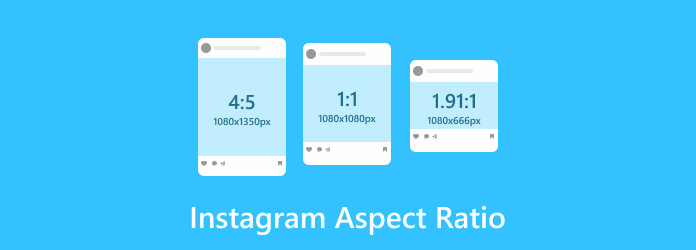
The aspect ratio for Instagram decides how your posts appear in the feed, Stories, and Reels. Here is a simple table to guide you:
| Format | Aspect Ratio | Recommended Resolution (Width × Height) | Best Use |
|---|---|---|---|
| Portrait (Feed/Carousel) | 4:5 | 1080 × 1350 px | Most immersive feed posts. The Instagram portrait ratio takes up more screen space and grabs more attention. |
| Square (Feed/Carousel) | 1:1 | 1080 × 1080 px | Classic Instagram look. The Instagram landscape ratio is safe, balanced, and perfect for wide shots. |
| Landscape (Feed/Carousel) | 1.91:1 | 1080 × 566 px | Wide shots like travel or group photos. |
| Stories | 9:16 | 1080 × 1920 px | Full-screen vertical content using the Instagram story ratio for maximum mobile engagement. |
| Reels | 9:16 | 1080 × 1920 px | The Instagram reel aspect ratio is best for reach and mobile viewing. |
| Profile Photo | 1:1 | 320 × 320 px (min) | Displayed as a circle on your profile. |
| Show MoreShow Less | |||
Part 3. Why Aspect Ratio Matters in Instagram
The Instagram ratio affects visibility. If your photo is too wide, it looks small in the feed. If it is too tall, parts may get cut off.
The 4:5 ratio works best for feed posts because it fills more of the phone screen. More space means more attention.
For Stories and Reels, 9:16 is important. It fits the full screen. It keeps users focused. There are no empty spaces.
When your content fits well, people stay longer. When people stay longer, engagement grows. That means more likes, saves, shares, and comments. Indeed, simple size choices can make a big difference.
Part 4. Easily Master Instagram Aspect Ratios
You already know the right Instagram aspect ratios, so why not apply them using Tipard Video Converter Ultimate?
It offers dedicated Instagram output formats with proper aspect ratios, clear resolutions, and more. It keeps your videos sharp and fully compatible with Instagram. It also supports bulk conversion, so you can edit many videos at once and save time.
With GPU acceleration, videos convert much faster. Less waiting. More posting. Now, turn your knowledge into action and make every post fit perfectly.

- Supports Instagram aspect ratios 1:1, 4:5, 9:16, 1.91:1.
- Edits videos by cropping, rotating, trimming, and adding filters.
- Exports videos in Instagram-ready formats like MP4 and MOV.
- Converts videos up to 120× faster with GPU acceleration.
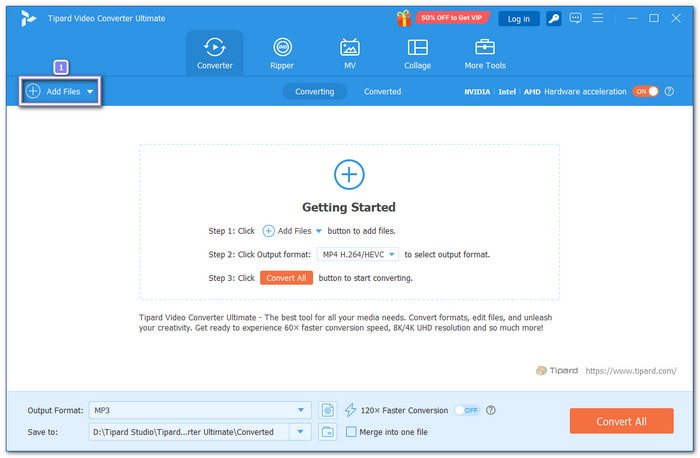
Step 1 Click the Download button above. Install it for free on your Windows or Mac. Once installed, open the program to begin.
Step 2 Hit Add Files to upload your video. You can also select and drop it into the main screen.
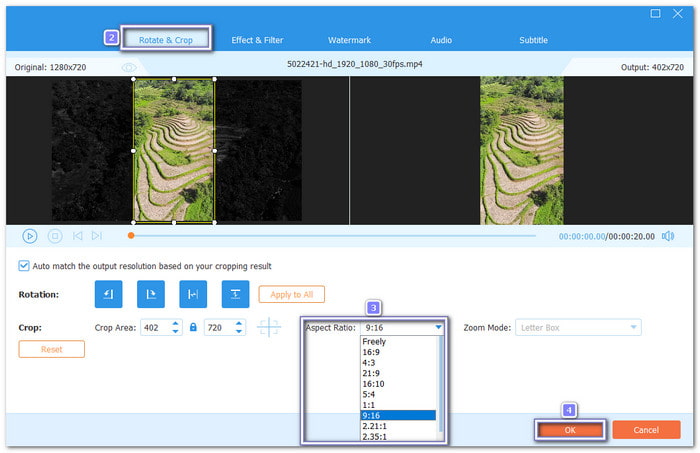
Step 3 Click the Edit button. It will open the main editing display. Go to the Rotate & Crop tab and head to the Aspect Ratio drop-down menu. Now, choose one of the aspect ratios that Instagram supports for videos:
- 1:1 - Best for square feed posts. Clean and balanced look.
- 4:5 - Great for portrait feed videos. It takes more vertical space.
- 9:16 - Perfect for Stories and Reels. It fills the whole phone screen.
- 1.91:1 - Ideal for landscape feed videos. Good for wide shots.
Pick the size based on where you plan to post the video. Then, click OK to apply the changes.
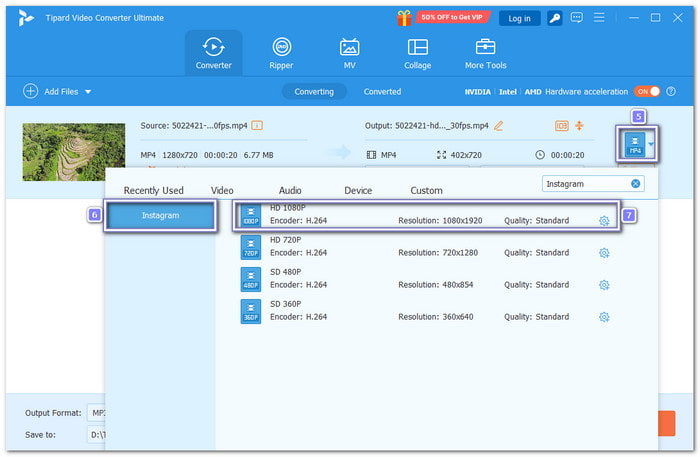
Step 4 To make sure your video is fully compatible with Instagram, you need the correct format and resolution. To do that, open the Format drop-down menu. Type Instagram in the search box. Then, select HD 1080P for the best clarity.
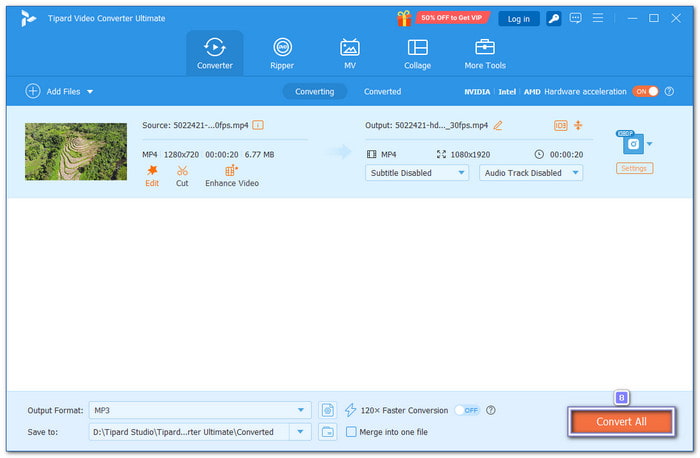
Step 5 Once settled, click the Convert All button to start processing. Tipard Video Converter Ultimate will export your video in your chosen format and size. After that, the destination folder will open automatically. You can immediately find your edited video and upload it to your Instagram.
If your videos look blurry, pixelated, or lose quality after uploading, you can also use Tipard Video Converter Ultimate to improve Instagram video quality. It ensures your content always looks professional and ready to impress your audience.
Part 5. Pro Tips for Maximum Engagement in Instagram
Growing on Instagram takes more than posting. You need a smart plan. Here are strong but simple tips you can follow:
1. Focus on Reels and Carousels
Reels often reach more people. Carousels encourage users to swipe. Swiping increases the time spent on your post. It helps you reach a wider audience.
2. Use the "Post and Engage" Method
Before you post, spend 10 to 20 minutes liking and commenting. Do the same after posting. It shows activity on your account. It can help boost early engagement.
3. Create Value-Driven Content
Teach something. Share tips. Show behind-the-scenes moments. Make content that people want to save or share.
4. Start Strong and End with a CTA
Your first line should grab attention. Keep it short and clear. End with a call to action. Ask people to comment or share.
5. Post Stories Daily
Stories keep your account active. Use polls, quizzes, and question stickers. These tools invite people to interact.
6. Post at the Right Time
Check Insights to see when your followers are online. Many accounts see activity in the early morning, during lunch, or on weekends.
7. Use Location Tags and Keywords
Add location tags to reach local users. Use relevant keywords and hashtags so people can find your content.
8. Follow the 5-3-1 Rule
Like five posts, comment on three. Follow one new account. It builds real community.
9. Stay Consistent
Post on a regular schedule. Do not disappear for weeks. Consistency builds trust and habit.
Conclusion
Now that you have learned the Instagram ratio size supported, you can make sure your videos fit perfectly in the feed, Stories, and Reels. If your video is not the right size, you can use Tipard Video Converter Ultimate to resize it easily. You can also follow our tips for maximum engagement on Instagram to get more likes, comments, and shares.
Remember, using the right size and strategy helps your content look professional and reach more people!
More Reading



About the Author


 Tipard Video Converter Ultimate