

Key Takeaways
- Sora AI is an excellent tool to generate videos, but it is incapable of upscaling them.
- Separate video upscalers are suggested to upscale Sora videos.
- For a better video upscaling and enhancement process, using Tipard Video Converter Ultimate is recommended.
Want the best Sora video upscaler? Well, Sora is an AI-powered tool that is capable of generating videos. However, if you want to make the generated clips crisper and more detailed, the best thing to do is to upscale them. So, if you are looking for the best tools that can upscale Sora video, you are in the right place. Check this post and discover all the best video upscalers you can access to effectively upscale your Sora videos.

Part 1. Can Sora Upscale Video
Can Sora upscaler video? Well, Sora AI is an exceptional tool when it comes to generating videos. It lets you create and generate short clips from images, existing clips, and even from text. The only drawback here is that it is not capable of upscaling generated videos. So, if you want to get a better version of your generated videos, the best solution is to use an ideal video upscaler.
Part 2. Comparison of the 5 Sora Video Upscalers
Take a look at the table in this section and learn more about the best Sora video upscalers.
| Sora Video Upscalers | Output Quality | Additional Features | Platform | Upscaling Speed |
|---|---|---|---|---|
| Tipard Video Converter Ultimate | Up to 8K | Convert, Enhance, MV, Collage Maker, Metadata editor, and more. | Windows and Mac | Super-fast |
| HitPaw VikPea | Up to 4K | Frame Interpolation and Stabilize Model | Windows and Mac | Moderate |
| TopazLabs AI Video Enhancer | Up to 4K | 19+ AI models (Artemis, Proteus, Chronos), stabilization, HDR conversion | Windows and Mac | Slower in poor GPUS |
| Vmake Labs | Up to 4K | Online editing suite, background removal, AI filters | Browser | Depends on the internet. |
| ImgUpscaler | Up to 4K | Supports images too, quick social media optimization | Browser | Depends on the internet. |
| Show MoreShow Less | ||||
Part 3. Detailed Review of the 5 Sora Video Upscalers
Do you want the best Sora 2 video upscaler? In that case, read everything in this part and explore all the video upscalers you can access to successfully upscale Sora videos.
1. Tipard Video Converter Ultimate
If you are looking for a powerful and reliable video upscaler, there is no doubt that Tipard Video Converter Ultimate can give you the result you want. The program allows you to convert your footage with the best quality, such as 1080p, 4K, and 8K. The good thing here is that it is a lightweight program so you can use it even on a low-spec computer. Aside from that, it also provides HEVC and AV1 codecs to reduce the file size. It even supports batch processing, allowing you to deal with multiple Sora videos at once to save more time. Therefore, always rely on this program for an effective video upscaling process.
To upscale the Sora video, follow the instructions provided below.
Step 1 Download Tipard Video Converter Ultimate and start installing it to begin the video upscaling process.
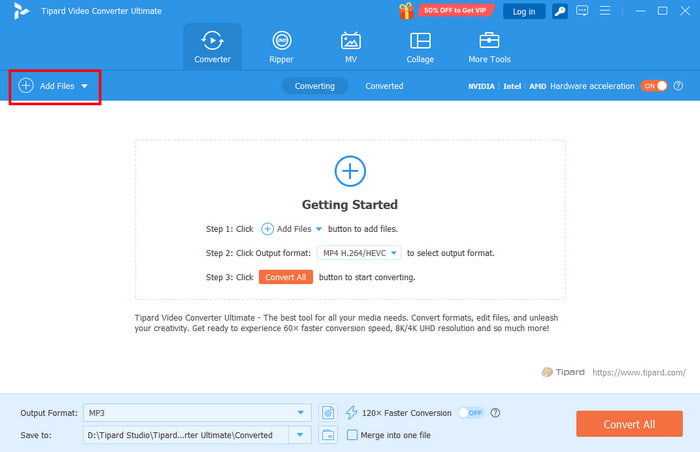
Step 2 Then, add the generated video by clicking the Add Files button. You can add as many videos as you want since the program supports batch conversion.
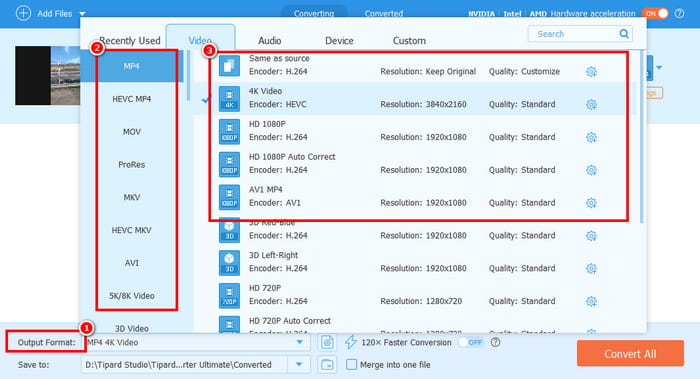
Step 3 Go to the Output Format and choose your desired output format for the video. Then, you can start choosing your preferred resolution from 1080p, 4K, and even 8K.
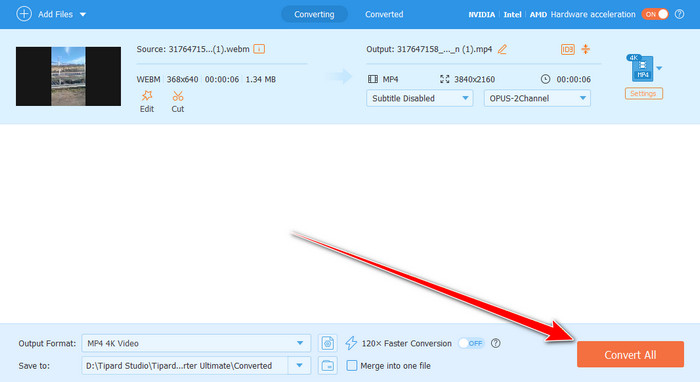
Step 4 Finally, hit the Convert All button to begin the conversion and upscaling process. After that, you can start playing/watching the video with the best quality.
- The user interface of the program is comprehensive.
- It can offer various editing features to improve the video.
- It supports various formats, such as FLV, MP4, MKV, WMV, AVI, MOV, etc.
- You must access the paid version to get all the features.
2. HitPaw VikPea
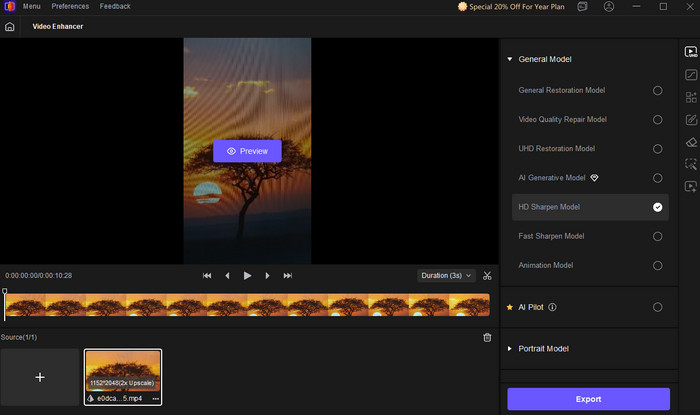
If you want a free Sora 2 video upscaler, use HitPaw VikPea. With its video enhancement feature, you can upscale the video for up to 4K. The best part here is that it has a simple user interface and a fast upscaling process. It can even offer various AI enhancement models to enhance your overall videos effectively.
- The layout of the software is simple.
- It can offer basic video editing tools to improve the video.
- It is resource-intensive.
3. TopazLabs AI Video Upscaler
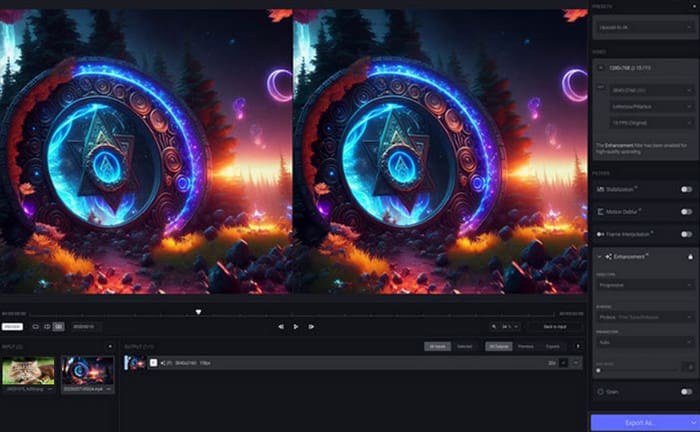
TopazLabs AI Video Upscaler is another tool you can use to upscale video generated by Sora AI. This program is helpful since it lets you get a sharper and more detailed version of your original video. What makes it more remarkable is that it can give you 10+ AI enhancement models and restoration capabilities, ensuring that your video is perfect during playback.
- The tool can upscale Sora video up to 4K.
- It can also offer denoise and stabilization tools to improve the videos.
- It requires a powerful graphics card for a smoother upscaling process.
4. Vmake Labs
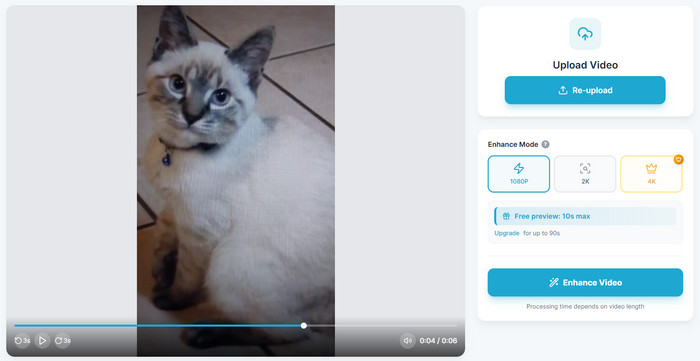
Do you want to upscale Sora videos online? Then, use Vmake Labs. This web-based video upscaler is ideal if you don't want to install any third-party upscaler on your device. You can even upscale the Sora video for up to 1080p, 2K, and 4K. Plus, it can also offer stock videos to check its capability as an excellent video upscaler.
- It doesn't show any ads during the upscaling process.
- The tool is accessible to all browsers.
- To download the full video, you must get the paid version.
5. ImgUpscaler
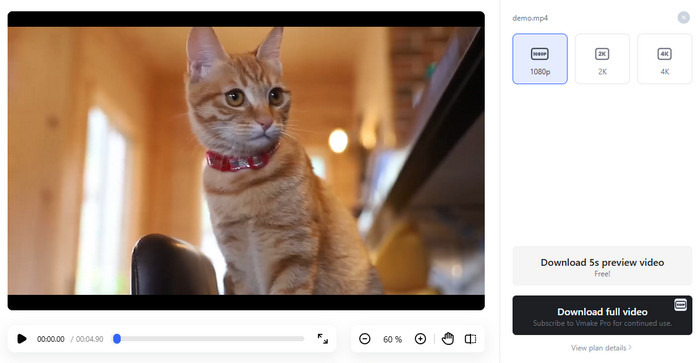
If you want to upscale video from 1080p to 4K, then ImgUpscaler is the best tool you can utilize. This tool is not just useful for upscaling images. You can access this tool and improve the resolution of your video in just a few clicks. It can even offer its Preview feature to check the result before the saving process.
- It can offer a smooth video upscaling process.
- The tool is ideal for non-professional users.
- To upscale the video to 4K, it requires the Premium version.
Part 4. Hardware Requirements for Local AI Upscaling
Wondering about the requirements for local AI upscaling? Then, you can check the table below to get more insights.
| Tier | Ideal Hardware | Best Use Case | Capabilities |
|---|---|---|---|
| Entry-Level | Integrated GPU / 4–8GB VRAM | Basic experimentation, low-res video | Runs small models (3B–5B), slow upscaling |
| Mid-Range | RTX 3060 (12GB), RTX 4060 Ti (16GB), Apple M3 (16GB unified) | Content creators, hobbyists | Handles 7B–13B models, 1080p–2K upscaling |
| High-End | RTX 3090/4090 (24GB), Apple M3 Pro/Max (32GB unified) | Professional editors, archivists | Smooth 4K upscaling, frame interpolation |
Part 5. FAQs about Best Sora Video Upscaler
What video resolution can Sora AI provide after the generation process?
If you are using the free version of Sora AI, you can get a video with 720p resolution. On the other hand, when using the Premium version, you can generate a video with 1080p resolution.
Which upscaler can give the best quality?
If you want to upscale your video to the best quality, access Tipard Video Converter Ultimate. This program can help you upscale your videos for up to 8K, ensuring satisfying video playback.
Is it safe to use the online Sora video upscaler?
It depends on the tool you use. Some tools are not safe to use and might use your file without your consent. To ensure that your data is safe, it would be better to use an offline video upscaler.
Conclusion
These are the tools that you can use to upscale Sora videos for better video playback. You even learned how to upscale your videos to the best quality. Plus, if you need a powerful upscaler that can give you all the features you need, we recommend using Tipard Video Converter Ultimate. With this tool, you can upscale your videos, resulting in a satisfying viewing experience.

All-in-one video toolbox: convert, edit, upscale, enhance, and compress your videos easily
100% Clean & Safe
100% Clean & Safe

More Reading

About the Author


 Tipard Video Converter Ultimate