

5KPlayer is a multimedia player designed to deal with high-definition video playback, audio streaming, and even online downloads. It merges the functions of a video player, audio player, AirPlay/DLNA streamer, and online downloader into a single versatile tool. So, are you interested in exploring more about its overall capabilities? In that case, read this review and get to know more about the program's description, key features, performance test, pros, cons, and much more.
Part 1. What is 5KPlayer
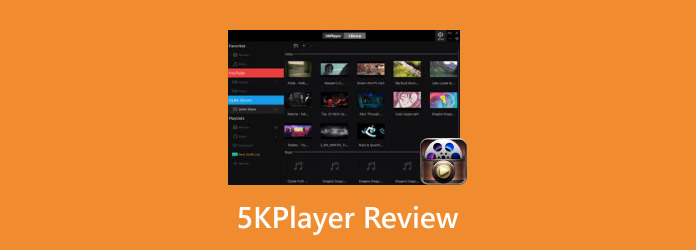
5KPlayer is a free-to-use multimedia player that supports high-definition playback, audio streaming, and online downloads. It also has multiple functions ideal for all users. It serves as a video player, audio player, AirPlay/DLNA streamer, and online downloader in a single platform. The good thing about this software is that it can handle a wide range of formats, including 4K, 5K, and even 8K resolutions.
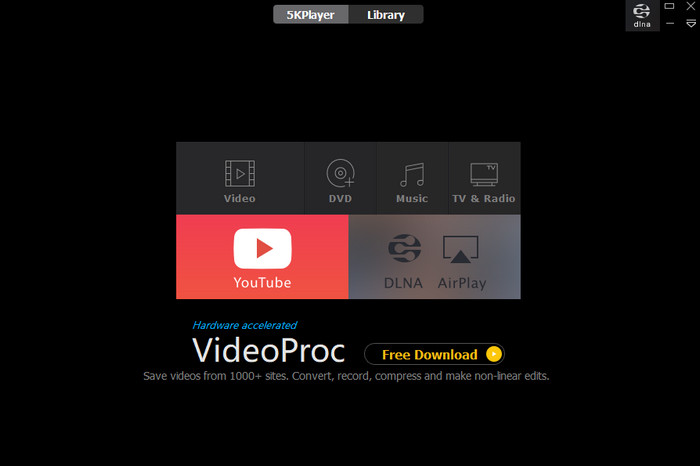
Beyond playback, the media player lets users stream content wirelessly across devices, which makes it versatile for home entertainment setups. It also has various powerful features and a simple user interface, making it a top choice for users who need an all-in-one media solution.
Is 5KPlayer safe?
After using the media player, we can tell that it is safe to use. You can watch and play your favorite videos or listen to your music without encountering any issues. The program also ensures that all your field and data artifacts are safe and won't be shared without your consent.
Part 2. What 5KPlayer Can Do
5KPlayer is not just an exceptional 4K or UHD video player. You can also use the program as your audio player, streamer, and video downloader. It can also support DVD playback and screen recording. This shows that 5KPlayer is more than just a media player. It can even help you in many ways, making it a versatile and remarkable platform for video enthusiasts, casual users, streamers, and professionals.
Part 3. Extra Tools of 5KPlayer
As mentioned, 5KPlayer is not just a simple video player. It can also offer various features you can access to deal with your files. So, to get a detailed insight about its other capabilities, instantly check and read all the information in this section.
Audio/Music Player
What we like about the software is that it is not just an ideal video player. It can also let users play music, making it a good audio player. It can even handle high-quality audio, resulting in a better listening experience. 5KPlayer also supports a wide range of audio formats, including MP3, WMA, AAC, FLAC, and more.
Screen Recording
Aside from being a video and audio player, it can also offer a screen recording feature. With this feature, you can capture and record gameplay, desktop activity, and tutorials. It is also perfect for creating instructional videos, capturing meetings, and saving live streams for collection purposes.
5KPlayer DVD Player
Besides playing digital files, it can also deal with DVDs. You can use any DVD without needing any additional plugins or codecs. It also ensures a smooth playback of physical media alongside digital files. It also supports various DVD formats, including commercial, encrypted, and region-coded discs, making it more powerful compared with other DVD player software.
AirPlay and DLNA Streaming
The media player also supports AirPlay and DLNA streaming features. It enables wireless streaming of media between devices, such as smartphones, computers, and smart TVs. With this feature, sharing videos and music across a home entertainment setup would be easier.
Library Section
5KPlayer can also offer its Library section. In this area, you will see all the files you have saved, along with the favorite ones. You can even organize the files based on your preferred order.
Part 4. 5KPlayer Playback Performance Test
The playback performance of 5KPlayer is strong. It can even deal with 4K and HDR, thanks to its hardware acceleration support. Plus, after testing the software, we found out that it has a smoother video rendering, reduced CPU usage, and stable playback. For more details, you can check the information we have provided below.
- Hardware Acceleration - The program supports NVIDIA CUDA, Intel Quick Sync Video, and DXVA 2.0 modes, resulting in smoother playback of 4K and HDR videos.
- CPU and GPU Load - Software decoding alone can cause high CPU usage. With hardware acceleration enabled, it can drop the CPU load, allowing multitasking while playing videos.
- Format and Resolution Support - The program can support various formats and resolutions. It can play and handle 4K, 5K, and even 8K.
- Cross-Platform Stability - After testing the program on Mac and Windows, we can tell that it can perform well and won't show lag or glitches.
- Comparison with Other Players - 5KPlayer is among the most reliable media players. It can offer a better and cleaner UI compared with other players. It also has better playback speed and won't show any annoying ads.
Want to download 5KPlayer to check its overall capabilities? Then, go to its main website and hit the Download button to explore everything!
Part 5. How 5KPlayer Improves High-Resolution Playback
5KPlayer improves high-resolution playback by leveraging hardware acceleration technologies, like NVIDIA CUDA, DXVA2, and Intel Quick Sync. With this, it ensures a smoother performance and reduced lag. As a result, even demanding formats, such as 4K, 5K, and 8K HDR videos, play stably with lower system resource usage. This makes it a wise choice for users who want a seamless UHD video experience without overloading their devices.
Part 6. Pros and Cons of 5KPlayer
Proceed to this section and explore the pros and cons of 5KPlayer.
Good Things about 5KPlayer
- Simple User Interface - 5KPlayer can provide a comprehensive UI, making it ideal for all types of users.
- Support Various Formats - It can play videos with different formats and resolutions. It includes MP4, MOV, AVI, MKV, 4K, 5K, and even 8K.
- Built-In Downloader - With its pre-built video downloader, you can search and download any video you need without using a separate platform.
- Ad-Free - The program ensures that there are no disturbing ads during playback. Its neat user interface lets users enjoy the content to the fullest.
Drawbacks of 5KPlayer
- Inconsistent Subtitle - The automatic subtitle downloads can be inconsistent. So, it would be better to add a separate subtitle file to the video.
- Limited Customization - Even though the user interface is simple and functional, it is still lacking some customization options compared with other media players.
- Requires a Mid to High-end Device - If you want to get a better performance, you must use a mid to high-end computer. Using an old device can only give you poor performance.
Part 7. Top Alternative to 5KPlayer
In this 5KPlayer review, you have found out that it is a reliable media player that can play your media files effectively. It also has various features you can enjoy when dealing with other content. However, it has some drawbacks you might encounter, including the demand for a stable internet connection, a modern personal computer, and limited customization. So, if you need the best alternative, we suggest using Tipard Blu-ray Player.

- The program can play Blu-ray, DVD, ISO, and folders at a cinematic level.
- It can play 4K UHD smoothly with little CPU usage.
- The Snapshot feature is available for taking a screenshot while playing videos.
- The software can support various digital media formats, like WMV, MP4, AVI, MP3, AAC, FLAC, and more.
- It can offer a playlist section where users can organize the files.
This media player is better since it is lightweight, so you can access it and get better performance even on a low-spec computer. It can also bypass DVD and Blu-ray encryption, making it the best player for smoother playback.
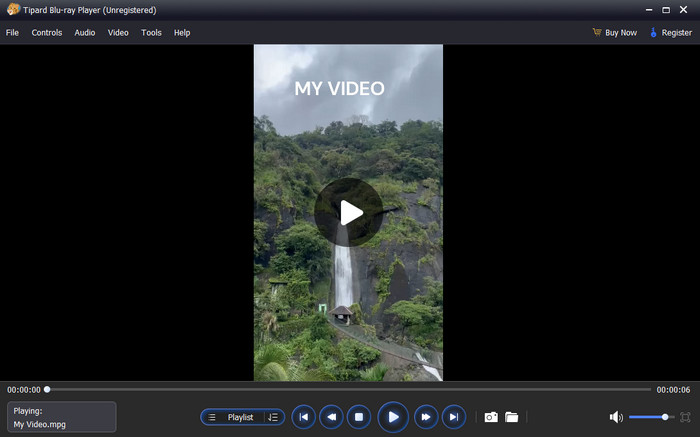
- It's easy to operate, thanks to its simple user interface.
- Since the media player supports shortcuts, you can use various keys for better and easier control.
- It has a consistent update, ensuring that you can access the latest features for better performance.
- If you want to find more features, you can use its paid version.
Conclusion
In this 5KPlayer review, you have explored its overall capabilities. You discovered how good it is as an excellent media player, screen recorder, video downloader, and streamer. You also explored its features, pros, and cons. Also, if you need another program that can replace 5KPlayer, you can rely on Tipard Blu-ray Player. It is ideal since it is lightweight, can handle high-quality files, and offers professional tools, making it the best media player for users.

Play Blu-rays and multimedia files with the best video and audio quality
100% Clean & Safe
100% Clean & Safe

More Reading




About the Author


 Tipard Blu-ray Player