

It can occasionally be dangerous to save data in a digital optical disc storage format, such as Blu-ray. We observe this partly because the disc type is brittle and prone to breaking. One of the reasons is that they are resistant to scratches; Blu-ray players might not be able to read your data.
For this reason, programs like Leawo Blu-ray Copy are developed. It can be used to copy or back up your Blu-ray files digitally. In this instance, there's no need to be concerned if unexpected or accidental circumstances result in the Blu-ray discs breaking. Scroll down to find out more details on the mentioned software.
Part 1. What Can Leawo Blu-ray Copy Do?
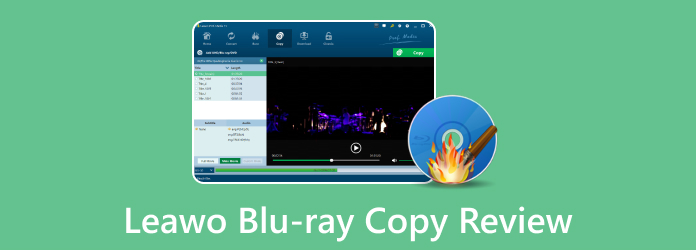
Leawo Blu-ray Copy is a utility designed for backing up or copying Blu-ray discs, as its name suggests. The program can process your Blu-ray discs without crashing or lagging in a matter of minutes. Let's check what exactly Leawo Blu-ray Copy can do:
Key Features of Leawo Blu-ray Copy:
- 1:1 Blu-ray Copy with original video, audio, subtitles, chapters, and titles preserved.
- Three Copy Modes: Full Movie, Main Movie, and Custom Mode for different backup needs.
- Blu-ray Compression: Shrink BD50 to BD25 for fitting larger Blu-ray content onto smaller-capacity discs, like comressing BD-5O to BD-25.
- 3D Blu-ray Copy: Preserve the original 3D effects during 1:1 Blu-ray copying.
- Blu-ray ISO Support: Copy discs, folders, and ISO image files to a hard drive or blank disc.
- ISO-to-Disc Burning: Burn Blu-ray or DVD ISO images directly to recordable discs.
- Selective Audio & Subtitle Copying: Choose specific audio tracks and subtitles to retain in the backup.
- GPU Acceleration: Leawo Blu-ray Copy supports NVIDIA CUDA, Intel Quick Sync, and AMD APP, which is helpful when you re-encode BD-50 to BD-25.
- Copy Protection & Region Support: The current product page states support for commercial Blu-ray copy protection and Region A/B/C discs.
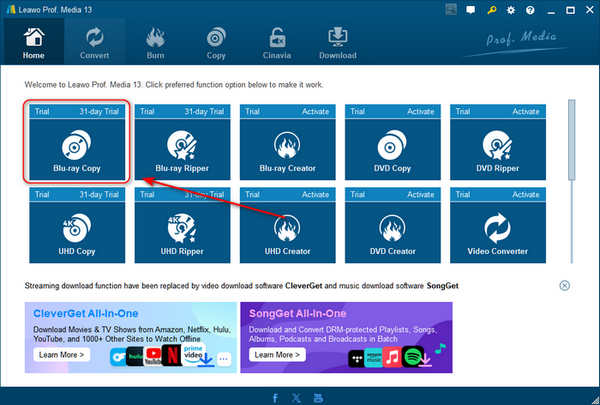
The primary target users for Leawo Blu-ray Copy software are beginners who have never backed up or copied Blu-ray discs into digital format. Every aspect of the product is designed to ensure that even the most inexperienced users have a seamless experience. But get ready by going through the steps of downloading, installing, and starting the utility. Even with a strong internet connection, completing it will take an hour or longer.
Part 2. Detailed Review of Leawo Blu-ray Copy
You still need to know additional details regarding Leawo Blu-ray Copy in addition to what has been mentioned above. Make as many notes on them as you can for future use. To read on, please scroll down below.
Pricing
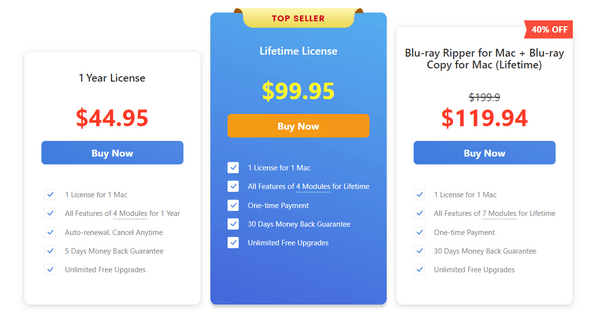
Having Leawo Blu-ray Copy for your Blu-ray folders and discs is advantageous. It is a third-party tool that you will only use seldom or once. Thus, buying it is rather pricey. In that case, the plan you'll get won't be worth the cash. The current plan you can buy for the tool is in the screenshot below.
- The interface is designed for first-time users because it is very user-friendly.
- It offers comprehensive features to meet most of the user requirements.
- The tool ensures that the copies of the Blu-ray discs and folders are of high quality.
- It has a disc protection removal feature after the process.
- It is available on both Mac and Windows operating systems.
- It is too expensive for a one-time user to back up or copy a Blu-ray disc into digital formats.
- It only contains limited advanced customization options.
- The features you can utilize will depend on the plan you purchase.
- The downloading process of the tool is too long even though you have a fast internet connection.
- The tool contains file sizes that are too large to consume much storage space on your computer.
Performance
Leawo Blu-ray Copy's performance is one of the most important factors to take into account. The cost of a third-party tool you buy must live up to your expectations.
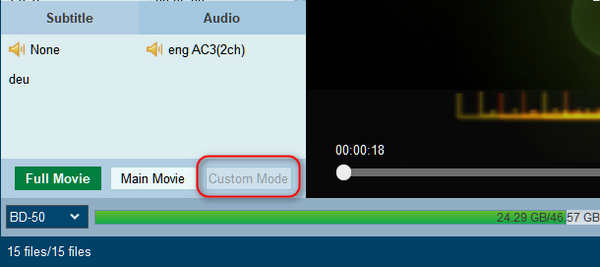
Copy Mode Test Result:In our test, Leawo Blu-ray Copy could copy a Blu-ray disc in the Full Movie and Main Movie modes. However, the Customize Mode option is gray. We cannot choose this mode due to unknown reason.
Title Recognition Test Result: The title recognition feature is awful. Although it can detect the main movie (with the longest duration), the title sequence is a total mess.
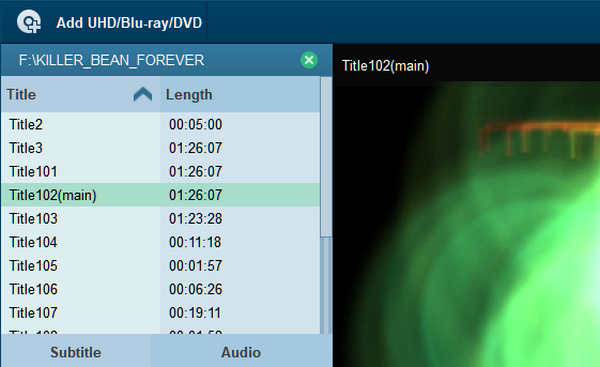
Copy Speed Test Result: Thankfully, the copy speed of Leawo Blu-ray Copy is decent; it takes about 20 minutes to copy a 40GB Blu-ray movie. However, it can be improved for better user experience.
Part 3. The Best Leawo Blu-ray Copy Alternative
Leawo Blu-ray Copy can bypass Blu-ray copy protections and quickly copy the main movie of a Blu-ray disc. However, it has some minor drawbacks. Therefore, do you want a more comprehensive alternative? It's time to learn about Tipard Blu-ray Copy. Leawo Blu-ray Copy is pricey for a tool that can back up Blu-ray discs, as you can see above. This Blu-ray disc copying software is far more affordable yet meets all your needs.
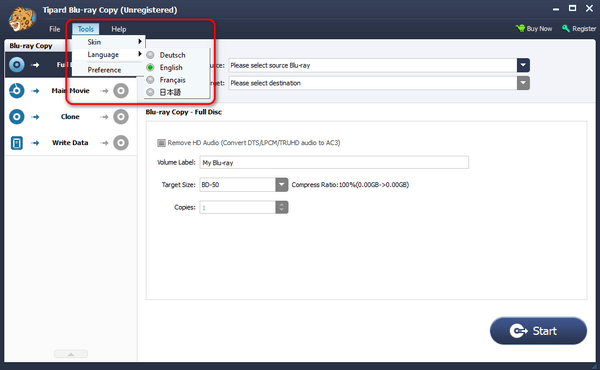
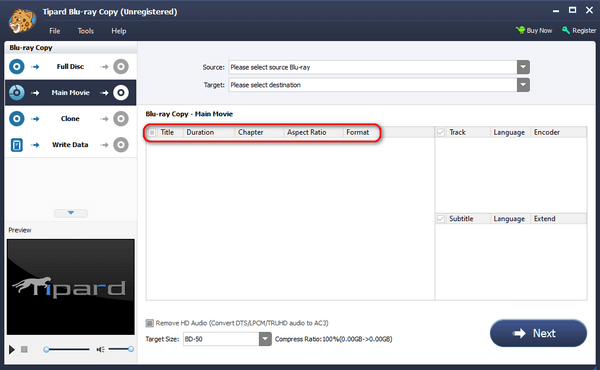
One of the easiest tools you will ever use is this software. Tipard Blu-ray Copy features and tools all have labels or names explaining their actions. If so, not-so-tech-savvy users will not use the wrong tools for copying or backing up their Blu-ray discs. The screenshot below shows that it also features a unique utility that supports four languages while using the program.
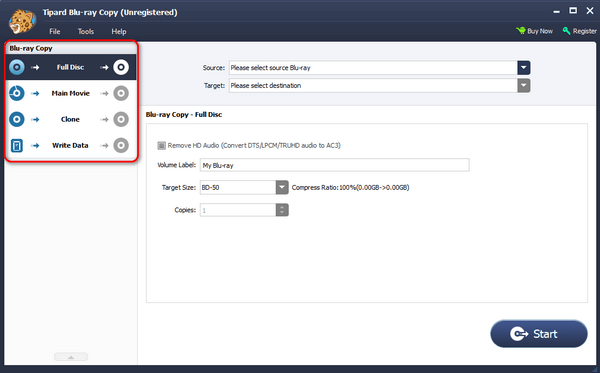
Tipard Blu-ray Copy has 4 main features: Full Disc, Main Movie, Clone, and Write Data. When you use the Full Disc feature, you can back up a Blu-ray disc, folder, or ISO files without having to choose a main movie. If you use the Main Movie feature, you can copy the main part of a movie. But if you use the Clone feature, you can duplicate the Blu-ray ISO file and disc. Lastly, you can copy the Blu-ray folder using the Write Data feature. All contents will be backed up with the same quality as the original Blu-ray disc files.
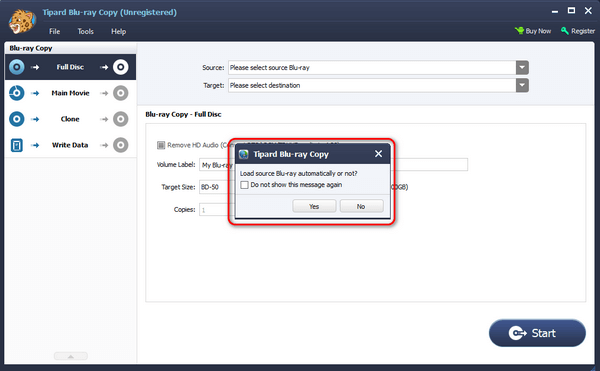
Moreover, the tool offers to load the source Blu-ray automatically once the software is launched. In this case, it will scan the Blu-ray files without you clicking anything. It also enables you to use keyboard shortcuts to execute some actions, including the Alt + F4 command, wherein it will close the software while running, no matter what.
Lastly, some information about the Blu-ray disc you prefer to copy will be shown on the screen. It includes their title, chapter, duration, format, and aspect ratio. If so, you will know the Blu-ray disk or folder you prefer to copy or back up.
Part 4. FAQs about Leawo Blu-ray Copy
Is there customer support available for Leawo Blu-ray Copy?
Yes. Leawo Blu-ray Copy has customer support ready to answer your queries about software issues. There's nothing to be anxious about if you experience problems with the tool anytime because they can answer your questions 24/7! Here's the main website of the software's support team. You only need to enter your information on the form, input your concern, and submit it. Later, wait patiently for their response.
How often does Leawo Blu-ray Copy receive updates?
The update of Leawo Blu-ray Copy may vary depending on the software issues that its users experience or if there are new features that the manufacturers want to release. These features may be about fixing bugs, performance, or other tools and features. If you want to be informed, you only need to visit the tool's main website often.
Is there a risk of losing data or damaging the original Blu-ray disc during the copying process?
No. There are no risks of losing or damaging data, including the Blu-ray disc, before, during, and after the copying process. The software uses advanced technology. That's why there's nothing to worry about; it is safe to utilize for backing up your Blu-ray discs.
Conclusion
We hope you find this Leawo Blu-ray Copy review helpful in learning more about the software. Our top concern is listing the product's cost, benefits, drawbacks, and performance. Furthermore, we provide Tipard Blu-ray Copy, the tool's top substitute for future reference. Because of their comparison, some users might also believe it is easier to use than the previously mentioned program. Downloading the tool is much appreciated.


More Reading

About the Author

 Click here to join the discussion and share your comments
 Tipard Blu-ray Copy