Most modern devices do not support disc drives, so you cannot play the disc content you have right now. Due to these instances, you will need ripping software to make the process easier. A good tool for converting Blu-ray content into a playable format for all devices while preserving quality. In this guide, we will review what the DVDFab Blu-ray Ripper is all about and how it can help you rip your old Blu-ray so you can watch it again.
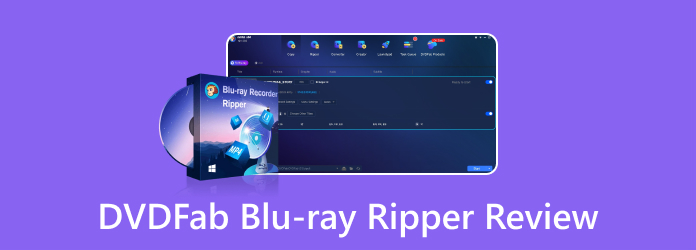
Part 1. Quick Verdict of DVDFab Blu-ray Ripper
Compared with other selections that offer Blu-ray ripping, DVDFab Blu-ray Ripper is a strong contender for those who want a fast conversion process, flexible output options, and quality control. It is not only a simple ripper but also handles compressed and near-lossless MKV output, which is considered a demanding conversion process. According to recent reports, it can rip a 2-hour Blu-ray in less than 8 minutes, which is impressive enough to be considered a ripping tool.
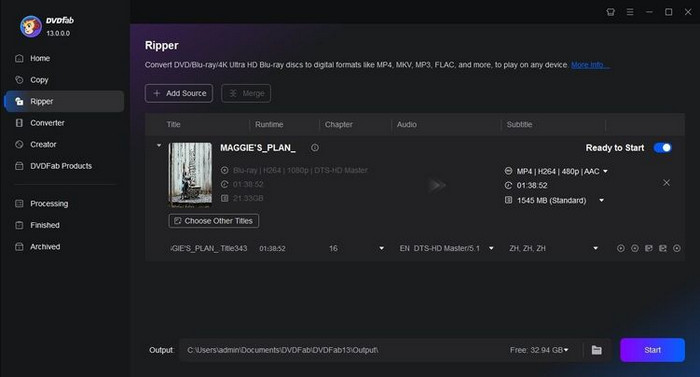
However, using its full-featured version with hardware acceleration is expensive. That is why many users are pushed to find a DVDFab Blu-ray Ripper crack. Downloading it from illegal sources is not worth it because your security and reliability are at risk. Overall, the official version is the best choice for those who regularly manage the Blu-ray collection and need more control, with the addition of editing features.
Part 2. Main Features of DVDFab Blu-ray Ripper
Get to know more about the DVDFab Blu-ray review that showcases what it offers, which is not limited to what we know. It supports different sources from various Blu-ray versions, as well as output formats, quality settings, and editing tools. Some features are also targeted at users who need faster processing or better control over their digital library.
1. Support Different Blu-ray Sources
The software do support BD-50 to BD-5 discs, as well as ISO files and Blu-ray folders. If you have homemade and commercial Blu-rays with protections, it does not have a problem handling them.
2. Lossless and Compressed Output
Since you need to convert the content from Blu-ray to digital, be mindful of the compression you use, as it can affect overall quality. You can choose to do a 1:1 lossless conversion to preserve its original quality and all its information, or choose a smaller file size to reduce storage needs.
3. Supports 1000+ Formats
Another advantage of downloading the DVDFab Blu-ray Player on Mac is that you can choose from 1000+ video and audio formats, making your converted Blu-ray content playable and editable on any device and software.
4. GPU Acceleration
Many users do not know that ripping Blu-ray content is hardware-intensive and that the conversion process can take a toll on their computer. But with the acceleration, it can help reduce conversion time, making it faster for you and more efficient for your PC.
5. Built-in Editing Feature
One of the most sought-after features that other users tend to forget is editing. This app offers basic editing features, including trimming titles and adjusting brightness before merging or exporting them.
6. Supports AI Video Enhancement
With the Windows version of it, DIA AI Enhancer can upscale the SDR video, which is a digital video format from older displays, into an HDR10 video. With it, you can also work on the details with its newly added AI tool named Detail Refiner AI.
Part 3. DVDFab Blu-ray Ripper Pricing: Is It Worth the Cost?
The truth is, everyone knows its capability as a Blu-ray ripper to PC, but that is not all. The premium version of the app costs $69.99 for a 1-year license. With this pricing, you can get all the features we mentioned, plus additional free support for future updates. But if you want to keep this on your computer, the Lifetime License for $99.99 is the right choice.
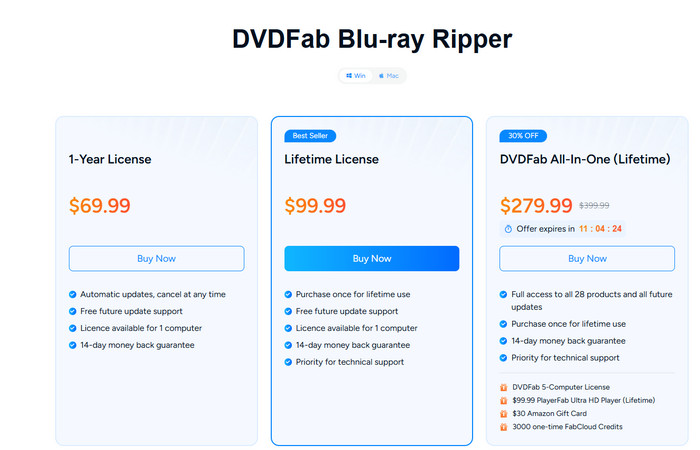
Now, the question is: is it worth it? It depends on how often you need to rip a Blu-ray. If you are going to use this for a one-time job, the $69.99 starting price may be hard to justify, even if you are willing to pay for good software; that cost can make you run away from it and look for an alternative. However, if you want all the features it provides, the price may be easier to justify.
Part 4. Master Review of DVDFab Blu-ray Ripper
- Supports Blu-ray from different sources: discs, ISO, and folders.
- Offers 1000+ available output formats to choose from.
- Lossless and compressed output options are available.
- Enable GPU acceleration to speed up the version.
- Batch conversion of multiple Blu-ray tasks is supported.
- Provides subtitles, metadata, and basic video-editing tools.
- Supports both Windows and macOS.
- There is no monthly plan, and the yearly plan is too expensive.
- The free trial has limited access to its features.
- Many of its advanced settings feel overwhelming for beginners.
- Some features depend on your computer's compatibility.
- The actual ripping process does take longer, depending on many factors.
Part 5. DVDFab Blu-ray Ripper vs. Alternatives
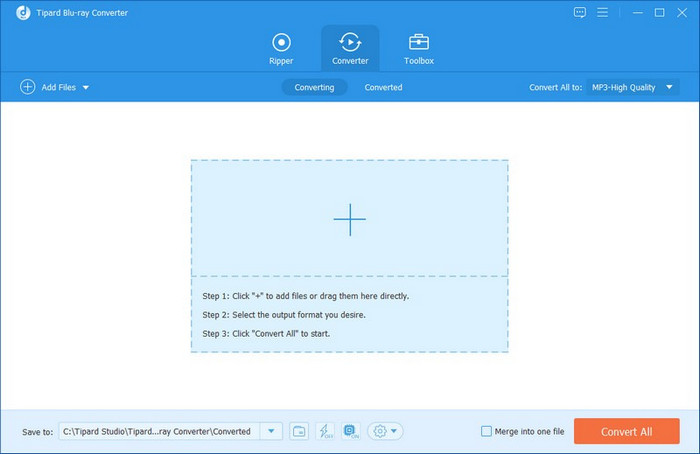
As an alternative to DVDFab Blu-ray Ripper, Tipard Blu-ray Converter is the best choice. Why? Because its workflow is simple, it's suitable for beginners to achieve good results with minimal setup and configuration. Compared to DVDFab, it is much cheaper, but you can get almost all the features that DVDFab offers in this app. Plus, it offers more customizations, format selection, and codecs than the previous tool. If you are looking for a cheaper alternative without losing most of DVDFab's major features, this is for you.
| Features | DVDFab Blu-ray Ripper | Tipard Blu-ray Converter |
|---|---|---|
| Pricing | Starts at $69.99 | Starts at $32.00 |
| Performace | Fast | Fastest |
| Subtitle Support | Advanced subtitle extraction and OCR | Multiple subtitle and audio track options |
| 3D Maker | Unsupported | Supported |
| Enhancer | SDR to 4K | SDR to 4K |
| Show MoreShow Less | ||
Part 6. FAQs of DVDFab Blu-ray Ripper
Can I use the free version of DVDFab Blu-ray Ripper?
Yes, you can use it, but there are limits to what it can do. Unlike when you purchase it, you can select various output options and handle different types of encryption added to your Blu-ray disc.
How fast is DVDFab Blu-ray Ripper for ripping Blu-ray content?
Based on the updated information I have gathered, ripping a Blu-ray disc in 2 hours and 36 minutes, which of the content can be done in less than 8 minutes, which is impressive with the help of GPU acceleration.
Is DVDFab Blu-ray Ripper the best option?
The word "best" is subjective, and we can all agree that the DVDFab Blu-ray Ripper does its job well, but is it the best? Well, there are better alternatives that are cheaper than it but perform well at ripping the Blu-rays.
Conclusion
Based on this DVDFab Blu-ray Ripper review, the app is truly amazing software. It can handle the ripping process and offers additional features you do not usually see in a Blu-ray ripper. However, due to its price, many are still looking for an alternative that performs as well as this but at a lower price. As we mentioned, there is one, and it might be the one you are looking for.

Rip Blu-ray to Digital Format with the Best Quality
100% Clean & Safe
100% Clean & Safe

More Reading
About the Author