

The AAC codec is a smart choice for compressing audio while keeping sound clear and rich. It was standardized in 1997 and quickly became popular. Today, many streaming platforms, radio stations, and personal devices use it.
In this guide, you will learn what the AAC codec is and why many people choose it over MP3. You will also understand its main versions and how they work. We will also introduce a simple player you can use to play AAC codec videos and audio files with ease.

Part 1. What Is AAC Codec
When you listen to music or watch videos, you need a format that keeps the sound clear but does not take up too much space. That is what the AAC codec does. AAC stands for Advanced Audio Coding. It is a modern audio format used to store music and sounds. Many devices, like iPhones, iPads, and iTunes, use AAC.
It is better than older formats like MP3 because it can give clearer sound at smaller file sizes. Here are its main specs:
| Feature | Specification |
|---|---|
| Full Name | Advanced Audio Coding (AAC) |
| Bitrate Range | 8 kbps - 320 kbps |
| Sample Rate | Up to 48 kHz |
| Channels Supported | Mono, Stereo, and Multi-channel |
| Compression Type | Lossy |
| Device Support | iPhone, iPad, iTunes, Android, and personal computers |
| Typical Use | Music, streaming, movies, games |
In short, the AAC audio codec is modern, clear, and small. It works well for music, movies, and streaming.
Part 2. In short, the AAC audio codec is modern, clear, and small. It works well for music, movies, and streaming.
If you compare AAC codec and MP3, AAC usually sounds better even when the files are the same size. That means you can have high-quality music without using too much storage.
Here are the main reasons to use AAC over MP3:
- Improved sound quality - Music has a crisper, more detailed sound.
- Improved sound quality - Music has a crisper, more detailed sound.
- Modern device support - Most phones, tablets, and streaming apps play AAC easily.
- Advanced features - Works well with multi-channel audio, movies, and streaming.
So, AAC is great if you want crisp music and save space. MP3 is older, and AAC is the modern upgrade.
Part 3. Understand AAC LC vs. HE-AAC
AAC has different versions, and two popular ones are AAC LC codec and HE-AAC. They are made for different uses.
AAC LC (Low Complexity) is the most common version. It gives high-quality sound and works well at medium to high bitrates. It is used for music files and apps where quality matters more than file size.
AAC LC (Low Complexity) is the most common version. It gives high-quality sound and works well at medium to high bitrates. It is used for music files and apps where quality matters more than file size.
The main difference:
- AAC LC - AAC LC codec is better for music libraries and offline listening.
- HE-AAC - AAC codec is better for streaming or saving space on mobile devices.
Knowing this helps you choose the right AAC version. If you want pure quality, go for AAC LC. If you want small files for online streaming, HE-AAC is better.
Part 4. How to Play AAC Codec Videos and Audio Files
The final 2 methods are online converting. Advantage of online WMA to WAV converters is well-known. But every coin has two sides, their downsides can be quite irritating.
If you ever need to play AAC codec videos and audio files on your computer, using the right player makes a big difference. Tipard Blu-ray Player gives you an easy and smooth way to enjoy your media without stress. It can play many popular and rare video and audio formats that use the AAC codec, so you do not have to worry about file errors or limits.
With hardware decoding, playback stays smooth and clear, even with high-quality files. It also offers a user-friendly playlist feature, which helps you manage and enjoy multiple files in one place. There is no doubt that with Tipard Blu-ray Player, playing AAC files feels simple, clean, and enjoyable.

- Simple playback controls for easy use.
- Play common and high-quality video formats, including 4K and 8K.
- Enjoy lossless audio with Dolby and DTS up to 7.1 surround sound.
- Use hardware acceleration for smooth and fast playback.
- Capture scenes as JPG, PNG, or BMP images.
Step 1 To begin, download Tipard Blu-ray Player for Windows or Mac. Install it on your computer. After that, launch the program. Once opened, you will see a clean screen that is easy to use, even for first-time users.
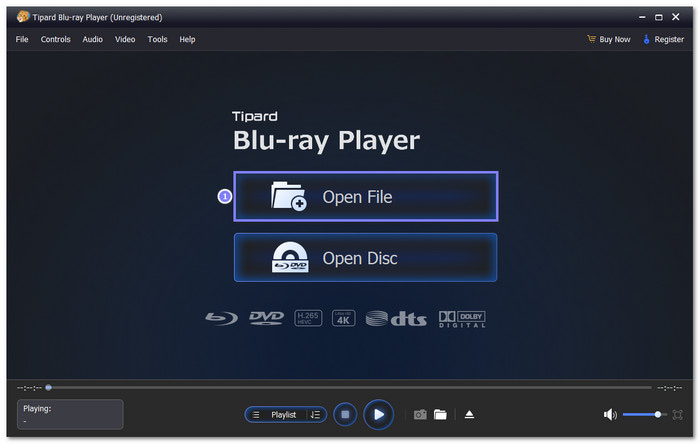
Step 2 Next, look for the Open File button on the main screen. Click it to browse your computer. Choose your AAC codec video or audio file.
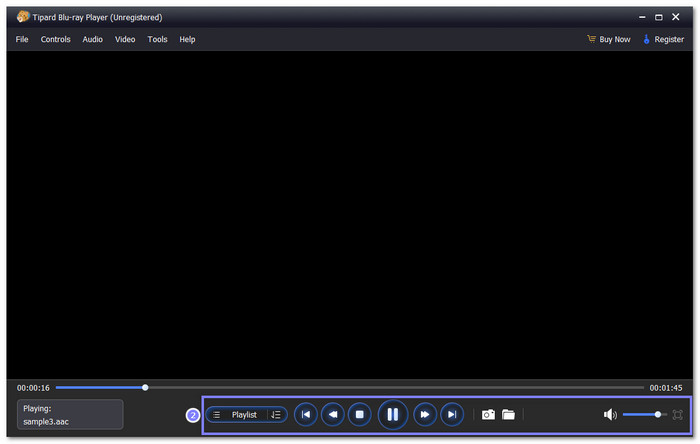
Step 3 After loading the file, playback starts on its own. You can use the on-screen controls to Play, Pause, Stop, Forward, or Backward. You can also move to the Previous or Next file. You can also boost the Volume to match your listening needs.
Step 4 All you need to do now is relax and enjoy your AAC codec video or audio file. Tipard Blu-ray Player delivers clean sound and stable playback. Every detail sounds clear, whether you listen with speakers or headphones.
Additional Details: Besides playing AAC codec videos and audio files, Tipard Blu-ray Player can also play Blu-ray discs, just as its name suggests. It supports Blu-ray folders and ISO files with smooth playback. It makes it a great choice if you want one player for both media files and Blu-ray movies.
Part 5. FAQs of AAC Codec
Which is better, SBC or AAC codec?
AAC is usually better than SBC. It gives clearer sound at the same bitrate. Music sounds more detailed and smooth. AAC is also more stable on many devices. It is why many phones and streaming apps prefer AAC.
What is the best AAC encoder?
The Apple AAC encoder is often seen as the best. It produces clean sound and keeps details even at lower bitrates. It is used in iTunes and Apple Music. Other good encoders exist, but Apple's version is trusted for quality.
Is AAC an Apple codec?
No, AAC is not only for Apple. It is an open standard made by MPEG. Apple uses AAC a lot, which makes people think it is Apple-only. In truth, AAC works on many devices, platforms, and apps.
Conclusion
There you go! You have learned in-depth information about the AAC sound codec. You now know its perks, like better sound quality, smaller file size, and wide device support. You also understand why many apps and devices choose AAC over older audio formats.
If you need to play AAC codec videos and audio files, you can rely on Tipard Blu-ray Player. It can play many AAC-based formats with smooth and clear sound. You can control playback, adjust volume, and manage playlists with ease. The player is simple to use, even for a first-time user.
More Reading



About the Author


 Tipard Blu-ray Player