

Video editing is more popular than ever. People use it for school projects, social media content, business videos, and more. The thing is, many users still prefer to use a video editor that does not cost anything.
Have you heard of VSDC Free Video Editor? It is one of the most popular free video editing options today. And right in this write-up, we will explore its features, limitations, and the basic steps to use it.
Part 1. What Is VSDC Free Video Editor – Quick Verdict
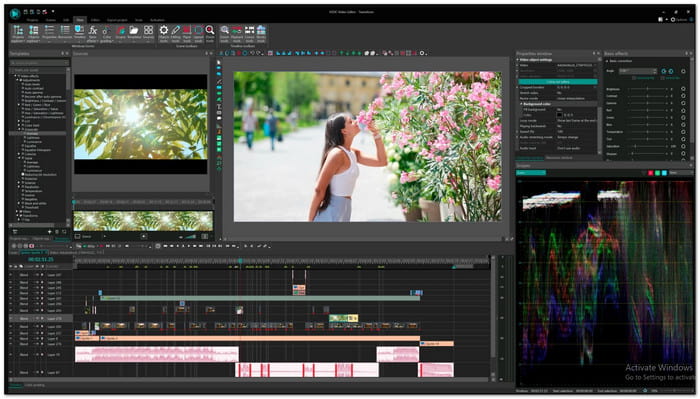
VSDC Free Video Editor is a free video editing program for Windows. It supports simple edits and advanced projects.
Clips may be edited, effects can be added, color correction can be applied, slideshows can be made, Chroma Key can be used, and videos can be exported in 4K and greater formats without watermarks. For novices, content producers, students, and small businesses, it is an excellent option.
The interface may take some time to learn, but the features make it one of the best free video editors available for Windows users.
Best for:
- YouTube creators
- Social media videos
- School projects
- Business presentations
- Family videos
- GoPro and action camera footage
Part 2. Key Features of VSDC Free Video Editor
Impressively, VSDC video editing software comes with many tools that help users create professional-looking videos without spending money. Below are its most useful features:
- Non-Linear Editing of Videos
Place videos, images, text, and audio anywhere on the timeline. Create picture-in-picture effects, split screens, and layered projects with ease. - Wide Format Support
Import and export popular formats such as MP4, MOV, AVI, MKV, ProRes, H.265/HEVC, and many more. - Chroma Key
Remove green screens and replace backgrounds with images, videos, or custom scenes. - Visual Effects & Filters
Access more than 200 effects, transitions, filters, and color grading tools. - Color Correction Tools
Adjust exposure, white balance, contrast, colors, LUTs, and HDR footage. - Motion Tracking
Track moving objects and attach text, images, icons, or masks to them. - Text Effects & Subtitles
Create animated titles, scrolling text, captions, lower thirds, and subtitles. - Audio Editing Tools
Improve sound quality with normalization, equalizer, echo, reverberation, and volume controls. - Video Stabilization
Smoother footage can be produced by reducing camera shake. - Pre-made Templates
Use customizable templates for intros, slideshows, transitions, titles, and social media videos.
Part 3. Detailed Review of VSDC Free Video Editor
VSDC Free Video Editor offers more than basic video editing. It comes with a wide range of tools for creating videos, adding effects, improving colors, and working with different file formats. However, no editor is perfect.
Before you decide if it is the right choice, it helps to look at its strengths, weaknesses, key features, and the differences between the Free and Pro versions.
Pros
This free video editing software gives you many useful tools without asking you to pay. It supports many file formats and lets you export videos without a watermark. It also includes effects, color tools, screen recording, and high-resolution export. Moreover, it runs well on many Windows computers and provides more features than most free editors.
Cons
The main downside of VSDC Free Video Editor is that the interface can feel confusing at first. It cannot be denied that some tools take time to find and learn, which makes it hard for first-time users or beginners to master. A few advanced features are also limited to the subscription version. In addition, VSDC Free Video Editor is available for Windows only.
Feature Analysis
- Editing Performance
VSDC Free Video Editor uses a non-linear editing system. It gives users more freedom when arranging clips, images, text, and effects. - Effects & Creativity
The program includes transitions, video filters, blending modes, masking tools, animations, and visual effects. These tools help create more engaging videos. - Format Compatibility
Format support is one of VSDC Free Video Editor's best features. Without the need for additional converters, it can handle nearly all popular video, music, and image formats. - Export Quality
The free version allows high-quality exports without watermarks or time limits. It is a major advantage over many competing free editors.
VSDC Free vs. VSDC Pro
Both versions share the same editing foundation, but VSDC Pro adds advanced tools and faster performance.
| Feature | VSDC Free | VSDC Pro |
|---|---|---|
| Basic Editing | ✓ | ✓ |
| 4K & HDR Support | ✓ | ✓ |
| Chroma Key | ✓ | ✓ (Advanced) |
| Motion Tracking | Limited | ✓ |
| Video Stabilization | Limited | ✓ |
| Audio Waveform Editing | ✗ | ✓ |
| Video Masking Tools | Limited | ✓ |
| Beat Synchronization | ✗ | ✓ |
| Hardware Acceleration | ✗ | ✓ |
| Real-Time Voice Recording | ✗ | ✓ |
| Show MoreShow Less | ||
Who Should Use VSDC Pro
You can choose VSDC Pro if you create videos regularly, work with 4K footage, or need faster exports. Also, if you want advanced tools like motion tracking, masking, stabilization, and hardware acceleration.
Part 4. Simple VSDC Video Editor Workflow
Getting started with VSDC is easy once you learn the basic process. Most projects follow the same simple workflow.
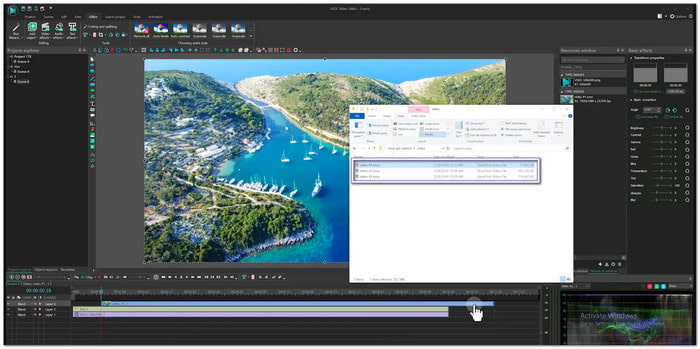
Step 1 Bring in Your Media
First, download VSDC free video editing software. Once opened, click Import Content, and select the video you want to edit.
Step 2 Edit Your Video
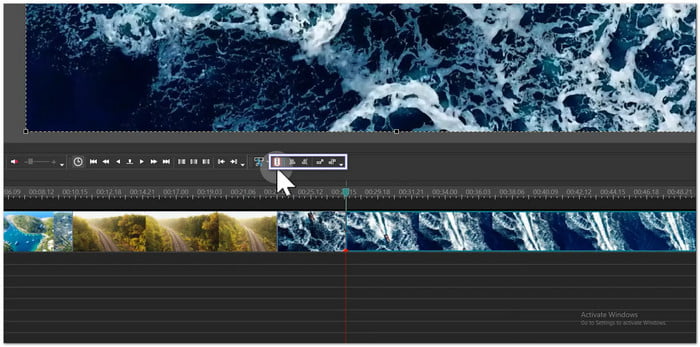
Use the editing tools to cut unwanted parts, split clips, crop video frames, rotate footage, add text and subtitles, apply effects and transitions, and improve video colors and audio quality.
Step 3 Add the Finishing Touches
Insert music, animations, overlays, logos, or visual effects to enhance your project.
Step 4 Export Your Video
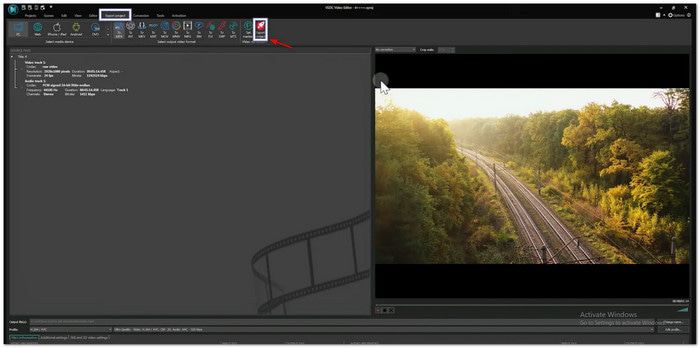
Open the Export Project tab. Then, choose an output format or a preset for YouTube, Facebook, Instagram, or other platforms. After that, export and save your video.
Step 5 Share Your Creation
You can upload the finished video to social media, YouTube, a website, or share it straight with friends, clients, or viewers.
Part 5. The Best VSDC Video Editor Alternative
VSDC Video Editor is a capable video editor, but it is not the best fit for everyone. It is available only on Windows, and its interface can feel confusing for new users. Some tools also take extra time to learn, especially if you are new to video editing.
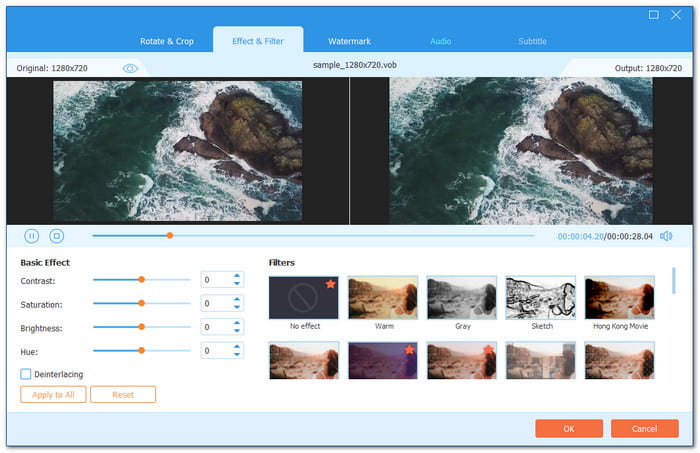
If you want a simpler option, Tipard Video Converter Ultimate is the best alternative. It works on both Windows and Mac, so you can edit videos on more devices without switching programs. It also offers a clean interface and a simple workflow. It makes it easier to edit, convert, and enhance videos, even if you are a beginner.
This program also features a clean interface and a straightforward workflow. It makes it easy for beginners to get started. Another advantage is its powerful GPU acceleration, which speeds up video editing, conversion, and exporting.
Some people may have heard
- Supports 500+ video and audio formats, including MP4, MOV, AVI, and MKV.
- Offers editing tools for cropping, rotating, effects, filters, watermarks, audio, and subtitles.
- Trims unwanted parts from the start or end of videos.
- Includes 50+ themes for weddings, travel, holidays, business, and more.
- Adds opening and ending titles for a polished video.
- Offers more tools like a video compressor, GIF maker, watermark remover, and more.
- Offers 45+ templates for a photo and video collage maker.
- Lets you change video formats and output settings before export.
- Supports Intel, AMD, and NVIDIA acceleration for faster processing.
- The trial version has limitations. Paid plans start at $18.00 with a 30-day money-back guarantee.
Part 6. FAQs of VSDC Free Video Editor
Where can I download VSDC Free Video Editor securely?
The safest place to download VSDC Editor is from its official website. It helps you get the latest version and avoid unsafe or modified files from third-party sources.
How to fix VSDC Free Video Editor issues?
Install the most recent version of the software if it crashes. Reinstall the necessary codecs if exporting videos is not possible. Reduce the preview quality for more fluid editing if the program is running slowly. When audio and video are out of sync, re-import the audio track and adjust it again. If the installation fails, run the installer as an administrator to complete the setup properly.
What makes the VSDC Free Video Editor suitable for students?
VSDC Free Video Editor is a free and lightweight program that runs well on many older or low-end computers. It supports a broad range of file formats and includes useful tools for school work, presentations, and basic video editing. Students can build editing skills without spending money on an expensive program.
Conclusion
This in-depth review of VSDC Video Editor helps you understand what the program can do. Do you think it fits your editing needs? Or do some tools feel hard to learn? If so, we understand.
That is why we recommend Tipard Video Converter Ultimate as the best alternative. It is easier to use, beginner-friendly, works on both Windows and Mac, and includes many tools to handle your video needs.

All-in-one video toolbox: convert, edit, upscale, enhance, and compress your videos easily
100% Clean & Safe
100% Clean & Safe

More Reading
About the Author


 Tipard Video Converter Ultimate