

Clipchamp was first launched in 2013 and later became part of Microsoft in 2021. Today, it is included with Windows 11 and can also run in a web browser. It means you can edit videos without installing a heavy program.
But is it the right tool for your needs? In this Clipchamp review, we will look at its features and pricing. We will also cover the good and bad, performance issues, and some good alternatives. If you are ready to discover all the details, please keep scrolling down.
Part 1. Main Features of Microsoft Clipchamp
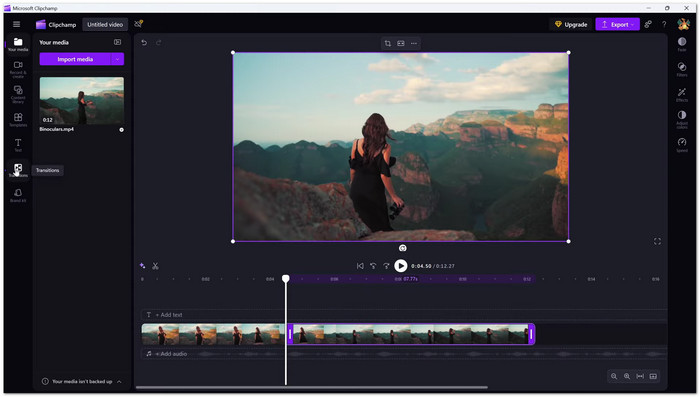
Microsoft Clipchamp is built for easy video editing. It gives you tools to make videos fast and simple, even if you are a beginner. Here are its main features:
1. Timeline Editor
Clipchamp has a timeline editor. You can layer videos, text, music, transitions, and overlays. You can drag and drop everything. It makes it easy to arrange your video clips.
2. AI Tools
Clipchamp has smart AI tools that save time:
- AI subtitles: Immediately make captions in 80+ languages. You can change font, size, and position.
- AI text-to-speech: Turn text into voiceover. Many voices and languages are available.
- AI noise suppression: Remove background noise hassle-free.
- AI silence removal: Cuts out silent gaps so your video flows better.
3. Video Resizer
You can resize videos for TikTok, YouTube, or Instagram. You can crop, blur backgrounds, or fill empty spaces to make videos look clean.
4. Royalty-free Elements
Clipchamp includes stickers, animations, music, sound effects, backgrounds, frames, and overlays.
5. Screen Recording
Clipchamp on Windows lets you record your screen and webcam. You can edit your recordings right away.
6. Video Templates
Ready-made templates are available for Reels, YouTube Shorts, and TikTok. Many of them sync to music beats.
Part 2. Detailed Review of Microsoft Clipchamp
Now that you know Clipchamp's main features, let us see how it works. We will look at its plans, platforms, pros and cons, and who it is best for. This section will help you decide if Clipchamp is right for you.
Pricing
- Free Version: It only includes basic editing. It offers auto composition and free stock. You also get text-to-speech, autocaptions, and speaker coach. Exports are available up to 1080p HD.
- Premium Plan: The cost is $11.99 per month or $119.99 per year. It offers unlimited exports up to 4K. You also get premium stock, filters, effects, a brand kit, and content backup.
Platform
- Clipchamp works on the web (Chrome/Edge), Windows 10/11 computer, and iOS mobile app.
Pros & Cons
- Clipchamp has an easy interface for beginners.
- It provides ready-made templates for social media videos.
- AI tools make editing faster and simpler.
- You can edit across many platforms with a similar experience.
- The free version allows exporting videos in 1080p.
- Premium assets are only available with a subscription.
- Advanced controls like keyframing or motion tracking are limited.
- Audio editing features are basic.
- Videos can only be exported in MP4, with animated images for short clips.
- Templates are short and provide limited control over effects.
Recommended For
1. Marketers: Quick ads, teasers, and promos.
2. Educators: Lessons and presentations.
3. Students: Projects and video essays.
4. Beginners and casual content creators: TikTok, Instagram, and YouTube videos.
Part 3. Performance Issues of Microsoft Clipchamp
Have you ever felt your video editor slowing down or acting up while working on a project? Many users notice that Microsoft Clipchamp can behave strangely sometimes. Let us take a closer look at the common problems and how to deal with them.
Common Issues
1. Laggy editing and playback
The timeline can feel slow or choppy, especially with longer videos or many clips.
2. Freezing or crashing
The app may freeze or close unexpectedly when working on complex projects or large files.
3. Slow exporting
Video exports can get stuck, often around 50%, which delays finishing your project.
4. High resource use
Clipchamp can use a lot of CPU and GPU, which may make your computer slower.
5. Buffering
Heavy buffering can occur during playback. It makes it hard to preview your edits.
Recommended Fixes
1. Empty temporary files and the cache.
It helps remove unnecessary data that can slow down the app.
2.Convert videos to MP4.
Compatibility problems can be avoided by using standard MP4 files.
3. Update or reinstall the app and graphics drivers.
Keeping everything up to date ensures smoother editing and fewer crashes.
4. Close other apps to free CPU and RAM.
Freeing system resources helps Clipchamp run faster and prevents lag.
5. Keep enough free storage.
Make sure your hard drive has plenty of free space to store temporary files and exports.
Part 4. Top Alternatives to Clipchamp Video Editor
Not satisfied with what Clipchamp offers? That is normal. The good news is, there are other video editors you can try. Below are a few of the top alternatives to Clipchamp that many creators use today!
1. Tipard Video Converter Ultimate
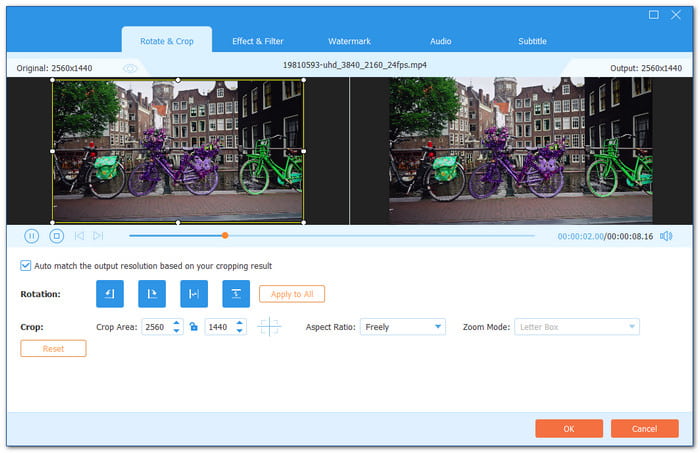
If you want smooth performance without lag, there is a top Clipchamp alternative. It is Tipard Video Converter Ultimate. It is lightweight and works stably on any computer. It provides many basic and advanced AI editing features. These include cropping, rotating, cutting, auto-enhance, video stabilization, etc.

- Trim, crop, add filters, and apply watermarks to your videos.
- Convert edited videos to many formats before saving.
- Create a personalized music video in one click with templates.
- Combine videos and photos into a collage.
- Offer more extra tools for video, audio, and images in one place.
You can also convert many videos at once with batch conversion. Plus, it supports GPU acceleration. Your videos are edited and converted immediately. It does all this without slowing down your system.
Platform: Windows and Mac.
Pricing: Offers a free version. Lifetime license for $56.00. One-month license for $18.00. Includes a 30-day money-back guarantee.
- Easy to master interface. Supports over 500 video and audio formats. Allows video editing like trimming, cropping, filters, and watermarks. You can also convert videos to many device presets and formats.
- The free version has limits. Full features require a paid license.
2. OpenShot
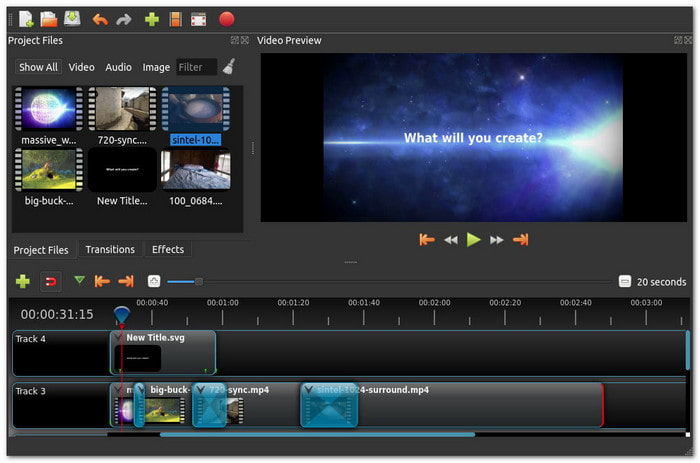
If you find Microsoft Clipchamp's free version too limited, there is a strong option. It costs nothing. It still lets you edit without restrictions. This open-source editor has been around for years. It gives you full control over your timeline. You can use unlimited tracks, add effects, reverse clip, and export in 4K without paying.
Platform: Windows, Mac, and Linux.
Pricing: Free with full access to all features.
- There are no fees. Exports are watermark-free. You can use unlimited tracks and drag-and-drop editing. It is available in over 70 languages.
- The interface is basic, lacks motion tracking, AI tools, and advanced effects.
3. FlexClip
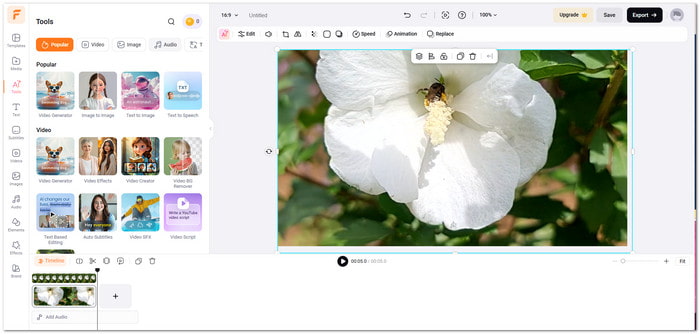
Looking for something that works online? This online video editor is easy to use and feels a lot like Microsoft Clipchamp. You can begin editing right in your browser. You pick from many ready-made templates. You can make videos for social media, marketing, or personal projects. It also lets you collaborate with team members. Projects are in the cloud so that you can access them from any device.
Platform: Web-based (Online).
Pricing: Starts at $19.99/month or $143.88/year.
- Team collaboration, many templates, cloud storage, easy to use, and AI-powered tools.
- The free version exports only in 720p with a watermark. Some features also require a stable internet connection.
Conclusion
To sum it up, Microsoft Clipchamp works well for quick projects and short social media videos. But it may feel limited for users who want more control or smoother performance.
In that case, you can try other tools like Tipard Video Converter Ultimate. It helps you edit videos and convert them to many formats. You can download it now on Windows or Mac and start creating better videos!
More Reading

About the Author


 Tipard Video Converter Ultimate