

Avidemux is a free and open-source video editor built for basic editing tasks. It is lightweight and works well on low-spec computers and Linux systems. But video editing has changed since 2026. Most creators expect smarter tools with AI features, templates, and real-time editing support. Simple cutting and encoding are no longer enough for many workflows.
In this Avidemux review, we will explore what it can do today. We will look at its features, strengths, limits, and performance. We will also check if it is still worth using now. We will also introduce a more advanced alternative for modern editing needs.

Part 1. Decoding Avidemux: Is It Still Useful in 2026
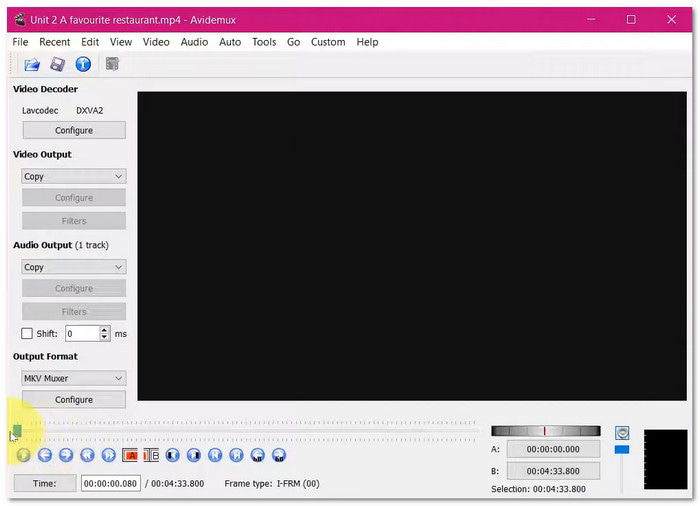
Avidemux is still useful in 2026, but only for straightforward tasks.
It works best for simple edits, format changes, and fast video cuts. Ads and other clips can be quickly removed or trimmed. Its "copy" mode saves time while preserving the original clarity. It also does a good job of resolving small problems like broken files or audio sync. It also supports popular formats like AVI, MKV, and MP4.
However, it does not support heavy editing tasks. It cannot match big tools like Premiere Pro. But for simple, immediate jobs, it still does the work well.
Part 2. Key Features That Define the Avidemux Experience
Avidemux focuses on simple editing with full control. It is not polished, but it works well for basic tasks. Below are the key features that define the Avidemux experience:
- Lossless Copy Mode
It cuts or joins videos without re-encoding, so clarity stays the same, and the process is fast. - Wide Format Support
It supports MP4, MKV, AVI, FLV, and MOV so that you can convert files with ease. - Frame-Accurate Cutting
Avidemux cut video allows precise removal of video segments with clean, exact cuts. - Built-in Video Filters
It helps you resize, fix colors, remove noise, sharpen, and clean old footage. - Advanced Video Encoding
It supports H.264 and H.265, which reduce file sizes while maintaining good clarity. - Flexible Audio Tools
It lets you add, replace, or extract audio tracks to fix or change sound. - Subtitle Support
It works with SRT, ASS, SSA, and SUB, and you can add or burn subtitles into videos. - Video Rotation and Flip Tools
Avidemux rotates video by 90, 180, or 270 degrees, and also flips them horizontally or vertically. - Automation and Scripting
It uses simple scripts and a job queue to handle repetitive tasks more quickly. - Simple Non-Linear Editing
It lets you edit parts of a video without changing the whole file. - Project Saving System
It saves your settings and edits, which helps with batch work later.
Part 3. Avidemux Software Performance Benchmarks
For basic video editing tasks, Avidemux works well. Cutting, joining, and format conversion are all possible with it. Although it is lightweight and quick, it is not suitable for complex editing tasks. Here is a detailed analysis of its performance:
- Fast operations in "copy" mode with near instant processing.
- Low resource usage and works well on old computers.
- Free and open source with no watermarks or hidden costs.
- Avidemux download is easy and accessible on any system.
- Robust codec and format support for popular and modern files.
- The interface looks old and may be hard for beginners to use.
- No multi-track or timeline editing for complex projects.
- Occasional crashes with some codecs or filters.
- Steep learning curve for advanced tools and scripting.
- No creative tools like video transitions, effects, or color grading.
User Reviews
Users say Avidemux Video Editor is a free and useful editor for quick work. It becomes easier after learning the basics. Some users like its simple design and wide operating system support. Others say it works better than expected for basic editing tasks.
Our Testing Results
Cutting and merging in copy mode is almost instant and depends on disk speed. Encoding like HEVC is slower and depends on CPU power. It supports standard formats such as MP4, MKV, and AVI. It is not as fast as GPU-based tools for heavy encoding.
CPU Usage
CPU usage stays super low in copy mode since the program does not re-encode the video. During encoding tasks, CPU usage becomes super high. It can fully utilize many cores while remaining efficient on older hardware.
Stability Factors
Stability is strong with common formats like MP4 and AVI. It may become unstable with unsupported codecs or heavy filters. Some export errors can occur due to mismatched settings. It works best when using standard containers and simple workflows.
Part 4. The Best Alternative to Avidemux
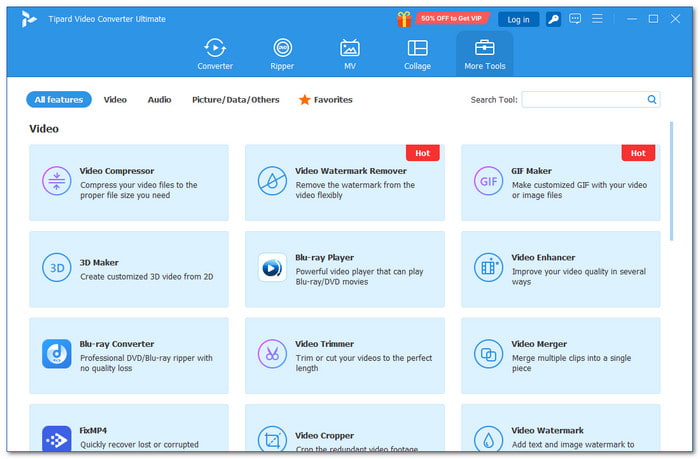
Although Avidemux works well for basic editing, it remains limited for modern needs. It lacks AI tools, visual timelines, and advanced creative features. Because of this, many users are looking for a smarter, more powerful Avidemux alternative. A program that can do more than just simple trimming and encoding.
One strong option is Tipard Video Converter Ultimate. It provides a more modern, flexible editing experience. It supports full hardware acceleration on both Windows and Mac. With that, video processing becomes much faster and smoother.
It also supports many modern video formats and codecs, with deep customization controls. You can preview edits in real time, which makes editing easier and more accurate. This Avidemux alternative also supports AI upscaling. It can make old or low-resolution videos look noticeably better.
Key Features:
- More than 500 video and audio formats can be converted up to 120× faster.
- DVDs can be ripped and copied to a computer without losing their original clarity.
- It lets you cut, rotate, and crop videos. It also lets you fine-tune effects, apply filters, boost audio, and add watermarks.
- It lets you create customized music videos in one click with ready-made templates.
- It uses AI tools to enhance video quality. It improves clarity, smooths motion, enhances sound, and sharpens resolution.
- It works with numerous video and audio formats for better compatibility.
- It supports batch conversion and editing for faster workflow.
- It allows you to combine videos and photos to create video or photo collages.
- It offers many tools in one place, including a video enhancer, a compressor, and more.
- It supports hardware acceleration from NVIDIA, Intel, and AMD for faster processing.
- The free trial only allows 5 minutes per file. With that, you need to upgrade to the paid plan for full access. It starts at $18.00 and includes a 30-day money-back guarantee.
Conclusion
To sum up, Avidemux video editing software is suited for simple video editing needs. It works well for cutting, joining, and quick file fixes. But today's video creation is not only about basic edits. Many users now need smarter tools. They need automation, creative features, and an easier workflow.
It is where more advanced editors like Tipard Video Converter Ultimate stand out. It brings AI-powered features and faster processing. It also offers a more modern editing experience that feels simple but powerful.
More Reading


About the Author


 Tipard Video Converter Ultimate