

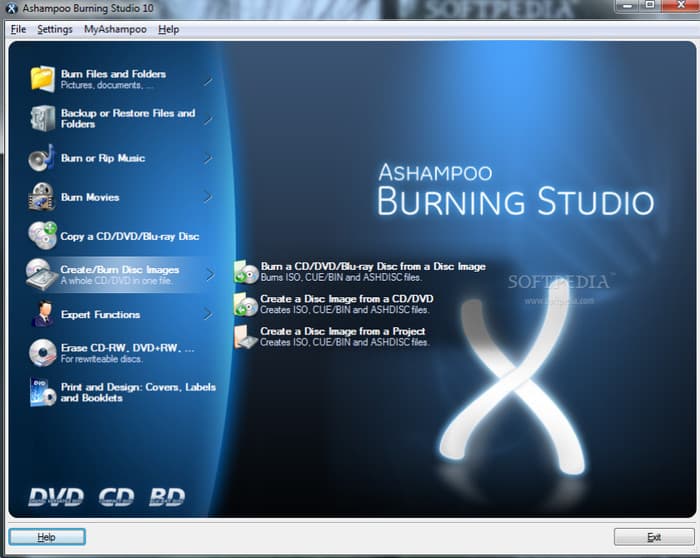
Ashampoo Burning Studio is an excellent burning software created and designed to simplify the process of creating DVDs, CDs, and Blu-ray discs. With its comprehensive user interface and various features, it ensures that users can get their desired result after the process. Now, if you want to learn more about the software, we are here to guide you. This review will cover everything, including its description, pros, cons, users' experience, and much more. Thus, read here and learn more about Ashampoo Burning Studio software.

Part 1. Quick Verdict of Ashampoo Burning Studio
Ashampoo Burning Studio DVD burner can deliver a solid balance of functionality and simplicity, making it the best choice for burning discs. Its simple user interface ensures that even non-professionals can create data backups, audio CDs, and video DVDs without having a hard time. Overall, Ashampoo Burning Studio is a practical solution for those looking for a hassle-free burning experience rather than complex professional-grade features.
Is Ashampoo Burning Studio Free?
The good thing about the program is that you can access and operate it for free. With that, you can back up a file, create a DVD, CD, and Blu-ray without spending a penny.
Part 2. How We Tested Ashampoo Burning Studio
Ashampoo Burning Studio was evaluated to ensure it can offer its simplicity and reliability for burning tasks. Our testing focused on both everyday technical performance and usability, covering aspects that matter the most. To know how we test this DVD burner, you can read everything below.
- Ease of Use -We check if the software is simple to operate. This helps us determine whether it is suitable for all users, especially beginners.
- Burning Speed - Another factor we tested here is the software's burning speed. We check how long this DVD burner can burn discs. Speed is necessary, especially for users who need a fast burner when dealing with numerous files.
- Compatibility - We also check if the program is workable and compatible with other operating systems and disc players. This ensures that users won't experience compatibility issues.
- Features and Customization - Besides its burning capabilities, we also check if it can offer more features and customization, such as menu creation, backup options, and cover design.
- Value for Money - The last thing we did was to check if the DVD burner is free to use or requires a subscription plan. We also compared its capabilities with other DVD burners to ensure that it is far superior to others.
Part 3. What is Special about Ashampoo Burning Studio
Ashampoo Burning Studio Freeware stands out as an exceptional all-in-one disc burning tool, combining essential tools for everyday DVD/CD/Blu-ray burning. To get more insights into how the burner is special, you can check its main and special features in this section.
Main Features of Ashampoo Burning Studio
- Disc Burning - The core feature of the software is to burn DVDs, CDs, and Blu-ray discs. This is perfect if you want to turn your digital files into a disc for collection purposes. The best part here is that the burning process is simple and fast, making it the best free burner.
- Data Backup and Security - The burner can also create a backup with compression, scratch protection, password protection, and even support long-term storage.
- Audio CD Ripping and Creation - Ashampoo Burning Studio can also rip music CDs with accurate metadata recognition. It can even convert to multiple audio formats, like MP3, WAV, and AAC.
- Movie and Slideshow Authoring - The software can build video DVDs and Blu-rays with menus, background music, and chapter editing, making your content appealing and satisfying to watch.
Special Features of Ashampoo Burning Studio
- Audiobook and Podcast Module - What we like about the burner is that it can also detect and organize multi-part audiobooks. It ensures that you can get a smooth playback without metadata issues.
- Car Radio Optimization - It can arrange tracks for perfect playback order on car stereos.
- Smart Backup Plans - Ashampoo Burning Studio DVD burner can offer intelligent backup workflows, ensuring reliable storage of multiple discs with disc spanning.
- Advanced Audio Quality - When ripping the audio, the software ensured to save it with the best quality. You can get good sample rates up to 48 kHz with AAC format support for modern devices.
Part 4. Master Review of Ashampoo Burning Studio
To learn more about Ashampoo Burning Studio, proceed to this section, as we provide its pros, cons, experience, and much more.
Good Things about Ashampoo Burning Studio
- This free DVD burning software can offer a simple user interface for an easier and smoother burning process.
- It is 100% free, making it accessible to all users.
- The software can offer advanced video authoring, allowing you to create professional-grade DVDs with menus, slideshows, and support modern codecs.
- It can deal with DVDs, CDs, and Blu-ray discs.
Drawbacks and Limitations of Ashampoo Burning Studio
- The burner is only compatible with Windows operating systems.
- There are times when users report playback issues after the burning process.
- It may feel excessive to users who prefer a simple burning process.
User Experiences and Reviews
Ashampoo Burning Studio freeware is an excellent tool that can offer a smooth burning process and a simple user interface. This lets users, especially non-professionals, burn discs without any hassle. The only drawback here is that there are times when it does not perform well. Plus, its advanced authoring features are not really needed for basic disc burning.
Part 5. Best Alternative to Ashampoo Burning Studio
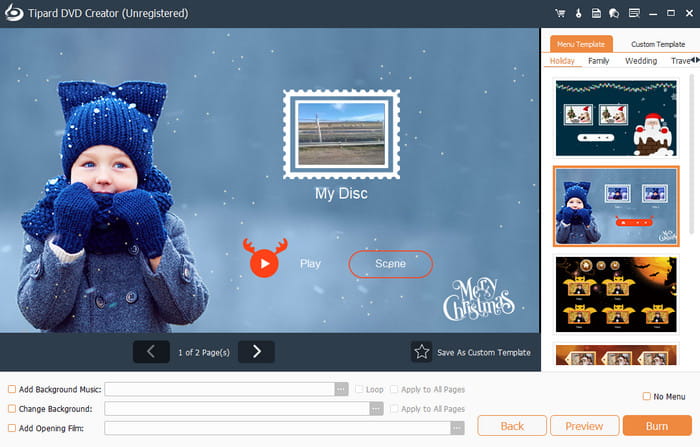
Are you looking for the best DVD burner that can surpass Ashampoo Burning Studio? Then, you can try using Tipard DVD Creator. This program ensures that you have a better and faster burning procedure. It is also lightweight for complex burning, which makes it more ideal. Aside from that, it can let you edit your videos before burning. You can crop the video, add audio background, insert a menu, add an opening film, and more. The best part here is that it can offer its Fit-to-Disc feature. It can automatically compress and adjust your project so it perfectly fits the available disc capacity without manual settings. You can also operate this DVD curator on both Windows and Mac, making it more accessible to all users. Thus, if you want the best replacement for Ashampoo, feel free to use Tipard DVD Creator.
Conclusion
In this detailed review of Ashampoo Burning Studio software, you have learned everything. You explored its detailed description, main and special features, pros, cons, and other information. With that, you can tell that this program is among the tools you can use for creating DVDs. In addition to that, you also discovered Tipard DVD Creator as an ideal alternative for a better and smoother burning process. It can even offer editing tools, a faster burning process, and a Fit-to-Disc feature, making it powerful and ideal for all users.

Burn and author media files to DVD disc, ISO, and folder
100% Clean & Safe
100% Clean & Safe

More Reading

About the Author

 Click here to join the discussion and share your comments
 Tipard DVD Creator