

A 4K Blu-ray player burner can be a handy choice when you want your favorite videos ready for offline playback. This also gives you more control over how you save and enjoy your video files.
But which options are worth checking out? This guide reviews 2 4K Blu-ray burners and 3 excellent Blu-ray burner drives. It will also teach you how to burn a 4K Blu-ray disc, ISO, or BDMV.

Part 1: What Is a 4K Blu-ray Burner
A 4K Blu-ray burner gives you a simple way to put large video files on a disc. It is a hardware drive that can read and write compatible Blu-ray discs. You can use it to save 4K videos, home videos, and other large files. It can also help you keep extra copies of important files for backup.
Part 2: Best 4K Blu-ray Burners at a Glance
| 4K Blu-ray Burner | Type | Ease of Use | 4K Support | Main Features | Compatibility | Pricing |
|---|---|---|---|---|---|---|
| Tipard DVD Creator | Software | Easy | 4K video input | Video editing, custom menus, chapter settings, and fast burning. | Windows | Starts at $15 |
| DVDFab UHD Creator | Software | Easy | 4K UHD Blu-ray | UHD menus, video editing, GPU acceleration, multiple audio and subtitle tracks. | Windows & Mac | Starts at 64.99 |
| Pioneer BDR-X13U-S | Drive | Easy | BDXL | Up to 16× BD-R, PureRead 4+, and M-DISC support. | Windows & Mac | $259.93 |
| ASUS BW-16D1X-U | Drive | Easy | BDXL | Up to 16× BD-R, USB 3.2, and M-DISC support. | Windows & Mac | $259.99 |
| LG WH16NS40 | Drive | Easy | Quad-layer Blu-ray | 16× BD-R, SATA, M-DISC support, and 4MB buffer. | Windows | $184.80 |
| Show MoreShow Less | ||||||
Part 3: 2 Best 4K Blu-ray Burners Review
1. Tipard Blu-ray Creator
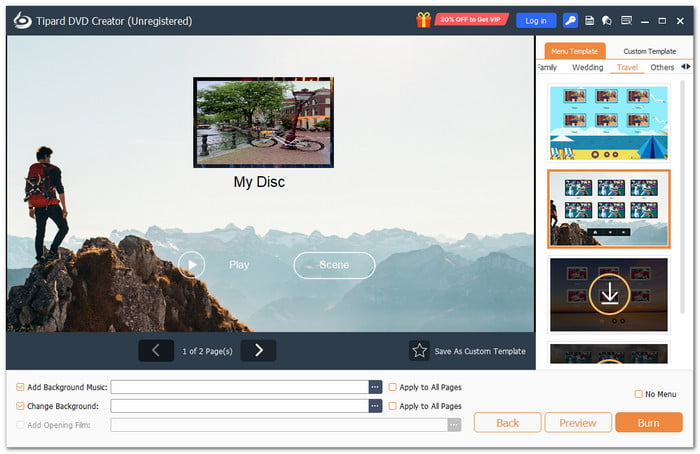
One of the best 4K Blu-ray burners you can use is Tipard Blu-ray Creator. It supports Blu-ray authoring. This means it can arrange videos into a playable Blu-ray with menus and chapters. It also provides free menu templates for easy setup. You can save your project as a Blu-ray disc, ISO file, or BDMV folder.
Best for: Making Blu-ray discs from 4K and HD videos.
Key features:
- Lets you edit videos and add chapters.
- Lets you add your own music, images, and intro videos.
- Blu-ray preview before burning.
- Multiple copies of a Blu-ray disc, ISO file, or folder.
- GPU acceleration with NVIDIA CUDA, AMD APP, and Intel Quick Sync.
Supported disc types: This 4K Blu-ray burner for PC supports BD-25 and BD-50 Blu-ray discs.
System requirements:
- Windows: Windows 7, 8, 10, or 11.
- CPU: 1.2GHz Intel or AMD CPU or above.
- RAM: 1GB RAM or higher recommended.
2. DVDFab UHD Creator
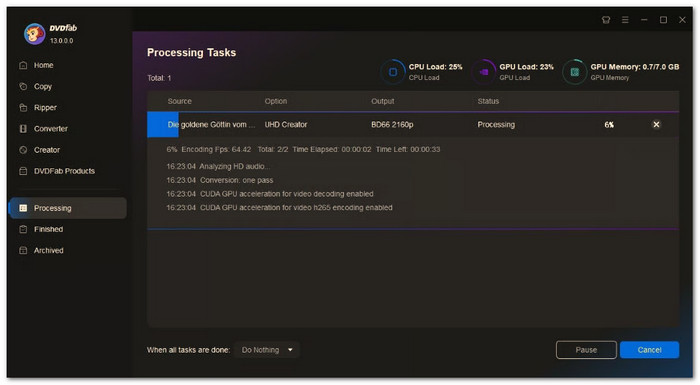
For true 4K UHD Blu-ray creation, DVDFab UHD Creator is a more advanced 4K Blu-ray burning software option. It can create UHD discs from more than 200 video formats. It can also keep HDR10 and Dolby Vision content. You can save the result to a disc, ISO file, or folder.
Best for: Creating 4K UHD Blu-rays with HDR and Dolby Vision.
Key features:
- 2160p video and 4K UHD output.
- Support for Dolby Vision and HDR10.
- Personalized UHD menu designs.
- Integrated tools for chapters, subtitles, cropping, and trimming.
Supported disc types: BD-50, BD-66, and BD-100 discs.
System requirements:
- Windows: Windows 10 or 11 64-bit.
- CPU: Intel i3 or higher.
- RAM: 4GB RAM or higher.
Part 4: 3 Excellent Blu-ray Burner Drives in 2026
1. Pioneer BDR-X13U-S
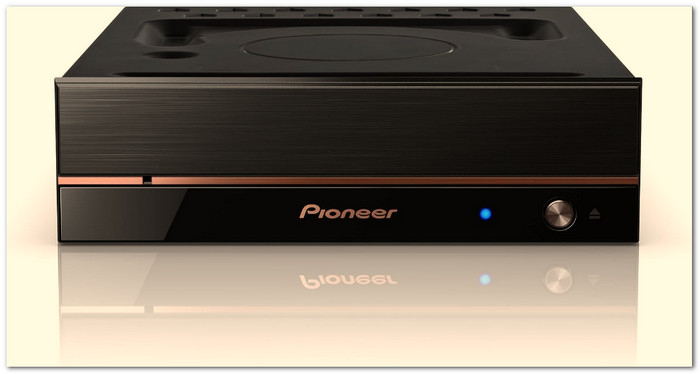
The Pioneer BDR-X13U-S gives you fast Blu-ray writing through USB 3.2. This 4K Blu-ray burner external drive supports up to 16× BD-R writing. It also handles 100GB and 128GB BDXL discs. PureRead 4+ helps reduce read errors on scratched audio CDs. It also supports M-DISC for long-term storage.
Best for: Large Blu-ray backups and high-capacity discs.
Key features:
- Writes BD-R discs at up to 16× speed.
- RealTime PureRead helps improve audio playback.
- Eco mode helps reduce power use.
- Uses a USB 3.2 Gen 1 connection.
Supported disc types: BD-R, BD-RE, BD-R DL, BD-RE DL, BD-R TL, BD-R QL, and M-DISC.
Power requirements: An AC adapter and power cord are required.
2. ASUS BW-16D1X-U
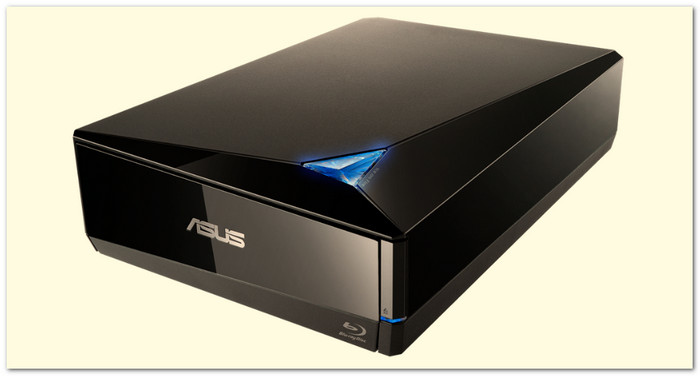
The ASUS BW-16D1X-U combines 16× Blu-ray writing with a USB connection. It can write BD-R single-layer discs at up to 16×. It also supports BDXL media up to 128GB. Windows and Mac systems are supported.
Best for: Desktop users who want an external Blu-ray writer.
Key features:
- USB 3.2 Gen 1 Type-A connection.
- Up to 16× BD-R writing.
- Up to 6× writing on BD-R QL.
- Windows and Mac compatibility.
Supported disc types: BD-R, BD-R DL, BD-R TL, BD-R QL, BD-RE, DVD, CD, and M-DISC media.
Power requirements: Requires a 12V ±3% and 3A power adapter.
3. LG WH16NS40
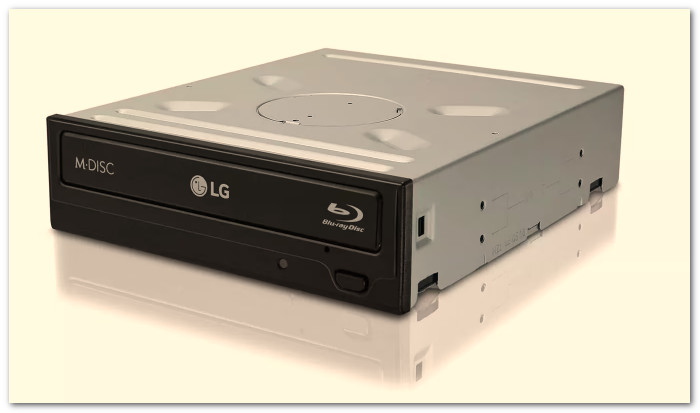
The LG WH16NS40 is an internal SATA Blu-ray writer with 16× BD-R writing. It can read and write several Blu-ray layers. It also supports DVD and CD media. M-DISC support adds another option for long-term data storage.
Best for: Desktop PCs that have an open internal drive bay.
Key features:
- 16× BD-R writing.
- Internal SATA connection.
- 4MB buffer memory.
- Buffer under-run prevention.
Supported disc types: BD-R, BD-RE, DVD, CD, and M-DISC DVD media.
Power requirements: Uses the desktop PC's internal SATA power connection.
Part 5: How to Burn a 4K Blu-ray Disc/ISO/BDMV
Burning a 4K Blu-ray becomes simple with Tipard Blu-ray Creator. Follow these five steps to create a disc, ISO, or BDMV folder.
Step 1 Get Tipard Blu-ray Creator on your Windows computer. Use the Download button to install it. Once opened, select Blu-ray from the main screen.
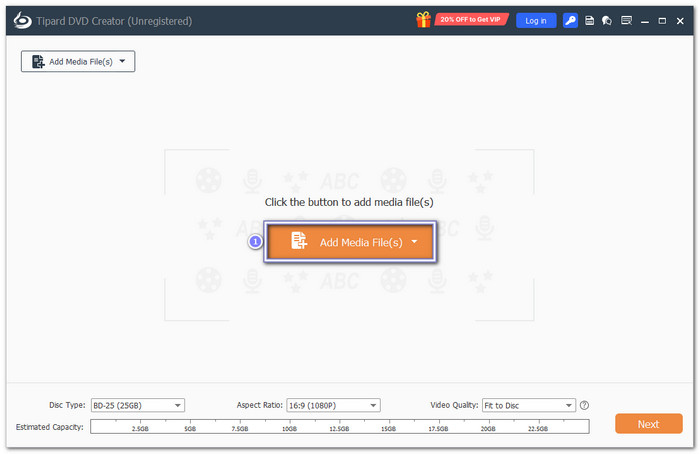
Step 2 Click Add Media File(s) to import your 4K videos. You can add files such as MP4, MKV, and MOV. Add more files if needed.
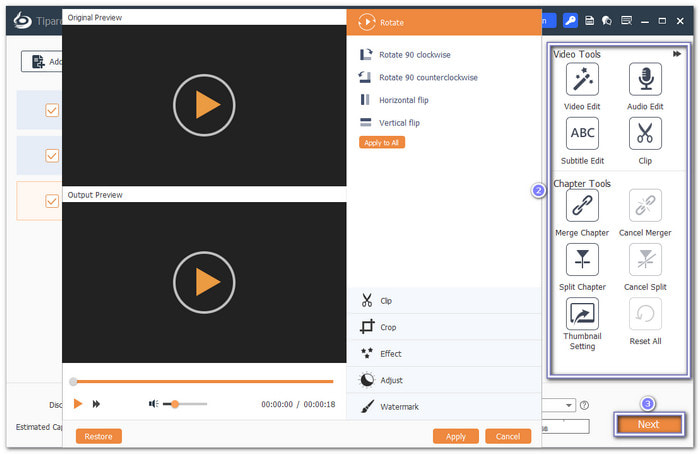
Step 3 Click Video Edit to rotate, clip, crop, add effects, adjust the video, or add a watermark. Click Next once done.
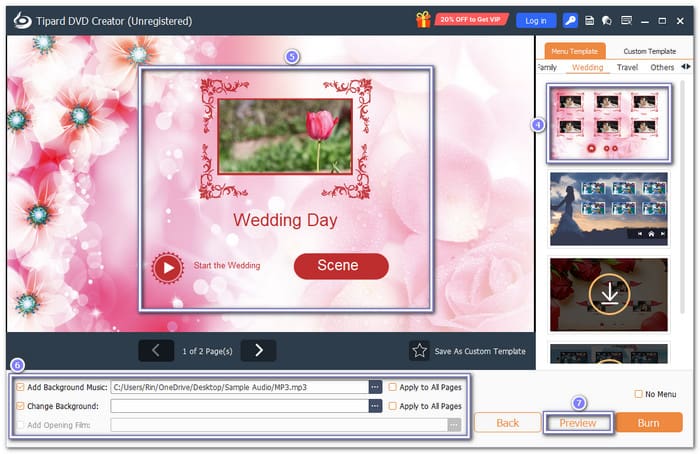
Step 4 In this window, pick a Menu Template on the right side. You can also add a Title, Background, or Music. Preview the menu before moving on.
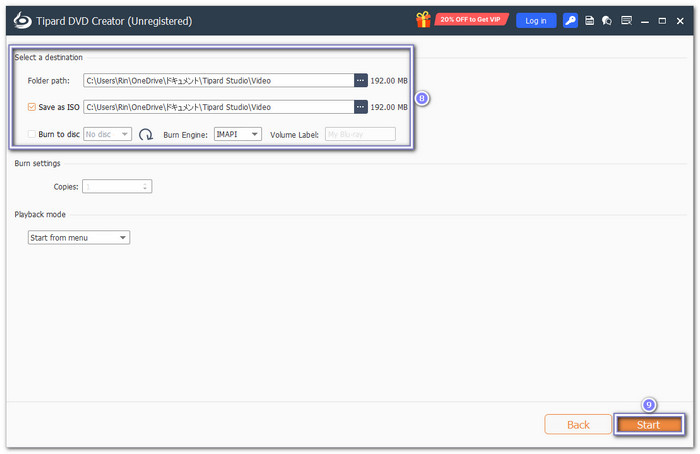
Step 5 Hit Burn to open the burn settings. Enable Save as ISO if you want to create an ISO file. Select Burn to Disc to make a physical Blu-ray disc. Of course, a blank Blu-ray disc is needed for that, so do not forget to insert one.
At last, click Start to begin the burning process. You can then play the Blu-ray disc. You can also open the saved ISO or BDMV folder.
Part 6: FAQs of 4K Blu-ray Burner
How much 4K video can a Blu-ray disc hold?
It depends on the disc. 4K Ultra HD Blu-ray discs can hold 66GB or 100GB. The actual video time depends on the video quality and bitrate.
Can I reuse a Blu-ray disc after burning?
Yes, but only with a BD-RE disc. It is rewritable. You can erase it and use it again. A BD-R disc cannot be reused after it is burned.
Which tool can I use to watch 4K Blu-ray movies?
You can use Tipard Blu-ray Player, PlayerFab Ultra HD Player, or Leawo Blu-ray Player, as they are reliable 4K Blu-ray players. They allow you to enjoy your Blu-ray movies and discs on your computer.
Conclusion
You have got to explore what you can use to burn a 4K Blu-ray. For software, you can trust Tipard Blu-ray Creator. It not only burns your videos but also lets you customize menus for the final disc. You can now keep your favorite 4K videos in physical form. It makes them easier to watch anytime without an internet connection.

Create Blu-ray disc, ISO, and BDMV folder from video and audio files
100% Clean & Safe

More Reading



About the Author

 Click here to join the discussion and share your comments

 Tipard Blu-ray Creator