

When it comes to free video editors, OpenShot Video Editor is often one of the first names you hear. Over the years, it has earned a strong reputation as an easy-to-use, open-source program for creators who want to Editors without spending money. But with many new video editors in 2026, do you think it still holds up?
In this OpenShot Video Editor review, we will show what the program can and cannot do, how safe it is, and whether it is really recommended for beginners. We will also give you a professional alternative if you want more advanced features and faster performance.
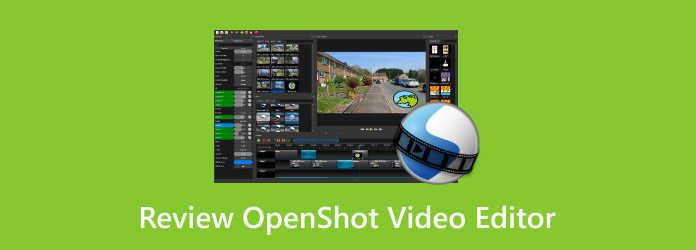
Part 1. What is OpenShot Video Editor
OpenShot Video Editor is a free and open-source video editing program. Anyone can download it and use it without paying. It works on Windows, Mac, and Linux. It makes it easy for many users to use the same editor on different computers.
The project started in 2008 and was created by Jonathan Thomas. The goal was simple. Make video editing free and open for everyone. It has a clean layout and features that are easy to understand, which you will get to know below.
Part 2. Key Features of OpenShot Video Editor
Once you open OpenShot software, you will notice many helpful tools. These tools help you edit videos in a simple way. Here are the main features:
1. Simple Interface
The layout is clean and friendly. Most beginners learn the editor in a short time.
2. Trim & Slice
You can immediately cut your video. It helps remove mistakes or keep only the best parts.
3. Animation & Keyframes
The editor lets you animate items in your video. You can fade, move, bounce, or slide text and clips.
4. Unlimited Tracks
You can add many layers to your timeline. These layers can hold videos, images, audio, or watermarks.
5. Video Effects
OpenShot includes built-in effects. You can adjust brightness, invert colors, or remove a background.
6. Audio Waveforms
The program shows audio as wave shapes. It helps you see where sound starts and stops.
7. Title Editor
You can add titles with simple templates. You can also design your own titles.
8. 3D Animations
The OpenShot editor can create three-dimensional animated titles and effects. Some examples include flying text or light effects.
9. Slow Motion & Time Effects
You can slow down a clip or speed it up. You can also reverse clip in OpenShot.
10. Drag-and-Drop Editing
You can drag videos, images, or audio into the editor. It makes starting a project very easy.
11. 70+ Languages
OpenShot supports many languages. It helps people from different countries use the editor.
Part 3. OpenShot Performance Review: Pros and Cons
Free program sounds great. But it is still important to look at how OpenShot Video Editor performs in real use.
Pros
- Free and open for everyone - OpenShot is completely free. You do not need a license or subscription.
- Easy for beginners - The interface is simple. New users can learn basic editing fast.
- Helpful built-in tools - It includes key features like unlimited tracks, animations, and three-dimensional titles.
- Works on many systems - You can easily download OpenShot and run it on Windows, Linux, and Mac computers.
- Improving performance - Recent versions added experimental hardware acceleration. It can help speed up video rendering.
Cons
- Stability problems - The program can crash or freeze. It happens more often in large or complex projects.
- Slow rendering - Exporting videos may take longer than other editors.
- Limited advanced editing tools - Professional tools like advanced color grading are not included.
- Some tools feel rough - Certain actions like resizing clips or using keyframes may feel confusing at first.
Part 4. Is OpenShot Safe and Good for Beginners
Many people ask two simple questions. Is OpenShot safe? And is it good for beginners? For OpenShot Video Editor, the answer to both is yes.
Is OpenShot Safe?
1. Safe to install
OpenShot is an open-source program. It does not contain malware or hidden payments when downloaded from the official site.
2. Download from the official website.
For safety, download and install it from the official OpenShot Video Editor website to avoid fake copies.
3. No watermarks
Does OpenShot have a watermark? The answer is no. You can export videos without watermarks. Even high-resolution videos like 4K are allowed.
Is OpenShot Good for Beginners?
Yes. Many new creators start with OpenShot.
1. Simple layout
The editor uses drag-and-drop controls. It makes editing easy to learn.
2. Basic editing tools
You get the tools beginners need. These include trimming, cutting, resizing, and snapping clips.
3. Built-in effects & titles
The editor includes hundreds of video transitions and three-dimensional titles made with Blender.
4. Unlimited tracks
You can stack many video, audio, and image layers. It helps users create simple or slightly complex projects.
In short, OpenShot Video Editor is a safe and beginner-friendly editor. It works best for small projects, school work, and basic online videos.
Part 5. The Best Professional Alternative to OpenShot Video Editor
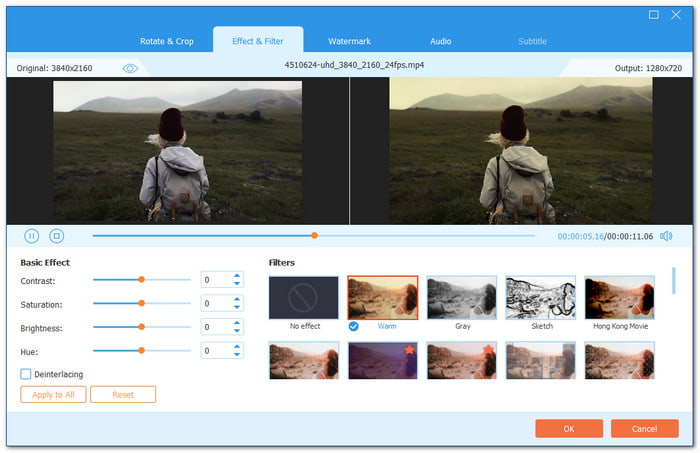
Many users like OpenShot Video Editor because it is free and simple. But some projects need faster tools and more advanced editing power. It is where Tipard Video Converter Ultimate becomes the best professional alternative to OpenShot Video Editor.
It is built for users who want stronger tools but still want an easy workflow. It offers AI-driven video enhancement that can upscale resolution, reduce video noise, fix shaky clips, and improve brightness and contrast. These tools help turn low-quality footage into clearer and sharper videos.
It also supports bulk conversion so that you can convert many videos at once. It saves time and keeps your work smooth. With Level-3 hardware acceleration, Tipard Video Converter Ultimate can decode, edit, and re-encode videos at 120× faster speed.
Comparison of Tipard Video Converter Ultimate and OpenShot Video Editor
Picking the right video editor depends on your needs. Tipard Video Converter Ultimate is a professional program built for speed, quality, and advanced features, while OpenShot Video Editor software is free, simple, and beginner-friendly. Below is a clear comparison to help you see their differences.
| Factors | Tipard Video Converter Ultimate | OpenShot Video Editor |
|---|---|---|
| Ease of Use | It has a clean interface with professional options that are still easy to navigate. | It is simple, making it perfect for beginners learning to edit videos. |
| Cross-Platform | It works on Windows & Mac. | It works on Windows, Mac & Linux |
| Editing Tools | It provides advanced trimming, cropping, filters, effects, subtitles, and 4K video support. | It offers basic trimming, slicing, animations, and three-dimensional titles through Blender integration. |
| AI Video Enhancement | It offers AI tools to upscale resolution, reduce shake, remove noise, and adjust brightness and contrast for clearer videos. | It does not include any AI video enhancement tools. |
| Batch Edit & Conversion | It can edit and convert multiple videos at once, which saves a lot of time for larger projects. | It does not support batch editing and conversion, so videos must be processed one by one. |
| Hardware Acceleration | It supports Level-3 hardware acceleration, allowing decoding, editing, and re-encoding up to 120× faster. | It has limited acceleration, which can result in slow rendering for large projects. |
| Cost | It offers a free and a paid version that starts at $18.00 for a 1‑month license and $56.00 for lifetime access. | It is free and open-source. |
| Performance & Stability | It runs smoothly with large projects and stays stable. | It can crash or freeze with complex tasks. |
| Ideal Users | It is best for professionals and beginners who want a simple but powerful editor. | It is great for beginners and casual editors who need simple editing. |
Conclusion
Hope our OpenShot Video Editor review helps you understand what it can do and what minuses to expect. Overall, it is recommended, especially if you are just starting video editing. The fact that it is free is really helpful if you are on a tight budget.
But if you are looking for a more professional video editor, you can count on Tipard Video Converter Ultimate. It allows you to refine your video into a polished and high-quality final product that matches your style. You can enhance videos, add effects, and export immediately with smart tools.
So, please go ahead, download and install it now to start creating videos you will be proud of!
More Reading
About the Author


 Tipard Video Converter Ultimate