

How to Convert PDF to ePub with PDF ePub Converter5
If you want to convert PDF file to ePub or get ePub file from PDF, Tipard PDF ePub Converter software can help you to do it. In a word, this reputable and powerful PDF to ePub Converter software can conveniently help you convert any PDF file to ePub and keep the original texts, images, layout and everything for you. There are four features of this PDF Converter Platinum: convert eBooks from PDF to ePub, support OCR to preserve 100% original quality, customized page ranges and support multi-language output.
Before you download and install this professional PDF to ePub converting software, I think it is important to know what is ePub and why need to convert PDF to ePub?
What is ePub?
ePub is an e-book file format with the extension .epub that can be downloaded and read on devices like smart phones, tablets, computers, or e-readers. It is a free and open standard published by the International Digital Publishing Forum (IDPF). The term is short for electronic publication and is sometimes styled ePub. ePub became an official standard of the IDPF in September 2007, superseding the older Open eBook standard. The Book Industry Study Group endorses ePub 3 as the format of choice for packaging content and has stated that the global book publishing industry should rally around a single standard. ePub is the most widely supported vendor-independent XML-based (as opposed to PDF) e-book format; that is, it is supported by the largest number of hardware readers.
Also, ePub is widely used on many software readers such as iBooks on iOS and Google Books on Android. iBooks also supports the proprietary iBook format, which is based on the ePub format but depends upon code from the iBooks app to function.
There are some step-by-step guides on how to convert PDF to ePub with PDF converting software.
Preparation: You need to download Tipard PDF to ePub Converter application, then install and run this software.
Load PDF files to PDF to ePub converting software
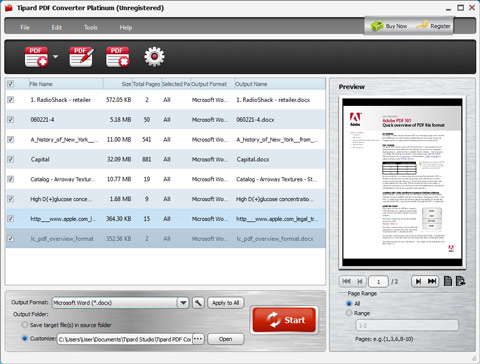
Run the PDF to ePub Converting application, and you will see the following interface. Tips: Click the Add file(s) or Add Folder under the dropdown list of File button to load your PDF files or just drag the PDF file to this PDF to ePub Converter.
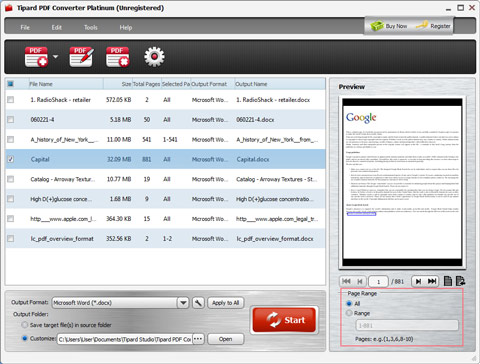
Define the pages to be converted
Choose the PDF file and click the radio button on the lower right corner of the interface. This PDF to ePub Converter provides you three ways to convert your PDF: convert the whole file, convert the current page, and convert selected pages by entering the page numbers or page ranges.
Start to convert PDF to ePub
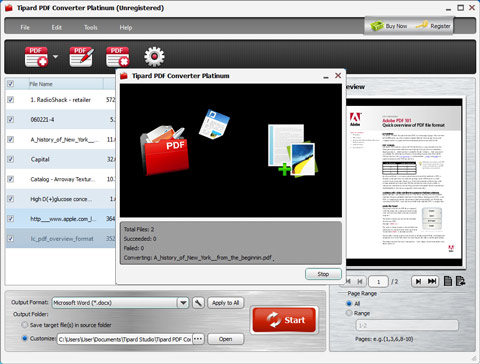
Once you finish all these settings, you can select the Convert button to begin the conversion operation. Then you can enjoy your PDF files on your portable devices such as Samsung, iPhone, iPod, iPad and more.

 Best 5 PDF to HTML Converters to Get HTML Webpages from PDF Documents
Try to change PDF documents to HTML5 webpages in easy and fast way, with all your texts, images and other layouts keeps original? Here are your best 5 PDF to HTML converters.
 Top 5 Methods to Convert A Kindle eBook to PDF in Online and Offline Way
There are top 5 Kindle to PDF converters, two of them are online web-based converters, to convert Kindle to PDF free, and the last three are one-step eBook format converters too.
 PDF to Text - Accurately and Reliably Converter PDF to Text
Easily and reliably convert PDF file to Text file format with PDF to Text Converter. Then you can read or edit your converted .txt files on your portable devices anywhere anytime.
 Easily Convert PDF to MOBI by Using Online Converters and Calibre
No paid filters and extra annoying installation, there are best 5 PDF to MOBI converters, to help you change eBook files and transfer to Kindle in free way. Or Professionals can use Calibre to replace.
 Click here to join the discussion and share your comments
